Showing posts with label software. Show all posts

Friday, September 30, 2016

Fix EasyWorship 2009 issues with new SongSelect site

We continue to use an older version (EasyWorship 2009) of EasyWorship for our church service projection screen management.

We’ve tried the newer EasyWorship 6 release – and it does have a lot of very attractive features – however the process and projection flow just doesn’t fit us as well as the older EasyWorship 2009 layout.

Anyway…EasyWorship has a plug-in like feature that allows you to sign into the SongSelect service with your associated account and easily import song lyrics directly into your EasyWorship song database.

Recently SongSelect updated their website design and it created several problems within the EasyWorship 2009 program.

First, the SongSelect webpage was “broken” in rendering within EasyWorship 2009

EWorship 2009 SongSelect Window - Pre-Fix

It may be hard to see but that banner area is all whacked out and the Sign In link didn’t work well at all.

Secondly, one could go to the SongSelect Classic page using the offered URL in that broken banner area and log in,

EWorship 2009 SongSelect Window - Pre-Fix - SS Classic

However while you could then log in normally, when we went to try to import song lyrics the “Import” button remained grayed out while using this “classic” login method. 

Our workaround was to download the lyric as a text file, then copy/paste it into a new song record in the database. This was less than ideal as you missed out a lot of the “meta-data” for the song item and had to manually put all that in as well.

I did some searching and found this helpful fix in the EasyWorship support forums.

SongSelect Webpage Fix for EasyWorship 2009 : EasyWorship Legacy  (URL change updated 2017-01-12)

Basically, you download an IE Fix patch from them for your Windows OS version and run it. It unpacks the EXE file to a temporary location, executes a batch file, and then applies a REG key fix to your Windows Registry to fix the issue.

In case you are curious, the fix just applies one of these registry tweaks depending on your OS (32 or 64 bit).

For x32 bit Windows OS:

Windows Registry Editor Version 5.00

[HKEY_LOCAL_MACHINE\SOFTWARE\Microsoft\Internet Explorer\MAIN\FeatureControl\FEATURE_BROWSER_EMULATION]
"easyworship.exe"=dword:00000000

For x64 bit Windows OS:

Windows Registry Editor Version 5.00

[HKEY_LOCAL_MACHINE\SOFTWARE\Wow6432Node\Microsoft\Internet Explorer\MAIN\FeatureControl\FEATURE_BROWSER_EMULATION]
"easyworship.exe"=dword:00000000

Once that was done, EasyWorship 2009 then displayed the new SongSelect website page correctly (compare to before as seen above):

EWorship 2009 SongSelect Window - Post-Fix 1

And the sign-in page displayed properly.

EWorship 2009 SongSelect Window - Post-Fix 2

After logging in this way and selecting a song’s lyrics we found that the EasyWorship application’s “Import” button worked again for full and normal song lyric importation.

Bonus Easy Worship 2009 notes:

While working this issue, I found that our installed version of EasyWorship 2009 is at 1.4 but there is a later version 1.9 that is available to fix some issues.

The upgrade process is very easy.

Upgrade 2009 1.4 to 1.9 Procedure? - EasyWorship Community

  1. Download the full EasyWorship 2009 v1.9 setup installer file
  2. Be sure EasyWorship is closed out on your system.
  3. Run the setup file you downloaded; resulting in an installation over your existing version.
  4. Done. (no license or registration information is requested or needs to be re-entered)

More information about the version 1.9 build change notes here in case you are curious: EasyWorship Community • View topic - EasyWorship 2009 Build 1.9 Now Available!

If you have to reinstall EasyWorship 2009, there is some information you want to capture first from your currently registered/working software:

Reinstalling EasyWorship 2007 and 2009 - EasyWorship Legacy (URL change updated 2017-01-12)

Locate Your Registration Information

If you do not have your registration info, you can get this info from the old computer.
Your Registration Information consists of the following:

  1. Name
  2. Phone Number
  3. Serial Number

To locate this information on the old computer open EasyWorship. Go to the main menu and select Help>About EasyWorship. The church name and serial number will be shown at the bottom.

To locate the phone number, select Register on the left side of the About window.

See also: Backup and Transfer Your Database (EW 2009) - EasyWorship Legacy (URL change updated 2017-01-12)

I hope anyone still using this older verison of EasyWorship 2009 like us finds this information helpful.

Cheers!

Claus Valca

Saturday, June 25, 2016

More EMail Client Thoughts…

When I posted Wrestling with Outlook Troubleshooting I was in the middle of helping an older church-member sort out his email client issues.

He had suddenly lost the ability to send emails in his Outlook client that was also using the Outlook Hotmail Connector (64-bit).  I fiddled around troubleshooting it for a weekend, but in the end had to punt and just reconfigured Outlook to tie into his hotmail & outlook.com email accounts via an manual IMAP configuraiton. 

I also set them up in Thunderbird as well to confirm it wasn’t an “account” issue.  Both worked fine so I returned the laptop and encouraged him to try both and settle on one he was most comfortable with.

Only the next week he reported more email problems. This time, he couldn’t delete his emails.

That’s an issue I haven’t had before in either Outlook or Thunderbird.

Long story made short the emails were deleting – but it took a while due to the synchronization delay between the local account and the server.

What do I mean?

So the gentleman wanted the email client to “reflect” what was on the remote email server account, rather than downloading a copy of the contents to a local file store on the laptop.  Had we set it up that way, then the email “deletion” would have been immediate – at least in terms of what he was seeing in the client itself.

Because we were not using the Outlook “Connector” plug-in, there was a lag between when he deleted an email and when the normal sync-time would trigger a re-sync of the “local” seen email contents.

So I would select an email message in the email client, hit “delete”, then…nothing for a while. It just stayed there.

If we were logged into the web-mail account directly in a web-browser session (rather than an email client application) the message delete was immediate. So it wasn’t a problem with the account.

However, back on the email client, if I hit “send/receive” right after deleting the message, the folders would re-sync and the email would “delete/disappear”.

Once this delayed delete was understood, I could tweak some of the settings, but I didn’t want to re-poll the mail server every few seconds/minutes!

Thunderbird seemed to be the fastest with “deleting” the message on it’s own with Outlook taking the longest.  The gentleman was OK with Thunderbird but I wasn’t getting a vibe from him that he loved it either.

In the end I found a compromise in Windows Essentials Live Mail.  It mimicked Outlook pretty well and had very intuitive control icons on the Ribbon. And it seemed to sync not quite as fast as Thunderbird, but much faster than Outlook.

My father-in-law loves Thunderbird – and I like going with it first since it is the one I use at home and am most familiar with it’s setup and operation for support needs. Dad still uses Outlook 2003 as that is what he was used to from his pre-retirement days. It’s all a matter of personal preference.

IMAP configuration worked great – though it does come with drawbacks when using with Microsoft mail server accounts – the greatest of which is that online contacts and calendars will not sync. In this case that didn’t matter as the gentleman didn’t use those features of his web-mail accounts.

Were I to do it again, I’d work my way down through these other free email clients until we found a winner that he liked:

  • Thunderbird - Mozilla
  • Windows Essentials – Windows Live Mail – Microsoft
    • Windows Live Mail and Outlook Mail - Microsoft Community – additional tips on setting up WLM to use IMAP connections due to the Microsoft changes killing the DeltaSync protocol that made it so seamless in the past. This is what I ended up doing and it worked perfectly.
  • eM Client – beautiful email client that should make WLM users feel right at home as Microsoft drops support of the Windows Live Essentials software packages. Free version of eM Client supports up to two email accounts. eM Client PRO ($) supports unlimited numbers of email clients.
  • Mailbird 2.0 – a more “modern” chromed email client in both free (Lite version) and $ versions.
  • Inky – free basic version and $ for subscription based version that has more features and IMAP support.
  • Pegasus Mail – free (dontation ware) email client that reminds me a bit of the Outlook Express application for some reason. Fully featured and not restricted, its a solid choice.
  • Shortcut URL on desktop – Seriously I’ve done this from time to time. If a user has an issue with an email client and the email service provides web-mail, I just make a shortcut from their web-brower to the desktop, label it “My Email” and that’s it.  The user goes right to their web-mail inbox and with Gmail, Outlook.com, and other email providers having highly improved and slick web-mail interfaces—an argument could be made “why bother with an email client at all?”

Cheers,

--Claus Valca

Monday, May 30, 2016

Windows “Service Pack”, Slipstreaming, ISO files, misc.

Wow.  Big thanks to Lavie for being patient with me while I hammered out all these blog posts.

I’ve still got quite a lot more, but it has been a very productive – non-productive day off.

Cheers!

Claus Valca

New Defrag Tool videos – does the fun never stop?!!!

Now that we are getting near the summer TV re-run doldrums, maybe now is a good time to start Chromecasting some technical videos.

Defrag Tools – Microsoft Channel 9

Media eXperience Analyzer – Microsoft Download Center

Cheers,

Claus Valca

Found Applications, Utilities, and Miscellany

Here is a bunch of stuff that I’ve collected over the past several months but never go around to posting.

Maybe you will discover something new or interesting in this mess.

Cheers!

Claus Valca

FIle & Folder Mirroring: top picks and other misc notes

I have two folders on my system: “Standalone Apps” and “Updaters”.

The first one pretty much speaks for its content. The second folder contains the most recent installation binaries for third-party browser plugins, security applications, etc.

I keep them updated weekly.  Then I synchronize (mirror) them to a few different USB drive devices.

I have been using FreeFileSync Portable for a long time as my primary tool to handle it.  It has a clear interface, runs pretty fast, and has been reliable. I can do a “preview” of the synchronization run to see just what will occur. Drawbacks? I’m stuck on the older v6.2 build as it is the last one that plays nicest with the portable launcher. It also is more complicated in that it uses a lot of dependencies to make it work.

I had been using Dimio's DSynchronize application before that. I still do use it once a month or so just in case it catches something that FreeFileSync misses. I like it is that it is very small and fast, regularly updated, and has a complex “simple” interface.

So TinyApps bloggist brought a new synchronization tool to my attention recently in the blog post Synchronize, backup, or copy files and folders.

It’s a very nice freeware tool called SyncFolders. As TinyApps points out, it can be combined with ShadowSpawn to leverage the VSS.

The only “problem” I had using it the first time was that I had selected the “copy” option in my rule build and not “back-up”. This meant that none of the removed files in my “source” set were getting deleted on target drives. Once I figured that detail out it was smooth mirroring.

In my post Call Me Burned but Recovered: Windows 10 Upgrade Failure I mentioned a backup tool called Drive Snapshot that seemed pretty darn cool.

TinyApps reached out to me after that post and kindly shared some content on his site related to this backup tool:

Somehow I also ended up finding Image for Windows via Terabyte. They offer their backup/restoration tool in DOS/Linux/Windows editions with a free 30-day trial version. Full product purchase is less than $50 at the time of this post.

As noted in my original post my whole-system backup solution involved using a boot version of OSFClone to capture my system partition to a USB drive IMG file. Restoration was booting with a WinPE stick, running DiskPart to recreate my partition structure, then booting a LiveCD ISO of Linux Mint (Cinnamon version). Then I used the Ubuntu Disk Image Writer already integrated in the Mint OS build shell to browse to my IMG file on the external USB drive and simply selected my system’s primary HDD to write the image back, after first confirming I was selecting the correct one with gParted.

For my standard system-wide key file and folder backups for disaster recovery I am still using the freeware application Back4Sure in the portable version. This backup routine focuses not on creating an entire system backup image but just the most critical folders on my system that would allow me to recover my user-data in the event of a malware/cryptoware attack.

Cheers.

Claus Valca

Saturday, November 28, 2015

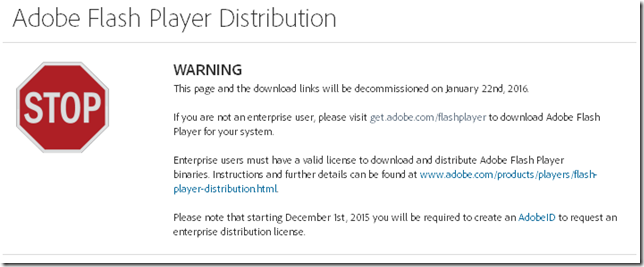
Adobe Flash Download Changes

I noticed the other day when snagging the latest Adobe Flash Player update from the Adobe binary download site that they will be removing most access to the “standalone” Flash Player download files.

Adobe Flash Player Distribution - Adobe

0xhiics3.nmw

That really bites as it is a great way to bypass all the nonsense with third-party app installs during your Flash installs/upgrades for friends and family.

On my own systems I have Flash Player set to notify me of new updates but to not install them automatically. I’ve yet to see a notification from the app that a new Flash version is available.

I’ve also gone back to check on systems that I manage Flash manually on for others and find that they do have the latest Flash version already -- and a third-party application (usually a tool bar helper or security application) installed that came along with the update ride that the user didn’t catch.

And under the revised access system, you will need to have an active Internet connection to access the on-line update download.

I’m not sure yet if some of the trusted third-party download sites I use will continue to be able to offer just the binary files for access. I prefer to get my binaries directly from the source, but that isn’t an option after January 22nd.  And these might not be available either.

Really, it’s yet another nail in the coffin lid to remove Flash altogether from my systems

Then there is this tweet tip from Aral Balkan that basically reminds us we can often use the F12 developer tools to emulate (user-agent switch to) an iPad or other mobile device with our browser. That may get us “Flash” content that is available if you don’t have Flash installed.

Related Java tip:

Sigh…

Claus Valca

Friday, August 28, 2015

Java (JRE) 8 Update 60 - Note

Not sure how I missed it last week. I’m usually very good about catching such things.

Oracle released Java 8 Update 60 on August 18th. - Oracle Release Notes

So I’ve been playing catch-up on updating the (few) systems that I manage that still have a JRE installation on them.

Two things I’ve noted.

First, if you are getting a 1063 Error code when installing it, first check to see if you are running Malwarebytes Anti-Exploit. If so, temporarily disable its protection before re-running the installer. When done, re-enable protection. This previous GSD post goes over the simple details & process.

Second observation is this, this particular JRE build doesn’t seem to fire the “do-you-want-to-remove-the-older-versions” uninstaller dialog window.

I’ve installed JRE 8-60 on a number of windows systems now.

Previous versions of Java 8 would go process the new version installation, then pop up a dialog window saying it (may have) found older/insecure version(s) of Java installed and do you want to uninstall them.

If you answered affirmatively, then it would remove them.

However this version go round, that dialog doesn’t present and when I checked (because I always check) the “Programs and Features” list, the older Java versions were left on the systems.

03l0c1lv.dmj

I’ve manually removed the older versions as they aren’t needed for compatibility on my managed systems and I don’t want the security overhead of these older ones.

Cheers.

Claus Valca

Tuesday, July 28, 2015

Portable Windows movie players

After I do a video file conversion I like to check how the conversion plays back.

I don’t really care for or use the stock Windows Media Player software.

For the longest time I have used VideoLAN VLC media player and found it adequate for the purpose. I prefer the VLC Media Player Portable package. However it seems to take a long time to load up and get started on all the systems I run it on. Maybe that’s me.

I was reading this TinyApps blog post Download Flash videos and I jumped and browsed around on the Grab Any media app/extension that was mentioned.

There I saw a recommendation for the MPC-HC open-source video player. It also comes in a Media Player Classic - Home Cinema (MPC-HC) Portable version over at PortableApps.com.

Me likey!  It is relatively small, launches much faster than VLC, and has so far been compatible with my favored video codecs.

So I’m keeping it around in my portable apps collection.

Another similar alternative to both VLC and MPC-HC is SMPlayer, another free media player for Windows systems also available in a SMPlayer Portable via PortableApps.com.

Always good to have alternatives!

Claus Valca

Sunday, May 03, 2015

Old News Update on TrueCrypt

My “to blog” hopper is overflowing with linkage. However there have been a number of challenges keeping up with the onslaught of “real-life” work and family needs lately.

The hopper is much neglected.

I anticipate there will be a series of upcoming posts that cover very old (in Internet time) topics that I still want to get up for my own reference.

This is one of such posts.

I use TrueCrypt to encrypt my primary personal laptop. The protection is against data-loss due to common theft.

The TrueCrypt project shut down suddenly, freaked a bunch of folks out, and spawned an independent security audit of the source code. Many folk fled in panic. I decided to stick it out and leave TrueCrypt in place rather than migrate to another solution. In April 2014 the first phase of the Audit was completed (PDF link) and things generally seemed fairly solid.

The second phase of the audit was finished up (PDF link) in April 2015 and things again looked relatively positive for the core security integrity of the software.

Here’s the rest of the story:

Now that the dust has settled, I remain confident in sticking with the current TrueCrypt deployment on my system. If/when I upgrade to Win 10 I’ll have to remove the TrueCrypt encryption and begin looking for the next alternative. But until then, it’s good enough for me.

Cheers,

Claus Valca

Sunday, March 15, 2015

Did you overlook any patching last week?

What a crazy, patch-filled couple of weeks it has been!

I’m dizzy.

First there are the Windows patches

Next there are those Adobe patches

Go get ‘em!

And for good measure, sometime recently Oracle released it’s own patches for Java. I didn’t realize I was behind until I checked!

Go get ‘em

Considerations…

Living without plug-ins such as Flash or Java - gHacks Tech News

Two EASY ways to check if you are up to date on your plugins:

Stay patched my friends!

--Claus Valca

Sunday, March 08, 2015

Harmonizing EMET and MBAE

In the GSD post “Anti-Virus Software Update - GSD Thoughts” I outlined the layered security approach I generally take on our Windows systems.

My layered use of the following products meets my own household needs but may not be adequate for less-than-advanced users.

  1. Free Firewall Software by GlassWire - Monitors and logs network connections…more used for logging than “active firewall blocking”.
  2. Sysmon - Sysinternals core service to log application/network executions
  3. Enhanced Mitigation Experience Toolkit - EMET - TechNet Security
  4. Microsoft Security Essentials - Microsoft Windows - Core AV protection
  5. Malwarebytes Premium - Supplemental real-time AV/AM protection
  6. (Optionally) Malwarebytes Anti-Exploit - Free Zero-Day Exploit Protection - browser layer protection

What I failed to clearly explain in that list is the following potential “gotcha” one may trip over.

Microsoft’s Enhanced Mitigation Experience Toolkit (EMET) – while generally very compatible both with Malwarebytes and Malwarebytes Anti-Exploit (MBAE) – seems to prevent smooth launching of the Internet Explorer web-browser when both are using default settings.

On both my Win 7 x64 and Lavie’s Win 8.1 x64 systems Firefox, Chrome/Chromium, and Vivaldi browsers all seem to work just fine with EMET and MBAE running…though I just keep to the default EMET configurations on install and don’t specifically add custom protection for Firefox/Chrome/Vivaldi to EMET. Internet Explorer (iexplore.exe) is included in the default EMET protection. And the free version of MBAE protects Firefox, Chrome, Internet Explorer and Opera browsers.

Many MBAE users recommend just skipping (or uninstalling) EMET but I find they do compliment each other nicely with the exception of Internet Explorer so I continue to run them together at the same time. With the following conditions noted below.

On Lavie’s Windows 8.1 system I actually - though great trial and error – arrived at a combination of EMET iexplore.exe protection feature checks/unchecks to get IE running smoothing with no issues along site MBAE. (When I can get Lavie’s laptop away from her, I’ll update this post with a screen shot of her Windows 8.1 MBAE configuration.)

On both my Windows 7 systems I just punted and disabled EMET protection for Internet Explorer entirely as I almost never use IE myself and will just trust MBAE to cover the EMET opening I’ve created with that strategy.

image

Likewise if you have the paid version of MBAE, you could optionally disable the IE protection in MBAE and leave the EMET protection in place; the free version doesn’t allow adding of processes or disabling of protections.

There are some Malwarebytes MBAE forum threads that try to address the tweaking of EMET more methodically.

Again, I managed to do that on Lavie’s Win 8.1 system and will eventually get around (probably) to either confirming the configuration for iexplore.exe in EMET 5.1 noted in the forum post above. Or I will find the combo that works on my Win 7 systems and post an update here as well.

In case you are curious to know if MBAE is actually protecting  your system, they do offer a series of tests files you can use to trigger the MBAE protection alert for validation.

In case you are curious, while working on researching this post, I found a few notices that a new version of Malwarebytes Anti-Malware (2.1) will be on the way soon. It is currently available in a Beta form if you are daring.

I’m looking forward to the changes and promised performance improvements.

Finally, in case you are interested, the Vivaldi browser I’ve been crushing on lately isn’t included in the free-version of MBAE protection. Again, if I was using the paid version, I’m pretty sure I could add the exe file to the list manually to provide customized protection. I imagine it should play well as it is based on Chrome/Chromium which does get protected by MBAE via its chrome.exe host process coverage.

I did pop into the Protection for new browsers - News, Questions and Comments Malwarebytes Forum and did the responsible thing by asking for vivaldi.exe to be added to the default protected browser list in MBAE.

Time will tell.

Cheers,

Claus Valca

Vivaldi browser–Technical Preview 2 Release + Tip

I’m really liking my Vivaldi browser experience so far. Each snapshot release helps refine the browser that much more.

It still isn’t my primary web-browser but I enjoy the web-browsing experience the more I use it between releases.

So does Ars Technica!  If you haven’t spent much time checking it out based on what I’ve been posting here (my #1 excitement…having a Chrome-like browser but with a true bookmark side-bar like Firefox) check out Scott Gilbertson’s wonderful review below.

The past few weeks have been busy for the Vivaldi team and no less than two “snapshot” releases capped by a Technical Preview 2 release have come out.

One weakness of Vivaldi right now is that it doesn’t yet support plug-ins. For core web-browsing that’s not a problem, but if you like to bolster the security of your browser it can be a bit daunting.

I run Malwarebytes Anti-Exploit as one (of several) layers of system security. More on that in a follow up post.

However the free version doesn’t support Vivaldi.

I also depend on adware blocker add-ons. I totally get the whole argument about how blocking ads cuts into the revenue streams of many full-time bloggers who make their living by ad-generated revenue. However, I’ve also seen the carnage from malware delivered via malvertizing campaigns. That isn’t the fault (usually) of the blogger or web-site but I don’t like the idea of getting infected either. Also, I’m very, very unlikely to purchase a product seen via a web-ad. Word of mouth and in-depth product reviews from trusted bloggers are much more likely to encourage me to check out a product.

I digress…

So I cannot run an ad blocker in Vivaldi (as I do in my primary-use Firefox/Chromium browsers), and want to do so to ensure I have an additional layer of protection against a malvertizing-based attack.

What to do?

Luckily, the tinyapps.org bloggist had the answer for me as posted back in October last year

Download, install, configure, update, protected! System-wide. The developers (Murray Hurps and Jeffery Cole) have recently (and generously) decided to offer their product (formerly $) fully-featured for free.

I’ve got a lot to learn about Ad Muncher, but the gist is that it runs on your system, sitting in the system tray, and can cover ad-blocking in any web-browser (without needing to be an add-on extension).

I recommend reading the Ad Muncher/Frequently Asked Questions page on the Ad Muncher Wiki site. It is a great place to start.

The program is highly configurable and you can add all kinds of extra tweaks and custom filtering.

It does sit as a local-system proxy-of-sorts for your browser web-traffic, so if you are concerned be aware of that and take some time to read the extensive Ad Muncher v4.72 and newer help page for all the technical details.  Also, don’t forget it is running as a proxy of sort as that could through off your troubleshooting a bit.

Check it out and big hat-tip to both tinyapps.org and the Ad Muncher crew.

Cheers,

Claus Valca

Sunday, February 08, 2015

Links for the Sysadmin crowd

Here is the last push linkfest for the day.

Mostly geared to system administrators but – hey – who knows, even you might find something useful here!

Have a brilliant week!

Cheers.

--Claus Valca

Network Tools and Tips – Linkfest

Here are a bunch of tools and tips for you network support geeks.

Whew!

--Claus Valca

System Stress Testing – 2015 Edition

Was it almost 5 years ago when I last posted some system stress testing tools? Wow!

grand stream dreams: System Stress Testing Suites

Since that time I still find myself reaching for specialized tools to stress test system hardware and components when troubleshooting a system.

Being able to stress a system when you are looking for performance or stability issues is critical. Having tools that you can run while monitoring the system are super-useful to see if you can force a problem to exhibit or if you want to be certain your solution has fixed the issue.

Back in the day, I recommended Bart's Stuff Test 5 but it doesn’t say it supports “modern” Windows systems any longer.

Funnily enough, this post What is New in Windows Application Execution? from the SANS Digital Forensics and Incident Response Blog jogged my memory when it mentioned a new-to-me SuperFetch parsing tool.

That tool doesn’t necessarily apply here, but the developer TMurgent does provide a ton of updated free tools that fit great with performance testing and stressing Windows systems.

New and Updated (Free) Tools – Confessions of a Guru blog

Performance tools – TMurgent Technologies

Here are the other stress testing tools I keep on my USB stick

More sources where I found some of these tools listed:

In addition to these Windows platform tools, LiveCD packages are available to boot your hardware system with a Linux-based OS and run additional stress test suites.

Happy Stressing!

--Claus Valca

Getting at your Windows 8 OS key

This was new to me!

Up until a few weeks ago, my experience with Windows license keys has been either to get it in the retail box, access it from the COA sticker on the OEM PC case, find it on the underside of the laptop or in the battery well. Of course if you are doing an enterprise-wide deployment you probably already know your volume activation product key as part of your support documentation.

But where do you find the OS license key on a Windows 8 system?

Turns out, it goes along with something I had missed during the Windows 8 rollout – it typically is now embedded in the BIOS of modern system boards once installed.

If you haven’t run into this problem because your Win 8 systems are running fine, then there is a good chance – like me – your first introduction to this new model can be a bit shocking.

If it is OEM purchase (Dell/HP/etc.) then you probably won’t find it on a sticker any longer, however, you can use NirSoft’s ProduKey to get it before hand for archival purposes in case you need to reinstall the OS.

This happed to a co-worker so here are the specifics.

The user had purchased a OEM Windows 8 system from a big-box store.  The HDD had failed miserably so there was no chance at even trying to get the key from the OS using ProduKey.

The user didn’t have any system restore or OS restore disks. And you can’t easily download the Windows OS install disks from DigitalRiver like you can for Windows 7 OS systems.

Option 1) – Build a WinPE boot disk and then download RWEverything | Read & Write Everything utility and stick it on a USB key. Then boot the (former) Win 8/8.1 system with the WinPE disk and run the RWEverything app from the USB to access and note the Win 8/8.1 BIOS-embedded OS key. Then download the Windows 8/8.1 ISO file from Microsoft and use the recovered key to enable the download to occur.

Option 2) – Download the Windows 8/8.1 ISO file and use the appropriate Windows 8/8.1 “trial” key to get the ISO file. Then when you go to activate the product, it should pick up the original OEM key embedded in the BIOS.

Option 3) – Just download and build a Windows 8.1 installation set using the Windows Installation Media Creation Tool. Boot the impacted system, install Windows, once running it should pick up the BIOS embedded Windows 8/8.1 license key and keep moving.

Because my friend already had a WinPE-based boot disk, he went with Option 1 and was eventually able to download the Windows 8 ISO files needed to set the system up, activate it again, then spend tons of time trolling the OEM’s site downloading the additional custom drivers needed to clear the issues in the device manager. It was a hassle but it was possible.

So now I have backed up Lavie’s new’ish Dell laptop Win 8 key to save future headaches. And I have stowed a portable version of RWEverything on my WinPE bootable service USB stick.

More resources and references for Win 8 BIOS-embedded keys, key recovery tools, and Windows 8 ISO download links and trial keys.

Super-special hat tip to Philip Yip who produces amazing Windows support guides over on his Unofficial Windows Guides blog. Extensive documentation and support material is here – very well organized – a must-bookmark site for anyone supporting Windows OS’s.

Cheers,

--Claus Valca

Saturday, January 24, 2015

Windows Tweaking Tool List - Updated

My “portable” Windows USB tool collection currently contains just over over 11.5 GB worth of applications I want to keep at the ready when working on a Windows system.

I like to think of it as a “EDSC” Everyday Software Carry version of the cool "EDC" Everyday Carry analog.

Two of my long-term goals are to 1) document and post on GSD an organized lineup of the tools for reference (remember this attempt?) , and 2) to cull through the pile and week out those that I no longer regularly use or are applicable to the post XP Windows environment I now live and work in (Windows 7/8/10).

Alas, I’m far away from tackling either of those noble quests at the moment.

However one folder seemed to be “low hanging fruit” and so I whacked it out this morning.

My original collection of these particular tool files on disk was 189 MB and now it has been reduced to 80 MB.

These are the Windows “tweaking” tools that I used to modify core Windows features, settings, and appearances.

It was easy to address as I realized a while ago that I really just don’t do much post-Windows install tweaking any longer. I might modify the default shortcut icon so it is smaller, I definitely modify the Windows 7 Logon Screen background image…and on Windows 8/8.1 I will add a third-party start-menu replacement. That’s it.

So I’m posting this listing for posterity and reference.

If a tool listed below is appended with an (X) then it is one I used to use/carry but have since removed from my software “EDC”.  Doesn’t mean there is anything wrong with it; just that either the features are no longer needed (say it is specifically designed for Win 2000/XP/Vista) or it may just have more features than I will ever use and want to carry.

If a tool listed below is not appended with the (X), then I still have it loaded up on my USB stick…just in case.

Almost all of these are at lease free-for-personal-use, though there may be some that have free versions with limited features that include additional options un-lockable under a $ version. Use according to license limitations.

Enjoy…

GSD Windows Tweaking Tool List - Updated

Library of Windows 7 & Windows 8 Shortcuts
http://www.7tutorials.com/biggest-library-windows-7-shortcuts

CustomExplorerToolbar
http://www.nirsoft.net/utils/custom_explorer_toolbar.html

(X) Dial-a-fix
http://wiki.lunarsoft.net/wiki/Dial-a-fix

(X) EnhanceMyVista
https://seriousbit.com/older/enhancemyvistapro/

(X) Enhanso - Tweak and Maintain Windows Vista, 7, 8, 8.1
https://seriousbit.com/enhanso

(X) eXtraButtons
http://www.xtrabuttons.com/

FileMenu Tools
http://www.lopesoft.com/en/filemenutools

FileTypesMan
http://www.nirsoft.net/utils/file_types_manager.html

FixWin (Win7)
http://www.thewindowsclub.com/repair-fix-windows-7-vista-problems-with-fixwin-utility

FixWin (Win8)
http://www.thewindowsclub.com/fixwin-windows-8

(X) FreshUI
http://freshdevices.com/freshui.html

(X) Vista Shortcut Overlay Remover
http://www.sevenforums.com/tutorials/3606-shortcut-arrow-change-remove-restore.html

(X) Glary Utilities
http://www.glarysoft.com/glary-utilities/

Handy Shortcuts
http://www.thewindowsclub.com/create-windows-desktop-shortcuts-easily-with-handy-shortcuts

Jumplist Launcher
http://en.www.ali.dj/jumplist-launcher/

Librarian
http://winaero.com/comment.php?comment.news.8

(X) Logon Workshop
http://kizza1994.deviantart.com/art/Logon-Workshop-265186911

(X) MS Tweakomatic
https://technet.microsoft.com/en-us/scriptcenter/dd939960.aspx

(X) Mz Vista Force
http://www.mztweak.com/mzvistaforce.html

Notifications Area Cleaner for Windows 7
http://www.itsamples.com/notification-area-cleaner.html

OpenWithView
http://www.nirsoft.net/utils/open_with_view.html

(X) Pitaschio
http://pitaschio.ara3.net/manual.htm

(X) PlacesBar Editor - Melloware
http://melloware.com/placesbar/

(X) PlacesBar Editor - MaDdoG Software
http://www.maddogsw.com/placesbar/

Quick Restore Point Maker
http://www.thewindowsclub.com/create-a-system-restore-point-in-1-click-with-quick-restore-maker

RapidEE
http://www.rapidee.com/en/about

(X) RegToy
http://www.majorgeeks.com/files/details/regtoy.html

(X) SafeXP
http://www.theorica.net/safexp.htm

ShortcutsMan
http://www.nirsoft.net/utils/shman.html

ShellMenuView
http://www.nirsoft.net/utils/shell_menu_view.html

(X) Stardock Tweak Vista
http://www.stardock.com/products/tweakvista/

(X) Stardock Tweak 7
http://www.stardock.com/products/tweak7/

(X) Startup Unblocker
http://www.jimmah.com/vista/Administration/autostart_admin_program.aspx

Taskbar Pinner
http://winaero.com/download.php?view.34

(X) Tidy Start Menu
http://www.tidystartmenu.com/index.shtml

(X) TweakUAC
http://www.winability.com/tweak-uac/

(X) Tweak 7
http://www.totalidea.com/products/tweak-7/index.php

(X) Tweak XP
http://tweaks.com/software/

Tweaks Logon Changer
http://tweaks.com/software/tweakslogon/

(X) UAC Trust Shortcut
http://www.itknowledge24.com/

(X) Ultimate Windows Customizer
http://www.thewindowsclub.com/ultimate-windows-customizer

(X) Ultimate Windows Tweaker
http://www.thewindowsclub.com/ultimate-windows-tweaker-v2-a-tweak-ui-for-windows-7-vista
http://www.thewindowsclub.com/ultimate-windows-tweaker-3-windows-8

(X) Vista4Experts
http://ntcore.com/vista4experts.php

(X) VistaTweaker 0.5 Beta
http://www.majorgeeks.com/files/details/vistatweaker.html

(X) WinBubble
http://unlockforus.blogspot.com/2007/11/winbubbles-features-gap.html
http://blog.unlockforus.org/2010/01/winbubbles-2010-customize-and-tweak.html
http://unlockforus.blogspot.com/2010/03/winbubbles-new-free-windows-7.html

Access Panel for Windows 8, Windows 7 & Vista, x86 and x64
http://www.thewindowsclub.com/windows-access-panel-for-windows-7-vista

Windows 7 Logon Background Changer
http://www.julien-manici.com/windows_7_logon_background_changer/

(X) Windows Tweaker 4.0
http://www.neowin.net/news/windows-tweaker-40

X-Setup Pro Portable for USB 9.2.100
http://www.majorgeeks.com/files/details/x_setup_pro_portable_for_usb.html

XdN Tweaker
http://xenomorph.net/files/code/vb/xdntweaker/

(X) xp-AntiSpy
http://xp-antispy.org/en/

(X) Windows XP Security Console
http://www.dougknox.com/xp/utils/xp_securityconsole.htm

(X) XP-Config
http://www.gaijin.at/en/dlxpconfig.php

(X) XPY
http://sourceforge.net/projects/xpy/

Control Panel - My Computer Tweaker
http://keybrdcowboy.deviantart.com/art/Control-Panel-My-Computer-Tweaker-350800290

Windows 7 in a Box
http://www.nextofwindows.com/windows-7-in-a-box/

Windows 7 Tips and Tricks (PDF e-book)
http://windowsvj.com/wpblog/windowsvj-xclusive-release-windows-7-tips-tricks-ebook/

Cheers,

Claus Valca

Saturday, December 20, 2014

Sysadmin Links - QuickPost

Stand back from your browser! Here comes a messy GSD Quickpost with tons of linkage for sysadmins….

New or Useful Software

PowerShell

Windows Diagnostic tool “PerfView”

  • Download PerfView - Microsoft Download Center - This little gem of a Windows performance collection tool is sweet! I’m really loving the easy of its data collection.
  • PerfView Tutorial - Channel 9 - Different video series than the “Defag Tools” listed below, Vance Morrison has some short mini-videos reviewing the tool, its usage, and some example applications. Good stuff!

Additional videos that are longer and more detailed on the tool.

Tips and Tricks

Windows 10

Windows/Updating

Network Nuggets

Cheers!

Claus Valca

Backup & Sync - QuickPost

For planned (personal) system backups to external USB drives I use Back4Sure by Ulrich Krebs

It has both x32 and x64 bit flavors, comes in a portable version, and is rock-solid based on my experience. Mr. Krebs keeps it regularly updated.

For synchronizing specific folders with those on my collection of USB flash drives and “service” USB HDD’s I had been using DSYNCHRONIZE by Dimio but found that some files were not actually getting copied over for some reason. Not sure why.

So I switched to FreeFileSync instead. It is also regularly updated and super-fast. I also like that I can more easily review what will/did/didn’t get actually sync’ed. It is available in an installed and portable version. It is so easy and reliable to use, I recommended it to my non-techie daughter Alvis who now uses it for system backups of her own. As a college student, data/homework/assignment backups are critical!

  • FreeFileSync - Free backup software to synchronize files and synchronize folders on Windows, Linux and Mac OS X

I recently saw mention of Beanland: AutoVer that can handle automatic/real-tie backup and versioning as well.  (I’m not sure where I found it so I can’t hat-tip anyone but I’m sure it was from one of my favorite technical bloggers…) I’ve been wanting to try it out but have been reluctant due to one critical requirement, you need to leave your backup storage location online and accessible! Duh! Well, from a security standpoint, if I’ve got an external USB drive attached to my system and am running live updates to it, and malicious code hits my system and does “bad things” to my files/storage, then it might be possible it could find/overwrite my “live” backup stores as well.

I’m sure there is a way to work around that with additional options (maybe store them in a container/way that would avoid being “crypto-locked”). But for now, I’m sticking with non-quite-live regular updates of my systems using Back4Sure and attaching an external media (I rotate between two) USB HDD for just the backup run, then removal when done. Hopefully the extra work (and drive rotation) will isolate the backup data from any infection damage were that to occur.

Thoughts?

Cheers!

--Claus Valca