Showing posts with label family. Show all posts

Sunday, April 21, 2024

Tearing it Down


Photo by jean wimmerlin on Unsplash

This is my confession.

I've left our church.

The church where Lavie and I met for the very first time.

Where we got married. Where we ministered together. Where we raised our daughter.

Alvis left quite a while before me.  She and her husband also met in our church.

They were married there with our shared friends and family.

However after years of ministry of their own, Alvis and her husband left the church.

They haven't been back.

Lavie left our church as well many years ago.   And hasn't been back.

And yet I've been continuing to show up and serve.  Year after year.  Leaving them (or being left by them) far behind.

Laboring shoulder to shoulder with my fellow church workers in love and dedication (and isolation and loneliness).

I've been blending faith and message with technology in our sound and projection booth to support a mini-concert session and bullet-pointed sermon to inspire.

Until I just couldn't any longer.

Despite the hopeful message, despite the deep friendships, despite the very beautiful people, and despite the kind hearts they hold their sincere faith in, I couldn't any longer.

So I said tearful goodbyes, gathered up warm hugs, and I walked away.

The people I care most about are in a desert.  Scattered, un-fed, un-shepherded, un-loved by the church body as a whole.

To get to the point that I've walked away from the church and faith that I have known for thirty years, I found myself doing something I hadn't done for a very long time.

I started being still and contemplating, pondering, wrestling with the reason for my faith. Asking myself hard questions about what I believed and why that mattered.

That opened my eyes to the desert that was in my heart, and seems to be what others in my family and friends have also expressed to me.

And I realized that first I needed to re-discover what it meant to eat the Bread of Life and drink from the Living Waters.

Then I needed to carry that sustaining faith into the desert and bring it to those who I love out there waiting and offer it to them.

I'm tired of working ten to twelve hour days at work -- the world's need for work will never be filled.

I'm tired of not having enough energy left on the weekend to listen to Lavie and really be present with my partner in life.

I'm frustrated for being only a few miles away from Alvis and her husband and my grand-children and not seeing them for weeks.

I'm broken by caring daily for Lavie's parents -- her mother slowly declining with dementia -- and seeing my own parents aging as well.

I'm tired of aching to worship the God I love and serve and feeling empty after serving at least four hours every Sunday. Watching the congregational excitement and doing my part to lead them, but feeling a million miles away from them -- hungry and thirsty in a desert of my own.

I know where I need to go now.  I know why I need to do it.

So this Sunday -- my first in forever not being physically in "church" -- I am starting the process of de-constructing my faith, my expectations and practices for worship of God, my praise to God, and my study of God.

I'm tearing it all down.

I'm going "This Old House" all in so I can then re-construct a proper and balanced faith of God. A place of faith to really live in. To truly Abide in. In God. 

And then go out into the desert for God to the others.

I have the inspiration. I hear His voice. I know what needs to stand on the cleared foundation.  I just need to do the hard work in spending time re-drafting and get to work framing it out and building anew.

Yesterday my brother and I worked side by side to mend Mom's fence.  He brought his tools and new boards, I brought my tools and encouragement. And we tore bad boards off the rails and replaced them with new and good ones.  We laughed. We encouraged. We considered. We labored together. We threw out the bad to the curb. Afterward Mom was (mostly) impressed with our work. We cleaned up before the rains came. We ate together. We drank together. We laughed and loved.

And the rains came. And it was good again.

Ezekiel 34

Grace and Peace

--Claus V.

Saturday, January 23, 2021

Still Here…Still Fighting the Good Fights

“Growing up, I always had a soldier mentality. As a kid I wanted to be a soldier, a fighter pilot, a covert agent, professions that require a great deal of bravery and risk and putting oneself in grave danger in order to complete the mission. Even though I did not become all those things, and unless my predisposition, in its youngest years, already had me leaning towards them, the interest that was there still shaped my philosophies. To this day I honor risk and sacrifice for the good of others - my views on life and love are heavily influenced by this.”
― Criss Jami, Healology

Saturday, June 25, 2016

A Perfect Father’s Day – 2016 edition

This past Father’s Day, dear little Alvis and her husband invited me over to their place for some hang-out time.

We watched some great Copa América soccer matches.

We wrestled with their “schnoodle” (schnauzer poodle mix) Molly.

We ate spicy chicken and I wolfed down red-beans and rice.

We laughed and then hunkered down when a ferocious storm blew through dumping rain by the bucketfuls, tossing lighting, drumming up thunder. And killing the power for about 30 minutes.

It was perfect!

Along the way I couldn’t help but be a dad and do some fixing of Alvis’s laptop.

See about a week or two prior, her husband had been using it when suddenly it died right in the middle of some work.

Alvis tried some pretty good troubleshooting but couldn’t make headway. It seemed to sort-of boot but would just display a black screen and power off.

To make matters more challenging, the kids reported that Microsoft had foisted a stealty/scammy Windows 10 upgrade on them. It was running Windows 7 just fine, but did a Windows 10 upgrade they didn’t ask for or want anyway. Classy.

However, they were good sports and adjusted. It seemed the Windows 10 upgrade went ok and the laptop survived the experience intact.

Was it a Windows 10 upgrade black-screen problem related to the upgrade? Was it a bad system board or power-source issue? Bad display? That snoodle can get rough at times though I didn’t see any teeth-marks on the lid.

In the worst case scenario, I was prepared to do a data-recovery and then port Alvis’s files onto her external USB drive so she could still work with her data on another laptop if her’s was dead.

I made sure the device was on the AC power cord and tried to boot it with a bootable USB stick first. Nothing.

I removed the stick and tried a power cycle again.

Miraculously, it sprang to life this time – for a moment. Enough to partially display a Windows 10 boot loading routine and for me to see an exasperated and amazed look on Alvis’s face that it was working for me – before the screen went black again and nothing.

Hmmm.

I pulled the battery out of the laptop and removed the AC cord plug.

I pulled a Leatherman Micra multitool out of my pocket and removed the bottom laptop access cover.

Alvis said she had started to do that earlier but stopped since she was afraid she would loose the tiny screws.

I was proud she had considered that (exploring under the access cover) and explained that the lid screws were “captive” and probably wouldn’t come out – though I did keep my eye closely on the schnoodle.

I pulled out the single DIMM of RAM, then firmly reseated it and clipped it back in.

The access cover was snapped back in place and screwed down, the battery returned to the bay, and the A/C power connected.

It booted right up normally and ran like nothing had happened. Fixed just like that.

After offering to roll her laptop back to Windows 7 (declined by Alvis) she did say that the thing that frustrated them them most was the “new” Start button and menu.

I downloaded and installed Classic Shell and after a bit of tweaking had the Windows 10 start menu tamed into a format Alvis was familiar with again.

Mischief managed – for now!

A right-perfect Father’s Day and I was still able to be handy and useful.

Thank you Alvis!

You are the best daugher a father could ever hope to have. I’m so proud of you.

Dad

Saturday, April 30, 2016

Knife Shapening 101

My awesome family recently gave me a gift that was a set of J.A. Henckels Synergy 16-pc Knifes (Amazon link).

I passed our previous (still nice) knife block set to my in-laws who were discovered to be knife-less in the kitchen after their recent downsizing move.

I had also been gifted a set of high-grade japanese whetstones in four different grades along with a diamond-embedded whetstone leveling tool.

So, no more using the cheap little grindstone wheel kept in our cutlerly drawer; although it does do a great job on our “regular” kitchen knife.

My first attempt to use the new whetstones wasn’t a total failure. But as I learned from my pre-attempt studies, it takes a LOT of practice and patience to do right.

Here are some of the best links I found for my skill development.

I’m still refining my technique, though it is a surprisingly good exercise in stress reduction; especially since it is almost a ritual getting all the items prepared for the activity at hand.

Cheers!

--Claus Valca

Saturday, February 13, 2016

Miscellaneous Apple bites

Looks like I am literally picking low-hanging fruit from my “to-blog” tree branches.

I previously reported this on my the struggles GSD post but am reposting here for topic inclusion.

The takeaway was to quit Process Explorer. I’ve seen a few other software installations where I have needed to close out Process Explorer entirely to make sure it doesn’t get in the way of some installations. Weird.

Of course, iTunes wanted to be updated, so I used the Apple Software Updater but it complained about the “iPod Service” not being able to start so the install kept failing. I then tried to download and run the iTunes package rather than using the updater but that failed at the same point.
I found this post Service ‘iPod Service’ (iPod Service) could not be installed... over in the Apple Support forums and followed “rickybpta” steps.

  • close SysInternals's Process Explorer ( if you have it and it's open )
  • close all Task Manager(s)
  • close Windows Services console ( services.msc )
  • close all command prompts ( cmd.exe )
  • open a cmd.exe as Admin
    • run: sc create "iPod Service" binpath= "C:\Program Files\iPod\bin\iPodService.exe"
    • close all command prompts ( cmd.exe )
  • open Windows Services console ( services.msc )
    • look for "iPod Service", see if it's not Disabled. If so, start it
    • close Windows Services console ( services.msc )
  • Run iTunes.msi again ( previously downloaded via the Apple Software Update's Only Download function )

That did the trick and it went on without any other fuss.

I had purchased a Yeti Blue USB microphone a while back to up my audio recording game. I had hoped to be able to eventually use it with my iPad/iPhone but there were some challenges reported so I’ve just stuck it out with my Windows 7 laptops where it has done a rocking-cool job of upping my audio game. Couple that with Audacity and The Levelator from The Conversations Network and while I am no audio-engineer, I can do a fine good job for most recording needs.

So it was exciting to see this news:

I need to update this post Claus’s iPhone App List - Updated 01/2014 as I’ve gone through some serious changes with the iOS apps I carry. I have purchased more than a few as well…so they must be that good! “Hey Siri! Remind me to update that post!”

Apps of note to get (or are recommended)

Music Memos – Apple – This one looks interesting but I’m not sure it might really meet my audio-recording needs on my Apple gear.

GarageBand for iOS – Apple – This looked good too, but maybe there is a better audio mixing app for “studio” mixing.

Due – Apple App Store – This is the best reminder/count-down timer/recurring event reminder app ever. Period. Buy it.

Round – Apple App Store – Because Due doesn’t currently handle recurring reminder events of less than a day (that I am aware of), you can’t yet use it to set medication dosing reminders. This looks to be designed specifically for that need.

Mighty Timer – Apple App Store – free app to help with brewing your tea. Alvis and her husband gave Lavie and I some very nice porcelain cups along with some fancy Matcha style tea. It has to be brewed very carefully but is super good!

Cheers.

--Claus Valca

Tuesday, November 11, 2014

Alister joins Tatiana

LE-pc08OK.  Been super-duper busy here at the Valca micro-ranch. Full weekends and long nights at the grindhouse and sacred-space.

However, last weekend I had a good excuse…I was setting up a new laptop named “Alister” to join my primary laptop “Tatiana”.

GSD readers may recall that Tatiana was the very first “higher-end” personal computer I allowed myself to splurge on: A Dell Named Tatiana. It is a 15” Dell Studio laptop with an Intel i7 processor with a 500 MB drive and full 1080 hi-def display (still gorgeous after all these years!).

What are my thoughts on it after just over 4 years?

Well, it still seems like a fresh-off-the-showroom-floor system. The i7 processor continues to chew up anything I toss at it with barely a bump on the processor load. The BIOS has been upgraded a few times but has all the virtualization support features to keep my VM’s running nice. The display is stunning.  I absolutely love the 15” size factor. It is easy to dump into my SwissGear tech backpack and go. I love the fact the keyboard doesn’t have an extra number-pad on it. A new video driver update for it finally fixed an audio issue I was having and the sound quality is top-notch.

Cons? There aren’t that many.  The system only will support a max of 8 GB System RAM so there is that limitation that really makes running multiple VM’s a hassle, or running a single VM and then doing some memory-demanding app work on the host system at the same time a challenge. That is my biggest current “complaint”.  I’ve still not upgraded from the stock 500 GB OEM hard drive. I’ve been waiting for the prices of 1TB SSD drives to come down more before upgrading. I can manage the existing space OK with off-loading VM’s to a 1.5 TB USB drive. It doesn’t have Blu-Ray player. Not a deal-breaker but I do have a number of fav. disks in Blu-Ray format that I can’t enjoy on the go with it (and I don’t want to download new digital ones from iTunes/etc.).  I did grab a few bundled digital downloads off the physical disks when we go that option so I do have a nice selection to carry with me but…see note about HDD space management. Oh, it doesn’t get “hot” but despite regular cleaning of the cooling system, the fan noise is fairly loud.  I can tune it out after 4 years of practice but when I do notice it, it is there. More like an oscillating fan on medium.

So what has this to do with “Alister”?

Well quite some time ago, little bro splurged on a high-end Dell Alienware desktop system to satisfy his hard-core gaming needs.  After some time he decided he no longer needed (or was using) his Dell laptop and passed it down to me.

What did I adopt?

A vintage 2012 Dell XPS 17” L702X laptop…almost maxed out.  After much work and rebuilding, it has been christened “Alister” after the Last Exile anime series character Alister Agrew who was Tatiana Wisla’s navigator. Seemed appropriate since we still refer to my red Studio laptop as “Tatiana”.

So here are some notes for future reference and the curious who wonder how additional tweaks can be made.

The very first decision I needed to make was how I was going to use the laptop.  It never crossed my mind to replace my primary (and beloved) Studio laptop Tatiana with the XPS system. Instead, I decided I would use the XPS as a field work-horse system. Instead of tucking Tatiana into my go-bag for personal service calls and out-and-about runs, she would stay safely at home. In its place, the laptop Alister would be drafted into service for demanding service runs, network discovery and service jobs, and to do the heavy lifting when it came to primary virtual machine hosting.

With that settled, I had some work to do.

The XPS system is great in that it offers a lot more upgrade flexibility.  It too has an Intel i7 processor and (though initially as handed to me loaded with 8 GB OEM system RAM) can support up to 16 GB RAM. It has a Blu-Ray player. And it came stock from bro with a dual-HDD bay; present were two matched 7200 RPM 500 GB Samsung drives. Oh, I almost forgot. It has two USB 3.0 SS ports! The 15” Studio laptop doesn’t; and I now have three different 1.5+ TB USB drives that can support USB 3.0. So I can finally take full advantage of them.

So, first we address the hardware situation.

I decided that per Crucial and Speccy and the Dell Service manuals, I would pick up two more 4 GB RAM sticks and cheaply upgrade to 16 GB RAM.  I would also sacrifice one of the 500 GB HDD to down-upgrade to a 250 GB SSD drive which would become my system drive and use the other 500 GB HDD as my data drive.

Only…guess what? I quickly learned that this Dell XPS 17” L702X model is notoriously confusing when it comes to supported RAM configurations.

A very long-story summarized, depending on the graphics “board” option selected for the L702X, if the 3D display is chosen, then you have 4 DIMM slots for RAM.  If not, then you only have 2 DIMM slots for RAM. Despite there being no Dell documentation as to that fact and despite Crucial scanner and other hardware identification tools all reporting my laptop had 4 DIMM slots. Open it up and you can only find 2 DIMM slots.  Crushed (momentarily) were my plans for a 16 GB RAM system.

However, there was hope…forums were filled with accounts of others who worked out that -- despite it not being documented -- assured you can drop two 8 GB DIMMS into the system and get 16 GB RAM anyway. There was also a YouTube video confirming the same.

As I said, the Crucial (my go-to brand for memory) website only auto sensed a 4 DIMM model but with some clever searching I found both 2-DIMM and 4-DIMM options (linked above)…neither of which showed me a 16-GB RAM option.

Knowing buying of two 8 GB sticks was going to me much more pricey than planned, but commited anyhow, I decided to see if I could trial the configuration before purchase.

(Laptop in tow) I headed down and about an hour’s drive from home into the new Micro Center Houston/West Loop store in Houston.

The sales tech working the counter listed as I explained my case. He looked up online and consulted with a senior associate and they both agreed that my system had 4 DIMM slots. So I opened it up and showed them the two only slots. After some testing they confirmed it was just 2 DIMM slots. More Google work (that I had already covered first) led them to the conclusion that two 8 GB sticks “should” work fine. Understanding my concern about buying RAM and then getting home to find it didn’t work,the MicroCenter staff cheerfully (nay gleefully!) agreed to my request to trial fit/run two Crucial 8 GB sticks in it before purchase. A quick swap in and reboot and 16 GB RAM was reported in the BIOS. Success.

Here is what I purchased for the curious:

I also picked up a Samsung SSD 840 EVO 250 GB drive that was on sale.

Again, the amazing good MicroCenter sales rep listed to my geek-talk regarding the system and advised me to go with the “bare” box SSD drive rather than the kit box. The kit box contains some extra software and an SATA to USB hardware dongle to make transfer of data/system from one drive to another more easy. He recognized that since I was doing a bare OS load I didn’t need to pay the extra $10-15 for the “kit” version.

Wallet considerably lighter after these purchases, I drove home and got to work. Note for the curious; MicroCenter rocks for geeks. The new store is super flashy and a pain to get on and off the freeway to, but it’s worth the visit and journey. For another’s opinion see D.Silverman’s Inside Micro Center’s new Houston store post via the TechBlog.

Drive swap went flawlessly back home. RAM was already upgraded in the store. I was amazed how light the SSD felt in comparison to the HDD drive I removed. Isn’t technology grand!

I first loaded the Windows 10 Technical Preview x64 OS on it. It went on super-fast and worked wonderfully for a few days. I really love the Win 10 OS so far and though I may not do an immediate upgrade from Win 7 to Win 10 on Tatiana, I would have no concerns or qualms if I had to recommend Win 10 or do an upgrade to one of my systems. Lavie’s laptop will be getting it immediately when released as her Win 8.1 still causes her considerable fussing. Anyway, it picked up almost all the drivers needed for the system and I found the few I still needed under Win 8 support worked fine.  Oh. It booted from shutdown to login screen in about 10 seconds. Serious. The BIOS load was the slowest part! SSD’s rock.

However, I then got greedy and manually tossed on a new build pre-release of Win 10 TP.

That resulted in breaking my network connections and Wi-Fi entirely. All attempts to reload the driver to get it working failed. It was noted in the blog post above but that’s the ropes when you fiddle with pre-release software.

In the end, I decided I needed stability and dependability for this particular system. Luckily, bro was kind and had well-treated the OEM Win 7 Ultimate sticker on the bottom of the laptop. Win 7 Ultimate x64 it was.

I did have to get the ISO for it, but that wasn’t an issue.

Boom. Fresh OS load from scratch, a quick and flawless phone activation was required with Microsoft, done. Activated!

Then another 1/2+ day was taken up with OS updates, Office 2010 install and updates, SSD management software from Samsung loaded and re-tweaked for performance.  And many more driver headaches under Win 7 than Win 10 TP.  Boot time was much slower to desktop…maybe 30 seconds now up from 10 seconds. Oh well.

Most driver issues were resolved and cleared by just hitting the Dell Support page for the XPS 17 L702X model.

I said “most”. The hardest driver issues to deal with are listed below and were not easily cleared.

That turned out to be the free-fall sensor. And it needed this driver to clear: ST Microelectronics DE351DL Motion Sensor Driver Driver Details | Dell US

The other weird one was that under Win 10 TP, my USB 3.0 ports worked flawlessly. Under Win 7? nothing. Nada. Dead.

Much much work later I got them going.

Turns out it took a multi-step process.  I had downloaded the correct Renesas drivers from the Dell site, but ended up needing these.

THEN I needed to go into the OS settings and turn off all the power-management settings for the USB ports to allow them to run full out with no power management options enabled.

THEN I found a Renesas program had been installed in my program list and running that came a configuration tool that allowed me to turn off a power-management option from within that app also.

FINALLY my USB 3.0 ports were able to pick up my 2 TB Seagate Slim USB external drive and power it and transfer data at the full SS rate.

Sigh.

Last issue I had was that I could not, not ever, never-ever get the silly Logitech SetPoint software to run on the laptop. Seriously Logitech? What gives?!  I’ve done more than a few posts here at GSD over the years fussing with your software! not the Web-driven install, not the manual install, nothing!

I finally got it on thanks to a command-line install trick I found. Installing it that way FROM THE SAME EXECUTABLE THAT WOULDN’T OTHERWISE RUN!

I love you “Katy05”. I’m married but I would buy you a cup of coffee or tea at Starbucks any day.

Her solution:

Try to reinstall SetPoint by following the steps below:

  1. Download and save (do not run) the exe file of the software installer onto your desktop.
  2. Open a Run box by pressing the Windows key and the letter R.
  3. Type in the location and name of SetPoint, i.e. C:\username\desktop\Setpoint6.65.62_64.exe /S (Note: There is a space between exe and the forward slash.)
  4. Press Enter.

The installation window will then come up and should let you finish the process.

    Worked perfectly and full mouse control and option settings are available now.

    Dell XPS L702x reference manuals & Stuff

    So…Alister runs super-quiet. I don’t think the fan ever kicks on (yes it does and it’s not broken), the 16 GB was a naughty splurge that I don’t regret for an instant. And the Evo SSD drive rocks my world! Amazing. I’m definitely making all my future HDD upgrades SSD’s. Now if the 1TB EVSO drive can just price drop some more so Tatiana can be upgraded…she is a bit jealous I think.

    For the curious via Speccy:
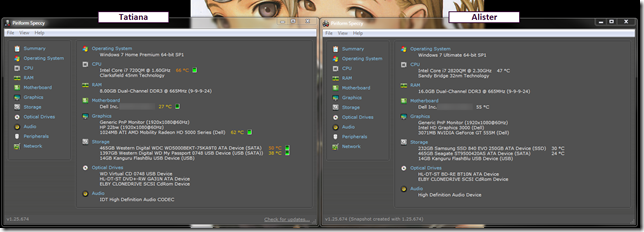
    hh5hxk2k.42b

    Photos may follow later if I’m really bored.

    Cheers!

    --Claus Valca

    Sunday, August 31, 2014

    OneNote for iOS

    Just like I post “linkfests” here for my archival reference and for sharing, I collect URL’s for family and friends as well.

    These typically run much less technical; though admittedly more than fairly geeky.

    Common subjects are interior design trends, architecture, recipes, Dr. Who fandom bits, short films, science, and faith/life-balance.

    Unlike the GSD blog where they get shoved out on stage and dialog/feedback is relatively rare, these more personal links across the web are chosen with discussion and togetherness in mind. They are random encounters discovered that can be shared and reflected. We need to build out new dreams, wishes, and hopes as we re-discover the Lavie and Claus bond that isn’t centered around Alvis any longer.

    The iPad makes a great platform to pull out on the couch when I’m sitting with Lavie. It’s a lot more comfortable (and feels more personal/intimate) than using either of our laptops.

    Only sharing the sharing bit is a bit clunky.

    I’ll send the URL collection out via email, but when we want to view the links together on the iPad, it requires opening the email client, finding the email (which can be quite buried…so it needs to be tagged/flagged), then clicking an embedded link. From there we review, then we need to return to the email client and hit the next one. Repeat.

    It works but is a bit clunky.

    What I wanted to do for some time is to select the HTML markup body of the email, paste it into a document editing app, then just use that as the launching place.

    Probably because I’m still not very familiar with the iOS app landscape this discovery process has been more of a challenge than it should be.

    My first hope was that Notability (App Store on iTunes) could handle embedded HTML markup copied and pasted. Nope.

    Neither could Byword (App Store on iTunes) or Documents by Readdle (App Store on iTunes). In all cases it would strip out the HTML markup code and leave me with useless plain text.

    Why was it hard to find a note-taking or document app that would keep copied HTML markup?

    Eventually I found what I was looking for.

    Microsoft OneNote for iPad  and Microsoft OneNote for iPhone (App Store on iTunes)

    I’m very familiar with OneNote usage on the Windows desktop (I have an Office 2010 version) but didn’t think about using it on my iDevices.

    One “gotcha” is that you will need to log in with a valid account to use the application. Having a Microsoft Outlook Live account makes the process very smooth. There were some extra validations and secret code-pasting required but it was easy to follow.

    Once I had the application installed and linked, I tested it by copy/pasting a big block of HTML markup from one of my emails to Lavie and Alvis with tons-o-links into a fresh note page.

    Hurrah! It looked like it kept the HTML formatting! I selected one of the links and it opened up quickly and perfectly in Safari.  Solution found!

    I then installed the app on my iPhone. This time all I had to do was log in, no additional account validation was required second go round.

    I must confess, the iPad version looks and works much more like the Windows desktop version than the iPhone version. However, having quick access to the notes is indeed handy.

    To add another major boost to handy-access of things, I quickly discovered I could link the additional OneNote notebooks I have on my desktop via the OneNote 2010 application I use to both the iPad and iPhone apps. It leverages Microsoft’s OneDrive storage platform.

    I’m still not ready to drink shoving all my electronic life to the “cloud”, but this is a handy start.

    So, if you are looking for a way to keep HTML markup notes -- from web or email snippings -- on your iPad or iPhone, then the free OneNote iOS apps are a great option to consider. And doubly so if you have a Windows client version of OneNote 2010 or higher on your desktop.

    Don’t have Microsoft OneNote for Windows desktop? Microsoft offers it for free:

    Download OneNote 2013

    Other platforms supported are Windows Phone, Mac, Android, Amazon, and the Web

    Cheers.

    --Claus Valca

    Saturday, June 21, 2014

    Lavie’s iPhone loss Mystery - Resolved

    This past Monday, Lavie called me at work terribly upset after her first visit to our new doctor. (Another rant story for another day.)

    Turns out the visit had gone very well and our new doctor meets Lavie’s approval. Yea!

    Turns out that somewhere between leaving the practice and getting home, she discovered her iPhone was lost. Noo!

    I immediately logged into the Apple “Find my Phone” app on my own iPhone at work, entered her information in, and saw her phone…kind of.

    The phone showed up but it couldn’t be located on a map. Turned off perhaps? In a dead zone?

    We both had tried calling it to no avail.

    I used the option to send a message to the phone and have a finder call us when it was discovered.

    Alas, at the end of the day no call and the phone still wasn’t showing up.

    Lavie was convinced it was on its way across one of our borders, I wasn’t sure and figured it was at the bottom of the elevator shaft or kicked under one of those heavy examination table/cabinet combos.

    The doctor’s office staff said they looked and didn’t see it.

    The practice security desk was contacted and didn’t report it being turned in but made a note in their log just in case.

    Lavie was still deeply upset with the lost. (She has never lost any mobile phone she has ever owned.)

    I was so calm about the loss that contributed to Lavie’s freaking out worse.

    So the following day we worked on damage control.

    I called our cellular carrier who disabled the SIMM card/# for the phone to prevent any unauthorized phone calls on our account. The rep was very kind and helpful.  No the phone hadn’t been used since her last call that morning to me. No new data usage or activity was showing up.

    The phone had both a passlock code set on it as well as the “Find My Phone” feature with iCloud enabled.

    I logged back into the iCloud and set it to “auto-wipe”.  I was pretty confident we wouldn’t have any data leakage/breach from it (hence my calmness) but was still curious why it was “dead” in the iCloud.

    Luckily, we still had Alvis’s old iPhone 4 as well. After her marriage, her husband had bought her a new iPhone 5s on their own account. Her old phone was on our account, and a few months away from the 2-year contract end, so I elected to keep in on rather than paying an ETF to remove it.

    So Lavie just carried Alvis’s phone for the day until I got back off work and we could drop by the local AT&T storefront.

    The AT&T rep was very helpful. He cut a new SIMM card (for free!) with Lavie’s cell # on it, then swapped out the SIMM from Alvis’s phone with the new one, also releasing the hold on Lavie’s cell #. Almost good to go. I hung on to Alvis’s SIMM card as it was still good.

    Back home, I backed up Alvis’s phone in iTunes, copied off all the photos from it (she said he already had them but I wanted to be sure), then wiped the phone.

    I then restored the last backup we had in iTunes for Lavie’s old phone to this one. It was from late December 2013 but it had most everything.

    I did have to spend some time re-adding a few apps but not that big a deal. Two hours later Alvis’s old iPhone was now fully migrated to being Lavie’s phone.

    Lastly, I checked Lavie’s iCloud account again, and now there were two “Lavie’s iPhone” objects listed. The new one I just finished setting up (with GPS locator hovering over our residence on the map active) and the old one…still not located and “dead” with wipe pending.

    So…we were out one iPhone 4..with one to two months left on our contract…and that pretty much it.

    Only guess what?

    Thursday night the security desk at the practice called.

    Lavie’s phone had been found…where they couldn’t say…but she was welcome to come pick it up at our convenience.

    So Friday Lavie picked up her phone.

    It was almost drained but very much still powered on.  It did say “No Service” as the SIMM had been disabled by our carrier but it connected to our Wi-Fi with nary an issue like a grinning tomcat dragging in after a long night of adventure.

    And the phone didn’t wipe.

    Curious.

    So today I figured out why the phone didn’t show up in iCloud, nor wipe itself as told.

    First, Lavie recovered a few missing phone numbers out of her contacts that had been added since the original backup.

    Then I got digging.

    Going in the Settings and iCloud area, I could clearly see “Find my Phone” was switched on with a nice green indicator showing. What up iPhone?!!

    Only there was a hazy semi-opaque haze to the page.

    Lavie’s information was all present, but it appears she (we I) didn’t actually log back into iCloud on it after the last iOS 7 upgrade.

    Once I did that, Bammo!  The phone wiped.

    So, lessons learned from the experience:

    • Make sure your iPhone/iPad is pass-coded. A longer passcode option can be selected over the standard four digit one.
    • Set up Find my iPhone/iPad on your device. Correctly. iCloud: Set up Find My iPhone
    • Test iCloud - Find My iPhone, iPad to make sure it really is seeing and tracking your device!
    • If you carry a lot of passwords on your iPad/iPhone, be sure to keep them in a password manager app, not in Notes. MiniKeePass.
    • Back up your iPad or iPhone device in iTunes (or via iCloud if that is  your thing) regularly. Like every week or so to capture Contacts changes and stuff.
    • If you do loose your device, set the call-back message if found in iCloud.
    • Call your mobile carrier and suspend your number just to be safe you don’t end up with any unauthorized calls.
    • If in deep doubt you will find it again, set it to wipe.

    More handy linkages:

    Cheers.

    --Claus V.

    Dad’s iPad Air Mystery - Resolved

    Dad had purchased a very nice 4th generation iPad Retina for his wife some time ago.

    She loved it and would use it primarily to catch up on emails, let the little nieces play games on it, maybe watch a saved movie or TV show while traveling. It was the Wi-Fi only model.

    Sadly, while bustling about the kitchen, Dad knocked it off the island and it fell onto their tile floor.

    It landed on a corner, denting the aluminum case inward by several millimeters, and cracking the glass in the black masking area in that corner.

    Other than the cosmetic damage and cracked glass corner, it worked fine and the touch sensor and Retina display were no worse for wear.  Some well placed tape protected fingers and kept the glass shards from falling out.

    Dad felt bad although his wife took it in stride and after some teasing, just continued to use it.

    Fast forward to about a month ago when Dad finally decided to replace it for his wife’s birthday.

    After some consultation, he upgraded to what she originally “really” wanted. This time it was an iPad Air with Wi-Fi and a cellular data plan. Now she wasn’t tied to using it just at home and the school’s Wi-Fi but could fully use it on the road to check her mail, etc. (Yes, I suppose we could have tethered the original one to her iPhone to piggy-back on that cellular data but she really wanted an “all-in-one” device connection.

    Dad is a good sport.

    We backed up her original device and then restored most of her items to the new one without fuss. She was thrilled.

    The original cracked Wi-Fi-only iPad found a second home with me (sweet) after a device wipe. For now I picked out the remaining shards of glass from the dinged corner, then put a layer of super-clear packing tape over that damaged corner, colored it with a black Sharpie, then put another layer of super-clear packing tape over it again. For the untrained eye it isn’t noticeable at all. Maybe I will try to replace the glass myself later…or put a thin layer of putty in the “floor” of the now-glass-free area, then fill it in with a layer of clear epoxy for a more permanent fix. Minor details.

    So now the stage has been set…

    Dad called me yesterday at work. He had got his bill from AT&T and the data usage charge for the billing period showing on the device was just over 650 MB.  That’s pretty small potatoes to me. I carry a 3 GB data plan on each of our iPhones.

    Bad for Dad however, as he is a bit more frugal and has just a 250 MB data plan on the iPad.

    That resulted in an unexpected 400 MB of data usage; with overage charges applied accordingly.

    So we discussed why it could have been suddenly so high.

    First thing that came to mind was that the Wi-Fi connection wasn’t set up correctly and the device was using cellular data rather than their home Wi-Fi connection. I walked him though the Settings, but we were able to confirm it was active on their Wi-Fi network just fine.

    “Running” apps can leak data, and I always close out any active apps that I am not using on my iPhone and iPad just out of habit…and to save a few bits of battery as well.

    Dad apparently wasn’t aware of this so when I showed him how to check (iOS 7) double-tap the home button then swipe up to close them, he was amazed at all the apps that were loaded and running.

    Looking at the apps seen, there were a few that “might” be data-leak culprits (email attachments and/or push notifications), but not really any that I would expect to pull down 400 MB + of data in a month.  That seemed to me more like an iOS software upgrade package.

    After talking through it more, Dad decided he would follow up with the AT&T store reps to see if they could drill into his bill with him. He doesn’t use the AT&T online site or an AT&T iOS app. If he did, he could have gone into the data usage status for that device which will show how much cellular data is used on a daily basis for each device. If you haven’t looked, it is pretty cool and helpful to understand your usage patterns. On-line account management via the web or apps still seem a bit dodgy for him…so we just roll with it old-school for now.

    Dad called me back that night with his findings.

    The AT&T store rep took a look at his account and then the device.  When they went into the Safari app, they found it was closed out, but when re-launched, about a bazillion page “tabs” open. Dad and his wife didn’t seem to realize with the Safari for iOS gui you may not catch that you have a bazillion tabs open. (With the Chrome browser for iOS app it’s a bit more apparent.)  More than a few were for their church’s web-page, which -- wait for it -- hosts streaming and playable video content.  Drilling into the iPad’s detail setting page for app data usage confirmed it was the Safari web browser that was the offending eater of almost all of that 650 MB data. I had forgotten about that detail info view while talking to him earlier.  More. Apparently even though Safari wasn’t “running” it was still periodically communicating and pulling down media files…which would account for the excessive MB usage rates seen.

    So Dad and his wife got another lesson about closing out tab/pages in Safari as well.

    All is well and Dad was a good sport to chalk it up to a learning experience.

    So…mystery cellular data usage solved…mind those Safari page tabs and monitor your data/app data usage periodically for good measure to look for developing trends.

    Cheers!

    --Claus V.

    Sunday, February 16, 2014

    Small bytes for the sysadmins this week

    Finally (did I really just slam up eight posts today?!!) here is a collection of links that may appeal to the sysadmin crowd here at GSD blog.

    Fix problems that programs cannot be installed or uninstalled - Microsoft Support FixIT tool.  I ran across this tool mentioned as a possible solution maker when I was monitoring the recent spate of Apple iTunes update FAIL that happened just a while ago.

    Per the Microsoft Support page link above:

    Fix problems that programs cannot be installed or uninstalled.

    Automatically repair issues that block program installation or removal because of corrupted registry keys. Find other automated solutions

    What it fixes...

    • Corrupted registry keys on 64-bit operating systems
    • Corrupted registry keys that control the update data
    • Problems that prevent new programs from being installed
    • Problems that prevent existing programs from being completely uninstalled or updated
    • Problems that block you from uninstalling a program through the Add or Remove Programs (or Programs and Features) item in Control Panel

    Free Tools for Active Directory Administration - WindowsNetworking.com

    FREE: AD Permissions Reporter – View Active Directory permissions - 4sysops

    …see also Free Active Directory Tools - 4sysops - Mondo list of free AD tools over at 4sysops

    Microsoft Resource Monitor Quickstart (by Tony Fortunato) - LoveMyTool blog

    Verifying a zeroed disk with zerocheck.sh - TinyApps blog. I need to experiment to see if the script can be ported/work under a Windows port; Is there a way to run Bash scripts on Windows? and win-bash - bash port for Windows. I’ll also dig around to see if there could be a PowerShell method as well.

    PowerTip: Mount ISO or VHD File with PowerShell - Hey, Scripting Guy! Blog

    2 Ways To Convert AVI & MKV Files To Add Videos To iTunes - MakeUseOf blog

    Coming soon in Windows 8.1 Update 1: Internet Explorer Enterprise Mode — Within Windows

    Windows 8.1 Update 1 leaks online -- This is what's new - BetaNews

    Whew!

    And just to prove that Claus isn’t all work and no play…my brother and I hooked up over the weekend and spend a breezy, clear and beautiful day exploring a regional bird-watching park. He tended to go for photos of actual birds. My shots were more of “desktop” background compositions…though I did get more than a few ducks in the frame.

    Unfinished Bridgenessetknnfwj.xub

    Do Not Passalwnbejc.eyg

    Zig-Zag05xomivd.qjc

    Pond3pzz13eo.jw1

    Ducknnu0txvt.kjn

    Cheers!

    --Claus Valca

    Wednesday, January 01, 2014

    Getting Ready for 2014

    Lavie and I recently completed a major family project that has taken most all of our time and energy.

    Couple that with 10+ hour work days due to multiple workplace projects and yours truly has been pretty exhausted, hence the lack of GSD posts of late.

    I’m hoping that as the dust settles and routines become normalized again, that I will be able to return to regular posting here.

    Rest assured that I have quite a pile of collected linkages built up and waiting to get out the door.

    Happy New Year 2014!

    Claus V.

    Monday, November 11, 2013

    Thank you, Veterans - 2013

    Yesterday I had the opportunity to visit with my father and thank him for his former service to our country.

    We talked about his service in Vietnam and lessons learned that seem to still perpetuate in service and in private employment (warehouse logistics managers seem to want to clear held inventory even if the engineers need it on shelf for emergency deployment).

    Dad served as a commissioned officer in the 18th Engineer Brigade of the United States Army. He volunteered to serve and left his newly formed family behind to go overseas.

    Growing up I remember he had a few shadow-boxes with some of his medals and pins and insignia patches. However, what made a more lasting impact to me of his years in service were the many, many photographs on the walls of the people and places of Vietnam; the good ones. Ones that you would expect to see today in travel shows and brochures.  The people were proud and kind and human and the culture rich and vibrant, despite the war raging around them. Dad was already an accomplished amateur photographer and his skill and eye for detail went overseas with him. Dad was able to capture the flavor and color of the country’s heart wonderfully and bring that legacy home for us to see.

    We were a fortunate family and can celebrate his service together father and sons on Veteran’s day. Many don’t have that opportunity.

    I was doing some shopping online a few weeks ago and spotted some nice high-quality decals with a few of his Brigade’s insignias in different styles so I ordered some and dropped them in the mail with a card that Alvis and Lavie also left messages in. It seemed like a very small and insignificant gesture for such a big sacrifice. But the conversation and sharing it re-started will remain priceless.

    Happy Veteran’s Day, Dad. Thank you again.

    Thumbnail for version as of 17:13, 3 May 2008

    Essayons et edifions

    --Claus

    Saturday, July 27, 2013

    Fun with Lightworks, the Canon 5D Mark II, and little Bro

    A few weeks ago, an exciting opportunity came up.

    I had the chance to publically record a nationally-winning high-school student’s (re)performance of his work under controlled settings.

    So out came the Canon EOS 5D-Mark II, lenses, and a solid tripod.

    My brother had just moved back in town so he got an invite too.

    He set up from a different angle with his own amazing Canon EOS 60D.

    Someone yelled “action” and we both started shooting HD video on our Canons.

    Side note: I am continually surprised and amazed when I learn of feature movies and video productions being shot with the Canon 5D Mark II/III.  I am humbled that I am carrying such a amazing piece of hardware in my camera bag now. Thanks bro! It’s inspiring!

    There was one minor flub in the performance so I shot a tight retake of that section with the actor.

    Data video files were downloaded and shared. It was grand fun.

    A week or two later I sat down at my laptop and faced the daunting task of somehow editing the video from two different camera angles, and the two different audio tracks into a single video performance.

    I had a lot of options, both new software and old ones.

    In the end I decided to jump off the proverbial cliff and went with the free community version of Lightworks.

    The learning curve was very, very high, but I had done due-diligence by spending a few days re-reading the PDF manuals downloaded earlier, I then watched (with full attention) the official Video Tutorials. Peter Bridgman did a bang-up job showing all the core features and things to know to quickly get grounded in the application.

    From there I just jumped in (with significant text-messaging support from my brother throughout the day), imported the multiple 4 GB MOV files each of the Canons had captured and started working away.

    I had planned on using some of the audio/video syncing features it carries, but in the end the time codes were not quite perfect between the cameras so it took a bit of trial-and-error to manually make all the angle cuts sync smoothly. IU

    The different angles and lenses also caused some differences in the color. I was able to edit the color in both to match very closely for continuity.  Even the section of performance “retake” slipped in seamlessly.

    The final challenge was exporting the video. My first attempt resulted in almost a 80GB AVI file. Wow!

    Another go with some different export settings knocked it down to a more manageable 40 GB size. I still had to run it through a secondary audio/video re-coder app to bring it down to a final 127 MB video file size so that it could play on a DVD format without stuttering.

    The end result was a pretty awesome HD video production shot with my bro, after at least 12 hours of learn-as-you-go video editing and post processing. The family of the student we shot the video for were blown away with the results, as were my brother and other family who got to share in the final production.

    Through it all Lightworks (x64 bit build 11.1) never choked or had any problems. My Intel i7 processor with 8 GB system RAM kept up with the workload as well.  I’m super glad I made that investment at the time of purchase. It hardly broke a sweat!

    For being an amateur videographer on a first foray into HD video recording and editing, it was a lot of fun and I’ll definitely have much more confidence the next time we roll into the field.

    Not soon after I was done, I spotted news about Adobe Premiere Pro’s own features and multi-video sync support:

    Adobe Premiere Pro CC Hands-On: Multi-GPU Support and More - Windows Extreme Blog

    While Lightworks isn’t probably going to win most home users away from more friendly video-editing apps, it is a truly professional-grade video editing platform…and the free version will probably be way beyond most average users’ ability to exceed it’s options.

    More:

    And the New Lightworks Version 11.1.1.e Now Available as Public Beta looks even more amazing!

    Lightworks NLE free edition - Highly Valca Recommended!

    --Claus Valca

    Saturday, June 29, 2013

    Thanks for the upgrades, Xfinity, now keep off my lawn unless you pay to maintain it.

    Back in January 2012, I was in the storm of indecision; Thoughts on a Plan to Drop POTS: Pros/Cons

    Do we toss our residential  POTS land-line phone service and move to a digital solution or not?

    Two months ago I finally got too frustrated and after a great sales marketing presentation by a spectacularly patient and kind Xfinity customer service rep, took the plunge.

    We had a Comcast/Xfinity HD cable package (no premium channels), a HD DVR unit lease, standard broadband Internet service, a cable broadband modem lease, and two “still free-for now” digital signal converter boxes. I think that bill for all that was around $175/mo.

    Then I had the POTS line service from a different provider (Verizon), which now has crept up to just over $80/mo for just regular phone service. Seriously. No bells-whistles-or value packages. That’s as cheap as I could get it!  No “metro” extended area dialing plan is offered. So to call the in-laws just a 35 minutes drive away is a long distance call. Really? How come they have a “metro” line package from their different phone provider and can call us for no long distance charge? Anyway…

    Thanks to her “no-bull” (honest I’ve been watching our new bill like hawk) customer service pitch, I jumped on an Xfinity “triple-play” package bundle and now get all this for $190/mo.

    • Unlimited Nationwide telephone voice-calling with no long-distance charges.
    • HD cable package, including three premium movie channels,
    • Primary HD DVR receiver cost included in the package,
    • Upgraded broadband Internet speed tier.
    • Download movies/TV shows/premium content to view and carry on our iPhones/laptops,
    • I even added another HD receiver (at an add-on cost being counted in that monthly bill amount) for kicks and grins and late-night HD bedroom movie watching as well.

    So not only did I save me some serious money (when removing the POTS line cost each month from our budget), I was able to add additional features/services and still come in less than my previous cable/phone bill combined (including all the taxes, surcharges, & fees). And for a sysadmin network geek, the extra bandwidth speed is better than on the biggest pipes we have at work!

    Sweet jebus!

    mowp3uwk.ad4

    Yes..that’s fairly typical now the Valca residence. Win7 wired connection on Gigabit capable Ethernet port/switch over Cat-6 cabling. by1lh5na.ei1

    Wi-Fi speeds across our 802.11n home router on laptops and iOS devices are about 1/2 that speed, but still pretty freaking good (IMHO).

    Even Lavie jumped on board and has been a firm enthusiast of the switch.

    We were a bit nervous about porting the home phone # we have had over to the new digital phone service. We’ve held that number longer than we’ve been married!  So for a month we carried both the POTS service and a temporary new digital phone service # to confirm the quality of the digital line was good. It was. With some trepidation, we went through the # porting service with an Xfinity customer service rep on a Saturday, and the following Saturday it was completed…no extra charges. Yea!

    Now I have one more partial billing cycle with our old POTS service provider to cycle through and I think that ends that relationship. Wow.

    So it was with some disconcerting feelings I saw this new plan by Xfinity to expand Wi-Fi service to their “roaming” customers:

    I think I understand the actual network deployment model though all the “hype” and sensationalism, but I’m still not convinced I like it.  I am (BTW) still paying a $7.00 broadband/phone modem rental fee each month as part of my $190/mo bundled service plan.

    I’m sure they can segregate the bandwidth on my “pipe” so it doesn’t impact my download speeds for phone/movie/network content and leave me with increased pingtimes and jitter.

    I’m sure they can segregate the network traffic so others cannot snoop on our own private traffic.

    I just don’t like the idea, so please keep your “pubic” Xfinity customer hot-spot traffic off my leased router.

    Well, unless….

    Now here’s an idea, Xfinity.  If you decide to do that, comp me the price of the modem-rental fee I am paying you each month to get the services I am already paying you for to leverage “free” Wi-Fi coverage access for other strangers who are your paying customers. If you want to let them use the hardware I have the privilege of leasing from you so they can get in the broadband carpool lane with me, then at least have the courtesy to pay for their gas.

    That would be a closer “win-win” for both of us.

    I get to see my bill drop just a bit and you get to extend your roaming Wi-Fi access across our neighborhood for other Xfinity guests.

    As of right now, our current Xfinity provided modem does not support Wi-Fi. I know because I didn’t want it (and asked for a modem model without it) as I run and manage our own private Wi-Fi network downstream from their cable broadband modem. That’s not to say I may not have to have another forced “upgrade” down the road, but for now it isn’t an issue.

    Think about it Xfinity. Otherwise I might have to invest in my own Xfinity approved (sans-Wi-Fi) DOCSIS Device. Now that I think about it, that was my most recent soap-box rant. See what I did about the previous one and that service provider when I finally dealt with it?

    I’m just saying…

    --Claus V.

    P.S. Hey Xfinity, since we are talking, when can I expect my new cloud-based X2/XI3 DVR unit from you? I doubt I’ll see a price drop on my bill, but I guess if it is at least as 50% more energy efficient than my current Cisco HD DVR monster that makes so much noise when the HDD spins up it scares small children, that might be something…and that Comcast version of Apple’s AirPlay feature sounds pretty handy considering I just bought a pricy Apple Lightning-to-HDMI adapter to watch HD media off my iPhone 5 on my HD TV.

    Sunday, April 28, 2013

    Lindi Ortega - Guilty Musical Pleasure of the week

    Discovered via Kent Newsom’s blog Newsome.Org

    BTW…according to Lindi’s website, she will be performing locally July 2nd 2013 at McGoingel’s Mucky Duck.

    I listen to almost every genre of music…from Gregorian chant, to classical, to Scandinavian metal-rock, and enjoy all things in between. My iPod/iPhone library is a real eclectic mess of material!

    But for some reason Americana/Bluegrass seems to tickle my soul like nothing else lately.

    Lavie and Alvis are amazed that my car radio has been lingering on the local country-music channel.

    I don’t know what the big deal is….

    CV

    Monday, February 18, 2013

    Too Many Bits, Bytes and Tech?

    At the risk of the GSD blog losing its focus from being a scratch-pad/notebook for my interactions with technology and shifting to a curmudgeon's front yard, I have lately been re-considering the role technology plays in my life.

    My “pay me” job is to manage technology at work both for our customers and our organization. Truth-be-told I don’t “create” technology, I just manage the consequences (good and bad) that it offers and brings. Usually that is pretty fun and rewarding when we succeed.

    My “don’t pay me” job is to help friends and family understand and cope with the never-ending upward thrust of technology in their lives. What used to be calls of “can I get that family recipe for grandma’s dinner rolls” has become “hey, a new update for Java/Flash/Windows was released, we need to update your PC. By the way, made chili lately?”

    When those who know me engage in “hobby talk” I share about a few books I am reading, a few movies/TV shows I follow, volunteer work doings at the church-house, and mostly about relaxing by keeping my eye out for new utilities, applications, and for/sec trends and news.  They usually just nod politely at the last one.

    So recently when I read each of these these posts, the experience gave me pause.

    I don’t do Netflix. I do buy DVD/BluRay movies and TV series I really, really like.  We do buy digital entertainment media - song/album downloads -- online. I still prefer to buy CD hardcopies but the writing is on the wall as even in the BigBox stores the CD section is shrinking. And that bookcase unit full of VHS tapes (mostly Disney movies) from 20 years ago stands as an accusatory judgment about investment in a technological media-delivery standard.  Sure I “own” all those wonderful movies and the delivery cassettes they come encased in, but cold-comfort when our HiQ-VCR finally dies. Should I (can I legally?) convert them to a digital file? Why bother. The quality will be sub-analog in the HD-standard world. And my time is much more valuable now than the hundreds of hours it would take to do so.

    Bin them? EBay them? I don’t know.

    How long until those DVD/BluRay’s will be the next VHS tapes in our house? Probably sooner that I care to admit.

    Then there is that drawer of audio cassette tapes. Alvis found them a while back and used some of the “blank” cassettes (I hope) for an art-project.

    Really?

    I have a cassette player in my car but it only is used for the cassette adapter for me to play my iPod/iPhone/Shuffle through. That’s it.  Lavie and Alvis’s cars don’t even have one in them; just radio/CD units.

    I guess an art-installation is as good as any solution I can come up with for them…probably better.

    My personal digital hoarding issue seems to be centered around collecting of Windows utilities; portable ones.

    I have a folder I keep these in -- as well as on my USB flash drives -- and currently it is just under 10 GB. Seriously!

    Do I really need (or even use) all of them?  Not at all, but then I might need one of them; a specialized digital tool for a specialized task. So I add to the collection, watch for updated versions, etc.

    A digital version of the Boy Scout’s mantra of “always prepared” gone amok perhaps.

    And now that I have a wonderful, super, life-enhancing iPhone (5) with 64 GB of storage, I find it calling me to dig deep into the App Store looking for additional productivity apps, tools, and what-not to fill it with.

    So over the next year I have resolved to:

    • Carefully review that 10 GB collection of utilities to honestly see if I can pare it down to a core set of tools and utilities that will allow me to accomplish what I need to do and support without all the overhead. A journey in coming to trust my skills and knowledge rather than the tools in-of-themselves to provide the solution perhaps?
    • Negotiate the clear-out of VHS tape-based media in the home…if nothing else to get the DVD/BluRay disks off the pile on the floor.
    • Get the hard-copy books I have out of storage and begin to interact with them again; to supplement the Kindles/Nooks in the house….and to make it a point to re-read them with relish. Shakespeare and Homer still are alive and relevant today for good reason. Let’s not forget that.
    • See if I can live with (and thrive) on a few choice quality cable/broadcast/radio media sources rather surf aimlessly through the hundreds I have on hand at my disposal right now.

    Technology is part of our lives and a major part of the culture and experience that makes us “human,” but it should never, ever, be a balm and substitute for human “being.”

    Lest we forget where having too many bits and bytes and capability can take us:

    Moving on…

    Claus V.

    Sunday, November 11, 2012

    Thank you, Veterans

    Today we remember our U.S. service veterans.

    Yesterday I got to share a few hours with my father who is a Vietnam war veteran and had the chance to thank him for his service.

    Here is a brief video produced by “TheWestPointChannel” on YouTube in honor of him and the many other veterans for their service to our country…and what that service stands for.

    See also:

    US Department of Veteran Affairs - Veterans Day Website

    Veterans Day 2012 - National Salute to Veterans | PBS

    Thank you, those who have served with honor, and valor, and in many cases…without notice.

    Carry on.

    Claus Valca

    Sunday, October 28, 2012

    Displaying digital media on an older HDTV - Dad Approved

    4tbgsbzc.lbn

    CC attribution: by Daniel Oines (dn1967b) on flickr.

    Being a child of the 70’s and 80’s, one common family event was family “slide show” time. Dad, being a hard-core amateur photographer (we had a dark room, chemicals, print paper, etc.) took lots of SLR photos. So naturally we had lots of slides.  That meant after trips or for family get-togethers, down would come the project screen, up would go the slide projector, and out would come the boxes upon boxes of slide carousels.

    Hummm…and in the next slide…ca-chuka-chucka…we can see…first young Claus proudly showing his tiny perch caught on his bamboo fishing pole…and in the next…ca-chuka-chucka…Claus has fallen off the pier into the lake. See how the pole floats? Alas, Claus does not. Ha-ha, dad.

    Ain’t technology grand?

    Fast forward to 2012.  Dad is now well into the transition from 35mm SLR photography to DSLR photography. That is generating a lot of digital photos from his vacation trips and amateur anthro/paleo field-work. Not to mention digital photos from iPhones and point-n-shoot cameras he and his wife both have and use for the daily life and family events.

    Up to now, he has been able view them quite successfully on his desktop PC at home. However when there is a large family gathering at his house, he has to fetch the correct camera, connect it to his Sony Bravia KDL52W4100 HDTV via a low-quality video-in (yellow RCA) plug. While serviceable, Dad’s got a sharp eye and the high quality of his digital shots isn’t done justice with the low-quality of the input method.  This older HDTV doesn’t have any slots for USB/memory cards like his PC does. Bummer.

    So he asked me for advice.

    I needed to find a dead-simple solution to bring him the ability to show his great digital photographs as close to HD as possible on his older HDTV.  Maybe move the desktop PC to the living room or use a super-long D-sub VGA output cable from the den to the back of the TV?  Well, yes…but…

    Here’s what we did.

    Part 1 - IncrediSonic Ultra Play IMP150

    I advised him to pick up a IncrediSonic Ultra Play IMP150 (Amazon link) multi-media player. It has a USB port and supports HDMI output. (The same model is on Newegg.com).  There is the unit, a remote, an A/C adapter, and some low-def audio/video cables in the box.

    I recommended this one to him for few reasons. First the Amazon product page has a mini-review video. I wanted him to be able to view the video to make sure the operation seemed logical and non-techy to use for him. The sub $40 price was great. It had an HDMI output that supported 1080p. Dad isn’t using all his HDMI ports on his Bravia TV so connecting it in HD output would be supported.  Not only would it support his digital image files, but it also could support many video file formats as well. It supported SD media sticks (from the point-n-shoot cameras). It has a USB port so media on a non-supported memory card format could be copied to a USB stick for display. Finally, the menu-interface and navigation seemed pretty intuitive.

    More videos of that product in action:

    IncrediSonic Ultra Play HD Media Player - MyKeyReviews - YouTube

    Vorstellung des Incredi Sonic Ultra Play IMP150 - HD TV Digital Mini Media Player (HDMI,USB,1080 p) - YouTube

    Note, there are quite a few other similar products that have pretty much the same features if you like this solution but want to explore other products, take your pick.

    Part 2 - Patriot Xporter XT Rage 32 GB USB stick

    Patriot Xporter XT Rage 32 GB USB 2.0 High Speed Flash Drive - Amazon product link

    Patriot Xporter XT Rage 32GB USB 2.0 Flash Drive Model PEF32GRUSB - NewEgg product link

    Dad does have a number of USB sticks that could have been used, but I recommended he use a new dedicated stick just for showing his digital photos/media on this unit.  There were probably even faster USB sticks than this one, but I have been pleased with my Patriot Xporter flash drive for many years. This 32 GB model has lots of storage room over his 4 GB models, and the smaller format would (hopefully) mean it wouldn’t stick out of the USB port on the IncrediSonic device like a standard USB stick would and risk over-torque/breaking of the USB port connection soldier points to the device system-board if dropped/banged/etc.

    I could have found an even smaller USB micro-plug but then I was worried about possible loosing of it, or it being hard to manipulate on the desktop system.

    The storage size and physical size of this unit seemed the best balance for his particular needs; adjust accordingly.

    Part 3 - HDMI Cable(s)

    So here is where my plan came together.

    I pointed Dad to this AmazonBasics 2-Pack, High-Speed HDMI Cables 6.5 feet cable set. NewEgg also has more than a few HDMI cable picks as well.

    This would so be easier and better quality than continuing to use that silly yellow video out/in RCA plug connection!

    I went with the 6.5 ft length so he could leave it plugged in on the back input panel of the HDTV display and then tuck the cord away when not in use. Then there would be enough length to allow it to stretch to where he could put the IncrediSonic device close enough to a A/C source and high-enough for the remote signal to reach it.

    The 2-pack was recommended so he could leave one permanently attached to the back of the TV as mentioned but the “spare” could be kept in the box/bag with the IncrediSonic so he could take it on the go when he visited other family members who also had a HDTV with HDMI inputs. This way the show could conveniently go on the road!

    Dad ordered the set the next day from my recommendations and a few days later had the whole thing running perfectly. He was beyond pleased with the quality of the display.

    I reminded him that according to the reviews, it defaults to 720p HD format but if the HDTV supports 1080p, he can change a setting on the device to get even better display quality for his DSLR digital photos.

    This or a similar “kit” might be really valuable for ForSec and/or other digital media users who need a standby for showing digital media presentations…just in case that laptop doesn’t work, or that TV/display provided isn’t what they said it would be, or if the one cable you need to use your standard setup goes bad. This particular combo came in a just under $100. Not bad.

    Definitely Valca Sr. approved.

    --Claus V.

    Friday, October 19, 2012

    …in which the power of “The Force” is realized…

    Alvis: “I went by the auto parts store and picked up some windshield wipers. The auto parts guy help me pick out the right ones.”

    me: “Great. You need some help putting them on the car when I get home or do you think you can do it yourself?”

    Alvis: “They’re already on. The auto parts guy asked if I wanted him to put them on for me.  I said sure!”

    me: “m’hmm…”

    Alvis: “So he went outside with me and put them on the car. Wasn’t that great?!”

    me: “m’hmm…”

    And the young Jedi Padawan comes into her own…. 

    Just don’t you dare try to put her in a binder…

    --Claus V.

    Monday, May 28, 2012

    Memorial Day Moment of Thanks - 2012

    WWIIMemorialWall VietnamMemWall

    World War II Memorial and Vietnam Memorial, Washington, D.C.,

    cc credits: flickr Jeff Kubina

    It would be a great wrong for me to allow today to pass without pausing to thank the families (current and past) who have lost loved ones in the defense of our country. 

    I seem to have been hit harder and become much more sensitized to the commercialism that today (and this weekend) has been draped with this year for some reason.

    To help, I have spent some time over the weekend at the following places on the web using the time I have been granted off from work to consider and reflect what this day means for myself, my family, and my communities.

    Thank you for your sacrifices, they are not -- and will not be -- forgotten in our home.

    --Claus V.