Showing posts with label forensics. Show all posts

Monday, May 30, 2016

Network Link Roundup

And yet another pile of URL web-linkage. This collection focuses on network techniques, tools, and software releases.

Grab a fork and dig in!

Cheers.

Claus Valca

TRAINING: Windows Security & Forensics

“New” Microsoft Virtual Academy training course spotted.

Topics:

  1. Windows Security and Forensics
    Take a look at the current state of the security landscape, Windows Security, and what "computer forensics" are.
  2. Windows Memory Attacks and Forensics
    Learn how and why hackers attack a system’s memory, and see how Memory Forensics can help address the problem.
  3. Windows Authentication Attacks and Forensics
    See demonstrations of how attackers use credential dependencies to gain elevated access to systems and to perform lateral movement. Plus, learn how to detect and prevent many of these attacks.
  4. Windows Forensics
    Explore Digital Forensics, and find out what to do as a first responder to preserve evidence for legal actions.
  5. Network Forensics
    Explore network forensics, along with case studies, best practices, and online analysis techniques.
  6. Malware Incident Response
    Learn about malware incident response, including identifying, locating, and removing malware.
  7. Windows 10 Forensics
    Take a look at Windows 10 forensics, and hear about new security features and innovations that can help forensic experts with their work.

Learn the following through this course:

  • Examine how and why hackers attack a system’s memory.
  • Identify how attackers use credential dependencies to gain elevated access.
  • Review what to do as a first responder to an attack; learn to preserve evidence for legal actions.
  • Explore network forensics.
  • Learn about innovations of Windows 10 that can help forensic experts do their jobs.
  • Learn the basics of computer forensics.
  • See how to respond to malware incidents.

This won’t instantly make you a professional forensicator it looks to give sysadmins a well-rounded introduction into key topic and foundational approaches when deciding where to begin – if there isn’t already a formal support structure in your organization for these items.

Claus Valca

Monday, February 15, 2016

Browser MetaData Leakage

I read this recent post by Dr. Neal Krawetz with some wonder and amazement.

He followed that one up with another related post, Just Browsing. See also his Invasion of Privacy post for browser fingerprinting and some perspective on “private/incognito” browsing session tracking.

The identification that (in some cases) your cellphone carrier could be adding extra headers to your smart-device information requests is not shocking in this day and age. But that it could contain (leak) your personally identifiable cell phone number was quite a surprise!

From Dr. Krawetz’s post:

Consumer Cellular has agreements to use T-Mobile and AT&T networks. If my cellphone uses the T-Mobile network, then no extra headers are added to my HTTP requests. However, if my phone uses AT&T's network, then AT&T appends a lot of personal information to every HTTP request:

  • X-Att-Imsi: This is my International Mobile Subscribed Identity and is unique to my phone.
  • X-Att-Plmn-Id: This contains my MCC+MNC code; that's the mobile country code (MCC) and mobile network code (MNC). These values identify the country and carrier. For example, MCC 310 is the United States, and MNC 410 in the United States is Cingular Wireless (now AT&T).
  • X-Up-Calling-Line-Id: This contains my cellphone number. Seriously: AT&T sends my direct cellphone number to every website my phone visits. Looking over my web server logs, I see other people who have been through this same path. Thanks to AT&T, I have direct phone numbers for people in Portland, Oregon and Cincinnati, Ohio and Roanoke, Virginia and... I'm actually surprised that my cellphone hasn't received more telemarketer calls.
  • X-Up-Subno: This very-disturbing field includes a timestamp that shows when (down to the second) I signed up with Consumer Cellular.

That got me looking for more information and I didn’t find much.

This circa 2012 post goes into some additional details:

It points to a test web page maintained by the interviewed researcher Collin Mulliner that can show some of your browser headers:

Running several tests with my cellular devices (with Wi-Fi disabled to force the data cross AT&T’s network) came back “clean” of any PII meta data; at least as far as this particular test was able to detect.

More information on the project and issue details here: HTTP Header Privacy info page

It was noted by the post author that the issue was with “medium-price-ranged” phones that needed a Web proxy to reformat Web content. And that iPhones and Androids do not do this.

I do plan to hit this Choices and Controls | AT&T Privacy Policy site with my devices as well to then “opt-out” of several of their analytics services listed there.

Finally, Martin Brinkmann at ghacks.net has an astounding roundup of links related to online privacy checkers.

That one is a keeper in your bookmarks.

Constant Vigilance!

--Claus Valca

Friday, August 14, 2015

So that’s how it works: Windows Platform Binary Table (WPBT)

Thanks to the ongoing work at Lenovo for their platform support methods, I now have a better understanding of how a security product such as Computrace can survive drive wiping; to then reload itself on a reimaged system.

Lenovo used Windows anti-theft feature to install persistent crapware - Ars Technica. From Peter Bright’s article:

And in its own awful way, it's a feature that makes sense. The underlying mechanism is simple enough; the firmware constructs tables of system information when the machine boots. The operating system then examines these tables to, for example, learn what hardware is installed in the machine and how it is connected. This is all governed by a specification called ACPI, Advanced Configuration and Power Interface. Microsoft defined a new ACPI table, the Windows Platform Binary Table (WPBT), that contains information about a firmware-embedded executable. When it boots, Windows looks for a WPBT. If it finds one, it copies the executable onto the filesystem and runs it.

The primary purpose of WPBT is the automatic installation of anti-theft software. This kind of software typically does a couple of things that require online connectivity: it can phone home to check if it's been reported stolen (and brick or otherwise disable itself if it has), and it can phone home to simply report where it is to aid recovery of lost or stolen hardware.

It's reasonably common (though by no means universal) for stolen hardware to have its disk wiped, thereby removing any anti-theft software and limiting the chance of recovery. WPBT provides a solution: even if the disk is wiped and the operating system reinstalled, the firmware can re-establish the software and report that the laptop was stolen.

So to get up to speed, Lenovo used this feature in certain of their systems BIOS to ensure that their service engine software would “respawn” even if removed by the user. Couple this stealth persistence behavior along with some security issues in that software, you have the makings of a second hurricane landfall of security hurt upon Lenovo.

A Microsoft technical paper detailing the Windows Platform Binary Table (WPBT) can be found. Warning, the following link is a direct DOCX document direct link. Microsoft WPBT DOCX Link.  As most of the articles about this paper only contain a link to document itself and not the context, here is a link to the Windows Hardware Dev Center Archive - Windows 10 hardware dev where the paper in question can be located under the Driver Archive section.

If you do have a Lenovo system using this root-kit like methodology, Lenovo has provided a removal tool.

Additional linkage on the topic

And previous Lenovo “SuperFish” issues:

Knowledge of this functionality support in Microsoft could give those looking to exploit a system another means to provide APT (advanced persistent threat) survivability.

Microsoft’s own WPBT paper (previously linked to above) addresses this threat in the “Security Considerations and Requirements” section.

The primary purpose of WPBT is to allow critical software to persist even when the operating system has changed or been reinstalled in a “clean” configuration. One use case for WPBT is to enable anti-theft software which is required to persist in case a device has been stolen, formatted, and reinstalled. In this scenario WPBT functionality provides the capability for the anti-theft software to reinstall itself into the operating system and continue to work as intended. This functionality is powerful and provides the capability for independent software vendors (ISV) and original equipment manufacturers (OEM) to have their solutions stick to the device indefinitely. Because this feature provides the ability to persistently execute system software in the context of Windows, it becomes critical that WPBT-based solutions are as secure as possible and do not expose Windows users to exploitable conditions. In particular, WPBT solutions must not include malware (i.e., malicious software or unwanted software installed without adequate user consent).

And Microsoft also offers a warning (of sorts). Take it as you will.

Removal of Malware
If partners intentionally or unintentionally introduce malware or unwanted software though the WPBT, Microsoft may remove such software through the use of antimalware software. Software that is determined to be malicious may be subject to immediate removal without notice.

Likewise, knowledge is power, so this can provide forensic security experts with one more area of a system to investigate for incident responses.

I’m sure there are some tools that might exist to examine the area on the BIOS where this specific code could be stored and extract it for analysis; if not then I’m confident they will be developed.

One utility for examining the code in BIOS that came to my mind immediately was RWEverything. I had encountered it before as a tool in extracting the Windows Key from Win 8/8.1 systems. It probably holds true for Win 10 keys as well.  Also Nir Sofer’s FirmwareTablesView might help out with viewing the WPBT contents if supported and present.

Curious.  Very curious.

Constant Vigilance!

Claus Valca

Tuesday, July 28, 2015

Rook Security - Milano tool

As usual…a week or more late…

Post Update 2015-07-31 New tool version: Milano 1.1.0 Release with Linux and Mac OSx IOC's Now Included - Rook Security

Anyway, Rook Security spent some time analyzing the data-dump from Hacking Team and in the process have found some indicators of compromise (IOCs) of a Hacking Team presence on a system.

Basically you can download their free/open-source tool which does a quick or full scan of a system and compares the files against known IOC hashes.

Downloads - Rook Security.  Current look for the “Milano 1.0.1: Hacking Team Malware Detection Utility” link.  There is also an MSI version for enterprise deployment.

Then it’s up to your leet skills to figure out if these are false positives or not.

I’ve ran their tool against both my systems. The quick scan is very fast. The full scan took a nighttime to complete on my traditional HDD system but it ran very fast across my SSDD drive system.  In all cases my systems came back clean.

It’s a portable app so no excuse not to include in in your USB carry-stick toolkit.

You may want to keep an eye on their tool for updates. At least one update has been released. It is also unknown if other security vendors are adding the IOC/hashes to their own detection engines.

More info here

Constant Vigilance!

Claus Valca

Saturday, July 11, 2015

Just thinking out loud…

Over at the dude ranch there have been a growing string of ransomware infections. (Hence the ongoing GSD posting of ransomware/crypto-whatever threat analysis posts.)

Good news is that (in most cases) our end-user data backup routines are pretty good so we can usually restore their data; give or take a few days back in time.

Bad news is that the current organizational IR plan seems to be detect (post infection or customer help desk call), grab canned report, wipe/reimage the system, then restore the user’s files after additional off-line scan checks.

I keep slapping my face with a prickly pear pad as (granted, based on my limited view from horseback afield and not being in the ranch-house proper) there doesn’t seem to be a clear effort to do real, structured, system/user level based incident response to determine the actual vector of infection(s); was it a Flash Player exploit? Malvertising? Email attachment? Breach in the fence?  What is it about our application levels or security posture that keeps letting these things through and execute?

If such data is being collected and analyzed the information isn’t leaking down to us working the herd.

Anyway…moving on…

What spurred this post is this SANS ISC Diary post from Didier Stevens.

So I dug up these KB’s from Symantec that provide additional info on their Symhelp tool, the Threat Analysis scan, sending a suspicious file, and reading Symhelp’s SDBZ file content on a different system than the infected one.

Ok. Back into the cacti.

--Claus Valca

Sunday, March 08, 2015

Threat Watch Linkfest

Here is a smattering of linkage for threats that caught my attention recently.

MITM/Superfish threats

Thoughts on a VNC-based network probe

It’s not a good sign when the help desk starts getting calls from users asking why IT is trying to remote to their systems with a new “VNC” product. It’s especially not good when IT doesn’t use that product and is not making blanket network connections to our customers.  Someone better tell the little Dutch boy to go stick his finger in the perimeter dyke! 

Some users selected “OK” to allow the remote connection thinking it was the local IT shop. Most did not.

Data has been collected from the incident and I was able to identify some IOC’s to use to go back and search out other systems where users may have selected “OK” but didn’t call in afterward that they had taken the bait.

Looking at logs from some of those systems, it appears that although a remote connection window was presented to the user, the application logs register the inbound connection but do not indicate that a connection was successfully opened to the user’s system, despite the dialog window presentation and the user clicking “OK”.  More research/incident-triage would be beneficial but the order came in to wipe/reimage these systems immediately so…there we are.

My guess (and without additional information it is just an educated guess) is that something got left open on the perimeter, an automated ip/port scan for VNC got by and triggered the local VNC responses seen. The actual mechanism and tool used remains unclear.

Here are some articles and links about VNC-type based attacks for my reference and review.

Dyre Trojan New Variant

Dyre Targets More Websites - ThreatTrack Security Labs Blog – besides looking to steal banking credentials from infected systems, this variant now has expended to file hosting, job hunting, general commerce, and even some income tax service websites!

Previously noted on this GSD blog: Fighting a Hydra named Drye/Dyreza/Upatre

Crypto<insert-name-here>

Turning the Tables

Mr. Zeltser offers a very interesting approach to preventing malware infection of a system. By using known infection-markers and loading them into a clean system, he can inoculate the system from infection.  It uses the tendency of malware writers to check to see if a system is already compromised (or is virtualized) by looking at running processes, maybe registry keys, etc. If those indicators are present, they the payload delivery and infection gets skipped!  The thought here is that if you know what those are, drop the safe “bits” around a system, then when the malware attack comes it “passes-over” the system and the system stays clean.  Very clever indeed!

How Malware Generates Mutex Names to Evade Detection – SANS-ISC InfoSec Handler’s Diary – Great supplemental post to the above by Lenny Zeltzer

See also: Looking at Mutex Objects for Malware Discovery and Indicators of Compromise – SANS Digital Forensics and Incident Response blog – article by Lenny Zeltzer

Constant Vigilance!

Claus Valca

Saturday, February 21, 2015

Time to set up a CERT/CSIRT? Yes!

One clear lesson learned organizationally from fighting a Hydra named Drye/Dyreza/Upatre is that while a entity can have clearly defined security groups and functions, unless there is a mechanism in place to bring them all together in unified communication and intelligence sharing, coordination of response can be seriously hampered.

Precious time may be lost as each group (network ops, AV ops, board of directors, executive branch, field staff) focuses the response effort based on their skill set and operational authority.

Communications and threat-intelligence may not make it to key decision-makers, general employees, or remediation responders.  This can provide just enough head-room for the threat to grow, morph, and dig-in.

It is mission critical that some structure be available for everyone to come together so the incident response can be coordinated and laser-focused; not just to block and remediate the incident, but to understand if it was a opportunistic attack, collateral damage, or a probe as part of a wider and more stealthy attack campaign.

I am happy to report that efforts are now underway on the ranch to get the fencing crews, the coyote kill-squad, and the herd wranglers all talking to one-another and develop our very own CERT/CSIRT team.

To that end, I’m dropping the following linkages as a starting place for reference as the workgroup forms.

I have found these resources make an excellent starting point for gaining foundational understanding of what an effective CERT/CSIRT team looks like and the many ways it can be structured depending on the organization’s needs/limitations.

Obviously this is just the tip of the iceberg, but I have found that as my knowledge of key CERT/CSIRT concepts and terminology has grown, so has my ability to find more advanced material on particular related items of interest.

If any CERT/CSIRT team leaders or members happen to be reading GSD, I would deeply appreciate any additional resources URL’s or links from you in the comments that could be valuable to those just getting started in CERT/CSIRT formation and operations.

ENISA - European Union Agency for Network and Information Security – Yes they are from across the pond but this is some of the very best publically available material I have found (so far) on CERT concepts and operations.

And here are additional reading resources for CERT/CSIRT teams; raging from basic to complex.

One crazy-big tome for Cybersecurity Operations

The SANS Institute InfoSec Reading Room (link) has lots of great material

Another training resource for CERT team-members is OpenSecurityTraining.info

One course of particular note there might be the Certified Information Systems Security Professional (CISSP)® Common Body of Knowledge (CBK)® Review

Finally, for some “perspective” I found these posts to be insightful and encouraging as this daunting task is considered.

Cheers,

--Claus Valca

Sunday, December 21, 2014

Super-Scale ForSec Linkpost

I think this post is going to have the same number of URLs as Christmas tree ornaments and mantle decorations that I hung and set out this afternoon. That’s to say there are a lot, and I am quite behind when considering the calendar.

I’ve been collecting these for at least two months and there are too many now to continue to put off posting them for reference. I’ve tried to group them somewhat for consistency in theme.

Exploits

Advice and Guidance

AV/AM

Analysis

Web Security

Network Bits

In the Library (mostly whitepapers)

Note: Many of these are PDF links and will open in your web-browser as a PDF…

Live CD News

Whew!

Cheers!

--Claus Valca

Sunday, September 14, 2014

Mega malware-focused link-dump

OK.

Now we arrive at the malware-focused link-bin.  This one seems a bit all over the road despite my best efforts at categorizing them a bit.

Cheers,

--Claus Valca

Mega ForSec link-dump - Mostly Musings and Considerations

The previous post were technical links.

This next collection also goes back a few months, and it covers most-excellent white-papers, musings, and other perspectives in ForSec and incident response handling.

Brainwashed by The Cult of the Quick - TaoSecurity

Linkz for SIEM - Journey Into Incident Response - Corey Harrell goes into great detail on security information and event management (SIEM).

SIEM Use Case Implementation Mind Map - Journey Into Incident Response - an expansion on the above post.

Where's the IR in DFIR Training? - Journey Into Incident Response - Corey Harrell touches on a subject I continually struggle and get frustrated with. It seems that so much of what I personally see (from my admittedly limited “sysadmin” perspective) is reactive response; something tripped an alert rule, it matches some pattern descriptions, instructions are received to drop everything and go wipe and reload it! It leaves me wondering about where the role of post-incident response activities should come in organizationally; such as evaluating what happened, what was the impact, is this event part of a larger trend, and what can we learn? I really gobbled down this post and the lively follow-on discussion in the post comments.

A guide to leading and motivating highly driven professionals - (PDF link) - SANS Institute Reading Room whitepaper by George Khalil.

Practical Threat Management and Incident Response for the Small- to Medium-Sized Enterprises - (PDF link) - SANS Institute Reading Room whitepaper by Jacob Williams.

Implementing an Information Assurance Awareness Program: A case study for the Twenty Critical Security Controls at Consulting Firm X for IT Personnel - (PDF link) - SANS Institute Reading Room whitepaper by John Dittmer.

Under Threat or Compromise - Every Detail Counts - (PDF link) - SANS Institute Reading Room whitepaper by Jake Williams.

Case Study: Critical Controls that Could Have Prevented Target Breach - (PDF link) - SANS Institute Reading Room whitepaper by Teri Radichel.

Incident Response in a Microsoft SQL Server Environment - (PDF link) - SANS Institute Reading Room whitepaper by Juan M. Walker.

(IN)SECURE Magazine - ISSUE 42 (June 2014) - (PDF link here) - articles include control/privacy discussion, “Incident response and failure of the ‘Just Fix It’ attitude” written by Mike Horn, and “Are you ready for the day when prevention fails?” written by Tom Cross which is another good IR-focused article.

Browser Fingerprinting and the Online-Tracking Arms Race - IEEE Spectrum - Not from your typical ForSec source, IEEE Spectrum looks into browser tracking beyond the stale cookie objects. Lessons for the ForSec community?

Incident Response with Triage-ir - SANS Diary post

USB firmware: An upcoming threat for home and enterprise users - Microsoft Malware Protection Center blog

Security of Password Managers - Schneier on Security- great post with links to some supporting whitepapers on the subject.

So on that last article, here’s a question for those still reading…what (Windows-based) options are available if password manager software is not approved in your organization? Seriously. How could one manage (and/or securely store) lots of credentials/strong-passwords on a “stock” Windows system?  The easiest solution is to stretch that grey matter and just memorize them; a modern twist perhaps to the great oral storytelling traditions of Homer and the bards that followed? Writing them down seems like an anathema. And then there is the challenge of “manually” generating strong/complex and/or random passwords that many password managers can assist with. Bother. (This was interesting: XKPasswd - Secure Memorable Passwords). Thoughts or suggestions?

Stay sharp my friend!

--Claus Valca

Mega ForSec link-dump - Mostly Technical Stuff

My cup runneth over with technical ForSec blog posts! Some of these reach back a ways…

Cheers,

--Claus Valca

WinFE LinkFest

It really hurts to get behind in my postings.  Brett Shavers has been running in overdrive mode lately over at the WinFE blog.

In case you have been living under a rock, or just been busy and harried like me, here is a sampling of the exciting news and events over at WinFE blog.

Which was quickly followed by new update posts…

WinFE Course and Free WinFE course, and finally the big announcement Windows Forensic Environment – WinFE Online Course Now Available - WinFE blog

Just in case anyone isn’t clear, the course page is linked below so everyone can find is easily. I’m probably blind this morning but didn’t seem able to find a big/direct course-reference link from the drop-down menu options or displayed prominently on the side-bar.

Note: There are two “preview” course sections you can look at without first having to sign up if you are curious.

WinFE blog points to this course review by Ken Pryor at the Digital Forensics Blog if you are curious on what to expect before signing up: Windows Forensic Environment Training Course Review

And a review of these posts should bring pretty current one current on the WinFE world.

Kudos to Brett Shavers and all the hard work he is doing for the community!

Cheers,

--Claus Valca

For/Pen/Sec LiveCD Updates

Here are some updates regarding forensic/pen-test/security aligned LiveCD projects released over the past several weeks.

Kali Tools Website Launched, 1.0.9 Released - Kali Linux - The latest release version of Kali is 1.0.9. Also now available is their Kali Linux Tools which documents all the tools included in Kali, including descriptions, link-back to the tool’s main-page, and sample output from the tool. Very helpful stuff.

Kali Linux 1.0.8 Released - EFI Boot Support - Kali Linux - Previous release information (July 2014).

Kali Linux 1.0.7 Released - Kali Linux - Previous release information (May 2014)

Official Kali Linux Downloads - Kali Linux - ISO/torrent download page

Offensive Security Kali Linux ARM and VMWare Images - Alternative builds download page

New Release of REMnux Linux Distro for Malware Analysis - Lenny Zeltser on Information Security - from the linked post, “The new release adds lots of exciting free tools for examining malicious software. It also updates many of the utilities that have already been present in the distro.”  The post has a great listing of the added tools with link-backs. ISO/virtual-appliance downloads and details at REMnux.

DEFT 8.2 ready for download - DEFT Linux - Computer Forensics live CD - some bug fixes and Ubuntu package updates.

PALADIN EDGE and Creating a USB - SUMURI LLC - PALADIN EDGE is based on the current Ubuntu release and will not contain their “Forensic Toolchest” package. Their PALADIAN build will continue to have the package and is based on the long-term-support (LTS) version of Ubuntu.

Cheers,

--Claus Valca

Saturday, April 26, 2014

Playing Nicely Now: Xplico 1.1.0 & Ubuntu 14.04 LTS

OK, in the grand scheme of World Events, getting the latest Xplico release to update/install in the latest Ubuntu LTS release isn’t that critical.

But it does get frustrating when something so easily-difficult turns into being something a case of something so difficultly-easy to solution.

Submitted for your entertainment and education, upgrading both Ubuntu 14.04 LTS and Xplico 1.1.0.

I’ve covered more than a few guides now here at GSD on getting Ubuntu upgraded in my VirtualBox session. Each time it goes a bit more smoothly than the last.

Likewise, getting Xplico installed the very first time on my own (rather than using it in a pre-bundled virutal machine appliance or LiveCD distro) was quite the effort.

Fortunately, after contacting the wonderful team at Xplico, they added some super-easy “scripts” to their wiki page to make the process a breeze for Ubuntu builds up though 13.10.

So what could go wrong this time?

Apparently still quite a lot.

First, let’s cover the Ubuntu upgrade using the well-worn GSD process.

Here you go…documented for your entertainment and my education.

  1. Find in RSS feeds that my Ubuntu 13.04 Raring Ringtail install has a Ubuntu 14.04 LTS Trusty Tahr update available.
    ●  Ubuntu 14.04 review: Missing the boat on big changes - Ars Technica
    ●  Ubuntu 14.04 "Trusty Tahr" Brings Small Changes, Long-Term Support - Lifehacker
    ●  Ubuntu 14.04 LTS is here -- Linux fans, download it now! - Betanews
    ●  Ubuntu 14.04 review: Trusty Tahr adds finesse and choices to the Ubuntu desktop - Desktop Linux Reviews
    ●  TrustyTahr/ReleaseNotes - Ubuntu Wiki
  2. Made sure my Oracle VM VirtualBox platform I run it is is current. Upgrade accordingly first.
  3. Excitedly start the in-place upgrade of my VirtualBox Ubuntu build.
  4. Play it safe to prevent VirtualBox upgrades messing with Ubuntu by first disabling 3D acceleration in the VM machine settings.
    hk3ijk2t.dbz
    Then install/upgraded to the latest VirtualBox Extension pack within Ubuntu proper. Unlike last time I knew what the correct option clicks to get the Extension pack installer auto-running after I mounted the CD/ISO file.
    1. First, run the installer from the host.
      rlkvvpwv.u4z
    2. Next choose the “Ask what to do” option.
      egm215wp.p3c
    3. Run the auto installer
      zdshppbk.nv0
    4. Authenticate and install
      rf4k25to.2tb
      ●  How do I install Guest Additions in VirtualBox? - Ask Ubuntu.
      ●  Installing Guest Additions on Ubuntu - VirtualBoxes
  5. Once done, I rebooted the system after re-enabling the 3D Acceleration option in the VM settings.
  6. From there I continue my previous successes by using Daniel Benny Simanjuntak’s tip in a previous Ubuntu post comments to run the following command from the terminal to start the upgrade process.
         …through terminal one can upgrade as well using the command:
          sudo do-release-upgrade -d
  7. For an alternative method found check out this Upgrade Ubuntu 13.10 (Saucy Salamander) to Ubuntu 14.04 (Trusty Tahr) via Tecmint.com post.
  8. Let it run for a while…do a few reboots…looks like a Flash package is causing some non-fatal errors…moving on anyway… 
  9. When it is all settled down, I log in and kick the tires a bit, and change the desktop to the more dramatic “Sea Fury” image from the pickings offered.
    zy43p4pb.tg0
  10. Looked for and updated any pending applications needing updating. Done.
  11. Check “Upgrade to Trusty Tahr” off my to-do list.

So far so good.

Second, let’s cover getting Xplico working again.

So despite some fairly recent updates with Xplico - Open Source Network Forensic Analysis Tool (NFAT) having come out, for my simple purposes, I’ve been running the Xplico 1.0.0 version up to this point in my previous Ubuntu builds.

As previously mentioned, the Xplico development team (specifically the most gracious and patient Gianluca Costa) kindly corresponded with me after I asked some follow-up questions to my Self-Installing Xplico in Ubuntu post. That eventually helped lead in a small way to:

  • Xplico 1.0.0 Released - with notice of the new Xplico Repository and
  • the fantastically helpful ubuntu page in the Xplico Wiki giving you the following install options from:
    • The Xplico Repository (currently for Ubuntu 11.04 through 13.10)
    • SourceForge for both Ubuntu 12.04 and Ubuntu 11.04 & 11.10)

Knowing that the Xplico team had recently released Xplico 1.1.0 in late December with some nice feature enhancements, I thought it was finally time to do the upgrade.

First, I launched Xplico 1.0.0 from within my Trusty Tahr machine…and it completely and totally failed to work.

Might have something to do with all that “Apache” stuff I noticed going on during the upgrade to 14.04 LTS perhaps?

No problem…I’ll just go back and reinstall the older Xplico 1.0.0 version using any of those handy Xplico “scripts” on the Wiki page.

Fail.

My first attempt was to use the first installation method from the Xplico repository.

That seemed to “mostly” work except it didn’t really work cause embedded in all the Terminal output were these potential issues:

Err http://repo.xplico.org trusty/main i386 Packages                          
  404  Not Found

and

W: Failed to fetch http://repo.xplico.org/dists/trusty/main/binary-i386/Packages  404  Not Found

E: Some index files failed to download. They have been ignored, or old ones used instead.

Yep…not going to work or continue with the build process with those buggers.

OK, lets move on to the SourceForge package source/method.

Snap, same errors…

Well, granted, I may have been rushing things out the door, maybe waiting a few days would help and the repositories could just happen to be off line.

So I came back a few days later (OK, just this morning) and tried again netting the same results.

So, being a somewhat clever and resourceful person, I did what most folks wouldn’t dare think about doing to fix a technical problem in a area (Ubuntu) they don’t know enough about; I fired up the email and asked for help from the most gracious and patient Gianluca Costa.  Funny thing is his email to me back from January 2012 is still sitting in my Inbox, one of about 8 emails I keep there for quick reference or encouragement. I knew there was a reason for that.

Less than 30 minutes later, from across the globe, came a wonderfully helpful response with the following critical bits amongst some other nice content:

If you like to test the 14.04 packages, their links are:
http://projects.xplico.org/xplico_1.1.0-14.04_amd64.deb
http://projects.xplico.org/xplico_1.1.0-14.04_i386.deb

After checking with him first, Gianluca kindly allowed me permission to share that information with you. Please do note these are still a work in progress and some fine-tuning might occur before their “public” release which should happen very soon...but if you are struggling for Xplico 1.1.0 to get working and just can’t wait, there you go.

Probably for a seasoned Ubuntu professional, that would be all the information needed to get Xplico going again…alas…not so much for me; at first.

Here’s how I finally got it going about an hour after getting the package repository links.

Now to be clear and fair, I did need to make some fresh coffee during the process. So it didn’t really take me an hour total! But then again in more honesty, I made the fresh coffee using a K-cup machine Mom and little Bro gifted me for house-sitting…so the coffee making process didn’t take as long as one might think. Seriously…just a few minutes. Cheese-and-crackers! …now that explanation seems to make it look like it did take me closer to an hour…umm maybe I slowed down to savor that rich Italian roast blend I had to honor Gianluca for his reply?

Moving on…

  1. In Ubuntu, I opened up Firefox and downloaded the “xplico_1.1.0-14.04_i386.deb” package to my downloads folder.
  2. I then right-clicked the package and selected Open With the “GDebi Package Installer” as that seemed as cool a thing to do as either of the options offered.
    5zyleuxy.k1z
  3. It needed some prompts answered, but it ran OK until near the end when I got this:
    oclyluha.buq[5]
  4. That did NOT look promising…but I can follow instructions like a few people can
  5. I opened a fresh Terminal window and ran “sudo apt-get install -f”
  6. That did a bunch more things. I’ve saved the text output to place with Alvis’s early macaroni art pictures from kindergarten class but here are the highpoints (yes…I’m leaving some things out for brevity…like that matters at this point in the blog post):

      The following packages were automatically installed and are no longer required:
        libquvi-scripts libquvi7
      Use 'apt-get autoremove' to remove them.
      The following extra packages will be installed:
        apache2 libapache2-mod-php5 libpq5 python3-psycopg2
      Suggested packages:
        apache2-doc apache2-suexec-pristine apache2-suexec-custom php-pear
        python-psycopg2-doc
      The following NEW packages will be installed:
        apache2 libapache2-mod-php5 libpq5 python3-psycopg2
      0 upgraded, 4 newly installed, 0 to remove and 10 not upgraded.

      Setting up libpq5 (9.3.4-1) ...
      Setting up python3-psycopg2 (2.4.5-1build5) ...
      Setting up apache2 (2.4.7-1ubuntu4) ...
      * Restarting web server apache2

      Setting up libapache2-mod-php5 (5.5.9+dfsg-1ubuntu4) ...
      php5_invoke: Enable module pdo_sqlite for apache2 SAPI
      php5_invoke: Enable module opcache for apache2 SAPI
      php5_invoke: Enable module readline for apache2 SAPI
      php5_invoke: Enable module json for apache2 SAPI
      php5_invoke: Enable module sqlite3 for apache2 SAPI
      php5_invoke: Enable module pdo for apache2 SAPI
      apache2_invoke: Enable module php5
      * Restarting web server apache2

      Setting up xplico (1.1.0-14.04) ...
      Installing new version of config file /etc/apache2/sites-available/xplico ...
      Installing new version of config file /etc/init.d/xplico ...
      Module php5 already enabled
      Module rewrite already enabled
      * Starting  Xplico 

    1. Done! And those [OK] tags I saw in the process were very comforting.
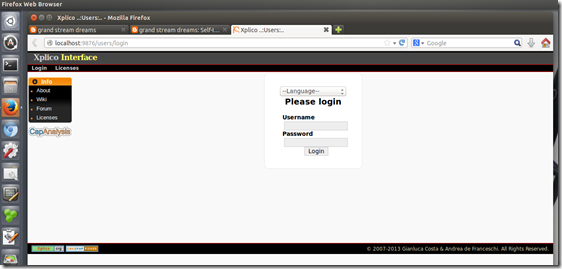
    2. I then relaunched Firefox using a custom profile setting I have configured for Xplico usage and browsed to “http://localhost:9876/users/login”
    3. Looking like this may turn out well!
      dk5fjo34.qdm
    4. Logging in and looking at my testing “cases” everything was back to normal again. Sweet!
      gefm2xcy.g34
      Note: PCAP file shown above collected from Network Forensics Puzzle Contest site; contest #3.
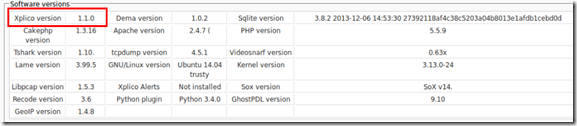
    5. Next I logged in as admin to check out the installation details to confirm Xplico was 1.1.0
      4njasmdb.hr0
    6. Yep! It’s a little hard to see there but here you go.
      z5eii1xn.wbc
    7. All is well.

    Xplico 1.1.0 is now running nicely in my Ubuntu 14.04 LTS virtual machine.

    I’m even more wiser for the process thanks to the kindness of the developer.

    I’ve got another blog post to add to the (eventual) GSD Xplico mega post that I keep collecting more material for.

    All is well in the world!

    Cheers!

    Claus Valca


    P.S. More images from the “xplico_1.1.0-14.04_i386.deb” deb package details when it was all said and done for the curious

    Xplico 1.0.0 [Running] - Oracle VM VirtualBox_2014-04-26_10-18-06

    Xplico 1.0.0 [Running] - Oracle VM VirtualBox_2014-04-26_10-18-32