Showing posts with label curmudgeon. Show all posts

Saturday, February 13, 2016

Only my own procrastination to blame…

Three years ago – almost to the day – I posted this: grand stream dreams: …you’re getting warmer!

Then at the end of last year I posted this: grand stream dreams: Biting the hand…

Both were (mostly) fussing about the rising price of renting our cable modem box and my desire to finally buy my own unit.

Still haven’t done it yet. But I AM going to!

So here are some updated links to spur me onward.

Cheers.

--Claus Valca

Saturday, November 28, 2015

Biting the hand…

Just looking for the needle and thread and peroxide bottle…

Possible solutions (first-aid bandages)

Moving on…

Claus Valca

Adobe Flash Download Changes

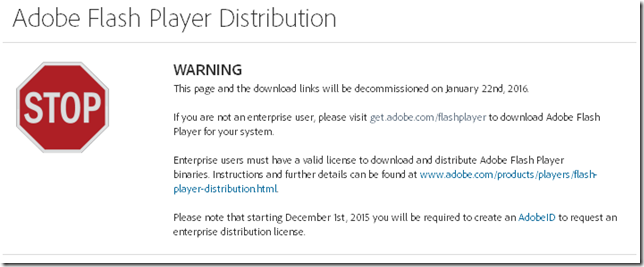
I noticed the other day when snagging the latest Adobe Flash Player update from the Adobe binary download site that they will be removing most access to the “standalone” Flash Player download files.

Adobe Flash Player Distribution - Adobe

0xhiics3.nmw

That really bites as it is a great way to bypass all the nonsense with third-party app installs during your Flash installs/upgrades for friends and family.

On my own systems I have Flash Player set to notify me of new updates but to not install them automatically. I’ve yet to see a notification from the app that a new Flash version is available.

I’ve also gone back to check on systems that I manage Flash manually on for others and find that they do have the latest Flash version already -- and a third-party application (usually a tool bar helper or security application) installed that came along with the update ride that the user didn’t catch.

And under the revised access system, you will need to have an active Internet connection to access the on-line update download.

I’m not sure yet if some of the trusted third-party download sites I use will continue to be able to offer just the binary files for access. I prefer to get my binaries directly from the source, but that isn’t an option after January 22nd.  And these might not be available either.

Really, it’s yet another nail in the coffin lid to remove Flash altogether from my systems

Then there is this tweet tip from Aral Balkan that basically reminds us we can often use the F12 developer tools to emulate (user-agent switch to) an iPad or other mobile device with our browser. That may get us “Flash” content that is available if you don’t have Flash installed.

Related Java tip:

Sigh…

Claus Valca

Saturday, October 31, 2015

Call Me Pessimistic…Windows 10 Upgrading

Back in mid October there were a series of events where the Windows 10 Upgrade appeared to present itself front and center to some users.

Ars Technica reported in their article that Microsoft responded and provided the following quote:

As part of our effort to bring Windows 10 to existing genuine Windows 7 and Windows 8.1 customers, the Windows 10 upgrade may appear as an optional update in the Windows Update (WU) control panel. This is an intuitive and trusted place people go to find Recommended and Optional updates to Windows. In the recent Windows update, this option was checked as default; this was a mistake and we are removing the check.

Because of some incredible weekend business, I had delayed processing my own Patch Tuesday Windows updating and was hopeful that the issue was fixed on 10/16 when I brought the system online.

Bad, news, it wasn’t. Good news, I was already on high-alert for a Windows 10 Upgrade attack.

2015-10-16 19_33_20-Windows Update

When I checked “Show all available updates” I saw this:

2015-10-16 19_32_45-Select updates to install

OK…maybe I didn’t get Microsoft’s “fix” for this issue. Let me recheck for fresh update availability from Microsoft.

2015-10-16 19_36_05-Windows Update

Hmm, the Windows 10 Upgrade was still showing front and center. A check of “Show all available updates” showed the new Patch Tuesday updates, but Microsoft was still pushing the Win 10 upgrade on the main Windows Update landing page.

2015-10-16 19_36_27-Select updates to install

I had to de-select the Win 10 upgrade option and then select all the other Important and optional updates I DID want to carefully get through my Patch Tuesday session.

This ended up happening on both my Windows 7 systems, though Lavie’s Windows 8.1 system seemed to survive the auto-updating process without a Windows 10 appearance.

This was disconcerting and I wonder how many folks actually did get an unwanted or unintended Windows 10 upgrade if they were not paying careful attention.

So now, after Microsoft’s apology and “correction” two weeks ago I saw these new news bits regarding Windows 10 Upgrade presentation to users:

From the Windows Experience Blog post;

We will soon be publishing Windows 10 as an “Optional Update” in Windows Update for all Windows 7 and Windows 8.1 customers. Windows Update is the trusted, logical location for our most important updates, and adding Windows 10 here is another way we will make it easy for you to find your upgrade.

Early next year, we expect to be re-categorizing Windows 10 as a “Recommended Update”. Depending upon your Windows Update settings, this may cause the upgrade process to automatically initiate on your device. Before the upgrade changes the OS of your device, you will be clearly prompted to choose whether or not to continue. And of course, if you choose to upgrade (our recommendation!), then you will have 31 days to roll back to your previous Windows version if you don’t love it.

So beginning early next near, Microsoft will change Windows 10 Upgrade to present as a “Recommended Update” and if your Windows Updates settings have been set to automatically include them, then you may get a bolder push to get Windows 10 on your system.

Yes, Microsoft says you will clearly have the option to not continue with the upgrade but I again wonder how many non-technical users will end up getting confused or just blunder on and accept the upgrade process.

Maybe they will like the results.

My experience has been as follows:

Despite all of our personal laptops being “Windows 10 Compatible”, Dell says they are not supported for Windows 10 (by Dell) and that drivers and hardware features may not work. I can confirm as of last month when I tried the Windows 10 upgrade on two of the laptops, serious hardware issues were encountered that resulted in me rolling them back to Windows 7/8.1.

I’m a techy and sysadmin so while it was a headache, no serious damage was done.

Considering the amount of time I’ve spent over the past few weeks helping family and friends through their own Windows 10 transitions, many non-technical users are feeling overwhelmed in Windows 10, also finding broken hardware, and frustrated.  That has required addition help getting the hardware working in Win 10 (where possible), and encouraging installation of Classic Shell and other tweaks so they can “find their cheese” again.

I continue to have really mixed feelings with Microsoft and Windows 10.

I dislike the privacy and tracking changes Microsoft has baked into Windows 10.

I’m dubious about the constant Windows 10 feature improvements being a OS release “work in progress”.

I really dislike the hard-sell push of Windows 10 upgrades on users – especially where it impacts non-technical users who don’t understand the risks and challenges, especially on older hardware and mobile (laptop) platforms.

Darn-it Microsoft, what’s going on?

Is Windows 10 Upgrade the IT equivalent of the zombie apocalypse?

Claus Valca

Tuesday, September 01, 2015

This week in browser bits: roll-backs, upgrades, and changes

Ever since Mozilla released an upgrade of Firefox to version 40.x I seem to been seeing frequent and persistent crashing of my Firefox browser.

As of the time of this post, I am running version 40.0.3.

The issue seems to occur most when I grab an open tab handle and drag/drop the tab into my bookmark side-bar to “save” a bookmark of that page.

It got so bad that I began to look at rolling back (downgrading) my Firefox version to an older version, say the last 39 release version, to see if that would help.

Making a bookmark the “long way” by clicking the “star” icon or using the Ctrl+D key-combo worked fine but was a lot of work due to my deep folder structure in the bookmarks.

Fortunately, I found that by grabbing the small icon on the far left of the address bar, I could drag and drop that to also create a bookmark at will without the crash I get from using the same technique but with the page-tab item.

I’ve not yet filed a bug report, but will shortly.

Firefox Version Roll-Back

The process to roll back to an older version of Firefox is fairly simple, as long as you know where to get the bits. In my case it is a touch more complicated as I use Mozilla Firefox, Portable Edition via Portable Apps. For installed versions of Firefox, head over to Index of /pub/mozilla.org/firefox/releases and download the version you want and reinstall. Sure, you should first back up your profile, etc. before doing it, just in case. For portable apps versions, head over to Mozilla Firefox, Portable Ed. at SourceForge.net project page, and find the earlier version, download, and over-install.

Here are some more guides on the process to roll-back Firefox:

My recent and growing frustrations with Mozilla/Firefox have led me to invest even more heavily that normal (and that’s saying something) in spending considerable more time using and testing alternative web-browsers; specifically Vivaldi (based on Chromium) and Pale Moon (based on Mozilla).

Add-On Support for Pale Moon and Firefox

Pale Moon (portable) has been very stable and runs very well on my systems in the testing work I’ve been doing more and more.

I don’t have a lot of Firefox Extensions/Add-ons and found that almost all of them were compatible in Pale Moon. Listed below are my current Firefox Add-ons and I’ve noted the ones that ARE NOT Pale Moon compatible -- at least directly installable via the Mozilla Add-ons store.

- about:addons-memory 10.1-signed  (not offered for Pale Moon / Firefox 24.9)
    https://github.com/nmaier/about-addons-memory
   
- Adblock Plus 2.6.10 (didn’t bother to try as I like/prefer uBlock Origin)
    http://adblockplus.org/en/
   
- CoLT 2.6.5
    http://www.borngeek.com/firefox/colt/
   
- Copy as HTML Link 3.2.1-signed
    http://justinsomnia.org/2006/05/copy-as-html-link-for-firefox/
   
- Download Status Bar 12.3.0.1-signed
    https://addons.mozilla.org/en-US/firefox/addon/download-status-bar/?src=api

- Extension List Dumper 2 1.0
    https://addons.mozilla.org/en-US/firefox/addon/extension-list-dumper-2/?src=api
   
- FiddlerHook 2.5.1.8 (installed on system by Fiddler, but doesn’t seem to pick up in Pale Moon / Firefox 24.9)
    https://fiddler2.com/r/?FIDDLERHOOKHELP
   
- Firebug 2.0.11 (not offered for Pale Moon / Firefox 24.9)
    http://www.getfirebug.com/
   
- Greasemonkey 3.3  (I didn’t bother to try to install yet in Pale Moon)
    http://www.greasespot.net/

- HttpFox 0.8.14.1-signed
    http://code.google.com/p/httpfox/

- Linky 3.0.0.1-signed
    http://gemal.dk/mozilla/linky.html

- NoScript 2.6.9.37rc1
    https://noscript.net

- Search By Image (by Google) 1.1.2.1-signed
    http://www.google.com

- Tab Memory Usage 0.1.8 (Disabled)
    http://mybrowseraddon.com/tab-memory.html

- TinEye Reverse Image Search 1.2.1
    https://tineye.com/

- uBlock Origin 1.1.0.0
    https://github.com/gorhill/uBlock

Pale Moon project provides a list of known incompatible Add-ons you may wish to consult.

The FiddlerHook item is not a real deal-breaker as I have lots of network sniffers/tracers to use, and isn’t “required” as you can just run Fiddler, then manually/temporarily set Pale Moon to use the system proxy.

Having said that, this extension isn't really needed in modern versions of Firefox. Instead, simply set Tools > Options > Advanced > Network > Proxy Connection to "Use System Proxy."

Likewise Firebug is a very powerful tool to inspect web page elements and code. However the “F12” web developer tools natively provided in Pale Moon are a sufficient alternative.

More Firefox Gripes News and the “Contextual Identity” Project

That last one really has me conflicted.

For full details see this Security/Contextual Identity Project/Containers - MozillaWiki feature draft page that Martin Brinkmann alluded to in his article.

Also, take a look at the Security/Contextual Identity Project mainpage for full context.

As a browser user, I can see the draw and benefit of having a feature allowing for concurrent “persona” sandboxing while browsing at work; that way I can browse all the cat sites I want at work under one “persona” while concurrently monitoring all my embedded network appliance and nodal dashboards in the same browser under my other “persona”, while doing all my personal secure on-line banking transactions in a third “persona”.  See how handy that will be? I can separate all those browsing activities while doing them at the same time in my browser -- at work -- and never will they need to inter-mingle.

Oh. Wait.  Why am I doing personal web-browsing at work on my work-provided systems?

Snap.

I guess it comes down to the workplace internet usage policy, but I just don’t see it a good idea to mix personal web browsing on work-provided equipment and networks; even if permissively allowed by the employer policy. That activity is fraught with security and privacy issues.

But then again, I’m an old security curmudgeon.

Like I say, read the feature draft page for full details. I’m confident many “modern” browser users will totes love this feature if it gets folded in. I get it and it does look like it will be slickly delivered. However as a sysadmin I think that while the feature looks good it may provide a false-sense of security and provides less benefit from a network administrator/security perspective for the organization’s benefit.

Oh well, I probably don’t have to worry because as we all know, only Internet Explorer is approved for use in the workplaces right?

Vivaldi Developments and Tab Tiling!

The Vivaldi team remains focused on regular snapshot updates to their project. It’s still at “technical preview” release level so not yet ready for prime-time use. But the fixes and features keep coming strong.

Snapshot 1.0.258.3 was pretty cool for me as it brought in tab-tiling.

Basically, you select more than one tab that is opened, hit a little tab-tiling option icon in the bottom right corner and select the layout, then the browser opens (tiles) them in a single window for concurrent viewing of all the tab pages side-by side!

In the example below, I’ve got the Phil Are Go!, Google Art Project. and Vivaldi Team Blog tabs all opened (tiled) in a single page window in Vivaldi. Cool!

_2015-09-01_10-15-03

For data-hungry sysadmins monitoring multiple web-pages on a super-screen sized monitor this could be handy.

And no, it’s not the same think as the “contextual identities” feature as Mozilla is discussing, thank you very much.

IE 11/ Edge browser

Just had to toss this one out there to make up for my cheeky comment about IE browser in the workplace.

--Cheers!

Claus Valca

Friday, August 14, 2015

Windows 10 Linkpost: Privacy Nightmare Edition

imageCC by 2.0 attribution: by Cory Doctorow on flickr.

In the last GSD Win 10 linkpost edition, we covered a lot of ground including a section on Windows 10 privacy concerns. We looked at a Tinyapps.org blog link that highlighted some of the EULA changes in Windows 10 and some general tweaks that could be useful to minimize the leakage of private data.

Not too long after that was posted, I began seeing some utilities and tools being developed and released that could allow concerned Windows 10 users to go beyond the standard set of Windows 10 tweaks easily accessible by knowledgeable users to curtail information and privacy leakage.

Since that time, even more research has been done on information leakage in Windows 10.  It looks to be increasingly difficult to prevent all information leakage on the Windows 10 OS. By that I mean information leakage from the Windows 10 OS itself; not even “normal” privacy leakage and user tracking via applications, web-browsers, cookies and “super-cookies”, etc.

Windows 10’s privacy policy is the new normal - Ars Technica

Even when told not to, Windows 10 just can’t stop talking to Microsoft - Ars Technica

As Peter Bright points out in his first Ars Technica post, a lot of OS’s have similar “phone home” behavior. And it is likely that the OS’s of mobile devices can track you even more closely as you walk around the earth than a more grounded laptop/desktop system. However, considering the broad release and “free upgrade” nature of Windows 10, many consumers may be unaware just how leaky Windows 10 is, or how significantly Microsoft has changed how the Win 10 OS chatters back home compared to previous versions.

For just one example:

So there are a number of guides on how a savvy user can modify the Windows 10 settings -- either during a custom installation upgrade or after the upgrade has gone on.

It seems these just scratch the surface.

If you really want to dial down on the leakage, you may want to consider using a third party tool to make more significant and deeper changes to you Windows 10 OS.

OK. Before we move on, here are some notices.

HERE BE DRAGONS WARNING #1:

I’ve seen the following post comment issued out by Microsoft to a number of bloggers referring to the tools that will be discussed below. So let me save them some time by reposting it here.

“We strongly suggest customers do not install applications of this nature. These types of third-party apps can alter the way the system operates, creating future problems and changing important settings and features.”

HERE BE DRAGONS WARNING #2:

Different tools take different approaches and some could significantly cause performance, stability, or security issues of their own if applied. Some whack into the Windows Registry. Some stomp on Windows services. A few even make (or block) specific network communications.  Few make backups of the system settings before changes are applied restricting your ability to roll-back the changes if something breaks.

Proceed at your own risk. I really encourage you to spend some time evaluating and understanding each of the tools listed or linked below before actually using.

Windows 10 Privacy Utilities

Martin Brinkmann’s post provides links and overviews to (currently) six maybe-ready for primetime utilities that can help Windows 10 users manage and take (some) control of privacy in Windows 10.

I highly recommend starting out there.

Here are some additional links I found in the days leading up to his post. Some of the tools mentioned in these articles are also covered in the gHacks post. Check out the comments for additional discussion.

I expect one or two things to happen in the area of Windows 10 privacy in the  coming months;

  1. We will see more of these Windows 10 privacy tools and utilities come out; each with greater capability, stability, effectiveness, and polish. With Windows XP the tweak tools tended to be “GUI experience” focused. With Windows 7 that trend continued. Windows 8/8.1 tweak tools seemed to be those to restore the Start Menu and make the GUI experience more familiar to XP/Win 7 users. With Windows 10, the tweaks-de-jour will most likely be “privacy” impacting. That’s my guess.
  2. I hope we will see more information and transparency from Microsoft on ALL the components, services, network features, etc. that apply to privacy, usage and behavior tracking, and network connections in support of the OS itself. I hope. This might go a long way to restoring a sense of trust to the Windows fan base.

Regardless, I’m still waiting a while before dropping Windows 10 on any of my home systems.

Constant Vigilance!

Claus Valca

Tuesday, July 28, 2015

Windows 10 and Wi-Fi Sense: Here be Dragons

I’ve read about.

I “get” it from the “helpfulness” and convenience side of things.

I absolutely don’t get it from a security standpoint.

So basically in Windows 10 it’s a feature that allows you to share your Wi-Fi network settings (and credentials) with other contacts via Facebook, or Outlook.com, or Skype. It seems to be a feature for Windows Phone 8.1/10 and Windows 10 in general.

My bae knows I’m coming over to crash at their pad, knows I love to do the Wi-Fi thing, sends me their Wi-Fi creds via Wi-Fi Sense and I’m golden for the hookup when I drop in. No awkward asking for Wi-Fi creds or trying to type in that 64-character strong password!

Thanks Microsoft.

You can optionally set it to automatically share your network settings/creds with your contacts, not just on a per-contact basis. Helpful isn’t it.

It seems that once they have the contact, they cannot then share the settings/creds with their friends/contacts as well, unless they already know the actual (clean-text) password and share it with others. Nor can you use Wi-Fi sense with enterprise networks using 802.1x. It also does not grant them access to other computers or devices on the shared network.

A workaround is to rename your network SSID to end with “_optout”.  Which kind of begs the question; if you are already OK with sharing this security why would you want to then go and “_optout”.

According to my understanding, while they can access your shared network, they don’t get to see your shared password. Small consolation because any malware or infection they have on their systems comes along for the ride and is granted permission to be on your network and in your “home”.

And that’s the core of the concern. While many non-technical users will be happy with the convenience of easily sharing network access to their family and friends, the deeper threat is what could happen once that “guest” system is connected on the network; exploit scans? pen-testing? downloading of questionable files?

To me it falls under that “it’s just network access to the Internet what’s the harm?” false security mentality that is so ubiquitous nowadays that drives security sysadmins to the point of madness. Just like the “why is it a problem that I borrowed my Ethernet cable at work to plug in my personal XP laptop during my lunch hour?…it’s not like I’m using my locked-down enterprise work system.”

Really? Just can’t see the problem there can you? Hmm.

Yes all those points are still risks under the “old-school” model of Wi-Fi access sharing; here’s my SSID, here’s the password, need some help? But at least there is a pause or opportunity to consider the device/user/access being granted--maybe go over some house rules and review/vet the system if you are a security geek.

Nor do I see a way to later selectively (retroactively) block or disable access granted to a contact…short of renaming your SSID and/or changing the access authentication password. Though I suppose if your Wi-Fi router supports it (and you know the former-bae’s MAC address) you might be able to block them via access point filtering.

Regardless, the current GSD recommendation is to run away from this “helpful” feature as fast as you can.

Now that I’m thinking about it, it’s probably time to consider setting up a “guest” Wi-Fi network with a different SSID that is isolated from the main “trusted” Wi-Fi network.

…or pick up a Wi-FI router that supports an isolated “guest” SSID zone as mine does.

More readings:

hat tip to TinyApps blog

Cheers,

Claus Valca

Random Thought…

I really get rumpled when I get a robo-call from our neighborhood conglomerate grocery store weeks (nay, sometimes months) after we had bought and consumed a recalled food product from the store shelves.

Thank goodness Lavie and I generally have iron clad guts and reasonably youthful health.

I file those calls under TL:DMN (Too Late:Doesn’t Matter Now)

--Claus V.

Saturday, July 11, 2015

Taking Flash Player out to the Bins

image

“Trash cans” CC attribution: by andresmbernal on flickr.

Post updated 07/13/2015 to incorporate yet another Flash Player 0-day. That’s three now if you are keeping count.

So in light of recent events, I’ve decided I’m taking Adobe Flash Player to the trash-bin on my secondary system as part of an experiment.

In case you have been living under a rock, the recent hack of “Hacking Team” has led to the public release of not one, but two (for now) 0-day exploits for Flash. Although, there were bad-enough Flash 0-day exploits around just prior to the new mess left on our lawns.

And as soon as each 0-day exploit of Flash became known, it was a done-deal that the exploit would become fairly common-place in the malware attack landscape.

CVE-2015-3113 (pre-Hacking Team)

CVE-2015-5119 (Hacking Team 0-day)

CVE-2015-5122 (Hacking Team 0-day)

CVE-2015-5123 (Hacking Team 0-day)

(not related to Flash Player but since we are on a roll…

So what is one to do?

For most people/businesses/enterprises…probably many folks won’t do anything and will keep on web-surfing with exploitable Flash Player versions hanging over their head like a sword strung up by a thread. (I’m speaking you to Enterprise team that has us running a quite-outdated version of Flash Player as our standard as part of “application compatibility”.)

Everyone using Flash Player should hop immediately over to Adobe’s Adobe Flash Player Distros page and download/install the appropriate version. Not sure if you need it, then first stop by Qualys BrowserCheck in every one of your installed web-browsers. It will tell you if you have the latest version of Flash Player (and other critical browser plug-ins) installed. If not, it will help you get them updated.

However, as the 2nd Flash 0-day shows, having the latest Flash Player installed is no guarantee you won’t get hammered anyway.

To add deeper layers of protection consider installing Malwarebytes Anti-Exploit (free/$) or HitmanPro.Alert (trial/$) for Windows 0-day exploit protection. Couple that with Microsoft’s Enhanced Mitigation Experience Toolkit (EMET) for good measure. Please.

But to get even more hardened on your security, seriously consider dumping Flash Player from your system entirely.  Yes that is a “extreme” position, but considering the threat landscape, if you don’t need it for a business critical reason then it’s time to shed it.

I’ve pulled that trigger on my secondary system. After about a week of trialing, I’m likely to do the same on my primary system and Lavie’s system as well.

Wonder what life may be like without Flash Player? Brian Krebs has already gone down that patch and can tell you all about it.

As a Windows user I used the “Programs and Features” area to manually uninstall both the Active-X (IE) and Plugin-based browser installations of Flash Player. For good measure I then downloaded and ran the official Adobe Flash Uninstaller to make sure no bits were left behind.

I also manually checked for the presence of Flash Player embedded in Chrome/Chromium and was prepared to disable/remove it manually if needed. In my case it wasn’t.

Yes there are additional guides on how to simply disable Adobe Flash (or set Flash media to “click-to-run”) in your browser and/or control Flash activity via add-ons.

However the risk seems too great so for me the answer is to just strip it out entirely.

Next step; to see if I need to remove any remaining Flash elements that are embedded in other Adobe products on my system in case they could be used to pivot as part of an exploit chain.

Seriously…if you don’t critically need Flash Player…remove it.

Constant Vigilance!

--Claus Valca

PS: I didn’t discuss it, but I have already removed Adobe Shockwave & Adobe AIR as well from all our systems. Don’t need them. Don’t use them. Do have the latest Java JRE still installed as I do need that for some JAVA apps but I keep it fully patched. Same with Silverlight. Just saying…

Sunday, August 31, 2014

Recently Found in the Internet’s General Store

I think if I had to start my own business, I’d love to open a small-town “un-general” store.

It would be have hot coffee and cold root-beer along with uncomfortable wooden chairs and tables for sitting. It would have not have Wi-Fi. The shelves would be filled with uselessly cool things of interest to no-one but me and the locals; like twine and carabineers and itchy woolen garments and conductor caps. And there wouldn’t be computers, but maybe some manual typewriters for visitors to use for their communication needs. And a pay-phone outside under a single dim street light.

It would open when I felt like getting up and close when I got tired of having company.

It would be filled with Americana melodies from artists no one has ever heard before and would never forget. And Opera.

I would probably call it something like “<tiny town name>’s Curmudgeonly Un-General Store”.

It would seem smaller on the outside and have a blue entrance door. That would be grand.

Anyway here are an assortment of links off the shelves of that make-believe place. Disregard any of the expiration dates at your own peril.

I ended up manually uninstalling “KB2982791” from all my Windows systems. The posts indicate that when the new update gets installed, the system will use the new code and just not execute the old code…therefore uninstallation is not required, but since MS pulled the patch, I’d rather not have it sitting there on my system, even if it is unused. I didn’t have any issues after the uninstall and mandatory reboot but YMMV.

You aren't using Resource Monitor enough - Scott Hanselman - A long time ago I found and posted about the various advanced troubleshooting tools Windows can offer. Though I am now fully enamored with the power of the Windows Performance Analysis Toolkit (WPT) for Windows (SDK 8), Scott’s post is a good reminder that with some skilled usage, Resource Monitor can be a great starting place and useful tool since it is already installed on Win 7/8/8.1 systems.

Case of the Excel Hang on Worksheet Open - chentiangemalc

Session Manager Firefox Add-on - MoonPoint Support Weblog

Some time ago Lavie (who leaves a bazillion tabs open in Firefox as her page-management technique) had a Firefox crash that wiped out her history of open tabs and the like. Painfully she had to start over again. She does have bookmarks, but most material she either is reading or plans to read is left open in a tab. The Session Manager Add-on that MoonPoint highlights would have saved her bacon. It will be a new feature coming soon to Lavie’s Firefox install!

Editing ISO files with Magic ISO Maker - MoonPoint Support Weblog

DAYU Disk PhotoFiltreMaster Free looks like an interesting product. More information in this BetaNews article: DAYU Disk Master Free: image backups and more

AOMEI OneKey Recovery is another free partition management tool that allows for system backup to a recovery partition. More info in this BetaNews line AOMEI OneKey Recovery allows you to recreate your PC’s recovery partition, and hat-tip to tinyapps.org who passed on a lead to it.

How To Quickly Repair Windows System Files in Windows 7 / 8 - Next of Windows - “sfc /scannow”

New: Sysmon v1.0; Updates: Autoruns v12.01, Coreinfo v3.3, Procexp v16.03 - Sysinternals Site Discussion blog

Updates: Autoruns v12.02, Coreinfo v3.31, Sysmon v1.01, Whois v1.12 - Sysinternals Site Discussion blog

Some tools in Outlook 2013 for diagnosing Exchange connectivity issues - MarkWilson.IT

Why Chrome Browser Looks Fuzzy in Windows 8 and How To Fix It? - Next of Windows

PhotoDemon - a fast, free, portable photo editor - I have Paint.NET, Photoshop (CS4), RawTherapee, Photivo, GTKRawGallery, Scarab Darkroom, FotoSketcher, and PhotoFiltre (to name the main ones) that I flit between while making edits and manipulations to digital photos. PhotoDemon is a new one to me and I’m positively loving it. It is jam-packed with filters and custom edits, it supports layers, and is very intuitive to use. There seems to be a lot of similarities in the usage, menu-system with Paint.NET so I instantly felt at home. It may not replace all of the other “fun” digital image tools I use, but it could replace more than a few. Since it is portable by design, clearing off the others would make easy room for this one…and allow me to reclaim some space in the process on my USB stick.

Best free video editing software: download these DSLR movie editors today - Digital Camera World - I was familiar with most in this list but there were some new-to-me finds that made the list bookmark-worthy.

RegEx 101 - Online regex tester and debugger: JavaScript, Python, PHP, and PCRE

Debuggex - Online visual regex tester. JavaScript, Python, and PCRE.

Regular Expressions Quick Start - Regular-Expressions.info

regular expressions 101 - DonationCoder.com This is the post that got me started and led to me finding the above RegEx links. For some desktop level applications to help with RegEx testing and learning, this post by Sivakumar K. at Hongkiat.com has a good list of options: Regular Expressions: 30 Useful Tools and Resources. I didn’t see these listed: Regular Expression Editor by WaterProof Software and Simple Regex Tester at SourceForge.net. Other projects at SourceForge include Regex Creator and Regular Expression Editor (RegExpEditor)

Apple’s iMessage becomes a major source of mobile spam - TechBlog

How to block and report iMessage spam to Apple - iMore

I’m now generally seeing at least one spammy iMessage notice a week, and like Mr. Silverman, it seems to deal with fake sunglasses.  Both posts above provide guidance on how to report iMessage spam to Apple to help with the whack-a-mole.

Problems with a wireless mouse and USB 3.0 flash drives was driving me crazy! - RMPrepUSB, Easy2Boot and USB booting... blog.  Great post about troubleshooting the unintended consequences of ubiquitous hardware! 

Ultimate Settings Panel One Click Access To Windows & Outlook Settings - AddictiveTips. Not for the feint of heart or Windows noobies.

Windows Performance Analysis Field Guide–Book Review - chentiangemalc.

TechEd in Houston Texas; and other troubleshooting bits - GrandStreamDreams blog - The above book reminded me that I still have a lot of TechEd presentations to get caught up on!

GlassWire - free new software firewall and network monitor. Hat-tip to tinyapps.org who directly pointed this gem to me and did a great micro-review in his blog post Beautiful new software firewall and network monitor. It’s been a lifetime ago since I spend any amount of time posting on firewalls for Windows platforms and a lot has changed since that time.  TinyApps also linked to a great firewall testing tool Comodo's HIPS and Firewall Leak Test Suite. Check out the post and follow-on linkage.

Currently, I continue to run the default (and lightly tweaked) Windows Firewall on our home systems. (GlassWire might lead me to change with the degree of logging/reporting it offers.) Windows Firewall does have some disadvantages.

Thus this post was interesting.

How to Control and troubleshoot outbound traffic in Windows - Next of Windows. It points to a portable and free network file tool -- Windows Firewall Notifier -- that “enhances” Windows Firewall in that it can display notifications for outbound connections. The current version 1.9.0 is from March 2014,but the  author has a newer beta version 1.9.1.9 (pending the v 1.9.2 public release) that is available from the downloads page. YMMV.

Cheers!

--Claus Valca

Monday, January 20, 2014

The GSD Curmudgeon comments…

I am so glad that the 2014 CES is over!

I’m tired of seeing my RSS feed pile filled with articles touting the wonderful Jetson’s-like world where everything will be networked together chatting away to make my life “better”.

…and Google buying Nest and the potential in-home data leakage it may bring out in our homes. But then good points (on both sides) have already been made on the topic.

image

And so the GSD Curmudgeon dumps these links for those crazy kids running rough-shod all over my carefully groomed IT yard this month.

Almost enough to generate a paradigm shift for some folks…just not in the direction you think:

As a sociology major, I’m curious to see how as technology merges and our “life-experience” becomes even more interconnected, if there won’t be a measurable trend in the number of persons and families seeking alternative shelter and community in other non-traditional technology eschewing (or limiting) religious groups.

As a sysadmin, I’m curious to see how security technology and practices will rise to meet the interconnected new product world for our protection and data leakage control.

Claus V.

Saturday, June 29, 2013

Thanks for the upgrades, Xfinity, now keep off my lawn unless you pay to maintain it.

Back in January 2012, I was in the storm of indecision; Thoughts on a Plan to Drop POTS: Pros/Cons

Do we toss our residential  POTS land-line phone service and move to a digital solution or not?

Two months ago I finally got too frustrated and after a great sales marketing presentation by a spectacularly patient and kind Xfinity customer service rep, took the plunge.

We had a Comcast/Xfinity HD cable package (no premium channels), a HD DVR unit lease, standard broadband Internet service, a cable broadband modem lease, and two “still free-for now” digital signal converter boxes. I think that bill for all that was around $175/mo.

Then I had the POTS line service from a different provider (Verizon), which now has crept up to just over $80/mo for just regular phone service. Seriously. No bells-whistles-or value packages. That’s as cheap as I could get it!  No “metro” extended area dialing plan is offered. So to call the in-laws just a 35 minutes drive away is a long distance call. Really? How come they have a “metro” line package from their different phone provider and can call us for no long distance charge? Anyway…

Thanks to her “no-bull” (honest I’ve been watching our new bill like hawk) customer service pitch, I jumped on an Xfinity “triple-play” package bundle and now get all this for $190/mo.

  • Unlimited Nationwide telephone voice-calling with no long-distance charges.
  • HD cable package, including three premium movie channels,
  • Primary HD DVR receiver cost included in the package,
  • Upgraded broadband Internet speed tier.
  • Download movies/TV shows/premium content to view and carry on our iPhones/laptops,
  • I even added another HD receiver (at an add-on cost being counted in that monthly bill amount) for kicks and grins and late-night HD bedroom movie watching as well.

So not only did I save me some serious money (when removing the POTS line cost each month from our budget), I was able to add additional features/services and still come in less than my previous cable/phone bill combined (including all the taxes, surcharges, & fees). And for a sysadmin network geek, the extra bandwidth speed is better than on the biggest pipes we have at work!

Sweet jebus!

mowp3uwk.ad4

Yes..that’s fairly typical now the Valca residence. Win7 wired connection on Gigabit capable Ethernet port/switch over Cat-6 cabling. by1lh5na.ei1

Wi-Fi speeds across our 802.11n home router on laptops and iOS devices are about 1/2 that speed, but still pretty freaking good (IMHO).

Even Lavie jumped on board and has been a firm enthusiast of the switch.

We were a bit nervous about porting the home phone # we have had over to the new digital phone service. We’ve held that number longer than we’ve been married!  So for a month we carried both the POTS service and a temporary new digital phone service # to confirm the quality of the digital line was good. It was. With some trepidation, we went through the # porting service with an Xfinity customer service rep on a Saturday, and the following Saturday it was completed…no extra charges. Yea!

Now I have one more partial billing cycle with our old POTS service provider to cycle through and I think that ends that relationship. Wow.

So it was with some disconcerting feelings I saw this new plan by Xfinity to expand Wi-Fi service to their “roaming” customers:

I think I understand the actual network deployment model though all the “hype” and sensationalism, but I’m still not convinced I like it.  I am (BTW) still paying a $7.00 broadband/phone modem rental fee each month as part of my $190/mo bundled service plan.

I’m sure they can segregate the bandwidth on my “pipe” so it doesn’t impact my download speeds for phone/movie/network content and leave me with increased pingtimes and jitter.

I’m sure they can segregate the network traffic so others cannot snoop on our own private traffic.

I just don’t like the idea, so please keep your “pubic” Xfinity customer hot-spot traffic off my leased router.

Well, unless….

Now here’s an idea, Xfinity.  If you decide to do that, comp me the price of the modem-rental fee I am paying you each month to get the services I am already paying you for to leverage “free” Wi-Fi coverage access for other strangers who are your paying customers. If you want to let them use the hardware I have the privilege of leasing from you so they can get in the broadband carpool lane with me, then at least have the courtesy to pay for their gas.

That would be a closer “win-win” for both of us.

I get to see my bill drop just a bit and you get to extend your roaming Wi-Fi access across our neighborhood for other Xfinity guests.

As of right now, our current Xfinity provided modem does not support Wi-Fi. I know because I didn’t want it (and asked for a modem model without it) as I run and manage our own private Wi-Fi network downstream from their cable broadband modem. That’s not to say I may not have to have another forced “upgrade” down the road, but for now it isn’t an issue.

Think about it Xfinity. Otherwise I might have to invest in my own Xfinity approved (sans-Wi-Fi) DOCSIS Device. Now that I think about it, that was my most recent soap-box rant. See what I did about the previous one and that service provider when I finally dealt with it?

I’m just saying…

--Claus V.

P.S. Hey Xfinity, since we are talking, when can I expect my new cloud-based X2/XI3 DVR unit from you? I doubt I’ll see a price drop on my bill, but I guess if it is at least as 50% more energy efficient than my current Cisco HD DVR monster that makes so much noise when the HDD spins up it scares small children, that might be something…and that Comcast version of Apple’s AirPlay feature sounds pretty handy considering I just bought a pricy Apple Lightning-to-HDMI adapter to watch HD media off my iPhone 5 on my HD TV.

Sunday, March 17, 2013

Abandon Hope all ye who log into the Web…

Sigh.

I really shouldn’t have read Bruce Schneier’s CNN Opinion post over the weekend: The Internet is a surveillance state

I’m not a tinfoil-hat wearing guy…Stetson is more my thing, but I think he makes a valid point. The rate at  which we generate capturable data in our daily lives continues to get easier and easier. Almost every local or national store I do business at wants to capture my email address or phone number. More than a few look offended at me when I decline to immediately sign up for a “consumer rewards” card at checkout.

Our ISP’s and our cellular providers likely capture more data about our web-habits, our locational habits, and all points in between.

I seriously doubt we could successfully fly “under the radar” even if we ditched all things electronic, because even if we don’t directly create “data track patters” via digital activities, our “off-line” actions would continue to get logged by others who remain plugged in.

I’ve come to accept that -- even it my head is dizzy from the constantly accelerating pace of data collection we subject ourselves to -- what really, truly, frightens me are the following things;

  1. Others who collect that data just don’t seem to be able to keep it secure.
  2. The personal consequences for data loss/theft/abuse become larger and more catastrophic in impact.
  3. More and more people seem to just not know or care about data collection or protection.
  4. Data collection to these business, organizations, entities seems to be a right -- not a privilege.
  5. Your rights to control (and knowledge about) the data collected on you seems to get more and more removed from your ability to do anything about it.

In many people’s minds it has just become another price to pay for the privilege of eating at the trough.

The consumers are the consumed. Reminds me of a digital version of a certain classic film.

Bruce’s well composed post reminds us in IT…gatekeepers, sysadmins, for/sec incident responders, and policy makers that our own cry should be “Data is people!”  And never, ever forget it.

Filed under “Oh Bother”

Cold Java

I was feeling so smug and confident having recently thrown in the towel with Java here at the Valca homestead and removing it from all of our Windows systems.  At seeing notice of the latest Java releases I automatically began moving towards my Java download site to snag the updated…when I realized I didn’t need to.

When I set up my father-in-law’s new (to him) laptop with Windows 7 I didn’t install Java. He asked me about Java when I was showing him just how similar Windows 7 would be to him from his old XP system. He said he was wondering how he needed to update Java since it was always complaining on his old XP system. He looked relieved when I told him he probably wouldn’t need it so I didn’t event install it. The Java update notices in the system tray just confused him to no end.

So Saturday, Alvis started complaining about her on-line college class course not working on her laptop.  A “sidebar” was missing used to navigate the course and material.

Hmm.

At first I thought it had something to do with the upgrade to IE 10 I did on her Windows 7 laptop. It’s been Spring Break so she hasn’t worried about classes since the update.

I added the college domain into the IE compatibility mode and that helped (the site now saw the browser engine as IE 7) but didn’t fix the issue.

According to the college, their program was only supported on IE, not Chrome or Firefox or Opera. I tried.

More troubleshooting with their helpfully unhelpful wizard.

Eventually I figured out it was trying to call to Java. Well, that made sense since I removed it at the same time I upgraded to IE 10.

So I did the “correct” thing and installed the latest, most secure version of Java, 1.7.17.  Only it still didn’t’ work as that was an “unsupported” version of Java.

SO I did the next-best “correct” thing and installed the latest, most secure previous version of Java, 1.6.43…and went into the Java control panel applet to disable use of the 1.7.17 version (and showed Alvis how to toggle between them). That works for me at work with a particular Symantec Java console applet that likes 1.6 but not 1.7. Alas, the college’s web portal still saw the 1.7 version and wouldn’t run.

(Side note: The Java 1.6 download versions aren’t easily accessible to install directly from Java.com as it is no longer being publically made available.) I had to grab a copy off a trusted third-party software mirroring site. Later I was able to finally find a public link to it on Java after-all: Java Downloads for All Operating Systems Version 6 Update 43). That will probably be the end of the line for 1.6 so you better bookmark this link if your Java app doesn’t like 1.7 builds.

SOOOO I uninstalled Java 1.7.17 completely.  And then the web-app portal was happy and Alvis could finish the course homework she had put off over Spring Break.

And all the hard work and victory I felt about us “plain home users” not needing to fuss with Java evaporated.

So it looks like I will have to continue to regularly scratch that itch on at least one of our home systems for the foreseeable future.

..and the Emperor Flash is found to have no clothes…

For those who care…

Stay safe.

--Claus Valca.

Monday, February 18, 2013

…you’re getting warmer!

23qe4oa5.dao

“Escape” on flickr. CC 2.0 attribution: Photo © 2010 J. Ronald Lee.

In a new development that warms my heart -- much like my last post of realizing the additional rental charge for the cable broadband modem -- we have now found Comcast/Xfinity is charging us $1.99 (+tax) for each of the previously “free” basic digital adapter boxes they gave us. We have 2 units in other rooms that supplement the primary HD/DVR unit in our living room which we rent.

We got these last year when Comcast switched from carrying analog signals for many of their channels to digital-only; their “Digital Migration” project. Want to get all those cable channels that aren’t “over-the-air” broadcasts?  Too bad. You need to use our digital adapter box.  But don’t be sad. We will give it to you for free! See? No pain!

Well that was a bait-and-switch.  Comcast is now charging for those previously-issued “free” digital adapter boxes.

And the frustration is sweeping users and communities across the Comcast service area.

comcast digital adapters - Google Search

From some articles I have read, Comcast “might” be rolling out better models of these first-generation digital adapters…some with HD signal support. Bet they come with an even higher price-tag. Not sure of the accuracy of the reports as you can already rent HD set-top receivers and HD/DVR units from Comcast.

I don’t know.  I brought up the topic of just ditching all our cable services except the broadband internet (which would go up more if we stopped bundling it with other services), but was immediately out-voted by the other family members who wouldn’t be able to get all their favorite TV/movies, even over the Internet.

What is so frustrating is not so much that we need to pay for equipment usage -- that’s fair and the American Way ™ -- what doesn’t feel right is getting something for nothing (which was fair because the service delivery method was a forced change on the customers) but then having to pay for it after the rollout. What would have been more fair and probably generated customer good-will (and enthusiasm) would have been to say:

  • So sorry, we have to convert our analog signal delivery to digital to increase capacity for your benefit and to enhance signal security and delivery control for us.
  • We are giving you up to two basic digital adapter boxes for free; bear with us though the transition process. We know you have some other choices and we want you to be proud to be our customer.
  • Thanks for sticking with us through the transition to digital signal delivery! Hurray! We made it!
  • Now that we are on the other side we have some exciting options for you.
    • You can keep on using the free basic digital adapter boxes -- still no charge for our loyal existing customers! You are “grandfathered” in.
    • Or, if you would like, you can swap them out for a new next-gen basic digital adapter box that will allow you to also get HD channels for your subscription tier -- at only $4.99/ea. a month!
    • Want even more features? Check out our full lineup of HD set-top cable boxes.

That would have been brilliant!  Sign me up!  Here’s my checkbook!  More money for you and more happiness for me!

So I guess Comcast has me exactly where they want me.

Simmering in their pot paying for the privilege of keeping two “free” digital adapter boxes for with two unhappy house-mates who aren’t pleased with quality of the new digital-only signal and clamoring for HD receiver set-top boxes now. Seems like the one HD/DVR in the family room may not be enough any longer.

All hail the great Digital Revolution and the power it brings to the consumer.

Claus V.

PS:

About that image/frog; per the photographer, no frogs were harmed in the photo-shoot.

See also: Boiling frog - Wikipedia.