Showing posts with label art. Show all posts

Friday, October 19, 2012

Wacom CTE-430 Drawing Tablet & Windows 7

I was cleaning out my home “tech closet” last week.

Tearing down old cell-phone boxes, old hard-drive product boxes, laptop boxes now that they have been “burned in” and I’m not returning them to the store…stuff like that. Sorting plastics/papers for recycling, etc.

While I was putting some of the small-bits I wanted to hold onto in my catch-all shoeboxes for such things tech, I found my old Wacom CTE-430 (Sapphire) drawing tablet and pen.  I had got this a long time ago when Lavie was doing drafting and design work on the computer.

As a young kid, Alvis had a copy of Disney’s Magic Artist and Sketch Board that she loved. But as she got older she outgrew it so it was passed on to relative’s family who had young children to use.

Now that Alvis is much older and quite the artist, I wondered if she would be interested again in trying the whole “digital artist” thing. Her preferred medium are watercolors, pastels, colored pencils, charcoals, and other medium that are -- by nature -- very messy and require lots of scattering of these items across the desks, the floors, the window ledges, etc.  Oh, and lots of my favorite mugs left next to the kitchen sink soaking brushes in soapy water.

Maybe Alvis would find it relaxing to do some digital sketch-work again when she was bored but didn’t feel like hauling out her normal art supplies.

So I decided to connect it to my Win7 x64 system.  It found some drivers and seemed to work OK but some of the pressure support for the pen didn’t seem to work.

Did some Google work and found the Wacom site but the US driver page wouldn’t work correctly to let me grab the drivers using the form selection boxes.

Eventually I found a direct link to the driver page I was looking for:

Driver 5.2.5-5a(RC) for Windows 7, Vista & XP (32 & 64 bit versions) - Wacom Graphire3

Downloaded and installed fine on our Windows 7 x64 systems.

Next I needed to find a few paint programs that supported tablet usage. This Gizmo’s Freeware page had more than I was looking for. Score!

Best Free Paint Program - Gizmo's Freeware

I downloaded and installed quit a few of them on Alvis’s system.

In the end we both thought the Art Rage 2 “Starter Edition” (free) was the best starting point. The sketching surface and tools were very easy to get started with.   Alvis thought this was hands-down the easiest of the bunch to use and play with. If she really gets into it, we will probably spring for the full Art Rage Studio Pro version. at $60 it seems a great value for new digital artists.

The others are also quite good, Project Dogwaffle & MyPaint were particularly well rounded applications.

We aren’t quite up to using the tablet in Photoshop yet, but I think with some practice, it could be useful there as well supplementing digital photo editing work.

Nice to know “old technology” can find new life…

Cheers.

--Claus V.

Monday, May 04, 2009

Visually Inspired…

Lavie is scheduled for another round of outpatient procedures today so I’ve taken the day off to play supportive husband.

Expect intermittent blog posting today.

Offered in this post are a number of items that are inspiring visually.

First up, high-res desktop wallpaper guru Mando Gomez has presented a number of dual-monitor flag-themes over the years.  These three have particularly inspired me and rotate on my desktops:

image

mandolux desktops – Texas/v2

image

mandolux desktops ad – Hope

image

YARRRR! on Mandolux Flickr Photostream

(in case it wasn’t clear…attribution to all images is due Mando Gomez)

I wasn’t sure about the last one with all this Somali pirate shenanigans going on.  True piracy isn’t nearly as glamorous or entertaining as watching Johnny Depp carouse around.  However, given that at least some folks in the Navy look to have a handle on individual situations, and it is just plain hard to find a good Jolly-Roger desktop image, I figured I’d pass it on.

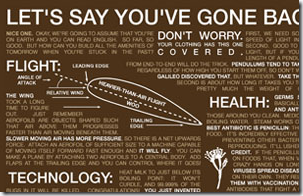
Crazy Dinosaur Comics artist Ryan North has this geek-inspired t-shirt: TopatoCo: Time Traveler Essentials Shirt 

It contains a summary of major scientific information that could be handy just in case you are swept unexpectedly through a time-space wormhole and pop up in say, the Middle-Ages.

image

There is also a poster available as well.

Graham Rawle has a collection of fun visual wordplay known as Lost Consonants.  Here’s the formula: take sentence and remove a single consonant from one key word, turning it into another.  Then add an image that goes with the repurposed sentence and see what you have got.  Kids and (most) adults pick it up pretty quickly and it is pretty clever.

Engineering Windows 7 : A Little Bit of Personality and TechBlog: Windows 7’s weird and wonderful wallpapers explained.

Both posts take some time to highlight the amazing (really is this Microsoft coming up with these?) choices in wallpapering options under Windows 7.

Many are quite “trippy” and I have to confess I’m liking the change from the traditional wallpapers offered by Microsoft.

Vista’s standard default wallpaper collections were a large move forward, but these Windows 7 options are amazing; not just for the diverse artwork in itself, but also for the deviation from the button-down collar attitude.

image

Fun!

--Claus V.

Sunday, April 05, 2009

Clever Card Design

I was tasked with working up a new set of business cards the other day.

We’ve got some high-profile projects and are meeting with various vendors and the exchange of business cards seems to be in vogue again.

Were it up to me, I’d just write my name and phone # on a length of Cat-6 cable.  Pricy but does the trick.

Alas I was encouraged to look deeper for inspiration.

In that search I found these sites that offered some creative and out-of-the-box business card designs.  I’ve seen a few of these before, but were price not a concern, I’d be hard-pressed to not attempt at least a few of these cards.

I’ve since come up with some designs for our group’s business card with the helpful input of some colleagues.

Nothing near as fancy, but definitely an improvement over Cat-6 cables…

--Claus V.

Saturday, December 06, 2008

Warm things for cool and blustery days

Minipost.

For the Belly

I still love RSS feeding the Houstonist for the latest behind the scenes goings on around our fine city of Houston, Texas.

I miss that they seem to have dropped their previous Tech Buzz regular posts.  Not so much  as they often pulled material from my blog, but I liked that local tech-news connection.

Anyway, a surviving post category has been local dining locations, and a top-post this week was Houstonist: One Pho the Money, Two Pho the Show covering two new Pho shop locations about Houston.

I’ve found a few choice Pho picks off Harwin, Fuqua, and recently on Bay Area Boulevard worthy of eating.  I sometimes stop in with a few near the light-rail line on the south-side of downtown with my Dad after work as well.  So I was happy to see this featured and be able to note some new joints to try.

A nice super-big bowl of beef Pho with some torn basil and hoisin sauce does wonders beyond miracles to my soul.

Of Belly “Bear”ers of the round and tumbly kind

I’m a kid at heart.

Give me a cold winter night and a DVD or VHS tape of the classic Winnie the Pooh stories and I am in childlike comfort.

Original Winnie the Pooh drawings » Drawn! The Illustration and Cartooning Blog

This brought me back to all things wonderful.

Hop over to BibliOdyssey: Original Winnie The Pooh Drawings for the full and amazing post up of E.H. Shepard’s brilliantly simple but evocative drawings of our beloved bear and friends.  Peacay also provides some nice commentary on them near the end of the post.

As stated, there is no telling if or how long the image links may survive depending on any copyright challenge requests for posting them, so finish up those stoutness exercises and head on over before they disappear like honey before a bear of very small brain.

….hmmmm.

Wonder how Pho with honey would taste?

--Claus V.

Wednesday, July 30, 2008

Odd's and Ends

Just some potentially useful linkage from this week.  Doesn't really fall anywhere in particular.

IKEA Instructions - IKEAFANS - Lost your IKEA product construction booklet? Look no further!  Spotted via Lifehacker.

Colorful Animation Expressions: Color in 101 Dalmatians: an introduction and Color in 101 Dalmatians: 1. Home Sweet Home - Oswald Iten is taking a graphic artist's look at the production design and decisions on one of my most beloved Disney "Classic" films.  Expect followup posts. This looks to provide a really fascinating examination of color, staging and animation design. Spotted via Drawn!

Your laptop is lying to you - Dan's Data. How battery life and signal strength are just relative now-days and may not actually be as helpful as you wish.  Sure puts the whole AT&T: More Bars in More Places' campaign in a new light....

Google LatLong: New, blue, and better than ever - Google Maps got some micro-format updates this week.  Kinda like looking for Waldo to find them: Google Maps Cleans Up Its Act, and Google Maps Redesign Rolled Out.

Tweak: Fx 3 Address Bar - Firefox Extension Guru’s Blog and Understanding & Tweaking the Firefox 3 Address Bar - CyberNet News.  - Great tips and tweaks on taming the newest features in Firefox 3's quirky address bar.  What you don't know might indeed make you less effective.

--Claus

Sunday, October 07, 2007

Japanese Woodblocks

GreatWaveDetail

The Great Wave off Kanagawa

One of the most iconic images of a Japanese woodblock print that I can think of is known as The Great Wave Off Kanagawa (Fugaku sanjurokkei: Kanagawaoki namiura) by Katsushika Hokusai (1760-1849). (Larger image link)

Copies hang in a number of international museums including The Metropolitan Museum of Art in New York City.

The movement of the wave and the boats with the small occupants is breathtaking. The bold colors and lines bring a force to the image that conveys the strength of the wave and its challengers. In the background lies Mount Fuji, almost like an imperial spectator stoically watching a game played out for its amusement.

An artist on Deviant Art using the moniker "Captain Slug" did a modern update that I absolutely love and frequently rotates on and off my desktop wallpaper.

I never really considered, however, the work that actually went into these woodblock prints. Although it looks like the artists may have just cut the lines out on a woodblock and then painted in the colors by hand - much like an ancient kid's coloring book - the truth is much more amazing to consider.

The Great Wave Reproduced

I was able to dig up a wonderful page in Japan where an artist goes through the stages used to make a modern version of that famous image by Hokusai: 葛飾北斎 | 浮世絵 | グレートウエーブ、北斎。 | HOKUSAI:Exciteエキサイトイズム.

Unfortunately, I still am unable to read Japanese or understand the spoken language, but you really don't need to do either to really enjoy clicking around the site.

What I really want to highlight is this page (Reproduct) where the artist takes us through four mini-presentations on how the blocks are cut, inked and then the final product in the reproduction.

Click on the first panel and then on the arrow-box with the characters (not the data one). You will be able to see each of the individual inked elements that make up the print when combined.

Click on the second panel and you will be able to view a brief video that shows how each woodblock is hand-cut and carved. It is very detailed and painstaking work.

Because of the potential for warpage, the blocks are carefully aged and are usually relatively small in size. Larger prints may be make up of several individual blocks, or the image itself made in a diptych or triptych form. Depending on the complexity of the image and coloring, the number of blocks can range from just a few to almost twenty.

Click on the third panel and you will be able to see another mini-video of the actual inking process for the blocks. Ink is carefully applied to its corresponding block. Depending on the artist's wishes, ink may also be applied in such a manner to create a gradient effect. In some cases, the same ink color may be used on a new block/layer to produce additional color effects.

Layers, gradients...who knew these techniques would be the forerunners to today's GIMP, Inkscape, Photoshop, and Paint.NET? Instead of carving today into woodblocks we are setting 0's and 1's crashing through microchips and charging electrons on metal platters.

More Japanese Woodblock History and Techniques

The ever handy Wikipedia has a number of great overview articles on Japanese Woodblock printing.

Woodblock printing in Japan - Wikipedia

Ukiyo-e - Wikipedia - particular technique in which glue was added to bind material into inks for bolder images.

Nishiki-e - Wikipedia - another technique in which multiple blocks were used in different areas on the image.

J. Noel Chiappa's very austere webpage has a tremendous number of fantastic Japanese woodblock items about half-way down the page.

In particular, this page, The Production of Japanese Woodblock Prints, contains a great and easy to read description of the process with remarkable illustrations of a woodblock print's color-layers. It is really wonderful and highlights the gradient and multi-color layering mentioned. Also worth looking at for the interested is the Glossary of Woodblock Print Terms that he has compiled.

A modern woodblock artist David Bull has a page on surimono albums that also contains great information and illustrations, including a page with detail images showing the different colors and textures. It's hard to imagine in our printed world but these works are actually three-dimensional, picking up the texture weave of the paper, as well as the relief from the pressing down of the paper into the carved surfaces. David also includes a page with multiple images showing the process of woodblock preparations, carving, and printing for six sets of woodblock prints. The number of stages illustrated run from just over ten to almost forty depending on the print.

Another modern woodblock artist, David Stone also offers a perspective of the process as well.

Think you have what it takes? PBS has a website where you can play with a Flash application and pick the colors for each layer of a virtual woodblock. It's much more challenging than you would imagine!

Japanese High-Resolution Woodblock Scans

What got me started on this post was a post over on Drawn! blog.

Turns out that Claremont College's Digital Library has been hard at work scanning in 289 Chikanoubu and Yoshitoshi woodblock prints and offering the images on-line.

Not only are the images themselves stunning, but the site has them categorized with subjects, titles, as well as descriptions to help viewers understand the image they are viewing.

I blew off several hours last night just on this site alone.

Sample Image: #37 Kii, Moon over the Hida River, Princess Tsuki

The aforementioned J. Noel Chiappa also has a number of nice woodblock scans from Hiroshige's 'Toto Yukimi Hakkei (8 Snow Scenes of the Eastern Metropolis)'

I hope you have found this mini-art review as fascinating and rewarding as I have.

Be artful and inspiring today!

--Claus

Sunday, August 12, 2007

Visually Speaking

camera

CC attribution: Troy McCullough, flickr

It's been a while since I touched my toes in the realm of the photographic.

A few months ago was Lavie's birthday. She had been wanting a new digital camera for some time. Nothing fancy, just a nice and slim one she could stick in her purse and grab mostly candid family shots eating pizza, visiting, the hamster, etc.

After much looking we settled on a Kodak EasyShare C763. It is light, small and has a great-big LCD screen. It has a 7.1 MP capture device, a slew of "scene and color modes," and image stabilization.

Lavie really loves it. It fits her small hand nicely and is light enough to carry in her purse.

As an added bonus, it uses SD card media, so she can just pop out the memory stick and put it right into either laptop and grab the files and go. Although it came with special software and cables, we haven't found a reason to use either one yet.

I'm getting the chance to show her many of the image editing applications I have been collecting, although she is fairly comfortable in Photoshop.

So here are some links regarding the visual arts I've picked up this week

Contest Controversy

One of the tech-tip sites I RSS feed daily is Daily Cup of Tech.

Blogger Tim Fehlman does a great job pulling from a wide range of sources, providing fresh looks into daily tech integration with "real-life."

My favorite and most referred to posts are his suggestions on maximizing USB memory device uses; Have Your Lost USB Drive Ask For Help, USB Drive AutoRun.inf Tweaking, and DCoT Helps Find Lost Child.

Anyway...Tim had started a contest to create a new DCoT logo. Seems easy enough.

Except he seemed to have attracted some strong comments from a reader who felt that these logo-design contests were "damaging" to the graphic design industry. RE: No-Spec, and Design Contests

So back and forth they dialoged.

In the end, it seems a "no-harm/no-foul" was called, but the discussion was interesting.

Lavie really enjoys doing graphic art layouts and designs for her company, and they always go to her instead of a "professional" graphic design artist. Wonder if that is "unfair" as well?

With the proliferation of "prosumer" grade graphic editing software and easy-to use alternatives to the BIG traditional graphic arts photo-manipulation and vector design software, it is becoming easier and easier for "amateurs" to enter the world of graphic designers and deliver acceptable and enjoyable works for their businesses and own enjoyment.

As I have noted, I use the following open-source, freeware, shareware software for most all of my image needs: Inkscape (vectoring), Paint.NET (photomanipulation), ImageWalker (photomanipulation), Photoscape (photomanipulation), PhotoFiltre (photomanipulation) and FastStone Viewer (thumbnailing and quick editing). There are tons more.

I do see a distinction between slyly using a "contest" to generate submission product which will be used for business purposes (It's just not cricket) and creating a "contest" aimed at your community of fans and audience to generate work that will be community based, community created, and community enjoyed (It's freedom, baby, yeah!).

Shorpy

If you like history and photography you HAVE to check out this website at least once!

Shorpy.com is the 100-year-old photography blog that brings our ancestors back, at least to the desktop. The site is named after Shorpy Higginbotham, a boy who worked in an Alabama coal mine near the turn of the century.

The webmasters at Shorpy take the finest in historical photographs they find, and then do hi-res scans for your enjoyment.

The quality of the photography is unmatched. In a world of MegaPixels where many today think that only recently is the photographer able to capture the finest degrees of detail and effect, it is refreshing to know the old-timers were doing that same thing 50+ years ago, without Photoshop.

Sweet.

Just a few samples:

Definitely added to my Photo Faves bookmark list.

Reminds me of the website Lost Films where webmaster greywater collects old cameras, and if he finds film in them, attempts to develop them. Quite a lot of interesting "lost" images.

Spotted via RetroThing

Japan Years: Japan Photo Blog

Mike and Nicki are a great couple living over in Japan with their young son Josh.

Their blog-posts are warm and endearing, but even more endearing are the photographs they are capturing "in the field." Even cooler is the fact that Mike knows the awesome photographer of Japan "Sushi Jeff" Laitila"! How cool is that?!!

They have a really great and extensive photo gallery link on their blog which is just spectacular.

I really loved the Bon Odori Season 2007 post (gallery link) which really captures the fun and energy of an annual neighborhood street festival in Japan. Lots of uninhibited pictures capturing the daily folks of Japan having fun, being people and enjoying the mix of culture, food and community that makes these places so vibrant and rich with color and excitement.

I think my favorite in the whole gallery is Girl In Yukata Eating Yakitori.

Her expression is classic pre-teen youthfulness. Dressed up in a traditional summer kimono, purse slung off forearm, one hand shoveling food into her mouth, the other clutching a box of the rest of her snacks. A crowd of the neighborhood adults and kids in more Western clothing slightly out of focus behind her milling about a fair-tent light by glowing lights strung on wires.

Beautifully classic.

Photowalking

I've always been a bit shy of taking up the camera. Not so much because of the technical nature of photography, but it seems that the best photographers who I admire get so close and personal to their subjects...almost intrusively. I'm a pretty shy person (no, really!) at heart and it is with great trepidation I aim a camera lens at another living person. Give me plants, landscapes, architecture, iconic images and I'm fine.

So when I was reading Thomas Hawk's photo-blog website the other day, I picked up a new term that sounded interesting: Photowalking.

Brian Auer did a spectacular job putting together a "treatise" on photowalking: In Response To My First Photowalk… | Epic Edits Weblog

He defines it as being the act of walking with a camera to take pictures for fun...but kinda in an informal group-shoot environment.

It sounds like a great way for the "shy of lens" to have the group-support of others in approaching subjects and situations they might not be otherwise comfortable or inspired to go tackle on their own. Along with the bonus of getting some great tips and friendships out of the experience.

Trevor Carpenter's website Photowalking.org showcases the concept.

Maybe then I could gather up the courage to be brave of eye like Thomas Hawk, Mike and Nicki, Sushi Jeff, or John Watson.

Local Miscellaneous Image Info

The Houston Art Museum will be screening the anime movie Ghost in the Shell 2 at the end of August: Houston Art Museum to Screen Ghost in the Shell 2 - Anime News Network

Other great anime titles are also being presented so if you don't normally get the chance to see anime productions on the big screen, now is a great chance!

Productions are to coincide with MFAH exhibition RED HOT -- Asian Art Today.

NASA Human Space Flight - NASA is posting spectacular High-Res images from the current STS-118 shuttle Endeavour's mission. Most are currently pre-flight photos, with a few launch images and now some of the orbiter's underside captured for review of the heat-shield conditions.

STS-118 imagery

Always guaranteed to be out of this world!

--Claus

Sunday, June 24, 2007

This Week in Link Review

Here are some links I've collected this past week (or maybe longer) that caught my eye.

They don't really merit individual posts but I found them useful or interesting.

Filter Google Search by Date...kind-of

Overwhelmed with too many Google search results?  Want to narrow them down to a more recently uploaded items?  Wait no more!

Google: Advanced Search page now lets you filter your results for pages updated in the past 3, 6, or 12 months. Handy.

Search Techniques: Get fresh results from Google searches - Lifehacker

Which led to a bit more details on the subject (with screenshots) via Matt Cutts: Google improves search for fresh documents

A deeper look into this interesting update via ResearchBuzz.com: Google Makes Change to Daterange Syntax

Which leads to GooFresh: "Goofresh is a way to search for sites added today, yesterday, within the last seven days, or last 30 days."

Very clever.

Security and Elevation-of-Privilege

Mark's Blog : The Case of the Insecure Security Software

Sysinternals guru Mark Russinovich takes a brief but detailed look on how software vendors can write their code with the effect of allowing malware to take advantage of poor coding to "...allow unprivileged users to effectively shut off the application, corrupt its configuration files, and replace its executables to elevate to Local System privileges."  In addition, it could "...modify the configuration data or create its own version and prevent the security software from changing it. It could also watch for dynamic updates to the files and reset their contents."

Yikes.

I'm not a coder, but these are good things to keep in mind when looking at software and considering how even a "well-patched" system can still be potentially exploited.

Watch those Special Bin hardware deals

If you are in the habit of buying technology hardware and it isn't in the original shrink-wrap packaging, you might be getting more of an "Ordeal" than a "Deal".

CTV.ca | N.S. family inadvertently got spied upon

Stores that accept returned hardware may not take the time to review/wipe/reset the items.  Thus when the product is picked up on-the-cheap by an unsuspecting user, some files or configuration settings from the prior owner may still be present...and lead to problems.

Read HTRegz take on the matter over at his post Buyer Beware! (”Returner” also Beware) - via Computer Defense blog.

KeePass - Useful Tip

I love and highly recommend the freeware product KeePass to manage the growing list of complex passwords I maintain.

However I just learned a new trick via Lifehacker: Track software licenses with KeePass.

Quite handy, indeed!

Big Web OS Review

Frantic Industries weblog does a two-part jam session on Web Operating Systems. They pick apart twenty of them.  If you've ever considered dabbling in a Web OS, here is a great place to begin.

10 online operating systems reviewed: covering Craythur, Desktoptwo, EyeOS, Glide, Goowy, Orca, Purefect, SSOE, XinDESK, and YouOS.

Another 10 web operating systems reviewed: now considering DesktopOnDemand, G.Ho.St, ODesktop, AjaxWindows, MyLGD, Nivio, Schmedley, Dekoh, Ironbox, and GCOE X. .

--via Web As Desktop: 20 Web operating systems reviewed - Lifehacker

Free Web Flair

Looking to add a bit more flair to your website or blog?  Smashing Magazine drops a great article that lists a ton of graphic resources for icons, buttons and other website flairs.

Freebies Round-Up: Icons, Buttons and Templates

Just be careful to take the time to review and understand the artist/owner's rules for usage.  Some may be only valid for personal or non-commercial usage.

Now, go make the Web a more beautiful place...but please...try to keep it classy.

Windows Hide and Seek

Download Squad drops a tip on How to Add/Hide software in Add/Remove programs.

Been bugged with those oddball programs that ship with XP?  Can't find how to remove them?

Back up your sysoc.inf file located in your Windows\INF\ directory.

Now open it in a text editor of choice...maybe Notepad?

Remove the word "HIDE" and leave the trailing comma.

Now go and take a look in the "Add/Remove Windows Components" list and they should be visible now.

I recommend you first review the original post Show hidden software in Add/Remove programs over at IntelliAdmin.com as it has more details and screenshots.

Since we are on the subject and don't want Vista user's to feel left out, ITsVISTA tips us on Hide the Vista Updates you don't want to see.

This is easy to do in XP and 2000, but a bit more tricky with Vista.  Great screenshots at that post, by the way.

New Versions

FreeCommander (freeware) - My favorite dual-pane Windows file manager utility has been bumped up to a new version.

Regshot (freeware) - a small utility that allows you to capture the state of your registry, do some system change (like install an application) then re-scan the registry and compare the files for changes.  Also can specify folders to be scanned for changes as well.

For the Kids (at heart!)

Star Trek Home Theater - While I am a fan of Star Trek and would love a home theater room one day, I think I would have to defer to Lavie's home theater decorating tastes with a few comfy love seats and leather club-chairs instead of the command-chairs and blinky lights. -via TechEBlog

Related TechEBlog post: Guy Turns Apartment Into Star Trek: Voyager

Joseph Wu origami - YouTube video on this Drawn! blog post.  Simply amazing origami work.  Joseph Wu's website.

See you under wet Houston skies!

--Claus

Saturday, November 18, 2006

Reducing the Net down and simmering....

Here are a number of links I've been sitting on for a while.

Firefox Add-on Pick

Uppity - This Firefox Add-on (weaning myself off calling them "extensions" now) will allow you to browse up the HTML tree in your Mozilla browser. So if you frequently find yourself on a deep-linked webpage and want to quickly browse up to a higher point (say going from "http://blogs.chron.com/ techblog/archives/2006/11/ data_rescue_can_be_easier_than_you_think.html" to "http://chron.com/") but you don't want to be back-space/deleting in the address-bar, this is a great little tool. Some pages it offers aren't valid links, but it is a quick an useful way to explore the site tree of web-pages. --via Lifehacker

Tech

Dough Mahugh "Office 2007 Technical Evangelist" drops a number of Microsoft Office Blog links. It you are into all things Office, then you may want to set your RSS feed to some of these blogs to keep up with the latest in Office developments.

The SANS-ISC handler's diary has had a number of good and interesting posts lately: Hacking Tor, the anonymity onion routing network, Malware with new features, and Microsoft Patching Observations (NEW).

Here's a neat tool: Fiddler (free) Quoting from the developer's page, "Fiddler is a HTTP Debugging Proxy which logs all HTTP traffic between your computer and the Internet. Fiddler allows you to inspect all HTTP Traffic, set breakpoints, and "fiddle" with incoming or outgoing data. Fiddler is designed to be much simpler than using NetMon or Achilles, and includes a simple but powerful JScript.NET event-based scripting subsystem."

Got a Sony laptop/notebook? Repair4Laptop has a fantastic collection of links outlining How to Upgrade, Repair, Disassemble a Sony Laptop or Notebook Repairs are a lot easier when you can see the ground others have covered first.

Looking to add some plugins into your Photoshop application? Check out The Plugin Site's Free Photoshop-compatible Plugins. Nicely organized, you might find some useful treats in here.

Images and Art

Speaking of images, Dwight Silverman points us to the flickr Wallpapers page. Wow! These are a pool of images at screen resolutions of at least 1024x768. If you are looking for striking photographic images for your desktop, this is a great place to find some really original work!

Bob Kessel is an artist who primarily uses vibrant, geometrical shaped elements, and strong lines. His works, both original and as inspired by others, present a bold usage of color and force. These are paintings that don't just attract your attention, they mug you! Wowzers.

Want a custom emblem/badge for your vehicle? Head over to BadgeMakerDeluxe. There you can select from some ready-made emblems or have a badge made-to-order. They look really nice and might be able to set your vehicle apart from the pack with some retro-bling. --via RetroThing.

Video Delights!

Some time ago, Dwight also blogged about Random encounters of the video kind. He tips us to a really fascinating website (Serendipitous Chat) that pulls random live video-cam feeds from the social networking site, Stickam. There is something compulsive about watching strangers chatter on with each other. I don't know why it is addicting, but it is. If loading a single Stickam user at a time is not meeting your hunger, try Kismetchat, which loads 12 random screens of Stickham users.

Despite reports to the contrary, it seems that YouTube retains a ton of Japanese anime clips. For anime fans, there is an Air video montage, a music video of "Love Hina" set to "Pretty Girl (The Way)" by Sugarcult (very slickly done!), and then, there is the incredible music video of "Love Hina" set to "Barbie Girl" by Aqua. Great stuff here on YouTube with a little searching.

Dream Wheels

If I could have just one car given to me, I would almost certainly ask for it to be a classic Aston Martin Vantage V8. It captures the toughness of the American muscle-car era, but retains a certain British "refinement". I recently found the Aston Workshop online. It is a wish-list of all things Aston Martin. They handle sales, restorations and parts. I may never have the opportunity to either drive, let alone own one, but it sure is fun looking! Their Downloads page also contains a number of quality photos, screensavers, and even sound-clips. Nice.

Extreme Blending!

Finally for just, all out WTF video madness, head on over to the Will it Blend? site. Here's the recipe: Take a commercial blender on steroids, look around the office, and ask yourself..."Will it Blend?" Two categories: "Don't Try This at Home" and "Try This at Home".

It's hard leaving you with a favorite, but it probably has got to be "The Movie": blending popcorn, a drink, and a movie.

I've got to get me one of these things!

Brilliant!

--Claus

Thursday, September 14, 2006

Papercut

If only my papercuts could end up like these.

Check them out.

Works of Art.

Zenlike.

peter callesen - selected works - via Drawn!

For an added dash of Japanese culture:

Tokyo Area Exhibitions, Fall-Winter 2006 - Japan Now & Then blog.

A wealth of links to art and cultural exhibitions in and around Tokyo. Even if you can't get to them in person, many have great links to the exhibitions to poke around online. Grab a good web-translator on your way, or load up the ever-wonderful "Translate" extension for Firefox.

I'm going to run and get some scissors....

--Claus

Sunday, September 03, 2006

Links, Rants, and Net Karma

It's Sunday and I've got a real mis-mash of stuff to spit out. Bear with me I'm tired.

That brings me to my first problem.

Sudoku:

See, I've known about this puzzling pastime for some time. Grandma was a crossword puzzle gal. You could always find an almost completely finished crossword puzzle anywere she was. And she did hers in ink, baby! No dictionaries or "cheats" for her. I love words, but ain't dat l33t with the crosswords. Anyway...Alvis kindly left two "medium" Sudoku puzzles she brought home from school (busywork) on the side-table. Friday night nothing much was happening on TV and I'd already seen the brilliant Aggassi/Baghdatis match replayed a million times (man, Agassi is still my hero! Even without his former flowing golden locks!) so I picked up the half-completed page and set to work.

But I just wasn't getting it.

So I hopped on the net and found these two Sudoku tutorial pages:

How to solve Su Doku: tips The mathematics of Su Doku, and

Sudoku (getting started, making progress, reaching out, raising numbers)

OK. Back to the pages. Twenty minutes later I had my "Eureka" moment. A (very late) hour later, both puzzles were done! Fun!

So last night I found the following:

WebSudoku - Billions of puzzles in Easy, Medium, Hard, and Evil flavors. (Easy-peasy, I can now handle the mediums!)

USA Today's daily Sudoku puzzle.

I found I could do some screen area captures of the puzzles, resize them and get about 6 pasted on a PowerPoint page for easy printing. Now I'm teaching Alvis what I learned. I was up until 1am ish I got 5 done in about 2 hours. (I prefer doing them on paper, not the pc.)

And it's all Avis's fault for leaving her stuff around....

Art Class:

While we are talking math: Math, art, and the Droste effect. Pretty Art!

Want to learn how to ink your art? MAD Magazine's illustrator Tom Richmond provides a detailed two-part video tutorial on inking. Part One, Part Two.

Just plain fun:

That crazy Aussie Dan (of Dan's Data) posts a wonderfully entertaining article about the joys of "Wicked Laser's "Nexus" green laser" I got a great science lesson and learned all about the 3vil fun one can have (with pictures) with a high-powered green laser! Muhhaaaahhaaahaaa!

BldgBlog has a neat article about a 1.6km-long carbon ribbon in the skies above Arizona. Yes, another space-elevator lifting concept.

Software Tips/Tools/Techiques/Oopsies:

ComputerZen's Scott Hanselman gifts us with his updated "2006 Ultimate Developer and Power Users Tool List for Windows" Awesome tool list covering many categories. And I thought I posted long blog posts. Bookmark this post, Stat!

LiveAmmo Security News Blog provides a wonderful roundup of A Collection of Rootkit Removal Tools. Bookmark this one as well. Many I know about, a few new ones make an appearance. All but one are freeware.

Computer Associates (eTrust Antivirus) updated their DAT signatures to include the Windows Lsass.exe process. Ummm. Yeah. And if a user set their AV setting to delete the file, the system tanked at boot. Bummer. Hate it when a false positive kills a system.

Mark Russinovich (formerly of Sysinternals) is now blogging at a new address: "Mark's Blog" over at technet. Go feed it. He is already on a tear!

Looking for XP help, support and tips? Bookmark this site: John Barnett Computer Journalist--XP Help and Support FAQ. Nice. Helpful pictures. Great place for finding 128 reminders about the detail tweaks that seem hard to remember.

Gmail Tip:

How to filter Gmail image spam. via Lifehacker. I've been seeing a few more of these slip pass Gmail's strong anti-spam filters lately. This is a great Gmail tweak to address that problem!

Rants:

The recent changes over at Blogger seem to have broken Firefox's ability to remember your login name/pw. Period. Looks like they figured it out and rolled out a new login method. Firefox is now remembering my login credentials again. Thanks Blogger! That was annoying.

I seem to have a rogue Firefox extension on my system. It is rendering cut/paste, arrow keys, and home/end keys temporarilly useless--as in dead and unresponsive. I know it isn't my keyboards as the problem is the same on both my USB and PS2 connected boards and happens on my laptops and desktops here at home and at work. Drivers are fine. Since the only commanality to all seem to be my Firefox loads and extensions, I need to do some work. When I close out Firefox the keys behave again. Sometimes it is fine and othertimes not. It's a real pain trying to copy/paste or navigave around in comment fields on the web and those keys just not work. Sometimes I can get around it by copy/pasting into notepad, then copy/pasting back into the web form field. Weird.

UPDATE--looks like it was either the extension Copy Plain Text or Copy URL+ causing the issue, or maybe the combination of both. I've uninstalled them both and my keyboard arrow keys and "Control-key + (whatever)" key combos are working fine again in web-forms and the like. Go figure.

My little bro. just emailed me last night to notify us he bought a Cannon Digital Rebel SLR.....I'm so jealous. I guess we have the same genes as that's the same one I've been lusting, drooling over for months and almost put on plastic (but I was disciplined and good).

Adobe Acrobat Professional just ticks me off! I have to use it at work for publishing tasks. And it puts this annoying little Adobe PDF creator toolbar in ALL of my Microsoft Office product toolbars! Yes I can remove it, but it returns again next time I re-open the program. I can "hack" a method to remove it, but then some of my Office products alert me that it can't find the removed Acrobat toolbar (Visio). And, it takes the first place on all the toolbars and forces the others a line down. Crappers! And yes, I am aware of quite a few alternative PDF document "producers". I'll post those soon.

Adobe Reader (freeware) is probably the premier application for viewing PDF files. It is nice and everything, but can be a bear to load. Possible solutions?

1) Foxit Reader (freeware) -- allows you to view and print PDF documents.

2) eXPert PDF Reader (freeware) -- allows you to view and print PDF documents.

3) Sumatra PDF (freeware) -- this is a new one I've just come across recently.

4) Keep Adobe Reader, but remove the plug_ins folder from the application's folder. Speeds launch-time.

Karma:

For the longest time I felt like an Internet leach. Taking and learning and consuming the wonderful freeware, tips and techniques the Web has to offer. As this blog progresses, I've been able to begin to give back and share. Lately I've been posting helpful tips and such on my blog (besides my second on-line home over at the Chonicle's TechBlog), and into comments I've ran across:

Digital Master Photographer Thomas Hawk has had some frustrating issues with his pc. I've joind in the tech-support team he's created and left a long list of (hopefully) helpful advice for him.

Digital Master Photographer Thomas Hawk has had some frustrating issues with his Blogger RSS feed going from "Full" to "Short" even though it was set to "Full". So have I. My Blogger RSS feed work-around is to: 1) publish post. 2) go into my Blogger account Dashboard and then select the "Settings" tab, 3) Select the "Site Feed" option. 4) Verify that "Full" feed option is selected (it always is), 5) Save the setting again. 6) Republish the Index. And the full feed returns to my RSS feed view. I've been doing this after EVERY post I've made to retain the "Full" feed and keep it from going back to short.

AndrewLee of PortableFreeware has been wrestling on what to do with the IE browser wrapper app "Browzar" which purports to clean an IE session as your surf. Scott Hanselman doesn't feel Browzar lives up to the bill and the BBC (and others) seem to agree. My recommendation? Stay away and if you MUST use this kind of app for your, umm..."research"....use PortableTorPark instead.

Quick Notepaper generators:

The other day, I had to dash out to a project design and planning meeting. I didn't have a steno-pad handy and needed somthing to take notes on, quick. I popped over to Lifehacker and found their post on Taking great Notes. In it they link to several sites that can custom generate printable note-taking paper sheets:

Notepaper Generator --via simson.net Simple and fast, adds nice little calendars to the top.

Cornell Method PDF Generator --via Study Smarter. Lots of configuration options. Holes/No holes, ruled, graph (grid), or blank and Advanced options like: alternative page size formatting, and line darkness adjustment, and user guide printing options.

Notepad Generator --via Michael Botsko. My ultimate selection. Custom header/footers, Font choices, lines in extra fields, line-height adjustment, and the every handy "Notes" and "Action" boxes for doodling--um--process charting.

Bookmark 'em all, just in case you have to dash to a meeting. That way you come to class prepared!

Whew!
--Claus

Friday, August 18, 2006

Would I like?

When I tried to log into my Blogger account this morning it refused to accept my login credentials.

I use hyper-strong passwords on all my web accounts. You know up to 64 character, randomly generated stuff. To keep them all managed because there is no way in Hades that I can remember them all, I use KeePass to manage my passwords. So I knew that it wasn't a password issue. The login bar at the top for Blogger has a request to log in with either your Blogger credentials or Google credentials, so I tried my Google info. Surprise! It took. I was then offered the chance to switch to the new Blogger (Beta) service. I'm brave (even though it worryingly tells you clearly that you can't switch back). So I entered my Blogger credentials as requested and....rejected.

It wasn't clear to me exactly why, but I suspect it was because I also have accounts enabled for Alvis and Lavie to post to my blog under their own identities--something called "Team" blogging. Oh dear.

Of all the features that the new Blogger (Beta) service is hyping, the one that I am most looking forward to is the ability to set categories to the posts from within Blogger. There are some third-party services that do the same thing, but I would prefer to have it native to Blogger.

I must wait.

I'm still using the Windows Live Writer (beta) application and really enjoying it. I can't say that it has improved my blogging beyond using my Firefox Performancing extension, but I do like the interface and I haven't had any posting issues yet (well, besides not posting pics directly). I just really wish they would allow the spell-check to work "in-line" as I type instead of having to run on demand. I also would like to see them add the ability to re-apply font coloring by clicking the button once. As it is right now, you have to click the font-color button, select the font color from a pop-up window, then select ok. If you do a bit of specialized font color formatting like I do, it would be better to just click the toolbar button and have it provide a drop-down color slate (like Bloggers WYSIWYG post editor) or if you click it twice, it will apply the last-used color instantly.

Paul Stamatiou gives it a well written review here.

I suggested LiquidIcon XP be added to the Portable Freeware collection. I pull a lot of my utilities and suggestions from this site. I've been wanting to contribute and give something back for all I get. Portable Freeware liked my suggestion and added it. Woot!

Miscellaneous Landings:

Periodic Table (freeware) - provides detailed info on elements, images, electron shell pictures, atomic diagrams, historical info. Really cool and nice application. Alvis is really looking forward to using this with her science homework.

I've posted before about the tiny house concept. I really find this whole thing fascinating. Now comes a new design: m-ch: micro compact home. It's kinda cute, but probably not really conducive for daily/family living.

Anti-spyware/malware killer Spybot - Search and Destroy now comes in "SB-S&D - Windows Mobile" flavor. I don't use Windows Mobile, but it is nice to see their product line expanding.

Windows Folder Customizations:

I've recently blogged about customizing your Windows folders (and the pains that can go with it). I'm using the PlacesBar Editor on my home pc and Lavie's laptop and am really digging it. It is dead-useful to a power-user like myself. However, I still find customizing the folder icons to be a little tedious. Enter the freeware application Folder Marker. With this freeware application for Windows, you can quickly apply colors to your folder icons, select up to 10 custom icons to apply to folders, and apply categories and sub-menus to your folder icon choices. My only word of advice is to be sure when you are picking custom user icons for your folders, to use icons that have folders as part of the image. Otherwise you might mistake the folder for a file.

I was able to finally get Avis's iPod Shuffle to work on her Linux machine. I used and ended up finding the right iPod device USB libraries so Linux would pick it up when plugged in. It is using gtkpod and I also had to install WMMX for the song-playback. Alvis is happy as a clam as she can do her homework, surf the web, and listen to her iPod from her Linux box all the while doing her homework! More helpful info: Using an iPod in Linux, and iPod Exodus: Mac to Linux.

Art Stuff:

Alvis is in the 7th grade, but her art-teacher placed her into his 8th grade advanced art class. She is very excited about this "upgrade." I'm not aware of any other 7th graders in the 8th grade art classes.

Artist and illustrator Gez Fry's website is very cool. He has some incredible artwork in his gallery.

Cute Cosplay:

I'm not really into cosplay (the act of making and wearing a costume like your favorite anime/manga character). However the work some of these fans do is really spectacular. One recent anime series is "The Melancholy of Haruhi Suzumiya."

Kirinon has posted some MOST EXCELLENT photos of a cute cosplayer in a Haruhi costume. She is too cute and the costume is very well done. As soon as I get done posting, I'm adding her to the Fan Service honor roll.

More cosplay fans in action at this Kirinon blog post.

See you in the skies,

--Claus

Friday, August 11, 2006

Friday's Finds

Whew!

Just got done with some last-minute back to school projects.

1) Got Alvis a new cell phone. School district policy allows the students to carry a cell phone on campus. It must be turned off during school hours and cannot be a camera-phone. Alvis said most of the kids carried a camera-phone anyway and the teachers really didn't care as long as it was turned off. Being responsible parents, we decided to nix the plan to get the Pantech C300 phone (with camera) and got a Sony Ericsson Z300a phone (without camera) instead. She was seriously bummed out as the Sony is about 2x as large as the Pantec, but it came with jewel-stickers and that brightened her up quite a bit. By the end of the day it was the best phone in the whole world. (Sigh...)

2) Found a new desk for her. It is about 2x as big as her old one, and it has a credenza unit as well. "Christopher Lowell Shore Workcenter." It looks kinda French-country style if you ask me. However, once I finished spending 1/2 the day assembling the crazy thing, it actually looks better in her room than the smaller one she had before. Picked up a new desk-chair for her as well. Neon-blue fuzzy fabric. Purrr-fect!

3) While cruising the office supply store where we got the desk, we got a florescent lamp. I didn't realize it but it comes with a 4-port USB hub and a Cat-V jack as well. Handy for desktop access I guess.

4) I finally bit the bullet and bought Alvis a flat-panel LCD display. Lavie has been trying hard to get me to get one. The local Big Box electronics store was running a sale on a Westinghouse 19" for a price of $159 after instant $80 rebate. While digging the boxes I noticed they also had some 17" models as well but there wasn't any floor display/price to be found. I couldn't find a salesperson for over 20 min even after Lavie asked a manager...I gave up and took both sizes to checkout. Ended up getting the Westinghouse LCM-17v2 17" for just $129. The picture quality looks great on her Linux pc. It has two speakers that sound acceptable for a pre-teen's pc. No USB ports on the monitor, however.

5) Reinstalled Alvis's PCLinuxOS (Wizard's Kid-Safe) system. The installed Linux system couldn't pick up the new LCD flat-panel at the correct refresh rate. I knew it could handle it as the LiveCD worked fine. So I spend some time Googling but never could get a clear answer on how to get into the boot settings to rescan for video devices...I'm a lightweight Linux head. So I just reinstalled and let it pick up the settings for the new LCD monitor (which it correctly did!).

Friday Tech Finds:

eEye Digital Security offers a slew of free network security tools. They have some really neat "toys" here. Worth checking out if you are in charge of network administration.

Foundstone (division of McAfee) also offers a slew of free security tools. Quite a lot for assessment, forensics, intrusion detection, network scanning, and stress testing. Don't use these tools on your own network unless you are the administrator. Heavy duty things here.

OpenDNS. Tired of running into DNS (Domain Name Server) issues? When I was with MSN dial-up I was having horrible DNS resolution timing problems and they REFUSED to provide me with some of their DNS addresses so I could manually put the values in. I got them anyway ;) Roadrunner isn't giving me any issues, but if you want a 3rd party DNS service (for free), this might be the way to go. DNS servers take the www.whatever.com and translate it into the actual IP numbers that computers use to find each other and the websites to go to. Of course, you have to trust that the DNS servers don't get "hacked" and end up routing you to a baddie site (the old DNS poisoning trick), but this might be a good thing if your ISP's DNS service is slow or picky. Worth keeping a bookmark to at least. via PaulStamatiou

Submachine 3: The Loop - fun free java based game. Really neat and clever. via Lifehacker.

Yes.com: Ever get into one of those discussions with your significant-other, child, co-worker, etc. about what the title and artist of that last song you heard played on the radio? Yes.com provides up to the minute play-list information on a vast number of radio stations across the country. They also provide top-played lists and other information as well. Very nice Web 2.0 stuff here.

Performancing 1.3 released: The fine folks at Performancing have released a new version of the Performancing extension for Firefox. It now supports plug-ins, themes and other handy elements. It remains my blogging tool of choice.

Ready for vacation time? Visit Far and Wide: The Golden Age of Travel Posters. Vintage and Art Deco style travel posters. With a little work, I bet one could make some really enjoyable desktop wallpapers.

See you in the skies,
--Claus

Saturday, July 01, 2006

Things to See

I have always loved artwork.

One of my favorite classes in college was my history of art class. I can spend hours in our Houston Museum of Fine Arts building just sitting and taking in the beauty. Once in a while I may take off early from work (or take an extended lunch) and just go there to decompress.

Some things to see I have come across this week on the web:

Sushicam's Picture of the Day: A new view of life in Japan, daily. Wow. One of my daily stops around the world.

Japanese artist Kenichi Hoshine living in New York He brings a sparse yet powerful style to his paintings.

The RIJKSMUSEUM A rich and extensive collection in the Netherlands containing Dutch masters, Rembrandts and other period pieces, in high resolution images. Now the docent's can't tell you to back off! (Yes--I had that happen to me once at an Ansel Adams exhibit.)

Artist Charles Reid paints light and airy watercolors. See his works over at Stremmel Gallery and The Munson Gallery,

Lost Films, Yes, you know you've done it. Taken some pictures with your film camera and either left the roll in there for years or took it out and never had it developed. This web-citizen collects old cameras and has developed some of the film he has found left in them. It is a haunting look back in time and a fascinating look at older cameras as well.

Just plain bad (in a funny way). 23<Kitty> I can't read Japanese so I don't know for sure what this blog's title is. Anyway, this post has a large number of disturbing pictures. Some of which I was able to share with Alvis--some I didn't dare!

Speaking of kitties...here are some crazy cat pictures--like we don't have enough on the web already. Catsize Entertainment

--Claus

Friday, June 09, 2006

Double-Play Goodness

Last Saturday I did one of those "Dad" things that's almost as beautiful as the perfectly turned double-play....

Alvis had been wanting to get wet...really wet...as in "wave-pool" wet all week. I knew we had a busy Saturday lined up, but had promised we would do all we could to make it to the wave-pool. By 4pm however, the day was still full and we were setting off to pick up a few last-minute gifts for Lavie's birthday.

I had called to the local bookstore to find out if they had the "Magister Negi Magi" manga editions we were hoping to get for Lavie--no dice. So that meant a longer journey to one of those "FOX" bookstores (you know, as in "You've Got Mail"). Alvis wasn't happy as she had done the math in her head and quickly calculated that this would probably mean no wave-pool. We had the standard father-daughter "discussion" about priorities and thinking of mom over ourselves. Dear Alvis's brain and heart were dealing with the conflictive feelings like only a pre-teen girl can really understand.

So, in a moment of pity and conflict myself, I quickly turned the car around and we shot out to the local mall. Maybe we could make it. However, a quick check on the cell-phone did confirm there was no way we could possibly get all the stops done AND make the wave-pool. They closed an hour earlier than we thought. Bummer. Now what?

We made an adjustment and picked up Lavie's birthday gifts. Somewhere between the food section and the manga section of the bookstore, inspiration hit.

At our next stop in Target getting cards (they have had the best selection of cards lately!) I sauntered over to the toy rows and started looking around the pool toys. Alvis perked up a bit. I bent down and looked at that wonderful invention known the world over as the "Slip'n'Slide." Ohhh! That did it. Alvis's face brightened like sunbeams breaking through storm-clouds. I asked her if she recommended the standard model (sheet of plastic, hose to water it down) or the "Bounce 'n Splash" model (an inflatable cushioned landing zone and a "pool" of water at the end).

"Definitely the Bounce model," said Alvis sounding suddenly much more grown-up and suspiciously like a most professional product consultant.

Plan still forming in my head, we then stopped by the grocery store and loaded up on picnic goods: potato and pasta salads, Frostie blue-cream sodas, Stewart's Key-lime cream soda, peach-tea Snapple. Plastic plates and utensils. Pink and Green Jello cups. The mandatory super-colossal seedless watermelon. Alvis loaded up the cart with three, ten-pound bags of ice carried at one time (is she really that big now?). We swung by Popeye's and grabbed a mix of fried-chicken and corn on the cob.

Racing back home we dumped everything but the chicken in the cooler and drug it out into the back yard. Alvis quickly changed into one of those darling gym-shorts/swim-suit top combos that daughters seem to love to drive their dad's mad in. Ten minutes later we had inflated the Slip'N'Slide and had it staked out in the backyard and Alvis was flying down the runway. Slipping and, well, honestly...sliding! The grass still smelled pleasantly fresh of green onions (a few are growing "wild" in the yard) and cut grass from the morning's mow.

Lavie got home from her afternoon errand run about thirty minutes later. We surprised her big-time. She joined me on the gliding swing and we held hands and watched Alvis continue to scream and giggle and perform different techniques for our enjoyment. Eventually we tucked into the cooler and chicken. Yummers. A round of Frisbee toss followed--playing that stupidly fun game of "let's see how many times we can toss it around before someone drops it."

Eventually the day wore down. Watermelon rinds littered our small compost pile. A big mud-pit had developed at the base of the Slip'N'Slide where Alvis's takeoffs happened. Bottles of pop littered the ground near the trash-can. Lavie and I held hands and negotiated with Alvis for "just ten more minutes..OK? I promise!"

Dad and Alvis ended up turning the perfect double-play. Wave pool, you ask? Forgotten.

Summer had officially began.

Spectator linkage

Turuya Ryokan - When I finally get over to Japan. I have to stay in a ryokan. It's like a traditional Japanese hotel. The Turuya Ryokan (English site) has a long and proud history. If I could decorate our home in any style--this would be very close to my perfect dream.

Speaking of home decorating, HG-TV is offering a fabulous web-based room planner. Pick your room, adjust the size, add furniture elements. Adjust. And re-adjust. Really fun and it is guaranteed to save your back from unnecessary strains.

Watashi to Tokyo blogged a while back about room layouts in Japan. One interesting thing I learned is that often, floorplans are listed in "tatami" units. Some are so strange, it really makes one wonder.

Danny Choo also expounded about the wacky world of rental/ownership life in Japan. It's one of those situations where you are crazy to rent, but also crazy to own. Nice humorous overview of some of the ups and downs of looking for property in Japan.

Bad news for you Windows 98/95/ME/Bob users out there! Not only did Mozilla seem to indicate Firefox 3.0 will not support any pre-W2K Microsoft OS, but Microsoft itself admitted that Windows 98 had a security flaw in Windows Explorer that was just so bad, itwasn't worth the effort to try to fix. Official support (security updates) is ending in July anyway for Windows 98/98SE/ME.

Want to fondly remember old web-browsing software? Can't find a version to run anymore on your old Windows 3.11 pc you still have chugging away in the garage? Head on over to evolt.org's Browser Archive. I installed Mosaic on our systems when I got my first job with my company and used Netscape Navigator at home back when it wasn't cool.

Microsoft may be planning an August release of IE 7 Beta version 3 - via AMCP Tech Blog.

Instructables has a pretty simple to follow guide on how to repair your remote controls. I have a fancy 32" TV that has a dual tuner built-in so I can run picture-in-picture without needing a VCR. Only problem is that it only can be controlled with the factory remote. Universal controllers don't work that feature. It's a real drag as the remote doesn't work. I've hacked it along for a long time, but it seems the metallic coating on the bottom of the rubber buttons that contacts the circuit board on many of the key buttons has finally worn off. I've heard somewhere that painting them with the same metallic goo used to repair breaks in a car's rear-window defroster will bring them back to life....

Finally, every now and then, I break out my artist-grade black-ink marker set and get to sketching. I love pen and ink sketches. I was delighted, then, to find Mattias Adolfsson's blog: MattiasInks. Inspiring stuff for the ink-sketchers. Mattias's "full" web-page has even more content.

Which leads me to close with Ed Emberly's web-page. As a kid, I spent almost every summer checking out Ed's illustration books for kids (and the kids at heart) from our public library. I would patiently followed the instructions and drew my basic shapes, added lines and dots and stuff and somehow end up with wonderful Emberly cars, buildings, dogs, flowers, bugs. I really liked the thumb-print people.

See you in summer skies,
--Claus

Sunday, May 14, 2006

History Passing


Earlier in this week, newspapers mentioned the passing of Lillian Gertrud Asplund. She was the last American survivor of the Titanic sinking back in 1912.

As a kid I as fascinated with the Titanic. My childhood was the period when it had not been seen or found. So I grew up on all those old movies about it and would read tons of books on it. It was a historic event I could puzzle out with my youthful mind: What did the ship look like? What really caused it to go down? What was the captain thinking? What were the last thoughts and acts of the men and women on board? Where was it resting? What did it look like? Could it be (should it be) raised or salvaged?

My imagination got a huge boost with the Clive Cussler novel "Raise the Titanic". The follow up movie was good, but a letdown from the novel.

Then James Ballard and his team found it and the veil of mystery was drawn back.

Lillian Gertrud Asplund's passing struck me, not just as a reminder of how close yet how far away we are from truly historical events is, but also about our own future.

What will the world be like when the media of the future note the passing of the last American survivor of September 11, 2001? It's hard to imagine such a time, but it will come....if we don't muck the entire planet up too badly before then. I think we take history too lightly--especially here in the States. We forget our brief past to easily and don't plan for our national future. I hope as we continue to mature as a nation, that we will gain some maturity and vision.

Mundane Linkage:

Paintings by Alex Kanevsky (fair warning--contains some nudes)
Comic artwork by illustrator Francesco Francavilla. I really like his inkwork.

The wikiHOW billed as "The How-To Manual That Anyone Can Write or Edit". Useful stuff here. I fear my skills around the house are more like Red Green level.

Ken Newsome got a new camera. I envy...

What I wouldn't give to have a romantic meal with Lavie on the deck under this giant tree in Japan at the Hibiya Matsumotoro restaurant?

Finally, the Download Squad points out that there is a new Firefox alpha 2 version released. I'm not messing with this one just yet. Doesn't seem to have a major feature upgrade yet. With the announcement of the removal of the Places elements from (at least the intial) v2.0 release, my enthusiasm has cooled a little bit more. I really have to agree with some of the commenters, that v2.0 is starting to sound like v1.5, but with many of our favorite extensions rolled in. I know there is much more under the hood, but it isn't getting me very worked up. The scale of change from IE6 to IE7 that Microsoft is pulling of is what I am looking for. Never thought I'd be saying that!

I've also noticed that this blog renders great in Firefox and IE7. Layout kinda sucks for you IE6 folks. Sorry about that, but I don't work for Blogspot and am not a master HTML coder either.

Happy Mother's Day, all you Moms!
--Claus