Showing posts with label security. Show all posts

Saturday, June 25, 2016

File under “You think they would have learned by now”

Seriously?

Remember these GSD blog posts from a year ago or so?

I guess you can’t keep a crappy “helpful app updater” down when it is an exploitable “feature” to help consumer’s out.

Constant Vigilance!

--Claus Valca

Now showing on the small screen – Ransomware!

Must read for all you IOT fans…

Next targets; your smart-refrigerator, your smart-washer/dryer, your smart-car, and your smart thermostat.

And you thought it was bad-enough fighting with your spouse over the room temperature?

Pay bitcoins now or your whole home (and heating/cooling bill) will be held hostage!

Sheesh…

IOT lovers beware!

--Claus Valca

Monday, May 30, 2016

Windows “Service Pack”, Slipstreaming, ISO files, misc.

Wow.  Big thanks to Lavie for being patient with me while I hammered out all these blog posts.

I’ve still got quite a lot more, but it has been a very productive – non-productive day off.

Cheers!

Claus Valca

EMET news bits

Some more news about the Microsoft Enhanced Mitigation Experience Toolkit (EMET).

I still recommend running it as part of that GSD Windows Defense in Depth Strategy.

Even for home users.

Cheers,

Claus Valca

KeePass & KeeFarce

Yes I use (and recommend) the freeware KeePass Password Safe & MiniKeePass (iOS) as a password management vault.

There are lots of other very good applications that take a similar approach. This one works for me as I can keep my database file in use both on Windows and iOS.

Though all that said, I remain intrigued by Master Password.

Anyway, there were some security news blips a while back that painted a picture that KeePass might be expoitable.

Well sure, if someone already is already running malcious code on your system, it seems obvious they can scrape any data you may access while the database is unlocked.

As Zeljka Zorz said in the close of her HelpNet Security article;

Lest you believe this is the death-knell for KeePass or other password managers, it’s important to know that as helpful as they are, all password managers are unlikely to withstand a targeted attack made with specialized software like KeeFarce (KeePass developers admitted as much).

But, in order to run this software, attackers must either already have access to the target machine, or trick users into giving them access by running malicious software such as remote access Trojans (RATs) or specialized spyware on their machines.

And if they gain access, your machine is not your machine anymore, and they can do pretty much what they want with it – security protections will not last long. So you can continue (or start) using a password manager, but protect your system with security software and be careful about the software you run on it, especially when it comes from untrusted parties.

Enough said.

Claus Valca

…since we are talking about encryption…

Here are some links about TrueCrypt, VeraCrypt, CipherShed, and Bitlocker…

FWIW – I’m still running the last release version of TrueCrypt…

Cheers,

Claus Valca

Windows Defender News and Tricks

I still recommend Microsoft’s free Windows Defender or Microsoft Security Essentials anti-virus/anti-malware applications (depending on Windows OS version) for most family and friends.

When coupled with a layered security approach for Windows systems it is a free and satisfactory solution for most users.

Microsoft has recently added a few new tricks to Windows Defender. These are good to be familiar with.

Note that the PUA feature seems to only work with Windows 10 OS versions – and not Windows 7 or 8.

Stay safe!

Claus Valca

Sysadmin Tools and Tips Linkfest: Part II

Mores…

Windows Updating and Patching – Tips and Tricks

Windows Troubleshooting and Tips

Windows Tools

Windows PowerShell

Microsoft News Bits

Cheers,

Claus Valca

Ongoing consumer product security issues

Note: most of this is “old news” now. Posted for posterity.

If you do use a Logitech wirless mouse/keyboard with a Unifying receiver, follow that last link above to install the new Unifying Software package, then do a firmware update on the device. Now would be a good time to check and upgrade your SetPoint software as well. GSD tip here.

…moving on…

Claus Valca

Saturday, April 30, 2016

Goodbye Quicktime on Windows

In case you missed it, Apple is no longer going to support patching of Quicktime on Windows.

As a potential web-browser plugin, having an unpatched version present is an avenue for vulnerablity exploit on your system.

And with lots of other video playback options that can handle Quicktime media files, it just doesn’t make sense to keep this one around.

Convinced yet?

Constant Vigilance!

--Claus Valca

Possible Windows 10 Alternative Install?

I’m not sure anyone really knows what Microsoft will do once the “free upgrade” period to Windows 10 expires.

Will folks who haven’t upgraded their systems get a second chance from Microsoft and still be able to attempt a free upgrade after that point?

Will Microsoft remove the “free” offer and require purchase of future Windows 10 upgrades for supported OS’s?

If so, will Microsoft uninstall/strip out all their “Get Windows 10” software dumped on Windows 7/8/8.1 systems and their browsers?

I guess we will find out in a few months.

So I was wondering if there could be a backup plan to get Windows 10 safely and stably installed on our seemingly incompatible laptops before that time limted offer expires – just in case.

My thought was to take a backup of our Windows systems (see previous post), then wipe out Windows entirely and reload a clean build of a Linux OS version.

All of these come in (or support) the Cinnamon desktop theme that I like best.

I’ve already been able to run all of them on my laptops via Easy2Boot to confirm they all work just fine (actually stupid-fast and stable unlike Windows 10) on our laptop hardware and WiFi network.

Once I have Linux running, I can then either install VMware Workstation Player or Oracle VM VirtualBox.

Next I should then be able to create a VM and just do a clean install of Windows 10 into it and activate it. I’ve been running the free Windows 10 VM’s offered by Microsoft for some time in both just fine.

I guess the only serious drawback is figuring out how to “secure” the Linux OS – or if I really need to!  I’m so conditioned to have so many firewalls, anti-exploit, anti-malware, and anti-crypto-locker layers running on my Windows systems I’m honestly not sure what to do. It’s one thing for a Windows guy or gal to play with and use various Linux distros in a “LiveCD” type of manner, it’s another thing to load them on your hardware and depend on them as your daily driver OS.

There really just aren’t the same number of Linux AV/AM products out there – because they really aren’t needed? To a Windows sysadmin running an OS without that protection in place just seems like going out in public naked!

Does anyone have any thoughts, links, or software recommendations regarding setting up a layered security approach on a home-user’s Linux OS system? Or it is really just not needed?

Cinnamon Extras:

Easy2Boot Extras:

Cheers,

--Claus Valca

Monday, February 15, 2016

Browser MetaData Leakage

I read this recent post by Dr. Neal Krawetz with some wonder and amazement.

He followed that one up with another related post, Just Browsing. See also his Invasion of Privacy post for browser fingerprinting and some perspective on “private/incognito” browsing session tracking.

The identification that (in some cases) your cellphone carrier could be adding extra headers to your smart-device information requests is not shocking in this day and age. But that it could contain (leak) your personally identifiable cell phone number was quite a surprise!

From Dr. Krawetz’s post:

Consumer Cellular has agreements to use T-Mobile and AT&T networks. If my cellphone uses the T-Mobile network, then no extra headers are added to my HTTP requests. However, if my phone uses AT&T's network, then AT&T appends a lot of personal information to every HTTP request:

  • X-Att-Imsi: This is my International Mobile Subscribed Identity and is unique to my phone.
  • X-Att-Plmn-Id: This contains my MCC+MNC code; that's the mobile country code (MCC) and mobile network code (MNC). These values identify the country and carrier. For example, MCC 310 is the United States, and MNC 410 in the United States is Cingular Wireless (now AT&T).
  • X-Up-Calling-Line-Id: This contains my cellphone number. Seriously: AT&T sends my direct cellphone number to every website my phone visits. Looking over my web server logs, I see other people who have been through this same path. Thanks to AT&T, I have direct phone numbers for people in Portland, Oregon and Cincinnati, Ohio and Roanoke, Virginia and... I'm actually surprised that my cellphone hasn't received more telemarketer calls.
  • X-Up-Subno: This very-disturbing field includes a timestamp that shows when (down to the second) I signed up with Consumer Cellular.

That got me looking for more information and I didn’t find much.

This circa 2012 post goes into some additional details:

It points to a test web page maintained by the interviewed researcher Collin Mulliner that can show some of your browser headers:

Running several tests with my cellular devices (with Wi-Fi disabled to force the data cross AT&T’s network) came back “clean” of any PII meta data; at least as far as this particular test was able to detect.

More information on the project and issue details here: HTTP Header Privacy info page

It was noted by the post author that the issue was with “medium-price-ranged” phones that needed a Web proxy to reformat Web content. And that iPhones and Androids do not do this.

I do plan to hit this Choices and Controls | AT&T Privacy Policy site with my devices as well to then “opt-out” of several of their analytics services listed there.

Finally, Martin Brinkmann at ghacks.net has an astounding roundup of links related to online privacy checkers.

That one is a keeper in your bookmarks.

Constant Vigilance!

--Claus Valca

Fixing Glasswire Upgrade Issue: failed to attach to service

Man on a mission!

And in this GSD post The Struggles I explained an issue I had upgrading my free version of GlassWire on my Windows 7 Ultimate system.

And no sooner had I completed that task than GlassWire wanted to update to a new version as well.

So I went though the download/install process and it seemed to go on OK, but when it opened up it could not reconnect to the Glasswire service.

When I checked the Windows Service for it again it also showed marked for deletion.

So I uninstalled Glasswire, rebooted reinstalled Glasswire but again it could not attach to the service.

I checked the service again. It was present and set to Automatic but stopped. When I clicked “start” the service launch crashed with an error I didn’t capture.

Rinse-repeat-same result.

The updated Glasswire version 1.1.36b was doing fine on the upgrade process on Lavie’s laptop and my other Win 7 x64 laptop so I’m not sure what was the issue here.

Next I found an even newer version 1.1.4.850b. Same issues.

Finally I found the original Glasswire version 1.1.32b on one of my duplicated (but not recently sync’ed) USB drives.

That installed fine. The Glasswire service started automatically, and the app reconnected with no issues. So I’m leaving it there for the moment on this system.

So last weekend I turned my attention to troubleshooting that issue.

I did a few more rounds of uninstall/reinstall but to no avail and only the version 1.1.32b would work when installed.

I poked around on the GlassWire Official Forum a while and found a few others who had similar installation and/or service attachment issues.

So from those I came up with my own game-plan.

  1. Make sure the Glasswire service GWCtlSrv.exe (and any sub-processes) wasn’t running – kill if needed.
  2. Uninstall Glasswire via “Programs and Features”
  3. Delete the “C:\ProgramData\Glasswire” folder
  4. Scan the Registry for all keys with “Glasswire”
  5. Reboot
  6. Temporarily disable any running AV/AM protections (as reasonable).
    1. MalwareBytes AntiExploit
    2. Microsoft Security Essentials
    3. CryptoPrevent
    4. MalwareBytes Anti-Malware
    5. Zemana AntiLogger
    6. Note: EMET was left running
  7. Install the latest Glasswire release build
  8. (if everything OK) – re-enable all AV/AM protections that were disabled.
  9. Reboot and confirm all is well

And I did exactly that.

For step 4 I could have scanned my registry with any number of free utilities to make the process easier;

In the end I found Registry Finder the easiest to work with for this particular task.

I did a search in it for “Glasswire” and it came back with quite a lot of related keys still left over. I first exported these then I deleted them and rebooted the system. Nothing seemed harmed so I proceeded.

For step 6.3 I ended up “restoring” my original settings by choosing the “None – Remove all protection” option of CryptoPrevent.

My thought on temporarily disabling all of these were that perhaps some protection was blocking the proper installation/registration of the Glasswire service.

I then installed the latest version of Glasswire and it went on with no issues, connected to the Glasswire service, and the graph starting working normally again.

Hurray!

I re-enabled all the protections and rebooted.

Glasswire worked normally again.

Mischief managed.

Or was it?!! For another purpose I had to go into my “Task Scheduler” and was suddenly flooded with a long series of pop-ups like this for LOTS of different tasks. Oh SNAP!

2016-02-13 22_21_32-Task Scheduler

Come back for Episode 2 – in which Task Scheduler’s “The task image is corrupt or has been tampered with.” error is assessed, understood, and vanquished!

--Claus Valca

Saturday, February 13, 2016

Enhanced Mitigation Experience Toolkit (EMET) version 5.5

Just a quick post.

A few weeks ago, Microsoft issued a release-version update to EMET.

Enhanced Mitigation Experience Toolkit (EMET) version 5.5 is now available - Security Research & Defense. From that post:

Today we are pleased to announce the release of EMET 5.5, which includes the following new functionality and updates:

  • Windows 10 compatibility
  • Improved configuration of various mitigations via GPO
  • Improved writing of the mitigations to the registry, making it easier to leverage existing tools to manage EMET mitigations via GPO 
  • EAF/EAF+ pseudo-mitigation performance improvements
  • Support for untrusted fonts mitigation in Windows 10

Get the stuff:

You still can’t seem to “upgrade” to the new version. I had to uninstall the previous EMET version (after exporting the custom settings I have). Then I installed the new version and imported my XML file back in.

It seems to be running just fine on our Windows 7 and 8.1 systems.

And yes, I do live dangerously and run it concurrently with Malwarebytes Anti-Exploit in a “yes I will run with scissors and you can’t stop me” sort of attitude.

Cheers.

--Claus Valca

Saturday, November 28, 2015

Web Browser Linkpost: Turkey Day Edition

Clearly I’m finding a little bit of time in the post Thanksgiving Day period to catch up on some blogging.

Here are some new browser bits I’ve tucked away over the past several weeks.

Tracking & Security

Vivaldi

Firefox and Mozilla Developments

FavIcon Reloader - Add-ons for Firefox - having two primary systems, and two Mozilla based browsers (Firefox and Pale Moon) means that my considerable bookmark library often gets out of sync. I don’t use an on-line sync solution but rather back-up/restore the file between apps/systems. That’s great but I loos my favicons if the difference. FavIcon Reloader works great to get the icons back. I tend to use them as visual clues a lot more than I realized.

ConfigFox - utility update to version 1.4.3

More…

Firefox finally comes to iOS - Ars Technica - meh..

Pale Moon

List of Pale Moon specific about:config preferences - gHacks Tech News

Cheers,

Claus Valca

Microsoft Training Courses: Networks, AD, & Security

I found these the other day while working on a project at work.

Networking

Networking Fundamentals - Microsoft Virtual Academy

Want to learn network security fundamentals? In this MVA course, discover the building blocks of modern network design and function and prepare for Exam 98-366: Networking Fundamentals, part of an MTA certification. Our online network security training course is free of charge and led by an expert who can help you build your skills and career.

Take this networking fundamentals training, and find out how to put the many pieces together to build a functional and secure network.

Understanding Local Area Networking
In this module you’ll learn about basic concepts and Local Area Networking.

Defining Networks with the OSI Model
This module describes the OSI model and how its layers determine how network traffic is moved and consumed.

Understanding Wired and Wireless Networks
This module covers the basics of wired and wireless media, protocols, standards, and concepts.

Understanding Internet Protocol
In this module you’ll learn about Internet Protocol (IP) and how it makes the internet and modern networks function.

Implementing TCP/IP in the Command Line
This module describes the tools used to manage and troubleshoot networks.

Working with Networking Services
This module describes the services that can be provided and that are required for a network to function.

Understanding Wide Area Networks
In this module you’ll learn about connecting your local area network to other local area networks over large geographic areas and across multiple types of boundaries.

Defining Network Infrastructure and Network Security
This module show you how to appropriately use the tools described in earlier modules to build a functional, secure network.

Recommended Resources and Next Steps for Networking Fundamentals
The information in this module provides you with an opportunity to dive deeper into Networking Fundamentals, at your own pace.

See also Networking Fundamentals - Channel 9

Another version perhaps or same one repackaged?

Introduction to Networking Fundamentals - Microsoft Virtual Academy

Educators, are you looking for a fast-paced and comprehensive introduction to network fundamentals? This on-demand, independent study course is just the ticket. Explore the basics of networking, and get a firm understanding of the underlying concepts. Each of these modules for educators and other learners runs about 30 minutes and covers new concepts, while reinforcing earlier topics. The course includes PowerPoint presentations for use individually or in the classroom.

Taught by educators with attention to the needs of school teachers and students, these courses address Local Area Networks (LANs), network definition using the OSI model, wired and wireless networks, Internet Protocol (IP), TCP/IP in the command line, networking services, wide area networks (WANs), and much more!

See these shorter supplemental videos for networking tips and tricks:

Active Directory

Active Directory Beginners Course - Microsoft Virtual Academy

This course provides students an introduction to Active Directory server roles in Windows Server. The course is intended for entry level students who want to get familiar with the Active Directory server roles and their basic functionality.

Introduction to Active Directory
This module provides an overview of the Active Directory roles available in Windows Server.

Active Directory Domain Services (DS)
This module provides an overview of Active Directory Domain Services in Windows Server.

Active Directory Certificate Services (CS)
This module provides an overview of Active Directory Certificate Services in Windows Server.

Active Directory Federation Services (FS)
This module provides an overview of Active Directory Federation Services in Windows Server.

Active Directory Rights Management Services (RMS)
This module provides an overview of Active Directory Rights Management Services in Windows Server.

Active Directory Lightweight Directory Services (LDS)
This module provides an overview of Active Directory Lightweight Directory Services in Windows Server.

See these supplemental videos for AD tips and tricks:

Security

Security Fundamentals Training Course - Microsoft Virtual Academy

With this Microsoft Technology Associate (MTA) Training course, you can prepare for MTA Exam 98-367. Build an understanding of security layers, operating system security, network security, and security software. The course leverages Microsoft Official Academic Course (MOAC) material for this exam.

Understanding Security Layers
Learn about defense in depth and the various options available for securing resources at the various layers at a high level.

Authentication, Authorization, and Accounting
Get an introduction to the topics of authentication, authorization, and accounting—what they are, how they are different, and how each is implemented and managed. Look at available options and how to use some of the tools in Windows for implementing each one.

Understanding Security Policies
Hear about security policies and how they may work in an organization. See how policies provided by Group Policy can prevent unauthorized access to an organization's resources.

Understanding Network Security
A network can be the most vulnerable part of an IT infrastructure. Learn some of the methods and options for securing these invaluable assets, and gain from a discussion of firewalls, Network Access Protection (NAP), protocols, and wireless networks, from a security standpoint.

Protecting the Server and Client
Learn about protecting the physical assets in your organization, including servers and clients—and the software running on them—and how to secure them.

Security in the Enterprise - Microsoft Virtual Academy

Do you know how cybercriminals work? Get helpful insight, in this cybersecurity course. As an IT Pro, you know that the computer threat landscape is continually changing and that increasingly sophisticated attacks are targeting your organization's infrastructure and confidential information.

Walk with experts through social media platforms to discover how they really work. Get tips and practical advice on social networking security. Plus, explore methods of developing a secure baseline and how to harden your Windows Enterprise architectures and applications from pass-the-hash and other advanced attacks, and look at system patching. Finally, learn how to help improve your organization's security with Microsoft operating systems and tools.

1 | Security Landscape of Today and Tomorrow
Learn about how the computer threat landscape is continually changing and how increasingly sophisticated attacks are targeting your organization’s infrastructure and confidential information.

2 | Social Media Security
In this eye-opening journey, venture into the very heart of social media platforms to discover how they really work. Get tips and practical advice on social networking security.

3 | Advanced Windows Defense
Explore methods of developing a secure baseline and how to harden your Windows Enterprise architectures and applications from pass-the-hash and other advanced attacks.

4 | Free Tools to Protect Your Windows Environment
Learn how Windows Clients are ready to mitigate some of these attacks and how you can utilize your security skills.

5 | Vulnerability and Patch Management
Do you patch your systems? How often? Do you know why you should take action against patching your systems? Find out, in this helpful module.

6 | Top Mitigation Methods to Protect Your Enterprise
Learn how to improve IT security with Microsoft operating systems and tools.

Get learning!

Claus Valca

Same Bread; brought to you by Dell

One of the smaller pleasures in life that Lavie and I share are watching the BBC short animated series “Sarah and Duck”.

Alvis is long-gone from the nest but the animation and crack-storytelling of this series is addictive. We keep coming back from more.

There is a card game that Sarah and Duck often are found playing called “Same Bread”. When I grew up we played a variant called “Snap”. The thought is you take turns laying cards from your pile and when a match (same bread picture) results you yell “Same Bread” and slap down on the cards first to win the pile.

So what has this to do with anything?

Dell = Lenovo “Same Bread!” (well almost)

So here was Lenovo’s card from earlier this year

And this week Dell’s card came out; pardon the mess but it was a messy round…they actually played two cards in this game.

Note that I’ve tried to order them from most technically helpful/detailed downward. If you just want to check/fix the issue on your Dell system, jump down to the bottom of the list.

Cleanup and Mitigation

Let’s Go Explore!

That post by Martin Brinkmann has a review/link to RCC to scan the Windows Certificate Store and detect potentially questionable certs. You will have to carefully research and decide on your own if any should be removed.

Check out also his “CTLInfo” app. It is portable and GUI based and can show/report on the Windows system’s Root Certificate Trust List. Added to my utility collection.

These posts are also good showing CTLInfo in action:

Microsoft also has some helpful info.

Goodness.

Claus Valca

Biting the hand…

Just looking for the needle and thread and peroxide bottle…

Possible solutions (first-aid bandages)

Moving on…

Claus Valca

Adobe Flash Download Changes

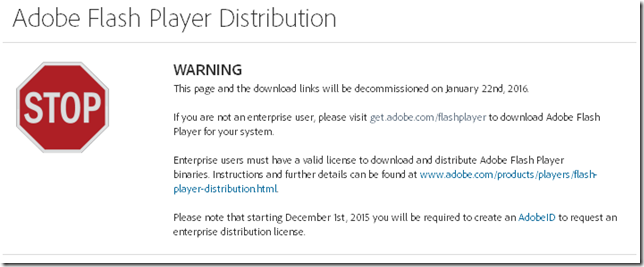
I noticed the other day when snagging the latest Adobe Flash Player update from the Adobe binary download site that they will be removing most access to the “standalone” Flash Player download files.

Adobe Flash Player Distribution - Adobe

0xhiics3.nmw

That really bites as it is a great way to bypass all the nonsense with third-party app installs during your Flash installs/upgrades for friends and family.

On my own systems I have Flash Player set to notify me of new updates but to not install them automatically. I’ve yet to see a notification from the app that a new Flash version is available.

I’ve also gone back to check on systems that I manage Flash manually on for others and find that they do have the latest Flash version already -- and a third-party application (usually a tool bar helper or security application) installed that came along with the update ride that the user didn’t catch.

And under the revised access system, you will need to have an active Internet connection to access the on-line update download.

I’m not sure yet if some of the trusted third-party download sites I use will continue to be able to offer just the binary files for access. I prefer to get my binaries directly from the source, but that isn’t an option after January 22nd.  And these might not be available either.

Really, it’s yet another nail in the coffin lid to remove Flash altogether from my systems

Then there is this tweet tip from Aral Balkan that basically reminds us we can often use the F12 developer tools to emulate (user-agent switch to) an iPad or other mobile device with our browser. That may get us “Flash” content that is available if you don’t have Flash installed.

Related Java tip:

Sigh…

Claus Valca

Malwarebytes Updates: Anti-Exploit and JRT

Malwarebytes has recently (11/23/15) released a new version of their Malwarebytes Anti-Exploit protection software.

Current version is now 1.08.1.1045 and should auto-update eventually. If it doesn’t or you just don’t want to wait, go download the package and over-install it to upgrade your current version.

Release History - Malwarebytes Support

New Features

  • Added Layer0 Dynamic Anti-HeapSpraying mitigation
  • Added Layer0 Anti-Exploit fingerprinting mitigation
  • Added Layer0 finetuned VBScript mitigation for IE
  • Added Layer1 ROP-RET gadget detection mitigation
  • Added Layer3 Application Behavior rules
  • Added protection for Microsoft Edge
  • Added protection for LibreOffice
  • Added failover upgrade mechanism
  • Added auto-recovery for Anti-Exploit service

Fixes

  • Fixed conflict with third-party products that use the same hooks
  • Fixed conflict with Office family profile
  • Fixed conflict with banking software plugin for browsers
  • Fixed conflict with Citrix when opening IE
  • Fixed conflict with components from Asus and Huawei
  • Fixed conflict with Kaspersky 16
  • Fixed conflict with Comodo
  • Fixed conflict with Imprivata OneSign
  • Fixed issue when custom shields were not kept after upgrade
  • Fixed issue with exclusions sometimes not applied to PDF profile
  • Fixed issue with Layer3 Application Behavior
  • Fixed issue with missing balloon notifications
  • Fixed issue with missing balloon notifications
  • Fixed false positive with Adobe Acrobat
  • Fixed false positive with certain .NET modules under IE
  • Fixed PhantomPDF crash when converting to doc

New Malwarebytes Anti-Exploit Adds Fingerprinting Detection - Malwarebytes Unpacked

Malwarebytes Anti-Exploit 1.08 ships with fingerprinting detection and more - gHacks Tech News

They have also released a new version (8.0.1) of the Junkware Removal Tool (JRT) which was recently acquired.

Junkware Removal Tool - Malwarebytes

I like this as it is a fast, focused, and portable tool to remove and repair a number of malware/ad-ware/junkware/PUP focused programs. It is one of the “first-strike” tools I deploy against a heavily infected system I may be servicing for a friend or family member.

Load up and carry on!

Claus Valca