Showing posts with label exploits. Show all posts

Saturday, March 18, 2017

Enhanced Mitigation Experience Toolkit (EMET) 5.5/5.52 Uninstall Error 2738

I’ve been taking the layered “defense in depth” approach on my home systems for some time.

Including using (concurrently)…

Last night something started to go wrong with the process and the wheels came off the wagon.

Here’s how I got them back on.

I am running the Premium (lifetime subscription) version of Malwarebytes. Some time ago they came out with a new 3.0 version release.  I’ve been reading the reviews throughout the rollout and have waited to do the upgrade. Once nice feature is it now includes the full version of their awesome Anti-Exploit program at no cost to Premium subscribers; something I was using the limited/free version for but couldn’t protect my Chromium-based Vivaldi browser sessions with as the free version didn’t allow setting of custom protections.

As I said, all the bits had been running fine together although – to be fair – Malwarebytes does warn users of EMET during installation that it has compatibility issues and recommends removal of EMET.  If disregarded, the installation will continue fine.

Thursday night, my Malwarebytes 2.0 version final got auto-triggered to offer me the eligible upgrade to the 3.0 version.

I said OK and let it install.  Installation seemed to go fine. No errors.

However last night, I went to launch Microsoft Excel and EMET went crazy and blocked it from running due to a perceived exploit. That hasn’t ever happened before and I was very confident my system hadn’t been actually exploited. I tried both Excel 2007 and 2010 versions that I have and both got the same reaction by EMET. I then tried Word and it also caused EMET alerts and binary blockage. Hmm.

Well, maybe something in the new Malwarebytes 3.0 was causing a compatibility issue with EMET finally.

So I went to uninstall EMET.  Only I had two versions.
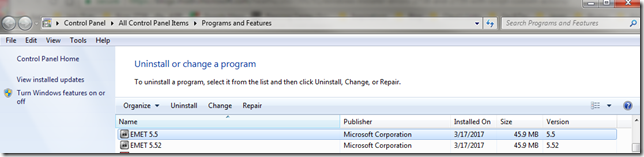
Programs and Features_2017-03-18_15-13-08

Not sure how that happened. EMET 5.52 was supposed to allow for in-place upgrade of EMET over a prior version. Didn’t recall getting an error before.

So I went to uninstall EMET 5.5 and got this:

EMET 5.5_2017-03-18_15-13-43

Same result trying to uninstall EMET 5.52

I tried repairs, changes, etc. to both EMET applications. I still had the original MSI installers for them both but even re-downloaded them from Microsoft. None seemed successful.  Note the dates in the “Installed On” column were yesterday’s so something in the processes I did worked, but it wouldn’t let me uninstall them; continuing to present that same “error code is 2738” message.

Since using Excel/Word were critical last night, I worked around the problem up removing all the EMET setting protections for the Microsoft Office suite application binaries. That let me run them without being blocked.

I figured that would be enough, but this afternoon I went to open a PDF with Adobe Reader – and EMET blocked it too from launching due to some kind of perceived exploit.

EMET had to finally go and I had to punch through that error code.

I ended up in a Microsoft forum where others with previous versions of EMET had encountered the same error but it seemed on installations – not uninstall activity.

Technet forums – Security (EMET forum search for “2738”)

Looking through them many seemed to share a common thread with a previous anti-virus product taking over, corrupting, or locking down a VBScript dll process.

Well, perhaps my Malwarebytes and/or CrytoPrevent protections were keeping the vbscript.dll service from being accessed or running?

So I removed my CryptoPrevent protections and disabled my MalwareBytes application.

Nope. Same error.

I did some more digging on a wider net and the more I read about other non-security applications having a
“2738” error on installation, I became convinced it was all related.

So after reading multiple posts I was confident to do the deeper work needed to try to fix this issue.

Using Registry Finder (under an elevated Administrator session) I searched my registry for the string {B54F3741-5B07-11cf-A4B0-00AA004A55E8}.

It came up 12 times, all in the expected locations, except I did have a single odd-string out under the HKEY_CURRENT_USER location. I was pretty sure that was my problem.

[HKEY_CURRENT_USER\Software\Classes\Wow6432Node\CLSID\{B54F3741-5B07-11cf-A4B0-00AA004A55E8}]

All the rest were under HKEY_CLASSES_ROOT, HKEY_LOCAL_MACHINE, or HKEY_USERS.

I exported the registry key first (just in case) then I deleted it.

I then opened up CMD (under an elevated Administrator session) and ran the following commands (note my system is a Windows 7 Home x64 OS):

  • cd %windir%\syswow64<enter>
  • regsvr32 vbscript.dll <enter>

cjj1w2zq.gps

I then went back and attempted to remove EMET 5.5 and it uninstalled with no more error 2738 codes.

I then followed by removing EMET 5.52 and it came off just fine as well with no errors.

I wrapped things up by re-applying my default CryptoPrevent and MalwareBytes protections states again.

Done.

Again, the trick was to remove the Registry entry just under the HKCU location where it was found present, then re-register the vbscript.dll component properly.

Later while preparing for this post I did find this EMET-related forum post that basically walks one through the same steps for an earlier version of EMET on a x32 bit based version of Windows 7. If you try to follow that and have an x64 bit version of Windows, you will need to adjust accordingly.

EMET 3.0.0 Installation fails on Win7 Pro 32Bit - Error Code 2738 – Microsoft TechNet

Additional resources and guides for addressing the Error Code 2738 problem:

The key to understanding why this works (and where the problem lies is explained nicely in Heath’s above post:

As some people have found, re-registering the runtime libraries vbscript.dll and jscript.dll will fix the errors, but that isn’t always the solution.

As a security measure, Windows Installer will not load script engines registered in HKEY_CURRENT_USER. As a user-writable store, a normal user could get an elevated install to run their library masking as a script engine if the custom action was not explicitly attributed with msidbCustomActionTypeNoImpersonate (0x0800). This is an elevation of privileges attack; thus, Windows Installer returns error message 2738 or 2739 for custom actions type 6 and type 5, respectively, and returns Windows error 1603, ERROR_INSTALL_FAILURE.

Because – somehow – vbscript.dll did get itself registered under my HKEY_CURRENT_USER location, the EMET MSI uninstaller script could not execute. Only by pulling it out, then re-registering it in the correct location automatically, would the removal process complete.

Final thoughts.

I only removed EMET from this particular system as it exhibited the crazy mitigation interceptions for Microsoft Office immediately after upgrading to MalwareBytes 3.0 Premium.

On my other Windows 7 Ultimate system, I am still running EMET (5.52 only) along with the protections noted in the top of this post. The only difference is that I’m using the free version of Malwarebytes 2.0 on it (without real-time protections). So until an issue appears, I’m keeping EMET on that system.

Lavie still is running Windows 8.1 on her laptop with a similar configuration. Lesson learned is that I will first remove EMET before upgrading her MBAM Premium version from 2.0 to 3.0.

Cheers!

--Claus Valca

Saturday, June 25, 2016

File under “You think they would have learned by now”

Seriously?

Remember these GSD blog posts from a year ago or so?

I guess you can’t keep a crappy “helpful app updater” down when it is an exploitable “feature” to help consumer’s out.

Constant Vigilance!

--Claus Valca

Now showing on the small screen – Ransomware!

Must read for all you IOT fans…

Next targets; your smart-refrigerator, your smart-washer/dryer, your smart-car, and your smart thermostat.

And you thought it was bad-enough fighting with your spouse over the room temperature?

Pay bitcoins now or your whole home (and heating/cooling bill) will be held hostage!

Sheesh…

IOT lovers beware!

--Claus Valca

Monday, May 30, 2016

EMET news bits

Some more news about the Microsoft Enhanced Mitigation Experience Toolkit (EMET).

I still recommend running it as part of that GSD Windows Defense in Depth Strategy.

Even for home users.

Cheers,

Claus Valca

KeePass & KeeFarce

Yes I use (and recommend) the freeware KeePass Password Safe & MiniKeePass (iOS) as a password management vault.

There are lots of other very good applications that take a similar approach. This one works for me as I can keep my database file in use both on Windows and iOS.

Though all that said, I remain intrigued by Master Password.

Anyway, there were some security news blips a while back that painted a picture that KeePass might be expoitable.

Well sure, if someone already is already running malcious code on your system, it seems obvious they can scrape any data you may access while the database is unlocked.

As Zeljka Zorz said in the close of her HelpNet Security article;

Lest you believe this is the death-knell for KeePass or other password managers, it’s important to know that as helpful as they are, all password managers are unlikely to withstand a targeted attack made with specialized software like KeeFarce (KeePass developers admitted as much).

But, in order to run this software, attackers must either already have access to the target machine, or trick users into giving them access by running malicious software such as remote access Trojans (RATs) or specialized spyware on their machines.

And if they gain access, your machine is not your machine anymore, and they can do pretty much what they want with it – security protections will not last long. So you can continue (or start) using a password manager, but protect your system with security software and be careful about the software you run on it, especially when it comes from untrusted parties.

Enough said.

Claus Valca

Western Digital Encrypted Hard Drive “gotchas”

Good information to know if you use a Western Digital encrypted hard drive. Not breaking news but still good to be familiar with – especially if your organization uses them!

Wow.

Claus Valca

Ongoing consumer product security issues

Note: most of this is “old news” now. Posted for posterity.

If you do use a Logitech wirless mouse/keyboard with a Unifying receiver, follow that last link above to install the new Unifying Software package, then do a firmware update on the device. Now would be a good time to check and upgrade your SetPoint software as well. GSD tip here.

…moving on…

Claus Valca

Saturday, April 30, 2016

Goodbye Quicktime on Windows

In case you missed it, Apple is no longer going to support patching of Quicktime on Windows.

As a potential web-browser plugin, having an unpatched version present is an avenue for vulnerablity exploit on your system.

And with lots of other video playback options that can handle Quicktime media files, it just doesn’t make sense to keep this one around.

Convinced yet?

Constant Vigilance!

--Claus Valca

Saturday, February 13, 2016

Enhanced Mitigation Experience Toolkit (EMET) version 5.5

Just a quick post.

A few weeks ago, Microsoft issued a release-version update to EMET.

Enhanced Mitigation Experience Toolkit (EMET) version 5.5 is now available - Security Research & Defense. From that post:

Today we are pleased to announce the release of EMET 5.5, which includes the following new functionality and updates:

  • Windows 10 compatibility
  • Improved configuration of various mitigations via GPO
  • Improved writing of the mitigations to the registry, making it easier to leverage existing tools to manage EMET mitigations via GPO 
  • EAF/EAF+ pseudo-mitigation performance improvements
  • Support for untrusted fonts mitigation in Windows 10

Get the stuff:

You still can’t seem to “upgrade” to the new version. I had to uninstall the previous EMET version (after exporting the custom settings I have). Then I installed the new version and imported my XML file back in.

It seems to be running just fine on our Windows 7 and 8.1 systems.

And yes, I do live dangerously and run it concurrently with Malwarebytes Anti-Exploit in a “yes I will run with scissors and you can’t stop me” sort of attitude.

Cheers.

--Claus Valca

Saturday, November 28, 2015

Same Bread; brought to you by Dell

One of the smaller pleasures in life that Lavie and I share are watching the BBC short animated series “Sarah and Duck”.

Alvis is long-gone from the nest but the animation and crack-storytelling of this series is addictive. We keep coming back from more.

There is a card game that Sarah and Duck often are found playing called “Same Bread”. When I grew up we played a variant called “Snap”. The thought is you take turns laying cards from your pile and when a match (same bread picture) results you yell “Same Bread” and slap down on the cards first to win the pile.

So what has this to do with anything?

Dell = Lenovo “Same Bread!” (well almost)

So here was Lenovo’s card from earlier this year

And this week Dell’s card came out; pardon the mess but it was a messy round…they actually played two cards in this game.

Note that I’ve tried to order them from most technically helpful/detailed downward. If you just want to check/fix the issue on your Dell system, jump down to the bottom of the list.

Cleanup and Mitigation

Let’s Go Explore!

That post by Martin Brinkmann has a review/link to RCC to scan the Windows Certificate Store and detect potentially questionable certs. You will have to carefully research and decide on your own if any should be removed.

Check out also his “CTLInfo” app. It is portable and GUI based and can show/report on the Windows system’s Root Certificate Trust List. Added to my utility collection.

These posts are also good showing CTLInfo in action:

Microsoft also has some helpful info.

Goodness.

Claus Valca

Friday, August 14, 2015

Sysadmin Linkfest: Rnd edition

Here is a seemingly random (Rnd) collection of linkage for the syadmins in the RSS crowd.

Enjoy.

20683743 (Tools)

FileIOTest is a command line tool that tests the speed of local or remote (SMB) storage by performing some common file IO operations repeatedly and measuring the duration.

These are the main facts:

  • Performs four different types of file IO: write, custom read, read with the GetPrivateProfileString API, create/delete
  • The number of iterations can be specified
  • Each generated file name is unique to prevent caching
  • Works with local and UNC paths
  • FileIOTest does not require any software to be installed
  • FileIOTest works on any version of Windows from Vista / Server 2008 onwards
  • FileIOTest is freeware

Couple this utility with some Windows performance monitoring traces (Win 10 WPT via the Win ADK here) and who knows what fun you could have?!  See also PerfView.

44468807 (Surface Pro)

I’ve been seeing some strange trends with a few of our Surface Pro 3 devices. For some of them, they seem to be loosing functionality (drivers?) with the Microsoft Dock hardware. Cases in point; one Surface Pro 3 tablet (Win 8.1) has lost the ability to connect to the network via the Dock Ethernet port. If I take another SP# unit and place it in the same Dock, it connects fine to the network with no issues…so it doesn’t seem to be an issue with the dock itself…just this particular tablet picking up and using the driver. I’m going to see if any of the Ethernet drivers in this pack (or the driver pack MSI itself) resolves the issue before doing reimaging the unit.  Likewise, a different SP3 user reported their external monitor connected via the display port through the Dock stopped working. Take another SP3 unit and place in the same dock and it drives the same external monitor just fine. Again, I’m going to try the driver pack first before doing a reimage on the unit. Thoughts?

59479408 (Mobile Ads/Malware)

I’ve seen a few of these “pop-up” fake alert windows in iOS, but not many. Lavie has seen more than a good many on her iOS devices. So far we have been able to get out of them with a bit of work but no harm done, yet. Regardless we are now more sensitive to these “exploit” methods.

I’m looking forward to the potential capability of ad-blocking modules (for security not revenue drain) in iOS 9. Here are some links

48734052 (Anti-Virus)

71414462 (Network Tools)

35251748 (SSD’s)

60014312 (Windows Server 2012 Essentials)

4537758 (Folder Redirection Considerations)

78434592 (Windows 8/8.1/10 and Windows Photo Viewer)

One of the most common requests for help from our Surface Pro 3 tablet users is how to get the photos embedded in emails to open up in Windows Picture Viewer rather than the Windows 10 “app”. It’s easy enough to show them how to save the attachment to disk, then right click and “open with” Windows Photo Viewer.  However that’s not convenient. Here are some tips on how to set it as the default application.

Randomness courtesy of the random number generator at RandomNumberGenerator.com

Carry on!

Claus Valca

So that’s how it works: Windows Platform Binary Table (WPBT)

Thanks to the ongoing work at Lenovo for their platform support methods, I now have a better understanding of how a security product such as Computrace can survive drive wiping; to then reload itself on a reimaged system.

Lenovo used Windows anti-theft feature to install persistent crapware - Ars Technica. From Peter Bright’s article:

And in its own awful way, it's a feature that makes sense. The underlying mechanism is simple enough; the firmware constructs tables of system information when the machine boots. The operating system then examines these tables to, for example, learn what hardware is installed in the machine and how it is connected. This is all governed by a specification called ACPI, Advanced Configuration and Power Interface. Microsoft defined a new ACPI table, the Windows Platform Binary Table (WPBT), that contains information about a firmware-embedded executable. When it boots, Windows looks for a WPBT. If it finds one, it copies the executable onto the filesystem and runs it.

The primary purpose of WPBT is the automatic installation of anti-theft software. This kind of software typically does a couple of things that require online connectivity: it can phone home to check if it's been reported stolen (and brick or otherwise disable itself if it has), and it can phone home to simply report where it is to aid recovery of lost or stolen hardware.

It's reasonably common (though by no means universal) for stolen hardware to have its disk wiped, thereby removing any anti-theft software and limiting the chance of recovery. WPBT provides a solution: even if the disk is wiped and the operating system reinstalled, the firmware can re-establish the software and report that the laptop was stolen.

So to get up to speed, Lenovo used this feature in certain of their systems BIOS to ensure that their service engine software would “respawn” even if removed by the user. Couple this stealth persistence behavior along with some security issues in that software, you have the makings of a second hurricane landfall of security hurt upon Lenovo.

A Microsoft technical paper detailing the Windows Platform Binary Table (WPBT) can be found. Warning, the following link is a direct DOCX document direct link. Microsoft WPBT DOCX Link.  As most of the articles about this paper only contain a link to document itself and not the context, here is a link to the Windows Hardware Dev Center Archive - Windows 10 hardware dev where the paper in question can be located under the Driver Archive section.

If you do have a Lenovo system using this root-kit like methodology, Lenovo has provided a removal tool.

Additional linkage on the topic

And previous Lenovo “SuperFish” issues:

Knowledge of this functionality support in Microsoft could give those looking to exploit a system another means to provide APT (advanced persistent threat) survivability.

Microsoft’s own WPBT paper (previously linked to above) addresses this threat in the “Security Considerations and Requirements” section.

The primary purpose of WPBT is to allow critical software to persist even when the operating system has changed or been reinstalled in a “clean” configuration. One use case for WPBT is to enable anti-theft software which is required to persist in case a device has been stolen, formatted, and reinstalled. In this scenario WPBT functionality provides the capability for the anti-theft software to reinstall itself into the operating system and continue to work as intended. This functionality is powerful and provides the capability for independent software vendors (ISV) and original equipment manufacturers (OEM) to have their solutions stick to the device indefinitely. Because this feature provides the ability to persistently execute system software in the context of Windows, it becomes critical that WPBT-based solutions are as secure as possible and do not expose Windows users to exploitable conditions. In particular, WPBT solutions must not include malware (i.e., malicious software or unwanted software installed without adequate user consent).

And Microsoft also offers a warning (of sorts). Take it as you will.

Removal of Malware
If partners intentionally or unintentionally introduce malware or unwanted software though the WPBT, Microsoft may remove such software through the use of antimalware software. Software that is determined to be malicious may be subject to immediate removal without notice.

Likewise, knowledge is power, so this can provide forensic security experts with one more area of a system to investigate for incident responses.

I’m sure there are some tools that might exist to examine the area on the BIOS where this specific code could be stored and extract it for analysis; if not then I’m confident they will be developed.

One utility for examining the code in BIOS that came to my mind immediately was RWEverything. I had encountered it before as a tool in extracting the Windows Key from Win 8/8.1 systems. It probably holds true for Win 10 keys as well.  Also Nir Sofer’s FirmwareTablesView might help out with viewing the WPBT contents if supported and present.

Curious.  Very curious.

Constant Vigilance!

Claus Valca

PSA - Flash Update Time

Adobe has pushed out new Flash Player updates to address security issues.

Unless your Flash installation is already set to auto-update, be sure you grab the latest version.

If your Flash installation does auto-update, it wouldn’t hurt to stop into your “Programs and Features” and confirm you actually are running the latest version; Flash Player 18.0.0.232.

Linkage:

Cheers,

Claus Valca

Tuesday, July 28, 2015

Rook Security - Milano tool

As usual…a week or more late…

Post Update 2015-07-31 New tool version: Milano 1.1.0 Release with Linux and Mac OSx IOC's Now Included - Rook Security

Anyway, Rook Security spent some time analyzing the data-dump from Hacking Team and in the process have found some indicators of compromise (IOCs) of a Hacking Team presence on a system.

Basically you can download their free/open-source tool which does a quick or full scan of a system and compares the files against known IOC hashes.

Downloads - Rook Security.  Current look for the “Milano 1.0.1: Hacking Team Malware Detection Utility” link.  There is also an MSI version for enterprise deployment.

Then it’s up to your leet skills to figure out if these are false positives or not.

I’ve ran their tool against both my systems. The quick scan is very fast. The full scan took a nighttime to complete on my traditional HDD system but it ran very fast across my SSDD drive system.  In all cases my systems came back clean.

It’s a portable app so no excuse not to include in in your USB carry-stick toolkit.

You may want to keep an eye on their tool for updates. At least one update has been released. It is also unknown if other security vendors are adding the IOC/hashes to their own detection engines.

More info here

Constant Vigilance!

Claus Valca

GSD Windows Defense in Depth Strategy

I noticed more than a few times I have posted a listing of the security posture I take and it has been almost a year since the last topic-specific post here.

So here you go. Tested and approved on Windows 7/8.1 platforms. Not sure yet on Win 10.

  1. TrueCrypt full disk encryption. Yes. I know. Development stopped mysteriously…blah.blah.blah. There are a number of free alternative WDE options for users if you wish (or Bitlocker if your Windows OS supports it) such as DiskCryptor or VeraCrypt. My purpose in using TrueCrypt/WDE is to protect the contents of our system from data-loss in the event the device is stolen. Period. (Note to self…I’ll probably have to do a full TrueCrypt disk decryption before doing the Win 10 upgrade. Hmm… gotta think about the options for WDE on Windows 10 carefully as Bitlocker only valid on one of my systems. Thoughts or recommendations anyone?)
  2. I’m using the built-in Windows Firewall product with (generally) default settings.
  3. I keep the Windows OS fully patched (drivers too as best I can) to minimize OS vulnerabilities.
  4. I keep any (remaining) third party plug-in software (such as Flash, Java, Silverlight, etc.) fully patched and install updates as soon as a new build version is released. However..see item 4.
  5. I have continued my march on removing Flash, Java, etc. plug-ins from our systems…with little ill impact. You can’t exploit what isn’t installed.
  6. Microsoft Security Essentials - Microsoft Windows. Far from the most robust or highly ranked, what I loose there I gain in the additional security layers below. Also the interface is easy to work with and manage and it plays well (thank goodness) with the additional security layers. My alternative choice would be Bitdefender Antivirus Free for those who need a super-duty AV product.
  7. Malwarebytes Anti-Malware & Internet Security Software - I use the “Premium” version on our systems. The free version is good too, however it doesn’t include “real-time” monitoring features.
  8. Malwarebytes Anti-Exploit Free - I use the free version of this tool as it covers all my primary concerns. Works great (as far as I can tell!) for zero-day exploits against (primarily) web-browsers.
  9. Enhanced Mitigation Experience Toolkit - EMET - Use of this anti-exploit platform is left for the more tech-savvy folks…particularly when combining with Malwarebytes Anti-Exploit. They can co-exist but takes some tweaking to harmonize with Internet Explorer in particular.
  10. CryptoPrevent Malware Prevention - Foolish IT - I use the free version to help protect all our home systems against ransomware/cryptoware threats.
  11. GlassWire - I use the free version of this firewall product for it’s logging features.
  12. Zemana AntiLogger Free - I’ve only recently found this product. It seems to be working well in the background.
  13. Process Explorer - Microsoft Sysinternals - I have this set to run in my system-tray automatically at login. It lets me quickly monitor and check on running processes and sub-processes. I check often so I can remain familiar with the normal running processes. If something new appears it should stand out to me and I can explore further.
  14. Sysmon - Microsoft Sysinternals - This core service runs in the background doing logging of process creations. I had turned on the network connection logging as well but there was so many entries, even with an event log manager utility it was hard sorting out the noise. So I turned off that option for now. This is mostly good for post-incident review work but it’s good to have running now.

If you are interested here are some previous GSD posts on this subject.

Constant Vigilance!

Claus Valca

Sunday, July 12, 2015

Summer’s On! Super Sysadmin Linkfest

Little Bro and I just wrapped up some Saturn Ion A/C system repairs in the driveway. Got the chill winds blowing in the cabin again. So with that resolved, time looks available for a summer’s on, super sysadmin linkfest dump to cover all the bases.  (And expect another Shade-tree Saturn Ion Mechanic tip post very soon, too.)

CryptoPrevent (Foolish IT) News

I personally use and recommend the awesome CryptoPrevent Malware Prevention utility from Foolish IT.

It is simple to use, hasn’t caused me any issue with the default security level settings, and gives me the comfort of having an additional layer of protection against ransomware threats. The free version works nicely on our home systems.

If you are using CryptoPrevent, this technical post may be useful: CryptoPrevent, ShadowExplorer, and VSSADMIN - Foolish IT.

Foolish IT has been hard at work on a new version and this post shows some of the new features and GUI - CryptoPrevent v8 Teaser.

Alternative remain thirdtier.net’s Cryptolocker Prevention Kit (updated) over at Spiceworks.

Considering the rash of ransomware infections at work lately, I’m surprised the AD and security team hasn’t gotten together to review the settings in the prevention kit noted above.  Just say’n…

Malwarebytes Tips and Updates

How-To’s

In my GSD post (mostly) Fast burn video file to DVD-playable format I ended up using DVDStyler Portable to burn some miscellaneous video files to a DVD. I really wanted to use DVD Flick (see this interesting comment thread and this one too regarding a portable version) but problems and a limited amount of time to solution the issue prevented a real trial. I had also found this Free Video to DVD Converter at DVDVideoSoft .

So it was with interest I spotted this post that looks like it could do the job as well.

The app mentioned was Freemake Video Converter. It is clearly stated in the post and in the comments that the application comes bundled with OpenCandy that may be tricky to decline installation thereof. A comment in the thread recommended running the installer from the command-line with the “/nocandy” switch. I tried that and it seemed to work. When you download the installer off the product web-site it is just a “stub downloaded” which then fetches and retrieves/installs the “full” package. In my case it was:

C:\Users\<PROFILEID>\Downloads\FreeVideoToDVDConverter.exe /nocandy

A follow-up scan with Malwarebytes Anti-malware come back clean (…well except where it found it embedded in the full app download package placed in the TEMP folder) and it always detects OpenCandy in installer packs (based on my personal experiences).

So here is a fourth option worth considering if you need a free utility to burn various video files into a single DVD compilation.

Passwords

I’m a hard-core user of the free KeePass Password Safe & MiniKeePass (iOS) utility. That said, I have to confess that it is very challenging keeping the core database synced between mine and Lavie’s various iDevices and laptops. Add to the fact that the master password datebase file is a hot target for hacking with all the keys to the kingdom I’m sincerely open to a new model for complex/random password management. And at work KeePass (and all password managers) are not approved software so I have to do a super-kludgy solution with using a Bitlocker volume file.

Master Password – project page.  Thanks to the TinyApps blogger I’m now very intrigued and will likely be seeing if I can incorporate this into my routine. There is lots of documentation available (both on TinyApps’ post and on the project page) and is is all very human-readable. The desktop version is a Java app so there is that “issue” if you are on Windows and have stripped Java from your system, though I guess you could go with jPortable and the jPortable Launcher from portable apps as a compromise. The developer also has a beta version of a Web app that could work.

Encrypting Windows Hard Drives - Schneier on Security

Network Nuggets

TraceWrangler – Jasper Bongertz’s awesome tool for sanitizing and anonymizing trace files was updated a while back to beta build 0.4.0 build 616 in x32/x64 flavors. ChangeLog. Sadly, I don’t (yet) do the twitter so there doesn’t seem to be an RSS alternative to watching for update releases without stopping by for a visit from time to time. Update! Jasper Bongertz has kindly now updated the project page to include a RSS feed! Awesome and many thanks! See also these recent posts by Jasper:

Link to test –> Speed test – DSLReports

Note to get the application to run successfully in Firefox (running NoScript) I had to temporarily do the following:

Adblock, or NOSCRIPT - is blocking access to remote IPs (not scripts).
Set NOSCRIPT>Options>Advanced>Trusted>Cascade top document.

Once testing was done, I disabled that option setting.

New or Interesting Utilities

SimpleWMIView reminded me a bit of WMI Explorer over at CodePlex. Probably would be complimentary apps.

SterJo NetStalker – SterJo Software – This is an interesting app. I particularly like that it comes in a portable version. As noted in the gHacks post, it is very similar to (but with some differences) to Nir Sofer’s CurrPorts utility.

At the church-house we run a program called Shelby Systems. It is a client/server based model and though most all of the systems have the client software on it, only one user in particular is constantly having issues connecting to the server unless we shut-down the (Windows) server’s firewall, allow the client communication to establish, then turn on the firewall again. So it looks like the server firewall has some not-yet-located firewall rule in play not set correctly. I’m hoping that this and/or CurrPorts can help us hone in on the specific issue. If I do solve it, I’ll post a troubleshooting guide.

SterJo Software – Products – SterJo offers a number of freeware utilities that may be of use to some sysadmins.

Troubleshooting Tips from the Pros

Windows SysAdmin Tips and Techniques

Microsoft Trainings and Infographics

Kali & Docker

McAfee & The Great Stinger “feature update” Debacle

So McAfee’s standalone Stinger AV tool is/has-been/was a great tool to run in an attempt to scan a system for specific threats and attempt to neutralize/remove them.  It is updated often with new definition patterns and has been a long-time tool in the GSD infection response toolkit.

However a while back an uproar occurred when it was found a new version upgrade with enhanced features left a running/persistent McAfee service (the 'McAfee Validation Trust Protection Service' mfevtps.exe) on your system afterward; even when the binary was removed, and with no clear way to remove it.

It seemed that the only way to really “clean” your system from McAfee after you tried to clean your system with McAfee’s Stinger was to follow these steps: How to uninstall or re-install supported McAfee products using the Consumer Products Removal tool

Only what I didn’t see in the aftermath were any notices that McAfee reported the persistent service module everyone was hollering about was due to a bug in the application. It was quickly fixed and now Stinger behaves the way it used to, fully cleaning itself up after run.

PortableApps McAfee Stinger news Comment thread post. From that comment..

John - thanks for reporting this issue.

The McAfee Validation Trust Protection Service is needed for Stinger to perform rootkit scanning of a system. This service is temporarily installed during a Stinger scan and is removed once the rootkit scanning portion is completed.

In a recent update to the Stinger's rootkit scanning engine, an issue was found where it wasn't getting uninstalled in certain conditions. We've fixed that in last week's release. The latest Stinger available for download should not leave behind any components post a scan.

Please let me know if you require any other clarification.

Best,
Vinoo Thomas
Product Manager, McAfee Labs

Possibly interesting (or conversational) but not related to McAfee Stinger debacle - Beware: Free Antivirus Isn’t Really Free Anymore – How-To Geek blog. I may come back to this post in more detail at a future time…

Microsoft Surface / Surface Pro News & Tips

iOS 9 Peeks & Misc Apple News

I’m really excited to see some dual-tasking coming to the iPad device in iOS 9!

Whew!

--Claus V.

Saturday, July 11, 2015

Taking Flash Player out to the Bins

image

“Trash cans” CC attribution: by andresmbernal on flickr.

Post updated 07/13/2015 to incorporate yet another Flash Player 0-day. That’s three now if you are keeping count.

So in light of recent events, I’ve decided I’m taking Adobe Flash Player to the trash-bin on my secondary system as part of an experiment.

In case you have been living under a rock, the recent hack of “Hacking Team” has led to the public release of not one, but two (for now) 0-day exploits for Flash. Although, there were bad-enough Flash 0-day exploits around just prior to the new mess left on our lawns.

And as soon as each 0-day exploit of Flash became known, it was a done-deal that the exploit would become fairly common-place in the malware attack landscape.

CVE-2015-3113 (pre-Hacking Team)

CVE-2015-5119 (Hacking Team 0-day)

CVE-2015-5122 (Hacking Team 0-day)

CVE-2015-5123 (Hacking Team 0-day)

(not related to Flash Player but since we are on a roll…

So what is one to do?

For most people/businesses/enterprises…probably many folks won’t do anything and will keep on web-surfing with exploitable Flash Player versions hanging over their head like a sword strung up by a thread. (I’m speaking you to Enterprise team that has us running a quite-outdated version of Flash Player as our standard as part of “application compatibility”.)

Everyone using Flash Player should hop immediately over to Adobe’s Adobe Flash Player Distros page and download/install the appropriate version. Not sure if you need it, then first stop by Qualys BrowserCheck in every one of your installed web-browsers. It will tell you if you have the latest version of Flash Player (and other critical browser plug-ins) installed. If not, it will help you get them updated.

However, as the 2nd Flash 0-day shows, having the latest Flash Player installed is no guarantee you won’t get hammered anyway.

To add deeper layers of protection consider installing Malwarebytes Anti-Exploit (free/$) or HitmanPro.Alert (trial/$) for Windows 0-day exploit protection. Couple that with Microsoft’s Enhanced Mitigation Experience Toolkit (EMET) for good measure. Please.

But to get even more hardened on your security, seriously consider dumping Flash Player from your system entirely.  Yes that is a “extreme” position, but considering the threat landscape, if you don’t need it for a business critical reason then it’s time to shed it.

I’ve pulled that trigger on my secondary system. After about a week of trialing, I’m likely to do the same on my primary system and Lavie’s system as well.

Wonder what life may be like without Flash Player? Brian Krebs has already gone down that patch and can tell you all about it.

As a Windows user I used the “Programs and Features” area to manually uninstall both the Active-X (IE) and Plugin-based browser installations of Flash Player. For good measure I then downloaded and ran the official Adobe Flash Uninstaller to make sure no bits were left behind.

I also manually checked for the presence of Flash Player embedded in Chrome/Chromium and was prepared to disable/remove it manually if needed. In my case it wasn’t.

Yes there are additional guides on how to simply disable Adobe Flash (or set Flash media to “click-to-run”) in your browser and/or control Flash activity via add-ons.

However the risk seems too great so for me the answer is to just strip it out entirely.

Next step; to see if I need to remove any remaining Flash elements that are embedded in other Adobe products on my system in case they could be used to pivot as part of an exploit chain.

Seriously…if you don’t critically need Flash Player…remove it.

Constant Vigilance!

--Claus Valca

PS: I didn’t discuss it, but I have already removed Adobe Shockwave & Adobe AIR as well from all our systems. Don’t need them. Don’t use them. Do have the latest Java JRE still installed as I do need that for some JAVA apps but I keep it fully patched. Same with Silverlight. Just saying…

Saturday, June 20, 2015

Browsers, Browsers, Browsers!

I’ve been all over the place with web browsers lately.

Fussing at (and tweaking) Mozilla/Firefox

Base Jumping with Vivaldi snapshots

I continue to be impressed with where Vivaldi is going on their project.

And Polishing up the Chrome

Discovery of uBlock Origin was a super-duper find for me a few weeks ago.

I have always used Adblock Plus in my “public release” Firefox and Chromium browsers, though I did not in the Developer Mozilla build. I also layered in Ad Muncher at the system level.

So when I learned about uBlock I thought I would give it a try. I liked it so much that I’ve installed it in all my Mozilla browser builds and in my Chromium browser as well. Top shelf.

I also run NoScript in my Mozilla browsers, but didn’t in Chromium. Never thought I could find a product that could be its equal.

I’m a stanch defender of the use of ad/script-blocking tools in my web-browsers. Not so much against the ads (annoying as they can be) but rather as a perimeter defense against malvertizing and zero-day attack campaigns. I follow these attacks time after time in the security blogs where trusted domain sites get nailed with malicious ad injections. Kind of like wearing your seatbelt while driving. It’s not that I myself am planning on being in an accident each time I get into the car to drive, but it comes from having a keen awareness that accidents occur when you least expect them and the seatbelt will provide a level of safety when it happens. (Well, and Texas law requires us to wear them too.) Anyway, hopefully the analogy stands.

Other security experts agree.

It was reading the comments in that SANS post that I then found the NoScript counterpart for Chrome/Chromium browsers:

Using ScriptSafe has been a bit of a learning curve adventure for me. Use of NoScript and fine-tuning the settings is second-nature now to me. However since I never used one in my Chromium browser, I am still scratching my head when pages don’t load as expected until I remember (again) that I have ScriptSafe now installed and have to tweak the domain/page rules to allow it to load properly but strip out the “unwanted” stuff.

The interfaces for making those choices (allow/block/etc.) are very different but as easy as they both are to use, I’m gradually liking the interface for ScriptSafe just a touch more. It is more user-friendly.

Regardless, I’m thrilled to now have two more tools to lock down the gates of my web-browsers with; uBlock and ScriptSafe.

Meanwhile the battle rages on for new ways to get ads past the blockers and deliver (in some malicious cases) their 3vil payloads.

Cheers,

--Claus Valca