Wednesday, January 11, 2006

Ahhh. I get it! VOIP...


It makes more sense now...they're likely talking about VOIP!

At the very bottom of my post Monday, I mentioned that a law had been passed by Congress and signed into law by our President. The sensational blog-o-sphere headlines screamed across the net that posting annoying comments (etc.) on the internet could land you in jail.

I had first grabbed a can of "blogger-gasoline" I had laying around to toss onto the pyre, but reason kicked in and I settled down and posted my blog about setting up my father-in-law's pc instead. I'm glad I did. I think it ended up generating a more positive discussion to the web-world than my initial one would have.

As is often the case in the blog world, a fact gets picked up and bundled in a sensationalist tagline and off the flames roar across the grasslands of the virtual world. Only trouble is, frequently once we've burned off our collective energy and caught the latest RocketBoom or HomestarRunner clip for the day, we've long since forgotten what kicked us off in the first place.

So with that in mind, I went back and checked out this story again since it has had some time to percolate around. Here's what I found:

Carl Liner over at Football Fans for Truth, takes a look and found a summary over at Senator Domenici's office supports his interpretation that the law is intended to extend existing telephone harassment laws to cover voice over IP (VOIP) technology that is internet based. If you follow the summary link, save your eyes and scroll down to section 113:

"...To strengthen stalking prosecution tools, this section expands the definition of a telecommunications device to include any device or software that uses the Internet and possible Internet technologies such as voice over internet services." (emphasis mine)

The Volokh Conspiracy folks break it down a bit more in their analysis on the subject.

Not convinced yet? Well, KipEsquire steps though the sections in question and arrives at the same conclusion: New VAWA "Annoying" Clause is Indeed Annoying -- But Not to Blogs.

Finally, if you haven't been convinced yet, Siva Vaidhyanathan and his Friends and Family, will happily pull out their own brand of punishment and whop you over the head with a post that is almost every section of the law code in question spelled out and stitched together for you enjoyment.

Lots more linkage exists on these pages if you just want to follow along, but a supportable and reasonable case seems to exist that a more reasonable (and less sensational) interpretation is that our caring lawmakers saw fit to extend anti-(wire-based) telephony stalking laws to now cover VOIP-based telephony stalking technologies so the fine men in black and blue could legally put some smack-down-hurt on the creepy dudes harassing the ladies trying to get on with their lives. You see, in my world of thinking at least, this law would be seen as a good thing.

If that's indeed the case...you go guys!

And by the way....

If you are one of the best geeky IT guys you know and look good in shades--you might want to know that the FBI is looking for you. No, not for that--nobody really cares what you did last summer! They want to give you a job! Really! And pay you pretty good for it, as well! Act fast, the offer is up at the end of January! Ahh, if I was just a few years younger....

And as an added bonus, I understand the sakura are beautiful in D.C. in the Spring.

My late grandpa was a G-Man with the FBI. He was one of the finest men I ever had the honor of knowing. Get-em grandpa!

See you in calmer skies!
--Claus

Monday, January 09, 2006

Dealing with the Dell...


So Pop got his new Dell. Shipping was fast and delivery was also. It came in less than a week from the order date--even with standard shipping. The order was correct, with nothing missing. Lavie was able to unbox the system and hook it up without any issues.

I wasn't there when she powered it up, but from what she said, it ran the standard XP new system setup prompts--pick a user name, name your workstation, etc. She had it up on the desk and out on the net in less than an hour. The only thing she wasn't able to do was configure Pop's email account settings (more on that later).

Pop said that most of the software on his Win98 box was so old and outdated (it was) he wasn't concerned with upgrading or reinstalling almost anything from the old system. We just needed to be sure his personal files, photos and settings (bookmarks) got moved over to the new system. Also, he hadn't bought any office productivity software with the system.

So, with that in mind, and knowing pretty good how he and my mother-in-law use their computer I had spent Saturday night downloading and copying a bunch of files for them to use, some patches and security software as well as some "eye-candy" for the folks to get full enjoyment from their new LCD monitor. Then downloaded a whole smogasbord of open-source and freeware applications that I trust and use.

I was already ready for a fight with the thing. The folks at [H]ard|OCP did a review on a gamer's Dell system and found it heavily loaded with pre-installed software that really put the brakes on they system's performance until they cleaned it up. Dwight Silverman posted about this article and got quite a lot of feedback as well. Threatchos.com blog also had a bit of note of the struggle between SBC DSL and Norton's on his Dell system.

Task One--Cleaning a fresh system.
The first job when I got there was to uninstall all the "3rd-party ware" that came on the Dell. I lost count of all the items, but there was a lot. I'm not going to name names (well maybe one or two) but there were at number of ISP provider trials, some Dell "help" stuff, a trial version of antivirus support, some non-MS (java) games, some trial software for image management, a music-jukebox player, some Google desktop tools/bars, etc. All in all I think I uninstalled at least 14 unneccessary items. Quite a few. To save time, I used Safarp.

Software list: Safarp

Task Two--PC Security

Next I got my IT tools out and scanned the systems startup keys: I used Autoruns and HijackThis. There I pulled off several more auto-run items that were not necessary or needed to run on this system. Done. Next I slapped on AVG-Free and configured it to automatically pull down updates as well as do a daily scan. Next came the firewall-ZoneAlarm. Done. I installed the malware/spyware scaners (but did not set to autorun/scan) AdAware-SE (free) and Spybot Search and Destroy. Pop knows how to use these and does so manually once a week or so. I then installed MS AntiSpyware Beta and configured it to run with realtime protection and periodic scanning. Since he had Win98 before, I had to give him a brief tutorial: Red=bad-deny it, Green=good-FYI, Blue=usually safe-call me if in doubt. I set Windows Automatic updates to run/install automatically and verified there were no critical patches left to put on. Good. I installed and enabled SpywareBlaster for additional surfing protection. Installed Spoofstick for IE. Finally we passworded his XP user account and set his personal documents file from being viewed by other accounts. Finally I installed/stored some IT troubleshooting utilities and tools in a utility folder, just in case I needed them in the future--they would be available on the machine. I verified that the Windows XP Security Center had correctly picked up the ZA firewall and AVG antivirus apps automatically, as well as the changes we set for automatic windows updates--it had.

Software list: a-squared HiJackFree, AdAware-SE, Autoruns, AVG-Free Blowfish Advanced CS, CCleaner, ClamWin (backup app just in case--not installed), Eraser, HijackThis, IttyBitty ProcessManager, Kerio firewall (backup app just in case--not installed), MS AntiSpyware Beta, Process Explorer, Safe XP, Spybot Search and Destroy, XPredit, TweakUIPowertoy for XP, SpywareBlaster, Spoofstick for IE, and ZoneAlarm.

Task Three--System tweaking.
I then added two additional accounts: a guest account was set up for family to use as well as an admintech account for me to manage the system with. Both his primary user account and the admintech account were given Administrator rights (he will have to install some software under his account in the future--this was just easier). And the guest account has limited rights. I installed TweakUIPowertoy for XP and we tweaked his desktop settings, icon preferences and the like. Finally we ran the MS Clear Type Tuner and optimized his LCD display.

Software list: Shootthemessenger, UnPlug n' Pray, Belarc Advisor, MS Clear Type Tuner.

Task Four--Application installations.
WordPerfect12(?) was installed on the system, but it was a 60-day trial version--so that got uninstalled as well. I did have to install his old Quicken Deluxe '99 as well as his old copy of MS Office 97. Why MSO97 when I put OpenOffice on the computer? Well, Lavie uses the pc sometimes when she visits her folks and still gets confused with OpenOffice. I then installed a selection of freeware productivity tools and utilities I really find slick and well executed:

Software list: Contact, EssentialPIM, EverNote, Free Commander, Foxit PDF reader, Faststone Image Viewer, iTunes, KeePass, Kyodai Mahjongg, Notepad2, Open Office 2.x, PDF Creator, Sequoia View.

Task Five--Internet and Email (Part One).
That means only one thing! Firefox and Thunderbird with supporting extensions. Granted, he isn't likely to use many of these, but these are (most of) the ones I find helpful. Thunderbird didn't get any additional Extensions at this time.

Software list: Firefox and Thunderbird!
Firefox Extensions: Download Statusbar, Fox Clocks, FoxyTunes, IE Tab, Image Zoom, Moji, New Tab Button on Tab Bar, Print Preview, Quick Java, Sage, Save Image in Folder, Sort Extensions and Themes, Spoofstick, Tab Clicking Options, TabX, Translate, Viamatic foXpose, and x Mod.
Themes: Outlook 2003 Blue for both.

Task Six--Data migration.

I had planned on pulling out the HDD from his old pc and dropping it in the Dell as a slave drive and doing a direct data copy. That's what I ended up doing. But the IDE cable for the HDD had only one connector for a HDD on it and no 2nd HDD drive bay. No problem. I used the IDE cable from the old pc that had two drive connectors instead and carefully ballanced the old HDD on the side of the case. A quick jumper change to slave and a manual BIOS adjustment and the drive was spotted. About 30min later the old drive was copied to the new. I used Sequoia View to show him how to manage his drive space. He thought that was really cool. When it was all said and done, there really wasn't much stuff that ended up being kept from his old HDD. I moved his My Documents folders, the pictures folders, his Outlook Express address and mail files, bookmarks and his Quicken data. All the rest he didn't want to mess with so it went into the trash hopper. The drive/cable was placed back and BIOS was manually reset to its original setting.

Task Seven--Internet and Email (Part Two).
Now that we had the Outlook Express files over, I could focus on Thunderbird. Lavie had tried to get Outlook Express set up, but the DSL account configurations confused her. I was pretty lost as well fixing the settings Thunderbird imported. I eventually had to punt and check the ISP site and use the info in their FAQ to get all the correct values. Once I had those--setup for Thunderbird went fast. Email was now working. Just some address book cleanup and email folder rearrangment after the OL express import of those files. Done. We verified that I had copied his IE6 cookies and favorites over ok. Then we imported those into Firefox.

Task Eight: Eye-Candy!
I snagged some golf-themed desktops from over at formule-golf.com. Next I found some pretty closeups of flowers, coffee, flags and such over at Mandolux. From there I selected some stunning beautiful nature photographs, city lights at night, and object closeups over at InterfaceLift. Finally I grabbed some bright and highly saturated "Vista/XP" style desktops from WallpaperStock. I showed Pop how to use Faststone Image Viewer to manage his wallpapers easily. It doesn't seem to come with a built in screen-saver to rotate images from folders. I don't really care for the MS one in XP, so we downloaded Imagewalker and set its screensaver application to do that work instead.

Task Nine: Misc Odds and Ends.
I finally verified that all the hardware was showing good status in the manager. XP had picked up the HP scanner driver perfectly. I did have to download the printer driver from Epson, but I had expected that. The final reboot (after many during this process). Finally I ran a malware scan with Spybot and MS Antispyware. MSAntispyware came back clean and Spybot only found two files remaining from some WildTanget java games that had come pre-installed by Dell. Done! He did a test run on logging into his system and he was good to go!

Still To Do.
Finish reconfiguring his D-link 4-port router--it burped the settings last week so we were just going with the direct DSL modem connection at this time. Also, put the old pc back together again and run a long cat-v cable from the router location into the kitchen. Finally set the old pc up in the kitchen and decide on SLAX or Berry (live-cd) Linux version--wait a minute! They can have both!

Summary.
All in all it took about 4 1/2 hours--not counting the time Lavie spent unboxing and doing the first setup pass. Quite lot of time. I would say about 1/4 spent on 3rdparty software removal, 1/4 spent on security and productivity software installations and set up. 1/4 on data-relocation and the remainder on email and final system tweaking. I wish Dell would include a batch file to auto-delete all that 3rd party stuff--kinda like a red-self destruct button on the starcruiser's bridge in the sci-fi movies--but only it's an icon. One punch and it's all gone--but I know that most consumers (nor Dell's software providers) wouldn't want that.

All in all it is running very well and very fast. Not a bad day's effort!

So, now you know the Valca approved apps I like to use on a system. Give them a try and good luck!

And now, in other news...

Did you see this? Is this for real or not? I have got so many questions about this that my wisdom and judgement have slammed on my blogger's safety-brake, preventing me from commenting on this just yet. I need to watch it bake in the "real world" (no, not that MTV loft) for a little bit. Until then...form your own opinion while I try to analyze mine....

Write an annoying comment, go to jail: via Ed Bott's blog.
Create an e-annoyance, go to jail: via C|net.
BoingBoing wades in with a little less drama and more reason.

In the meantime, my crack legal team has advised me, to now, in the interest of fair and public disclosure, make a public statement that all posts here--as made by me--are done with no intent to annoy anyone. at all. not one bit. be kind. please. I love you all. Spread the love and karma and go eat a peanut butter and jelly samwich...with bannanas in it. You'll be glad you did. Do you feel the positive vibes? That's the only intent you'll find here!

Into the skies,
--Claus

Sunday, January 08, 2006

Round Two...

I'm beat again.

I got up this morning and spent an hour trying to get the blog template to behave with a two-column view in Internet Explorer. It won again.

In the process of searching the web for help with this issue, I crossed a really neat site called eris : design. They have a nice selection of graphically-refined templates. As an added bonus, you put your layout tweaks in and it will generate the template code out. What did I have to loose? So with Lavie's help, I settled on this one and copied it into a text file, along with my old original template for safe keeping.

But, I had to leave before I really got up to speed (uggh! I hate that!). And we went to Lavie's parent's home in the "country." Then I spent over 4 1/2 hours today setting up his new Dell pc. I promise to do a long blog very soon about THAT experience. To my surprise, Lavie had unboxed it and hooked it all up yesterday when she was up there with them (she's quite clever that way!). So I just had to spend all that time pulling off the "3rd party-ware" Dell so "kindly" preloaded. Installed all the required patches, security and productivity apps we prefer and configured them. Pulled the HDD (6GB) out of his old Gateway system and hooked it up (temporarily) as a slave drive to his 160GB new HDD and copied his entire old HDD over. Then we moved his user-data to its new digs, and got him converted over to Firefox (with extenstions) and Thunderbird. YEAH!

It rocks and is a major upgrade from a 333MHZ processor to his new 2Gig MHZ processor.

So when we got back home around 8pm, I called my momma and checked in for the week. Then I got back to the blog design. After much tweaking and coding, this is where I am calling it quits for the night. I still have some minor adjustments to make and the IE 6 rendering engine is still sputtering over my template code--now the title and quip list to the left side in IE--but I think it really looks rockin' in Firefox. (Please let me know what you think--beside the fact it still looks off in IE6--I'm working on that.)

Special thanks to The Japan Years family. Mike, Nicky and Josh spent some of their collectively valuable time on my lost cause--working to help me sort out my "floating side column" issue in IE6. Only I didn't get their email until after I had published the new blogger layout. I feel so bad! Really! I'm sending some good karma your way tonight! I appreciate your time and work, guys! You really rock!

In side news, Dwight Silverman gave me and a few other "regulars" some nice "kudos" on his website post tonight. We worked to keep his Techblog up and current, even while he played at the CES. I can't wait to hear what "swag" he netted. Thanks for the props, Dwight!

Just for fun tonight:
Get some culture: Visit the WebMuseum and see some awesome works of art.
Get some laughs: Browse Ad*Access and see just how far advertisements have come.

Good news, the caffine in the Dr. Pepper I drank on the drive home is almost out of my system. Bad news, it's now almost midnight here in Texas, and I have to go to work in the morning.

So for those of you keeping score--the Second Round results: Claus(1), IE(2), Dell (Split Decision).

See you in the skies!
--Claus

Saturday, January 07, 2006

Geared Up

I'm geared up and ready to go.

Tomorrow I will be setting up my father-in-law's new Dell pc. I'm ready to burn a cd-rom full of applications, utilities, security stuff and desktop images. I plan to get it configured, then pull the hard-drive from his old pc and put it (temporarily) in his new one to do a data transfer. Once we are sure it is running well, we plan to reconfigure his old one into a Linux based web browsing station for the TV room. I'm trying to decide what to use...and am leaning to SLAX or Berry distros right now since all they will be doing is internet surfing and email while away from their new Dell in the study.

I'm still trying to figure out why my Blogger sidebar shows great in Firefox but floats to the bottom in InternetExplorer. It has something to do with the layout spacing. I played with it for a hour and got the template looking better (see how the sidebar elements are centered). Finally I created a 2nd fresh blog just so I could snag a template that was working in both. I have copied the code and am going to compare them side by side to pin down where the issue is. But that will have to wait for now.


Google announced a new "product" (?) called Google Pack. It comes with a series of software items for you to download and install on your pc. I'm curious, but won't be downloading it on any pc's I own or support. I'm also very surprised they chose Norton's for the Antivirus pick. It is only a trial subscription and
I am really surprised by their choice of Norton's AV. I would have put my money on ClamAV--open source and pretty darn good--albeit the interface needs some upgrade to XP-candy style refinement rather than something like Win95. And the big question remains...can a user then run manual-updates to the DATS after 6-months? or will they be stuck with a program they don't want to upgrade (for $$) but don't want to uninstall (and loose protection). Sounds kinda dangerous to me...As for me personally, I'll stick with Grisoft's AVG-free for now.

From a "mom and pop" standpoint--or just the curious--it might "just"do. If you read their blog, the (surface) intent seems to be to offer a "one-stop" download package of some basic software enhancements that can make update management simple and installation easy. If this is becomes a successful bundling/deployment model, I could see them offering additional bundle packs: graphics, security, (open office?), etc...maybe this one is general enough for them to "fish the waters" with to see how many people bite.

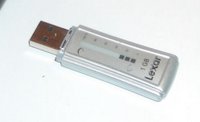
On the Cool Stuff List: This Lexar USB stick has a visible indicator (e-ink) to display how much space you have used. That is the best USB "gimmick" I have seen. I think I'll get me a 2GB one for work! Awesome!

Lavie's dad was taken to the ER this morning running a 102+ fever for several days. Lavie went up to spend the day with him and his mother. Alvis and I had to stay home to work on her English class project. We spent the entire day cutting out dragon figures, making a goblet of fire, a wizard's trophy, a golden egg. And later this week I (Lavie doesn't sew) will work with Alvis to sew a mermaid doll. I promise pictures when it is all done. It's a spectacular craft/engineering/art project. Wow. We wrapped it up around 7pm for the night. Cops was on tv. Had to watch that. Pop's back at home now (high fever caused by bronchitis) and resting comfortably, but wanting me to know he wants me to come and get his computer going ASAP.

During a mid-afternoon crafting break, Alvis and I decided to get outside and take in some fresh air and sunshine. On the way to the mailbox, we passed a group of neighborhood kids (7+) gathered around a downed bike getting repaired by them. On the way back they were still at it so I (very uncharacteristically) asked them if they needed some help. The kid (8?) was trying to get his chain back on the gears. I popped it on right away and it popped back off. Hmm. There was too much play in the chain. So I offered to take it to our place where I could adjust the chain tension. Deal. So there Alvis and I were walking down the street, me carrying the bike and 7+ kids in tow. I grabbed my tool kit from the trunk and we all went to work on it. Once I got the chain tension fixed, it still kept popping off. The kid looked upset and said he hoped he didn't get in trouble for tearing up his new bike (apparently he had already been fussed at before). This time I took the time to watch the chain as I slowly rotated the crank and "ah-ha" found the trouble. The bike looked pretty cool, but the main gear crank was cut from some pretty thin and flexible metal. The crank gear had all these wicked design cutouts, but that left it very flexible on top of the thin metal. (....when I was a kid, they made the crank gears out of 1/4" nickel-plated steel....). Another 5 minutes of bending the crank true and the chain was good and solid and excitement passed over the group of kids as they took off again.

I don't know what made me stop and help today. I'm not a distant guy, but I generally let people and kids be unless they ask me first. It kinda seemed like something my grandpa would do.

But the payoff came as Alvis helped me pick up my tools and pack them away. "That was a really nice thing you did, Daddy," she said to me smiling.

Jackpot.

See you in the skies,
--Claus

Friday, January 06, 2006

Meeting a Princess

Lavie and I had a meeting with a Princess today. Not just any princess, but The Princess.

The visit left me stunned. Let me explain...


Lavie has a favorite story about getting up early one morning with her father as a little girl. He is a bit of an anglophile and they had an important event to watch on the television. It was the wedding of Lady Diana Spencer to the Prince of Wales. She can relieve the moment in hushed reverence. It was the most beautiful event she had ever experienced. Just watching the pomp and beauty of that moment changed her. She has been in love and awe of Princess Diana ever since. Lavie followed her ups and downs with the British media and her royal marriage, and her eventual discovery of the strong, compassionate and mature woman she was just learning to become. I remember the night we learned of the terrible accident she was in. Lavie sat glued to the television again with her father, now watching what would become the tragic closure of her beautiful life--and the heartrending funeral afterwards.

Lavie has collected quite a few Diana items, books, stamps, etc. over the years. She has devoured them all. So it was with some excitement that I spied a billboard announcing that a special exhibit about Diana would be coming to Houston's Museum of Natural Science. I kept it a secret intending to surprise her one day, but she found out quickly anyway.

Today we had a round of quarterly doctor's visits for Lavie's fibromyalgia monitoring. They are in the Texas Medical Center area, which just happens to be a few blocks away from where the Diana exhibit was being held--and soon would be closing. Lavie doesn't like driving in the maze of towers and constant construction in the area (and parking garages scare her) so I came along for my driving skills and a husband's tender support. We decided to make a dash over to the Diana exhibit between the scheduled visits.

I wasn't entirely sure what to expect. To confess, I'm not really as much of a Diana fan as Lavie is. I admire and deeply respect the work she and her foundation do around the world. She is a very inspiring person, but looking at some dresses isn't my idea of fun...however, as we entered the exhibition rooms, I couldn't help but feel we were entering into a sacred place.

We first passed through a gallery of tiaras. This was pretty interesting, but Lavie and I were surprised on just how un-glamorous they all looked. The diamonds and emeralds just didn't look that stunning. They looked grey and washed out. I know this is because they were old and the quality doesn't match the finer ones in the Royal collections (or the marketing blitz of our mall-jewelry stores--maybe we are jaded (no pun intended) today. The HMNS gem collection has a thousand-times more sparkle and splendor to it.

Next we moved into a gallery filled with items from Diana's childhood: letters, school notes, a child's blue typewriter, a uniform, a stuffed frog with her nametag stitched under it's nose...her ballet shoes, signed by classmates...her collection of small toy porcelain animal figurines...one of which was a green turtle--just like the one Alvis has by her bed...a letter written to her "daddy" with each line in a different marker color. On the wall was a looped 35mm movie, grainy with time showing a little girl dancing, swimming, playing, being a little girl just like Alvis...it was at this moment I knew I was in trouble...I was getting a lump in my throat.

The next hall was dominated by the very same wedding dress Lavie watched Diana wear down the center isle of St. Paul's Cathedral on July 29, 1981. We stood only feet away from it. We walked around it. We admired it. Pictures and tv can't do it justice. Along side in the wall were displayed some photos of the English streets Diana's father had taken before the event. There was an official box for reception guests to take home pieces of the wedding cake in--how classy is that? It was incredible. I wondered with sadness what thoughts were in Diana's heart and mind as she wore that dress? Did she have any idea of what lay before her? Would she have gone through it if she had known?

Then we went into the dress room. This is what I had been dreading, and what surprised me. The dresses were works of art. What surprised me most was just how small and petite they were. I never would have know Diana was that small. In all the photographs and videos I have seen, she always looks so tall and strong and larger than life. Yet here I was and these dresses were so small and tiny next to me. I'm a tall and broad shouldered guy, but I always had Diana as a tall woman. Now I understood Diana in a very personal way. Diana, with her personality and cheer and energy made everything seem big...her personality and charisma magnified herself larger than she ever could be physically. Her down-to-earth nature mixed with her poise and grace, and her sharp eyes and wide smile just made her a giant--no matter where she was or who she stood by. The dresses were splendid. The cut and seamwork was precise and perfect. Not a stitch was out of place, nor a bead missing. Wow. The dresses were stunning. This is where I felt I met her. Lavie was in heaven. And in among the dresses and high-society outfits she had to wear was the mine-sweeping outfit she wore in her work supporting the eradication of land-mines. It was such a contrast, yet even here it, because it was her's worn with pride, it had a royal elegance about it and seemed to fit perfectly beside the others.

The next gallery led to a room that contained the original drafting manuscripts and score-sheets of Elton John's "Candle in the Wind." The song played over the speakers in the background while a video ran of her funeral procession. There was a pit in front of the screen filled with rose-petals. On the opposite wall was the eulogy given by her brother at the services and a copy of the draft he printed on his (inkjet!) printer. It had some very interesting lines edited out. I won't mention what they were, but I was surprised to see them in the draft.

Finally we exited into a room filled with the legacy of her charity work; from AIDS to leprosy to families of the incarcerated to the arts. She touched so many hearts, hands and lives. It was a real waste she couldn't be around to touch even more...but then...she was touching Lavie and I's even as we stood there in awe. Diana's work continues...with her foundation taking up where she was taken away from.

On the way out we passed by what I first thought was a large collection of her books. It looked like what you would image an English library might look like. Floor to ceiling books. Bound in wood with cast-iron hinges, books with dappled paint patterns on the edges. Gold gilded books. Leather bound books. Black stern books. Volumes and volumes and volumes. But as we passed by, we realized these were books of condolences sent to Diana's family from around the world. One book was opened to a page from a children's school in England...they had drawn pictures and written things that only could come from a child's heart. There was a book filled with kanji from Tokyo and in the middle of all the kanji, an English name and writing. Books from Auckland. Books from Canada. Books from India written in Hindi in their owners' hands. It was overwhelming to understand how many people, in how many locations had sent wishes of peace and thanks and grace to Diana's family.

Lavie and I left with reverent wonder--and now I now I can say, with all seriousness and respect--I got to meet a Princess today. And she touched and hugged me.

Wow. How cool is that?

--Claus

Monday, January 02, 2006

Reporting for duty!

Reporting for duty!
I have decided to name the monitors Tatiana and Alistia after two supporting characters from Last Exile. Tatiana is the primary monitor (L) while Alistia is the secondary (R). This seems fitting, as in the series Tatiana is the lead vanship pilot of the Sylvana, while Alista takes a more backsteat role and acts as as the navigator. She is very supportive and protective, however.

I had to make a stop on the way home to pick up a DVI cable to bring Alista to the party. I learned that DVI cables--although very important and helpful things for LCD pc monitors--are actually stocked in the "home entertainment" section of the big-box electronics store. Who would'a known? I'm also trying out UltraMon software. I am pretty pleased with it right now. I'm going to give it the full 30-day trial test before I decide to keep it. It does make multiple wallpaper management much more simple. It doesn't seem to be hogging any resources..

I am blogging again in IE 6.0 I'm still not sure what is going on with the image posting issues in Firefox. I sent an email to the Blogger staff, but don't expect any responses. IE 6.0 works fine while Firefox wants to ensert invalid code in the image links. I had a friend try their blog (thinking that I hacked up something making changes to my template code) but their standard one in Firefox does the same thing..

I am going to switch over to try the Firefox on Alvis's Linux system this week and see what it does. If it behaves, then the problem may be with something in the Windows Firefox code. If not, then it must be Firefox specific. I'm just not sure. It seems to persist even if I use the IEtab extension for Firefox. I am glad it isn't a problem with the template code.

I still am feeling uncertain about the primary font style for the blog posts here. I think the serif font style I used before was better, but I didn't like the discrepancy between the sans-serif font in the sidebar and the serif font in the primary posts. I'd really like your feedback.

Oh, one more thing. The image above of Tatiana and Alistia is actually a postcard included in the Last Exile DVD series as a bonus item. The long range bullet site has a zip file of all the cards. I'll post a link once their site comes back on line.

Time to send Tatiana and Alista into the skies!
--Claus

Sunday, January 01, 2006

Dual New Year's Goodness!

Happy New Year!

Lavie, Alvis and I want to take a moment to wish you a happy New Year!
The dual pictures are in honor of my bro. He came over this weekend and shared some belated Christmas time cheer with our family. In the back of his truck he produced two 19" LDC flatscreen monitors for our pc! Sweet! Words cannot begin to describe the awesome beauty of looking at these two pieces of technology. Awesome!
Our Shuttle pc is running a dual-head Radeon AGP card. The monitors didn't ship with digital cables, so we had to use analog ones. Unfortunately, while the analog output on the Radeon worked, we couldn't get the pc to use both the mainboard's on-board video output and the Radeon's. So I am going to drop by the big-box tech store in town tomorrow and pick up the digital output cable so we can get this puppy out and running! I think I am going to try Ultramon software to manage both monitors. I've tried the Windows XP one at work but was left feeling a little bit frustrated. Ultramon seems to have gotten some very good feedback. I'll let you know.
While not nearly as Japanese style living as we would like, we did practice a little of their New Year's customs this weekend. We did some light housecleaning. I swept up all the leaves on the porch and doorway rock garden. We put away some odds and ends and tossed some things. Blue Lotus has some beautiful pictures on her site that really inspired me to get busy. The picture to the left is a Shimekazari. These are usually hand-made wreaths that adorn the doorways in Japan to welcome in the spirits. I didn't make one, but next year...Another tradition Blue Lotus mentions is the custom of sending New Year's day cards to family and loved ones. Lavie and I plan to break out the stamps and get creative!
We planned on taking the bro out to lunch at the local Japanese restaurant, but it ended up being closed. Duh. Japanese holiday and everything. So we changed gears and ate at an American Institution known as Chili's. Afterwards, we came back checked out some new FPS's that bro. had. Alvis tried to stomp him bad in Grand Turismo 4 on her PS2. We introduced him to Katamari as well. Finally we finished off with a nice romantic movie called Appleseed, where the heroine works to discover her inner spirit and place in the world. Oh, yeah! It's got battles, combat, mecha, a Blade-Runner futurism, and did I mention, guns, more mecha and wicked bad helicopters that would make Major Motoko jealous...but it does have a romantic theme. Really. Kinda....a little bit....
I got our router up running successfully. I went with a 4-port D-Link DI-604 model. I had a few false starts, but got it up and running well. I also had picked up the same model for my father-in-law. He is on DSL and it took a little bit more fiddling to get it to work. The manual says to set it up with PPPoE settings for DSL users, but that didn't work...at all. Finally I gave up on the manual and got it to work perfectly with plain old Dynamic IP . Now he and his son can run both their pc's on the net and don't have to keep coordinating the cable swap. Sweet. Oh yeah. We decided that his circa 1994 Gateway 333Mhz Celeron pc with massive 6GB hdd running Win98 was not going to survive much longer into the new year. So after much deliberation, we ordered him up a new Dell. Sweetness. It should arrive after next weekend. We'll drop his whomping 6GB hdd in the new Dell, do a data copy, then move this relic into the kitchen/study and load MEPIS on it for them to use as an internet browsing station.

The arrival of the "twins" as they are now known here in the Valca home along with the establishment of a network capability, meant that I could now get Alvis's pc up and running full speed. I moved our 1-year old 17" CRT monitor to her pc and found out that Overclockix didn't like the monitor's screen refresh rate. At all. Period. It refused to display. The old Dell monitor worked, but no amount of monitor setting adjustment would allow the display to kick in. I guess if I was more of a Linux head I could have worked it out, but all my Linux books are at work. So I just tried several Live Linux CD's I had until I found one that played well. Ended up installing MEPIS on her hard drive instead. It worked flawlessly. In about 30 min. I had installed a new OS, configured her desktop and profile, got the firewall working on it, and downloaded a new Firefox 1.5 version for Linux. Easy-Peasy! She loves it. It is fast and plays great.
Tech snacks for the New Year:
The news on the Microsoft WMF exploit hasn't been very good. It continues to be unpatched and more new versions of the exploit are popping up all over the place. NPR did a really good general news story about the issue. Head over there and give it a quick listen if you aren't too technically savvy. More info over at SunbeltBlog with a link to test file to see if your system is vulernable as well as an unofficial patch that has been checked and validated by Steve Gibson over at GRC. That's good enough for me right now. I've got it installed on my XP SP2 Home system.
What my Shuttle PC dreams about when it has been very good. Link
What my Shuttle PC dreams about when it has been very bad. Link
Free FOXIT READER for PDFs--also allows you to type in them so great for filling out forms that were formatted in PDF.
Wallpaper Goodness:
WallpaperStock continues to outdo themselves. They have had some really awesome wallpapers of the Vista theme. I can't get enough of these! Keep 'em coming! Their site has been running a bit slow on the page services lately. I can only hope this is due to an increase in visitors.

Also, the bro. collects coins. Here is a beauty of a desktop from WallpaperStock of German 2 Euro coins. The metallic colors against the dark reddish background field is stunning.
Time for bed. Got to go read the nightly installment of HP-POA. Harry is about to get his new Firebolt! Ohhhh.
See you in the New Year's Skies!
--Claus