Saturday, February 14, 2009

Laptop DC plug protection hack: Safety on the cheap!

Faithful readers of the GSD blog may remember the near-disaster we went through here with our Gateway laptop:

Basically the plug socket jack solder-points became broken on the systemboard.

This turns to be a common problem for many laptops.

It was a $250 fix that I would rather not repeat.

Looking at the design and knowing how Alvis (and I) had been using it, I suspected the L-shaped design of the plug allowed it to swing downward and then when carelessly set on a lap, the ottoman, a table, etc. this could put pressure on the systemboard jack solder points and cause them to break.  Take a look at what I mean below.

image

In most cases that plug wants to point directly down and makes a 90-degree connection into the laptop DC plug jack receptacle.  Any pressure on the plug cord housing is transmitted directly to the plug jack as it is not fortified tightly/directly to the laptop casing body like some other systems I’ve seen (Dell).

I saw a guide once where a guy had hacked together a “strain-relief” connection with an unused modem jack plug/socket, cable, and some rubber bands.  It was ugly but worked.

Unfortunately, the back of this model laptop only has the DC plug socket on one side and a VGA D-sub connection point on the other corner.

image

But wait….maybe I could make a low-profile “dummy cap” for it to which I can affix a clip of sorts to hook the AC cord wire into.  That should keep the L-shaped AC/DC plug aligned safely so it doesn’t get jammed when resting on the desk or my lap and maybe apply pressure again that could re-break the solder joints.

I ran this thought across the D-man’s desk but he was having a hard time following.

So last weekend I did the hack and took pictures so everyone can see the MacGyver jury-rigging job that I did.

So far field-deployment has been very positive in the results!

The Hack-Job

I dropped in at RadioShack and picked up a 15-Position HD Male Solder D-Sub Connector.  They actually had two models.  One with the pins inserted as shown above and one without the pins inserted.

I got the pins-in-place model as I was thinking that the pins would help keep the jack aligned and attached more firmly.  In hindsight I should have got the other one.

Once at home I got out the Dremel and drilled a vertical 90-degree hole in the portion of the connector just behind the "plate”.  The hole was just large enough for a small plastic zip-fastener to fit through.  I also ground-smooth the sharp edges created when I drilled out the hole to make sure the cord (or me) didn’t get cut by any burrs.

Once done I inspected the work.

The problem I saw was that when I drilled through it some of the pins were now very loose.  I removed these with needle-nose pliers.

Then I wondered if maybe while making the cut, some metal fragments might cause a “short” between pins, thus sending a false signal to the VGA system.  That probably wouldn’t be good.

So I ended up extracting them all to leave the connector “pin-less”.

I attached the connector on one end of the laptop.

I then plugged in the DC plug on one side.

I routed the cord horizontally across the back being sure to leave just a little bit of slack to keep tension off the jack itself.

Then I threaded the zip-tie through the hole and bound the cord snugly to the connector housing with it; trimming off the zip-tie excess when done.

image

image

image

Thoughts

It works great.

the L-shaped jack is now safely oriented to keep it from getting jammed when the laptop is on a flat surface.

image

I suppose I could use screws to more securely attach it to the laptop, but I decided against that. I do want it to “break-away” easily if the cord is tripped over or snagged.

I did lightly crimp the housing just a bit to allow a snugger fit on the VGA plug itself.

I probably should have mounted it securely in a vise when I did the drill-out to get a more accurate hole and placement, but it was close enough.

All said, it cost just under $5.00 to rig this preventative getup.

Not too bad and not too ugly.

It remains small enough to wrap the cord up without adding much bulk.

Small price to pay.

Cheers!

--Claus V.

Sunday, February 08, 2009

Windows 7 News Roundup #7: SKU’s, UAC’s, and VHD’s

Lots of stuff going on with Windows 7 this week. 

Fortunately it has been concentrated in a few key areas: SKU’s for Windows 7 and more back-n-forth action with UAC than we say during this year’s Super Bowl.

  • How well does Windows 7 handle 512MB? - Ed Bott’s Microsoft Report.  “Very well” apparently is the answer.  I’m not surprised and I suppose some real low-end systems might be used to run Windows 7 (along with “netbooks”) but I wouldn’t want to have to use a system with anything less than 2GB RAM now.  Call me spoiled but I like the extra headroom.

  • A closer look at the Windows 7 SKUs - Windows 7 Team Blog and Six of 7: Microsoft announces Windows 7 versions – Chron.com TechBlog.  Details emerge from the W7 levels for sale.  Do want Windows 7 Home Premium or Windows 7 Professional?   A single DVD will contain all versions offered for Windows 7, so if you go cheap and regret it, you get instant upgrade satisfaction (with some extra greenbacks).  As you crawl up the SKU food-chain, you keep all the features of the lower versions, but get more. Then if you are in a “specific market” there is Windows 7 Starter, Windows 7 Home Basic, and Windows 7 Enterprise.  Then there is Windows 7 Ultimate which offers the whole kit-n-caboodle.   Yep.  Leave it to MS to make product selection still clear as mud.

  • Windows 7 DirectAccess – Features and Windows 7 DirectAccess – Experiences – 4sysops blog takes a look at this VPN-replacement feature for Windows 7 clients and Server 2008.  It has lots of features and supports automatic, VPN’ish connections between the user’s system and the remote server with no end-user interaction once set up.  However it does seem to have some high requirements to function on the server side.  Looks to be pretty cool but I’m not seeing it as a replacement for traditional VPN setups anytime soon.

And then there was that whole UAC fumble and recovery…

  • Engineering Windows 7 : Update on UAC – Engineering Windows 7 Blog – Microsoft goes in depth on why W7 UAC is so much better than Vista UAC. Not only that, they feel malware will have an even harder time getting on a W7 system than a Vista system.  And that people (sysadmins and security folks) just aren’t getting those facts correct.  Key takeaway quotes were “One important thing to know is that UAC is not a security boundary. UAC helps people be more secure, but it is not a cure all. UAC helps most by being the prompt before software is installed.” and “Recapping the discussion so far, we know that the recent feedback does not represent a security vulnerability because malicious software would already need to be running on the system.”  I know they are working hard at listening to test users, but they just weren’t also listening to the outcry from the security researchers and folks who have to clean up the messes users make on their systems, despite UAC.

  • Windows 7 auto-elevation mistake lets malware elevate freely, easily - Within Windows. R.Rivera then found that not only was the previous issue with UAC still bad, a new weakness was found.  If (malicious or otherwise) code uses a “trusted” MS binary to launch another code under an elevated process (malicious or otherwise) UAC settings for notification/approval of the elevation was bypassed.  Oops.

  • Second Windows 7 beta UAC security flaw: malware can silently self-elevate with default UAC policy – istartedsomething – Long Zheng details R.Rivera’s findings a bit more and makes them easy and clear to see the danger this presents.  Even if “UAC is not a security boundary.”

  • List of Windows 7 (beta build 7000) auto-elevated binaries - Within Windows – R.Rivera then goes through the binaries in Windows 7 and identifies 68 selected binaries that could be potentially used (some more likely than others) to auto-elevate any code they are asked to execute on behalf on the application that has engaged them to do so.

  • Engineering Windows 7 : UAC Feedback and Follow-Up  – Engineering Windows 7 Blog – Windows developers finally listen to the outcry from it’s professional users and relent on UAC design and conceptualizations:

    With this feedback and a lot more we are going to deliver two changes to the Release Candidate that we’ll all see. First, the UAC control panel will run in a high integrity process, which requires elevation. That was already in the works before this discussion and doing this prevents all the mechanics around SendKeys and the like from working. Second, changing the level of the UAC will also prompt for confirmation

    The first change was a bug fix and we actually have a couple of others similar to that—this is a beta still, even if many of us are running it full time. The second change is due directly to the feedback we’re seeing. This “inconsistency” in the model is exactly the path we’re taking. The way we‘re going to think about this that the UAC setting is something like a password, and to change your password you need to enter your old password.

    The feedback is that UAC is special, because it can be used to disable silently future warnings if that change is not elevated and so to change the UAC setting an elevation will be required.

Windows 7 and VHD Mounting

A lesser-know feature of Windows 7 is its native support to recognize and access virtual hard drive files.  Now to be clear, this won’t be the same as actually virtually “running” any OS the virtual hard drive may have (a la Virtual PC 2007).  It is more like mounting an “off-line” version of the virtual hard drive so you can access the files contained within.

But how to do this is neither intuitive or well documented.

Thank goodness for the Virtual PC Guy

In Windows 7 / Windows Server 2008 R2 VHD support is now part of the platform.  This means that you do not need to enable Hyper-V to mount and manipulate virtual hard disks.  You can mount virtual hard disks directly on your Windows 7 / Windows Server 2008 R2 system in two ways.  The first is to use the Disk Management UI:

  1. Open the Start menu
  2. Right click on Computer and select Manage
  3. Expand Storage and click on Disk Management
  4. Click on the Action menu and select Attach VHD
  5. Enter the Location and name of you virtual hard disk (there is a browse button you can use)
  6. Click OK

And you are done - simple!  To unmount the virtual hard disk you just need to right click on Disk entry for the virtual hard disk and select Detach VHD.

The other option is to use diskpart.  To do this you will need to:

  1. Open up an administrative command prompt.
  2. Run diskpart
  3. Type in SELECT VDISK FILE=insert your VHD file path and name here
  4. Type in ATTACH VDISK

When you are done you can unmount the VHD using the DETACH VDISK command under diskpart.

Awesome work there Ben!

Though I personally think Microsoft should just go ahead and add it natively to the right-click shell context menu to instantly allow for right-click mounting/dismounting of the VHD’s.  I think it will only be a short matter of time before someone is clever enough to do so via a registry hack like the method Robert McLaws came up with for handling WIM file mounting/dismounting.

Cheers!

--Claus V.

This week in security and forensics

Just a smattering of links this week.

Not that there wasn’t a lot going on….

  • Sample Analysis System - F-Secure Weblog – F-Secure is now offering a new way to submit malware samples (or suspected malware samples).  Users can register or submit anonymously…though being anonymous has its limits.  Registered users are able to access reports, track usage, and (it appears) retrieve reports on items they have turned in in the past.  This might encourage dedicated contributors as well as help organize regular users’ data.

  • How Do They Make All That Malware? – Larry Seltzer at eWeek does a short post that outlines how malware writers bulk-create their naughty-naughties as well as how the A/V companies leverage web-based scanning services to bulk up on their own DAT signatures.  It’s a constant arms race with many being caught and protected against, but like those little swimmers, it just takes one to make it through.

  • Forensic Links – Windows Incident Response blog – Nice collection of links related to Windows forensics. Some memory and registry review linkage.

  • TimeLine Analysis  – Windows Incident Response blog – One of the challenges in forensics work is trying to lay out a time-line for events.  While one would think that with all the file-dating, file access dating, logging, and other excitement that Windows is constantly doing, it would end up in a simple open-n-shut case.  Turns out that is much harder to do…at least do accurately and do well.  Different applications and systems record time data in different ways and formats. It takes a multitude of tools and skill from the examiner to slowly peel back all the layers and lay out a solid scenario of events.

  • The Security Shoggoth: Strings and update – The Security Shoggoth blog – Light but useful examination on the use of Strings from Sysinternals.  Specifically how some additional arguments on the command-line can pull either ASCII or UNICODE strings out of search parameters.

  • Browser Plugins, Add-Ons and Security Advisers – Hackademix blog. Giorgio Maone goes on an offensive defense of Firefox security when it comes to Add-ons and other things.  Yes, clearly all these elements make Firefox great, but also open the browser to security issues if a malicious add-on is adopted. Fortunately, as Giorgio shares, there is a whole lot of cross checking going on in the community.  As long as you are getting your Add-ons from trusted sources, you should be good.

  • OpenDNS to block Conficker - heise Security UK – This great DNS service on Monday will begin to block Conficker attempts to connect to potential control servers. Administrator alerts to the presence of the worm will be available and should help efforts to locate infected systems. The service is free to both businesses and home users, but will require registration to access the tracking and logging features. I use OpenDNS at home and have configured our router to use it as the DNS service.  Never had any issues.  It is an amazing service.

Breaking Update to post

  • Some tricks from Conficker's bag - SANS-ISC Handler’s Diary has some more information on the Conficker virus.  Interesting findings: First that is checks to see the way it was executed  Depending on what it finds, it acts accordingly.  Secondly, it patches (in memory) the MS flaw that allows it to attack a system in the first place.  This is to presumably prevent the system it is running on from being cross-attacked by other malware using the same exploit it is.  It’s not an altruistic move as it isn’t a permanent patch.  Finally (and this was new to me), it uses an Microsoft code element to delete all System Restore points for the system.  This prevents responders/users from going back to a previous “pre-infection” recovery point.  Mighty nasty!

  • Bits from Bill: Protection is Here for Win32/Conficker.A and .B – WinPatrol father Bill Pytlovany shares a few more news and tips regarding the Conficker headache.

--Claus V.

Saturday, February 07, 2009

Windows Goodies

Just some neat (for sysadmins) posts on Windows related items

  • The Case of the Phantom Desktop Files – Mark’s Blog.  Yep. Microsoft Sysinternals guru Mark Russinovich breaks down a new mystery revealed on his wife’s system.  It’s good information and might be valuable from a forensics or malware fighting perspective.  Turns out it is a PMIE(Private [browsing] Mode Internet Explorer) Integrity Level thing and as always, very fascinating.
  • Help! My Application only runs on a Single Processor system! – Ask the Performance Team blog – The Windows pros provide some nice advise on how to get a balky application to play nicely on a multi-core system.  They provide a number of (relatively) easy methods for forcing the app (affinity) to run on a particular core or cores to help tune its performance.  These GSD blog posts might be related and worth looking into as well: Enabling Dual-Core Support and Windows CPU throttling techniques.
  • Birth of a Security Feature: ClickJacking Defense – IEBlog continues it drumbeating celebration of IE8’s “ClickJacking” defenses. They’ve done the coding in their browser and now are out to convert the web developers to change their code to “activate” that protection.  I’m not sure I fully understand it but something just seems a bit off.  Maybe I’ve been reading NoScript (and clickjacking defender) Giorgio Maone’s hackademix.net blog responses to the whole thing too much and have become biased.  To the IE team’s credit, at least they are trying.
  • TaoSecurity: Benefits of Removing Administrator Access in Windows – Links to a study that shows that (big surprise) running Windows from a non-Administrator level account provides better system integrity protection than doing so under an Admin level account. 
  • Windows XP Your Way- Configuring Windows Explorer – Somehow at work the other day I was fast-finger clicking though a ton of windows on my desktop. One of which was Windows Explorer. Anyway, I ended up accidently setting the display sorting view of the items to show them all grouped alphabetically.  It was big-time annoying and I had to Google this stupid solution to find the menu path needed to correct it back to my “detail” view preference.

Enjoy.

--Claus Valca

More Browser Bits

A bitty collection of browser related linkage this week.

  • Newsfox NEXT v1.0.5rc1 – IMHO simply the best RSS feed Add-on extension for Firefox there is hands down.  Development has slowed but the developer continues to tweak it.  I’m using it right now and it performs great and is stable on my systems. The RSS feed that describes this release doesn’t pull up the actual update post yet so I have copied it below.

      This will become version 1.0.5 after bug fixes. This will not happen for months due to time constraints/scheduling. I expect that this version can be used without any difficulties.

      The usual disclaimers apply: this is a beta release so use it with caution on a backup of your Newsfox folder.

      The new features (where to look for bugs to fix):

      • Relative references allowed for NewsFox folder
        The folder for NewsFox has been hard coded which creates an annoyance, but not lack of functionality, when using portable Firefox. The annoyance being that the new directory needs to be chosen each time, and in fact if the newsfox directory is not carefully chosen so that it doesn't exist as a non-NewsFox folder on other machines, there could be problems running NewsFox. This version allows relative filenames such as ../../newsfox (. is the current directory and .. is the parent directory) and uses a default of ./ where .=the newsfox folder contained in the profile folder. Hence if you use ./, there should be no problems with portable Firefox. Existing users may wish to change their NewsFox folder to use a relative reference, either in Options > General tab > NewsFox directory or by setting newsfox.global.directory equal to './'. Equivalently, the about:config preference newsfox.global.directory can be reset(removed), which will cause the default to be used.
      • Expanded search option dialog if search is not over all feeds (bug#20506)
        It is now easier to set a search over a collection of feeds that is not a regular group. See the bug for more information.
      • Blank source or XHTML in source
        Now if a source is set in a feed and it has a blank name, NewsFox uses .... Also if XHTML is in the source name, NewsFox processes it correctly.
      • Sound for new articles (bug#20218)
        For sound notification set newsfox.global.notifyUponNewSound equal to true. If the file NFsound.wav exists in the profile directory, it will be played when there are new articles. If the file NFsound.wav does not exist, the system beep will be played.

      • R Pruitt (wa84it AT gmail.com)

  • Official Gmail Blog: New in Labs: Multiple Inboxes – This seems a bit inaccurate.  As I understand it, you can still only have one “inbox” in Gmail. You can’t display other account inbox’s in your gMail account view. What you can do is set up additional “viewing panes” that display items from your primary “inbox” that meet certain custom filter/label settings you configure.  Still, it’s pretty cool for power gMail users.  For more related links and tips:

  • Official Google Blog: Dive into the new Google Earth – Not really browser related, but still cool.  New Google Earth 5.0 includes additional features such as sea-floor “imagery”, tour layers, and a 3D map of Mars.  All pretty cool.  No word if/when these will be added to Google Maps.  See also Google Earth, Google Ocean: mysteries of the seafloor are mapped for the first time | Technology - guardian.co.uk

  • Mozilla Add-ons Blog - How to develop a Firefox extension – An updated walkthrough on the basic stages needed to develop a Firefox extension.  There are other great (and more technical) how-to’s on this subject already on the Net, but this might be one of the best places to start.  Assumes you have a fair bit of coding knowledge as well as familiarity on the Firefox application structure for folders/files.  I’d like to write a mini-add-on that adds a button on the toolbar that lets you instantly “back-up” your bookmark to a JSON file with a single click instead of having to browse through the menu-bar dropdowns and bookmarks manager.

--Claus V.

Miscellaneous Hard Drive Security Links

image

(“Master” – dual desktop via Mandolux)

My brain is still swimming in whole disk encryption issues from the past week at work.

Found these links particularly insightful or amusing; maybe both.

  • Cracking budget encryption - heise Security UK – Really great and extended article that show the process by which researchers analyzed and broke the on-board encryption methods used by a particular USB hard-drive system. It is great analysis work and might be useful from a forensics perspective as well. 
  • Hard Drive Passwords Easily Defeated; the Truth about Data Protection - Computer Technology Review: Data Storage and Network Solutions.  Great (though a bit old) whitepaper post on different strategies and techniques used in drive encryption. Software-based whole-disk encryption is the strongest solution currently available.  Using the firmware-based HDD locking might seem like a fast and easy solution, but law-enforcement and data-recovery specialists can bypass this with a bit of effort.
  • What happens when you overwrite data? - SANS Computer Forensics, Investigation, and Response.  Update by Dr. Craig Wright on the mechanics when data is overwritten and recovery is attempted.  Nice images and very readable.  Continues to expand  his Overwriting Hard Drive Data post earlier presented by Dr. Wright at the same blog.
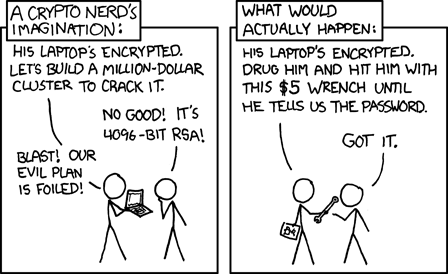
  • Security – As found on the always geeky and insightful xkcd webcomic blog

image

Other Personal Observations:

Having a cool security sticker/label on you systems that lets everyone know your system is encrypted offers no security if the system is a laptop and “lifted” while it is running and not locked down.

Just because the label says it is encrypted it in no way guarantees that the drive itself has actually been encrypted.  Security auditors still have to log and verify by accessing the system that the encryption solution has been correctly applied to the drive(s). If a technician images the system and forgets to apply the encryption solution (if not automatically deployed via system policies), the sticker provides a false and dangerous sense of security completion and protection for both management and the end-user.

While a properly encrypted system does protect and guard the data on the hard-drive itself, it

  1. Doesn’t mean that the data can’t be easily lifted by malware/trojan running on the system when the system is live and operating in an “unencrypted” mode,
  2. Doesn’t mean that the system no longer has “theft value” as someone could remove and discard the drive, drop in a replacement and sell the sucker at a pawn shop or eBay,
  3. Doesn’t mean that the data is protected enterprise-wide if the data is accessed/replicated across various desktop/laptop systems in the organization and any one of those systems escapes the disk-encryption process,
  4. Doesn’t help anything if people keep their access password or passphrase taped under their keyboard, to their monitor, or cpu base.

I’m fully supportive and highly value properly applied whole-disk encryption solutions.  However, it must be seen as just one more hardened layer of protection among many in a properly configured and applied organizational computer security structure.

--Claus V.

Utility and Software Lookout

Whew.  I’m exhausted from those last to PE 2.0 posts.

Prepare for some rapid-fire light posting.

These are freeware utilities and stuff that might be worth looking into that I found this week.

  • Process Explorer – version 11.33. One of the ultimate Microsoft Sysinternals tools. “This update fixes a bug where the history graph tooltips could display the wrong data point and reduces the memory footprint of the structures that store graph history.”
  • Autoruns for Windows – version 9.33. The other ultimate Microsoft Sysinternals tool. “This Autoruns update fixes a couple of minor bugs and adds a new Windows 7 location.”
  • WinPatrol v16 Monitors Changes to UAC Settings – If you are a Windows fan and have been anywhere alive over the past week, you probably have hear of some Win7 UAC design “feature” controversy.  Microsoft heard their customers and relented. However, if you use WinPatrol 2008 the upcoming version 16 will provide monitor and notification of changes to UAC settings.  That’s a nice layer to monitor, despite what Microsoft says.
  • AutoRun Eater - (freeware) – We’ve covered AutoRun issues and defenses here before. This neat security utility provides a different take.  It runs in the system tray full-time and monitors execution of autorun files when devices are inserted or executed.  Upon discovery it first performs an analysis. If a suspicious pattern is found, it blocks execution, tosses up a dialog window, and presents the suspicious code.  Then it allows the user to block or ignore execution.  Amazingly clever.  Certainly not a cure-all, but it might very well provide a first and easy to use line of defense for non-technical users as well as experienced system administrators who don’t want to use some of the tougher/lock-down methods against blocking all autorun executions.  Check out the Frequently Asked Questions page for details.  Spotted via Donna’s SecurityFlash blog.
  • Free Task Manager - (freeware) – I know it is kinda sacrilegious to mention any other Windows Task Manager in the same post as Process Explorer (my default manager), but this one might provide some features for less-technical users.  It doesn’t really “replace” the default Task Manager but provides some extended features such as Disk I/O graphing, port monitoring by application, and a locked-file identifier.  I have and use much more focused and specialized tools for all of those tasks, but for someone looking to move up from the standard, but doesn’t need the power-hitting utilities I use for those things, this might be worth looking into.
  • MyLastSearch v1.35 - (freeware) – NirSoft app that “…scans the cache and history files of your Web browser, and locate all search queries that you made with the most popular search engines (Google, Yahoo and MSN). The search queries that you made are displayed in a table.”  This version now lets you filter results by Web browser (in Advanced Options) .
  • IECacheView v1.25 - (freeware) – NirSoft app that “…that reads the cache folder of Internet Explorer, and displays the list of all files currently stored in the cache. For each cache file, the following information is displayed: Filename, Content Type, URL, Last Accessed Time, Last Modified Time, Expiration Time, Number Of Hits, File Size, Folder Name, and full path of the cache filename.”  This version now has an option to filter cache results by displaying only URLs which contain the specified filter strings.  Cool.
  • highlighter - (freeware) – Neat log file viewer and analysis tool spotted via SANS ISC Handler’s Diary post this week and offered by Mandiant.  I downloaded the msi installer and in a moment had it up and running. Besides being another tool to read log files, you can highlight words to focus on, and remove “good word patterns” to narrow down your view.  It also provides a neat GUI view in a dynamic image format to show content and structure of the file, along with a histogram view to show patterns in the file. It sounds like a lot but the utility is light, fast and easy to grasp.  It also comes with a nice help file.  Check it out.  If it’s from Mandiant, it must be good!
  • HolisticInfoSec.org: Mandiant Memoryze is the 2008 Toolsmith Tool of the Year – Deserved recognition for Mandiant.  Post has some neat tips on their Memoryze capture and analysis tool.
  • Threat Detector - Cyber Patrol – Web-based application that will scan a system (Internet Explorer only) and look for usage patterns for dangerous, malicious, or “bad” sites.  Might not help if the history/cache/browsing history has been nuked or if PrivateBrowsing was used.  However, for parents who have systems where the family uses IE exclusively, it might be worth doing a quick scan to see what comes up.  Just a tool, use with a grain of salt.
  • GBridge - (freeware) - “Gbridge is a free software that lets you sync folders, share files, chat and VNC securely and easily. It extends Google's gtalk service to a collaboration VPN (Virtual Private Network) that connects your computers and your close friends' computers directly and securely.”  I’m a big fan of ShowMyPC for free remote desktop support, but setting up a remote-to-my-pc connection is a $ feature and getting one set up and running with the open-source tools can be challenging.  MakeUseOf has a great how To: Extend Google Talk Into A Remote Access Tool With GBridge that shows you how to really make this work.
  • Wireshark: Wireshark 1.0.6 Released – Open Source network sniffing tool had various bug and security concerns fixed in this update.  In both full install and portable versions.

--Claus V.