Showing posts sorted by relevance for query NewsFox. Sort by date Show all posts

Wednesday, December 26, 2007

NewsFox Tweaks and Tips: Make it even easier to use!

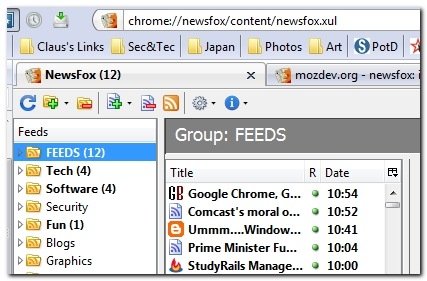
NewsFox is an RSS feed-reader Add-on extension for Firefox.

It has a three pane layout that fits within a single tab.  This allows loading of a sidebar item in Firefox without impacting the reader.

To the left is a column that shows a master "Feed" folder at the top.  This folder contains all your feeds.  Below you can create additional folders to place copies of your feed items into.  I have folders organized like "Tech", "Software", "Security", etc. This structure came out of my time using Sage as my Firefox RSS feed reader.  I've just preserved it, but don't really use them now due to NewsFox's great functionality.

To the right are two more panes, one over the other.  The top pane shows the feed posts and the bottom displays the feed content.

I won't bore you in this post about why I think NewsFox is the new greatest RSS feed reader on the block.  Please go read my gush on the "On the Edge of Firefox Bliss" post I did about a week ago. 

Since adopting NewsFox, it has not crashed, stalled or had any other issues.  It is fast, allows me to custom-organize and sort both my feeds and their category folders without locking me into an alphabetical nightmare.  It is easy to import a new feed list (OPML).  And feeds may be marked read individually, by post, or globally for the entire list with a single click.  And, you can even password and/or encrypt particular feeds, for what reason, I'm not sure, but it is cool to know it's supported.

However, there were a few tweaks and tips for NewsFox that I had to track down to make it really flow with my Firefox usage and feed reading.  Some of these are a repost from my previous article so I can combine them all here together. Some are new.

After making these easy adjustments I've been able to rip through anywhere from 100-300 pending feed posts in less than 30 minutes.

#1 - Tweak: Adding NewsFox to the Firefox RSS feed reader list

The current version makes adding RSS feeds a bit tedious.  You have to copy the feed URL then go into NewsFox and create a new feed, and paste the feed. Once saved and a refresh ran, it will correctly update the title information.  Not bad.  Native appearance of NewsFox in the RSS picker for Firefox will be added in an upcoming version.

When I find a page with an RSS feed I want to track, I don't want to go through all that copy/paste/refresh stuff. I just want to click the RSS icon in the address bar, send it to NewsFox and keep going.

If you want to add that ease in NewsFox right now, like I did, you can follow these steps to get it to show up in the list:

Starting in NewsFox 0.8.2, there is a bug so that the NewsFox autosubscribe option in Firefox does not get added properly. This will be fixed in 0.8.4. Here is how to add the autosubscribe facility manually: go to about:config and type browser.content in the filter box. Then change

browser.contentHandlers.types.3.title = NewsFox

browser.contentHandlers.types.3.uri = chrome://newsfox/content/addurl.xul?%s

You can use a different number than 3 in the above, but you need to use the same number for both preferences. For instance if you want to get rid of Bloglines, you can use 0 instead of 3. Alternatively you can install NewsFox 0.8.1 and then upgrade to 0.8.3.

Works like a charm!

#2 - Tweak: Customizing the NewsFox reading pane

The second issue I had was the bottom pane where the RSS posts are displayed.  The post text seemed a bit large on the font size, and the white background was too bright for my eyes. 

Would NewsFox support style changes to the color and font in the reader pane?

Style sheet for text view - MozDev forum post

Starting with Newsfox 0.7, the styling of articles in text view can be changed. This is done by editing the file 'textview.css' in the newsfox folder inside your profile folder. The file 'textview.css' is just an ordinary CSS file and can be edited with any text editor.
Here is the default file contents and a small view:

body
{
  font:10pt Verdana,sans-serif;
  background:white;
}
#newsfox-box
{
  background: #e3dfd9;
  padding:10px;
  overflow:hidden;
}

And here is an alternative file contents and a small view:

body
{
  font:12pt Helvetica;
  background: #dfdfbf;
  padding: 20px;
}
#newsfox-box
{
  font: 12pt Verdana;
  background: #7f9fbf;
  padding: 8px;
  overflow:hidden;
  border: 2px solid black;
}

In the body of the article, the alternative view has larger text in a different font, a parchment colored background, and more padding between the body of the article and the edge of the article box.

Inside the heading box, the alternative view has larger text, a different colored background, and a border around the heading box. Newsfox uses bold face type for the article title without it being specified in 'textview.css'.

The views are much narrower than is usual in order to fit this page better, which makes the alternative not as appealing due to the larger type and extra padding.
The syntax is reasonably self-explanatory once you understand 'px' for pixels and #xxyyzz is one way to specify a color. Use your favorite search engine with 'css tutorial' to find more information about CSS, and have text view look the way you like.

I ended up setting mine as follows:

body { font:8pt Verdana,sans-serif; background: #dfdfbf; }

#newsfox-box { background: #c7c7cf; padding:9px; overflow:hidden; }

.srch { color: red; font-weight: bold; }

Looks much better now.  Adjust your's accordingly. 

Here are some hex-code lists to get you started experimenting with:

Other classes are definable as well if you wish to tweak more:

The following classes are defined: .newsfox-mail, .newsfox-title, .newsfox-category, .newsfox-date, .newsfox-link, .newsfox-enclosures, .newsfox-encl. So you can style individual pieces of the newsfox-box in text view. For example, to keep the categories from showing, place

.newsfox-category { display: none; }

in your textview.css file inside your newsfox folder. The class .newsfox-enclosures refers to the span containing all enclosures, and .newsfox-encl refers to a single enclosure.

#3 - Tweak: Getting feed pages to open in a background tab

When I am rolling through all those feeds each day, I prefer to scan-though the posts, and then if they look interesting or worth bookmarking for a blog idea, I open the main page they link to.

Sage opened them in a background tab so I could have a ton opened and then later read them in detail later.  I had already set Firefox to open liked tabs in background tabs, but it didn't work with NewsFox. Each time I clicked on a post link, focus shifted from NewsFox to the new feed post, and I would have to click back to the NewsFox tab.  The CTRL-click worked, but I didn't want to have to do all that keyboard work.

Then I found an about:config setting tip over on Teuton's blog:

Open up a new tab and type about:config in the address bar of Firefox and hit enter.

In the filter bar, type browser.tabs and you will be able to filter down the list to those you want to look for.

  1. See if the browser.tabs.loadInBackground key is present.  If so, set it to true (as it should be).
  2. See if the browser.tabs.showSingleWindowModePrefs key is present. If so, set it to true.
  3. Finally, see if the browser.tabs.loadDivertedInBackground key is present. If so, set it to true.

If one of these keys isn't there, you will have to manually create it.

  • Right-click on the whitespace and select "New" then "Boolean".
  • Carefully enter the key's name from above you are missing, then set the value to "true".

These settings now allowed any NewsFox feed link I clicked on to open in a background tab every time.

Note: if you mis-enter a custom firefox key in about:config, there isn't an easy way to remove it. You have two options...one easy and one not.  The easy way is to select the bad key and set it to default.  Firefox will ignore any custom keys set to "default".  The difficult way is to close Firefox, then navigate to the prefs.js file in your Firefox profile folder.  Open it with a text-editor and carefully find and delete the line with the bad key.  Save the changes and start Firefox.  Make a backup of your prefs.js file first, just to be safe.

#4 - Tweak: Change the default three pane layout to three vertical panes

This was great!  I just didn't really like the over/under style of the feeds and the reading pane.  I preferred a more "Sage/Outlook 2003'ish" view.  Too bad it wasn't supported.

Guess what? It is!

Type "about:config" in the address bar and enter.

In the filter bar, type newsfox to filter the list.

Find the key newsfox.advanced.horizontalPanes and set the value to "true".

Restart NewsFox and be amazed!

#5 - Tweak: Changing the default sorting of your feeds

With Sage, I had to click on each feed item in the top sidebar pane, then could click individual posts I wanted to read in the bottom pane, or just scroll through all the posts in the reading pane.  With hundreds of posts each day to sort through, this was a lot of work.  It would have been nice to be able to sort them all by unread-status and then by date.

That way I could just fire up the RSS reader, and chronologically look at all my unread feed posts, ignoring those I have already read in the past.

I had hoped NewsFox would allow me to do this, but at first glance, it appeared that while I could click on a column in the feed listings to sort it, it was not sorting them this way be default.

It took me awhile but I finally found the about:config preference rules in the NewsFox beta notes.

To make a user defined default sort, set the about:config preferences newsfox.sorts.columnX and newsfox.sorts.directionX where X is 0, then 1, then 2, etc.. For example, the default is newsfox.sorts.column0="date" and newsfox.sorts.direction0="descending". To sort by date and then unread status (to put unread articles at the top), you can have

newsfox.sorts.column0="date"
newsfox.sorts.column1="read"
newsfox.sorts.direction0="descending"
newsfox.sorts.direction1="descending"

You do need to have newsfox.sorts.column0="none" in order to have no sorting, otherwise the default will happen. In fact, only the first letter of any of these preferences is ever looked at by NewsFox: newsfox.sorts.column0="d" is the same as "date". The columns are "flag", "title", "read", and "date".

By default, NewsFox comes with the following settings in about:config

newsfox.sorts.column0="date"
newsfox.sorts.direction0="descending"

So to get NewsFox to automatically sort all my feeds first by "read" status (presenting the unread feeds at the top), then by date (with newest ones at the top) each time I launched it, I opened up about:config, typed newsfox in the filter bar, then did the following:

Changed newsfox.sorts.column0 value "date" to newsfox.sorts.column0 to "read"

Added a new key newsfox.sorts.column1 with a value of "date"

Added a new key newsfox.sorts.direction1 with a value of "descending"

I restarted Firefox, then launched NewsFox.

Volia!

Automatic sorting of the feeds now, with the unread ones at the top sorted by date/time.

You can adjust and create your custom auto-sorts to your needs using the values and techniques shown above.

#6 - Tweak: More about:config special settings

The NewsFox version release notes are a great resource for more undocumented about:config tweaks and inner workings.  Many of these are actually in the GUI option settings, but some are not.

Options that can be changed within Newsfox options dialog:

  • style
    default: 1(text) Global style can be text or web.
  • checkOnStartup
    default: false Check feeds when Newsfox starts?
  • autoRefresh
    default: false Auto check feeds every autoRefreshInterval minutes?
  • autoRefreshInterval
    default: none This is measured in minutes. It is only used if autoRefresh is true.
  • notifyUponNew
    default: false This will notify you when Newsfox is done updating feeds. Currently doesn't work with K-Meleon.
  • confirmDelete
    default: true The default extra check on deletions can be bypassed by setting this to false (or by unchecking the box in the options dialog).

Options that can only be changed in 'about:config':

  • doneButton
    default: true after first use This is set to true after the first running of Newsfox when a button is placed on the menubar. If the user then removes the button, no second attempt to place it will be made if this option is true.
  • favicons
    default: from browser.chrome.favicons Favicons can be turned off/on with this option. The default is set from the browser preference for favicons.
  • guessHomepage
    default: trueNewsfox only looks for the favicon in [homepage]/favicon.ico (this may change in a future version). Some feeds don't set a homepage and hence Newsfox doesn't try and get a favicon. If this option is true, a simple guess is made at a homepage based on the feed URL.
  • refreshTimeoutInSeconds
    default: 60The number of seconds to wait for a response from a feed server before giving up. I read feeds where the server regularly takes up to 30 seconds to answer, but this option can probably be safely lowered (I use 40).

# 7 - Tip: Adding duplicate feeds

By default, NewsFox prevents you from adding duplicate feeds. Not sure why you would want to do this, but someone might.

To add a duplicate RSS feed, you need to manually add the second feed but add a "?text" to the end of the duplicate feed's URL, where text is whatever you want it to be.

use "http://xkcd.com/rss.xml" and "http://xkcd.com/rss.xml?hi" for example. The portion of the web address after the ? will be ignored if it doesn't make sense to the webpage server.

If there already is a question mark in the web address do the following: use

"http://news.google.com/?output=atom" and

"http://news.google.com/?output=atom&hi" for example.

#8 - Tweak: Open feed post link directly in the reading pane

In tweak Eight, I worked hard to figure out how to open a feed post link in a background tab in Firefox.  To me that is the purpose of a feed reader, read the feed and if interesting, open the link in a new tab.

Some folks however, want to see the actual feed-link web-page open in the reading pane itself.

To make this tweak, you will have to add the following key in your about:config settings:

newsfox.z.openInViewPane and set the boolean value to "true"

#9 - Tweak: Only manually mark feeds as "read"

By default, NewsFox will mark a feed post as "read" when you select it in the feed list.  I like this behavior myself as it lets me rip through a bunch of feeds quickly without pausing if i want to. However I can see where some power-users want to skim through all their feeds VERY fast and then go back and manually mark feeds as "read" at their leisure.

To make this tweak, you will have to add the following key in your about:config settings:

newsfox.z.selectMarksArticleAsRead and set the boolean value to "false"

#10 - Tip: Create custom feed search folders

Suppose you have a key word or topic that you want to monitor your RSS feed posts for. What to do?

NewsFox lets you create custom search feed folders with a range of filter values.

Finding and creating the search folders isn't easy at first, but when you realize where to go and how powerful they are, it is amazing!

Notice up in the icon bar for NewsFox the little folder with the green +?  There is a drop-down arrow next to it.  Select the arrow and click "search".

You will notice a small folder is now added to your feed folder list, and it has a magnifying glass on it.

You will also see a "Group Options" window come up. Give your custom folder a meaningful name "Vista related feeds" for example. Set the search values, and search text. I put "vista" in there in my trial-run. It can support pretty complex operations.

When done click "OK" and let it rip.

Now when you click on that particular folder, all the feeds that NewsFox has that apply to that search filter will be listed in that folder!

How cool is that?!!

Note One: Adding search folders does seem to slow down the feed discovery speed.  I think this is because it is having to search the content of each feed as it scans to see if the feed post needs to be added.  Use these when needed, and carefully.  Your performance experience may vary.  Removing my "Vista" test search folder remarkably sped up the feed finding again.

Note Two: If you do choose to use these, I do recommend following the NewsFox developer's advice to turn off the option to show the number of unread articles in your search feed folders.  It does tend to slow down the NewsFox reader even more.

I hope you have enjoyed this post.  And maybe gotten a glimpse at why I think NewsFox whips the pants off just about any feed reader for Firefox out there, including my former favorite, Sage.

--Claus

Monday, May 04, 2009

NewsFox XML Error in Firefox 3.5 b4 patched

Despite a rather involved search for an acceptable RSS feed reader (client or “embedded”) I’ve yet to find a RSS feed reader that surpasses the way the Firefox RSS Add-on NewsFox works for the way I surf/blog and read feeds.

NewsFox has been working fine with my RSS/Atom feed rendering up to and including the Firefox 3.1 beta 3 build I have been using.

Recently Firefox 3.5 beta 4 was released and NewsFox started throwing XML rendering issues on a number of feed posts.

Some RSS feeds would render correctly 100% of the time in NewsFox. Other RSS feeds would have some articles displayed properly and others did not.

Testing for a corrupt profile or Add-on cross-conflict didn’t resolve the issue so I assumed the issue had either to do with changes in the newer Firefox rendering engine code or the NewsFox parser wasn’t able interface with it correctly.

I’ve been using NewsFox version 1.0.5.RC1 with no issues (until now).

The developers of NewsFox have been on a much deserved vacation according to the NewsFox forum so I decided to just keep using Firefox 3.1 beta 3 until a newer version came up.

After about of week of periodic searches for others with a similar problem, I figured the NewsFox developers might not know what is going on so I posted a forum comment about my observations and error.

Amazingly I got a fast response from vaganyik wondering if it was related to Bug 20801.

Turns out it was.

R. Pruitt (a.k.a. wa84it) quickly posted this on the bug page:

The prior NewsFox strategy for displaying XML was

Atom and XML -> display XML
RSS -> try XML -> success: display as XML
-> failure: display as HTML

Unfortunately with Gecko 1.9.1, the 'try XML' step generates fatal errors
unable to be caught. At least it seems so from looking at it for 2 minutes.

Here is a version that does not do the 'try XML' step, and so should work fine
with FF3.5 and SM2.0. Final solutions will await when I really start looking
at things which may be a week or two. The only downside(ie why I bothered with
the 'try XML' step at all) is that SVG graphics and other XML goodies won't
display in RSS feeds, although they still will work in atom feeds.

Great background information on how NewsFox is working behind the scenes.

He also provides a CGI file there as well.

If you are running NewsFox, encounter the XML error on your feeds, and are using Firefox 3.5 beta 4 (tested in Windows (XP/Vista)) and want to be rid of them, then give the following “patch” a fix.


  1. Download the no XML errors in Gecko 1.9.1 (id=5854) CGI file by clicking on the link provided. It should offer you the change to install software into your Firefox build.

  2. Allow the install at the top notification bar.

  3. You should then get the “Software Installation” pop-up to install “attachment.cgi”.

  4. Don’t freak. The cgi file is like an XPI file.

  5. Allow the installation to progress. (You might have to override any “maxVersion’ compatibility checking.)

  6. You should then see NewsFox as listed being updated and Firefox needing a restart.

  7. Allow the restart and then recheck your NewsFox RSS feeds. All should now be well.
NewsFox should now report (post patch) in as NewsFox version 1.0.5rc1_noXML

Please note that this is just a temporary patch until the NewsFox coding guru’s can get back to work and do a more elegant fix.

Besides showing just how awesome the NewsFox maintainer R. Pruitt is, this has also clarified for me another question.

Often when adding new feeds, I am presented with options for RSS 1.0, RSS 2.0, or Atom feed formats.

I must admit that usually I just go with RSS 1.0 or 2.0 over Atom not really understanding the nuances between them.

However, it is clear that Atom format seems to be the preferred choice seeing how NewsFox renders the additional information they provide without errors. In comparison, NewsFox has to do additional handling steps when RSS feeds contain XML code.

For any NewsFox user who might be encountering this….

Cheers!

--Claus V.

P.S. This also fixes the same XML rendering error in the Firefox “nightly/Minefield” versions as well. However those builds have another issue with NewsFox in that the NewsFox area is reduced to approximately 3/4 of the tab area. Certainly functional but not the whole-tab coverage in the beta/final Firefox versions. I’m not complaining about that one as it’s one thing to have an error in a beta/RC version release and a whole different thing (IMHO) when you are using nightly developer builds. I wouldn’t want to waste the wa84it’s time focusing on alpha level browser build compatibility.

Saturday, October 04, 2008

Run NewsFox at Firefox Startup

As everyone knows by now, I am a die-hard NewsFox evangelist.

NewsFox is (IMHO) simply the best RSS feed reader Add-on for Firefox there is. Period.

I even get exciting looking for the latest (alpha/beta) releases of NewsFox.  Currently I’m on NewsFox 1.0.4rc1 (XPI link) and loving it.

In my post NewsFox Auto Feed Load “Fixed”, Nathaniel left me a comment posing a question I hadn’t considered before.  And I am glad he did!

... is there a way to get NewsFox to automatically fetch your feeds when you start Firefox and show you a little notification from the bottom of the screen like it does when you've opened NewsFox and it refreshes your feeds? That would be great for me, but as it is I have to open NewsFox to know what's up with my feeds...

Hmmm…..

Like Nathaniel, I have just always hit that little NewsFox icon in my toolbar once I got Firefox loaded so I could check my feed.  But could I somehow figure out a way to “auto-launch” NewsFox and have my feeds pulled and waiting for me?

Yep.  Turns out it is very simple.

How to Launch NewsFox at Firefox Startup

In Firefox go to the menu bar and select "Tools" then "Options".

Click on the "Main" button at the top and find the "Home Page" line where you have your home-page URL listed.

Go to the end of that URL (whatever yours may be) and then add the following after putting a space after it (although the “spaces” before/after the pipe don’t seem to be necessary, it helps me when I look at it):

| chrome://newsfox/content/newsfox.xulimage

Note that I used a "|" or "pipe" symbol. On my keyboards it is the one over the enter-key and shares the "\" key. This will tell Firefox at program launch to open each URL in that line as separated with a "|" as a new tab in the current window.  Actually you can add as many of these as you like for your favorite pages.

So for example, my line looks like this (all on one line):

http://grandstreamdreams.blogspot.com | chrome://newsfox/content/newsfox.xul

What this does is to open NewsFox in a secondary background tab behind my primary home-page tab on Firefox launch. If you want it to be the foreground tab, just swap the URLS between the "pipe" symbol.

NewsFox_Refresh_at_Launch Of course, it goes without saying that you must also have set NewsFox to automatically update and look for new feed posts at launch.  Do this and it should work perfectly!

Now when I fire up my Firefox at work at home, I am presented with not only my own homepage, but also NewsFox launches in the background and begins to refresh the feeds.

When done, the little NewsFox status icon in my status bar updates with the number of new feeds (as is does as well in the tab), and a little pop-up animation also notifies me of new feeds.

Sweet!

That wasn’t hard at all, was it!

Thanks Nathaniel!  Great inspiration leading me to a fantastic new application of NewsFox!

More Grand Stream Dreams posts on NewsFox.

Cheers!

--Claus

Saturday, February 07, 2009

More Browser Bits

A bitty collection of browser related linkage this week.

  • Newsfox NEXT v1.0.5rc1 – IMHO simply the best RSS feed Add-on extension for Firefox there is hands down.  Development has slowed but the developer continues to tweak it.  I’m using it right now and it performs great and is stable on my systems. The RSS feed that describes this release doesn’t pull up the actual update post yet so I have copied it below.

      This will become version 1.0.5 after bug fixes. This will not happen for months due to time constraints/scheduling. I expect that this version can be used without any difficulties.

      The usual disclaimers apply: this is a beta release so use it with caution on a backup of your Newsfox folder.

      The new features (where to look for bugs to fix):

      • Relative references allowed for NewsFox folder
        The folder for NewsFox has been hard coded which creates an annoyance, but not lack of functionality, when using portable Firefox. The annoyance being that the new directory needs to be chosen each time, and in fact if the newsfox directory is not carefully chosen so that it doesn't exist as a non-NewsFox folder on other machines, there could be problems running NewsFox. This version allows relative filenames such as ../../newsfox (. is the current directory and .. is the parent directory) and uses a default of ./ where .=the newsfox folder contained in the profile folder. Hence if you use ./, there should be no problems with portable Firefox. Existing users may wish to change their NewsFox folder to use a relative reference, either in Options > General tab > NewsFox directory or by setting newsfox.global.directory equal to './'. Equivalently, the about:config preference newsfox.global.directory can be reset(removed), which will cause the default to be used.
      • Expanded search option dialog if search is not over all feeds (bug#20506)
        It is now easier to set a search over a collection of feeds that is not a regular group. See the bug for more information.
      • Blank source or XHTML in source
        Now if a source is set in a feed and it has a blank name, NewsFox uses .... Also if XHTML is in the source name, NewsFox processes it correctly.
      • Sound for new articles (bug#20218)
        For sound notification set newsfox.global.notifyUponNewSound equal to true. If the file NFsound.wav exists in the profile directory, it will be played when there are new articles. If the file NFsound.wav does not exist, the system beep will be played.

      • R Pruitt (wa84it AT gmail.com)

  • Official Gmail Blog: New in Labs: Multiple Inboxes – This seems a bit inaccurate.  As I understand it, you can still only have one “inbox” in Gmail. You can’t display other account inbox’s in your gMail account view. What you can do is set up additional “viewing panes” that display items from your primary “inbox” that meet certain custom filter/label settings you configure.  Still, it’s pretty cool for power gMail users.  For more related links and tips:

  • Official Google Blog: Dive into the new Google Earth – Not really browser related, but still cool.  New Google Earth 5.0 includes additional features such as sea-floor “imagery”, tour layers, and a 3D map of Mars.  All pretty cool.  No word if/when these will be added to Google Maps.  See also Google Earth, Google Ocean: mysteries of the seafloor are mapped for the first time | Technology - guardian.co.uk

  • Mozilla Add-ons Blog - How to develop a Firefox extension – An updated walkthrough on the basic stages needed to develop a Firefox extension.  There are other great (and more technical) how-to’s on this subject already on the Net, but this might be one of the best places to start.  Assumes you have a fair bit of coding knowledge as well as familiarity on the Firefox application structure for folders/files.  I’d like to write a mini-add-on that adds a button on the toolbar that lets you instantly “back-up” your bookmark to a JSON file with a single click instead of having to browse through the menu-bar dropdowns and bookmarks manager.

--Claus V.

Monday, December 17, 2007

On the Edge of Firefox Bliss

Oh my, I've been down the Mozilla Wonderland of Firefox/Minefield 3.x (nightly builds) all weekend.

And though I have retreated back to the safety and familiarity of Firefox 2.0, I must say...I am now teetering on the edge of adopting Firefox 3.0 full time.

What pulled me back?  It was the bookmarks, baby.

Stick with me for a moment and see the Wonders that I found along the way.

Meet Firefox 3.0

I've long been running the latest alpha versions of Firefox 3.0 (a.k.a. Minefield) along side the stable 2.0 version.  I use 2.0 for all my daily work both at home and at work.  I still do a regular daily update of my Minefield installation as well.  I take it around the block for a bit to see the progress on "Places" and the memory leak issue, the speed and graphic and page rendering.

It has been a clean installation with no extensions.

If you want you can play with a "standalone/portable version of Firefox 3.0 beta 1" put together by PortableApps.com.  This is a good and safe way to experience Firefox 3.0 beta 1 without harming your existing 2.0 installation or profile. Or you can Build your Own: Firefox 3 (alpha/beta) Portable versions. Choice is yours depending on your geek-level.

WIRED has two very good articles that provide some hope on the state of Firefox 3.0's progress:

The first outlines some primary changes most users will encounter in the new version; a revised address bar functionality, the Places bookmarking system, the secure-website identification handling, the revised download manager, Add-on installations. While the second expands on the ages-old review of Firefox's memory-leak problem.

Regarding the Memory Leak Issue

My Firefox 2.0 with its large number of extensions averages about 146 MB of RAM.  That's quite a lot.  By comparison, Firefox 3.0 (nighty) is generally averaging about 97 MB RAM.  That's a bit of an improvement...but I wish it was slower.  Granted, this includes the about:config memory management tweaks I found still work for Firefox 3.0.

That 2nd post points out a new extension available only for version 3.0beta releases: RAMBack :: Firefox Add-ons.  This extension creates an icon for your toolbar.  When you click it, it releases memory that Firefox hangs onto for performance reasons.  CyberNet News has some more details on it: Clear Firefox Caches to Recover Memory.  My tests with it find that it temporarily recovers about 5 to 8 MB of RAM. Not much, but its a start.

For Firefox 2.0 users, who might be tempted to outfit their current version with using the Clear Cache Button :: Firefox Add-ons it doesn't seem to help in the same way as RAMBack.  It does dumps the cache files but in my tests, doesn't have any impact on program RAM used.

In the Mozilla Pipes...Firefox 3 Beta 2

The Firefox Extension Guru has some news on the next beta release of Firefox 3.0:

  • The current plan is to have Firefox 3 Beta 2 released on Friday, December 21st sometime in the afternoon
  • Firefox 3 version numbering is going to be be 3-part (3.0.X) instead of the current 4-part (3.0.0.X) scheme
    • However, extension developers can NOT yet use the new version scheme and must set their maxVersion at 3.0b2 (or whatever the current beta is at that time)
  • Extensions now require a secure update channel to function - either by using an updateURL with SSL or by using a new updateKey. Add-ons hosted at addons.mozilla.org are not affected by this.
  • Drinking the Mozilla 3.0 Kool-Aid (but now swallowing)

    So, enthused by the growing stability I was seeing in Firefox 3.0 nightlies, enjoying the speed of page-rendering, seeing the memory leak issue getting better, seeing Places in place in 3.0 now, and finding a number of extensions now 3.0 beta compatible, I decided to see if I could fully outfit my Firefox 3.0 nightly version and use it over the weekend.

    First thing was to pick out a handful of "critical" add-ons for Firefox that I can't live without.  I have quite a list.

    First thing I encountered was that most of them still were not compatible with 3.0 and refused to install.

    So, I did my little "hacking the fox" trick by downloaded them to my desktop, opened the .xpi files with 7-ZIP and edited the install.rdf file inside by bumping the max-version setting up to 4.0. I saved the file and added it back to the .xpi package. Then dragged and dropped it onto the Add-on window.

    I did this for about ten or twelve extension that weren't outright 3.0 compatible.

    When I rebooted, many of them were working, but a few were not. Sage, my favorite RSS feed reader refused to work due to the new Places bookmarking structure no doubt.

    However, the real deal-killer for most of them seemed to be a cryptic message that the extension "does not provide secure updates" resulting in a disabled extension.  This is tied into the changes activated that FF Extension Guru pointed out above in the last bullet. Unless the add-on .xpi package links to a secure web-address for it's source, it will not be allowed to run.

    Some users found that by editing the .xpi file to point to a https:// location (real/working or not) that allowed the extension to work.

    I quickly found a simpler (and more dangerous) global workaround to get these "hacked" extensions enabled:

    1. In your Firefox 3.0 address bar type the following: about:config
    2. Confirm the nice warning message that you are about to eat mushrooms,
    3. Right-click on some white-space on the page and select "New", then "Boolean"
    4. For the name carefully enter the following: extensions.checkUpdateSecurity
    5. For the value, set it to "false"

    Save the new key and restart Firefox.  Now they should all be working and you won't get the "Does not provide secure updates" deal-blocker for the modded extensions.

    So now I had all of my critical extensions and they seemed to be working well.  Of those that I chose, none seemed to have any fatal flaws that prevented them from working.  And as I said, a few were already natively 3.0 compatible already.

    A New Firefox Feed Reader

    I have gushed, evangelized and attempted to convert the masses to the joys of using Sage.  However, it just refused to work due to the new Places bookmarking structure.  Adding to my dismay, the extension hasn't had an update in a very long time, and no news has been forthcoming from the developers.

    I have considered using a freeware application-based RSS reader application (GreatNews, FeedGhost, Omea Reader, RSSOwl, orSharpReader) and there are some good ones out there, I have also tried Google Reader.  However, my blogging style just isn't conducive to these "stand-alone" RSS readers.

    Firefox does have a number of RSS feed reader extensions available besides Sage, these include Brief, Beatnik, and Wizz. I actually used Wizz for a week before finding it just a bit too awkward to use.  I really wanted something just like Sage, but that was Firefox 3.0 compatible.

    Then I found NewsFox.

    It knocked my socks off. It has all the features I wish Sage had and then some, but it remains fast and has features I didn't know I was missing.  It fully supports Firefox 3.0 builds as well as 2.0 builds.

    How much do I like it?

    This Sage evangelist has seen the light.  I exported my Sage RSS feeds in a OPML format.  I installed the NewsFox extension. And restarted Firefox.  Tonight, I have deleted my Sage RSS feeds out of my bookmarks and removed the Sage extension. No looking back.

    NewsFox allows you to build your own list, or import a list from a URL, file or OPML file.  I did the last one.  Then it allows you to add it in to your existing list of feeds for do a "clean start" which puts it in as-is.  In less than a minute there was my familiar RSS feed/folder breakdown, exactly as it was before.  I ran a quick update and the feeds were pulled in.

    NewsFox presents the feeds in a three-paned tabbed window format.  Sage opened the feeds in a tabbed window, but the interface selector was actually a sidebar element. So unless you had another extension that allowed loading of multiple sidebars, you couldn't have both, say, your bookmarks and the Sage open at the same time.  NewsFox allows this easily.

    Feeds may be viewed in a master folder "Feeds" that sorts all feeds by columns for a master view.  As I've noted, it also allows you to create your own folders for organizing your feeds. Folders can be ordered any way you wish and are not locked into an "alphabetical-only" format like some I've used.  Individual feeds also can be ordered inside them any way you wish.

    You can globally mark all feeds as "read", individual feeds, or individual folders.  That's something Sage didn't let you do either. Nice. You can even flag posts. You can encrypt feeds on the disk, and you can password-protect individual feeds to "secure them" from prying eyes.

    There are a number of options which I might discuss later, but you got-em by the loads.

    Feed scanning and processing is very, very fast.  It is easy to monitor the progress on the status bar.

    Adding NewsFox to the Firefox RSS feed reader list

    The current version makes adding RSS feeds a bit tedious.  You have to copy the feed URL then go into NewsFox and create a new feed, and paste the feed. Once saved and a refresh ran, it will correctly update the title information.  Not bad.  If you want to add in NewsFox to the Firefox drop-down RSS picker, you can follow these steps to get it to show up in the list:

    Starting in NewsFox 0.8.2, there is a bug so that the NewsFox autosubscribe option in Firefox does not get added properly. This will be fixed in 0.8.4. Here is how to add the autosubscribe facility manually: go to about:config and type browser.content in the filter box. Then change

    browser.contentHandlers.types.3.title = NewsFox

    browser.contentHandlers.types.3.uri = chrome://newsfox/content/addurl.xul?%s

    You can use a different number than 3 in the above, but you need to use the same number for both preferences. For instance if you want to get rid of Bloglines, you can use 0 instead of 3. Alternatively you can install NewsFox 0.8.1 and then upgrade to 0.8.3.

    Works like a charm!

    Customizing the NewsFox reading pane

    The other issue I had was the bottom pane where the RSS posts are displayed seemed a bit large on the font and the white background was too bright.  I had updated my CSS stylesheet for Sage to do a smaller font and a misty gray-blue background.  Could I do the same for NewsFox?

    Yep!

    Style sheet for text view - MozDev forum post

    Starting with Newsfox 0.7, the styling of articles in text view can be changed. This is done by editing the file 'textview.css' in the newsfox folder inside your profile folder. The file 'textview.css' is just an ordinary CSS file and can be edited with any text editor.
    Here is the default file contents and a small view:

    body
    {
      font:10pt Verdana,sans-serif;
      background:white;
    }
    #newsfox-box
    {
      background: #e3dfd9;
      padding:10px;
      overflow:hidden;
    }

    And here is an alternative file contents and a small view:

    body
    {
      font:12pt Helvetica;
      background: #dfdfbf;
      padding: 20px;
    }
    #newsfox-box
    {
      font: 12pt Verdana;
      background: #7f9fbf;
      padding: 8px;
      overflow:hidden;
      border: 2px solid black;
    }

    In the body of the article, the alternative view has larger text in a different font, a parchment colored background, and more padding between the body of the article and the edge of the article box.

    Inside the heading box, the alternative view has larger text, a different colored background, and a border around the heading box. Newsfox uses bold face type for the article title without it being specified in 'textview.css'.

    The views are much narrower than is usual in order to fit this page better, which makes the alternative not as appealing due to the larger type and extra padding.
    The syntax is reasonably self-explanatory once you understand 'px' for pixels and #xxyyzz is one way to specify a color. Use your favorite search engine with 'css tutorial' to find more information about CSS, and have text view look the way you like.

    I ended up setting mine as follows:

    body { font:8pt Verdana,sans-serif; background: #dfdfbf; }

    #newsfox-box { background: #c7c7cf; padding:9px; overflow:hidden; }

    .srch { color: red; font-weight: bold; }

    Looks much better now.

    The Firefox 3.0 Downfall

    For two days I used Firefox 3.0 quite happily.  Sure there were some quirks.  NewsFox absolutely refused to work if I had Firebug enabled on it.  For some reason, it appears that NoScript was keeping NewsFox from launching links from its reader pane in new tabs, unless I right-clicked the link and chose "open link in new tab."  I tried to whitelist it, but the chrome format it uses in the address bar just wasn't being accepted.  It worked fine in Firefox 2.0 with both Firebug and NoScript.

    I was able to sort though my (almost 100) RSS feeds with speed and ease. Because I could keep my bookmarks sidebar open at the same time as NewsFox, I could drag links for blogging topics over into my "To Blog" folder easily.

    Aside from a few "hacked extension" hangups...everything worked fine

    Except for a problem with my bookmarks.

    I had imported my bookmarks.html file from Firefox 2.0 into Firefox 3.0 and it went smoothly.  I had a bit of reorganizing to get the old-file structure in line under the new Places format, but it was easy enough to accomplish.

    It took me a while to get used to not looking for "Organize Bookmarks" option which is present in Firefox 2.0.  It is gone in 3.0 and now to open the "Library" window which contains your bookmarks and structure you click "view all bookmarks".  I didn't use the bookmark "tagging" ability, I did find the "most frequently accessed" and other automatic "specialty" bookmark folders in Places to be pretty handy and cool.

    But other than coming to terms with the new Places structure, I didn't have many problems.

    Until I began moving or re-ordering a bookmark in my folders, it would jump up several links from where I wanted to place it. Or it might appear near the very top.  Since I often have 8 to 10 groups of bookmarks with anywhere from 4 to 10 or more bookmarks in each group, hunting for a missing or mis-located bookmark became very frustrating.  And I was unable to find a good technique to put them back in order. It came down to a LOT of cut/paste of bookmarks to reinsert them where I wanted.

    I have a highly ordered and structured bookmarking system to keep track of all my blog post subjects and the like this was a Big Deal.  I continued to wrestle with "jumpy bookmarks" for the rest of Sunday, but it got so frustrating that I had to go back to the stability of Firefox 2.0.

    That's too bad because all-in-all using Firefox 3.0 (nightly) was a very pleasing experience.

    As soon as the bookmarking bugs get ironed out, I will make the jump to 3.0 permanent, even if they are still at alpha/beta level releases.

    It's really that good.  And now I have fully outfitted build of Firefox 3.0 to continue testing and monitoring the nightly updates for fixes.

    Bonus Must-Have Add-on.

    Rip (Remove it Permanently) is a (literally) killer Add-on extension for Firefox sure to make Computer World's next Top 10 Firefox extensions to avoid list.

    It compliments the other 3vil extension Adblock nicely.

    Whereas Adblock is like a sniper, picking out advertisements, ads, and other unwanted media elements on a case by case basis, Rip allows you to select block elements on a page...from very tiny ones to humongous ones. It has made a number of sites with rather annoyingly large blocks of ad/feature embellishments very enjoyable now to view and access.

    Definitely a keeper.

    So Firefox 3.0 (betas) are very close to being at the tipping point for daily usability. Just a few more bug-fixes and enhancements and I will be shutting down Firefox 2.0 and adopting 3.0.  And as it continues to climb up the beta-ladder, more developers will be putting the final touches on their 3.0 extension updates since they will be able to work with a version that is more stable and approaching final release code level.

    Happy Firefox frolicking!

    --Claus

    Monday, September 01, 2008

    NewsFox Auto Feed Load “Fixed”

    2008-09-01_105004

    I’ve been a NewsFox fan for some time now.

    It’s a RSS reader for Firefox and it is fast and has a lot of features that helps me power through hundreds of feed articles a day in minutes.

    For the past month or so however, I’ve been battling a nuisance with it; NewsFox would not auto-update my feeds at startup or according to the fresh schedule.

    At first I thought it might be due to the fact that NoScript or some other feature was blocking it.  I added some custom strings in but that didn’t help.

    Nobody seemed to be complaining and the constant march of new and beta updates of NewsFox didn’t seem to fix it.

    Was it a bug? Was it just me?

    Yesterday I went over to Forums and started poking around, with the thought I might finally ask if anyone else was seeing the same thing.

    Turns out, Schleeb had beat me to it: Auto-Refresh and Refresh all feeds on Startup not working | NewsFox

    Schleeb’s report sounded exactly like mine.

    While waiting for a response, Schleeb hit upon the solution.

    Sweet, I actually just figured it out. I'm pretty sure NewsFox must have recently changed in such a way that it looks at the "general.useragent.extra.firefox" variable, and if it doesn't see Firefox (as is the case in custom builds like I run) it wouldn't auto-refresh or refresh all feeds on startup. Once I manually changed that variable (which I shouldn't have to do) it started working again just fine.

    I opened up “about:config" in my Firefox build and found the following value for that key;

    Minefield/3.1b1pre

    I modified the value to Firefox/3.0.1 which I found seemed to be fairly "standard" after a bit of Google searching.

    I then went back and relaunched NewsFox and it began auto-updating the feeds again like old-times!  Hurray!

    Way to go Schleeb!  Brilliant catch!

    Schleeb's forum post seemed to get a cool response at first, but I posted a "thanks...worked for me as well" response.

    Then one of the NewsFox developers (wa84it) posted an additional followup that was more positive;

    Beginning in 1.0.4 for browsers that set general.useragent.extra.firefox(eg Firefox and Flock types):

    1) if the string contains 'fox/1', Firefox 1.x will be assumed.
    2) if the string contains 'fox/2', Firefox 2.x equivalent(Flock based on Gecko <= 1.8) will be assumed.
    3) otherwise it will be assumed the browser is capable of Firefox 3 type stuff.

    Currently, it goes the other direction. It seems weird that Minefield and Gran Paradiso would set this preference, or if they do that it wouldn't contain Firefox somewhere within it(at least Flock does that). They've already set navigator.userAgent equal to Minefield or Gran Paradiso, why are they setting this pref at all? I don't understand why Flock sets it either, they should set general.useragent.vendor?

    So, it looks like my problem (and Schleeb's) was that we were using Firefox "nightly" builds of Grand Paradiso and/or Minefield, and that Newsfox was behaving funny due to a check on the general.useragent.extra.firefox value.  It didn't like the entry found.

    Curiously, it doesn't look like Newsfox is the only thing this value can impact.

    Turns out that by tweaking this value to a more "standard" release version, you can cure some more bad-behavior.

    So far making that tweak hasn't seemed to make any difference on other Firefox Minefield operations.  But I'm having to keep a closer eye open now.

    This field seems to be some additional information which is added to the "user agent" control that indicates what browser Firefox is reporting as.  Among other things it is used by the Add-ons site to do a extension compatiblity check, so if you tweak it, don't tweak it too far off from your current version or you may get offered Add-on's that aren't really compatible with the Firefox version you are really running.

    I'll be working my way through my other systems applying this tweak until Newsfox 1.0.4 is released.

    In the meantime, if you have that same problem, you might try this tweak of Schleeb's.

    Worked like a charm for me.  Wasn't a deal-breaker with NewsFox but certainly an annoyance.

    --Claus

    Sunday, February 24, 2008

    More Firefox (Minefield/FF3 beta) Tips, Mostly

    As my regular readers may remember, I have Firefox loaded up on multiple systems at our home; on the main desktop system as well as both laptops.

    Generally I still keep them all "sync'ed" by exporting the bookmarks file to a USB stick and "importing" it back to the system I am using.  I'm usually able to keep it all straight in my mind and the girls don't use bookmarks much at all, so I haven't overwritten anyone (well, not that I know of).

    Last weekend, I did a MAJOR cleanup and reorganization of my bookmarks/folders in Minefield (Firefox 3.0 nightlies).  I've been using Minefield/Firefox 3.0 as my primary Firefox browser now that most all of the bugs in Places (the bookmarking system) have been worked out.  I REALLY like Firefox 3.0 now.  Wowzers.  Page rendering is awesome.

    Download Firefox 3 Beta 3

    Download Firefox "Minefield" - cutting-edge nightly builds of Firefox 3 - for brave idiots only.

    Only when I went to do my usual plan of importing the bookmarks from the Vista laptop Minefield build into the desktop Minefield build, it completely blew out Places/bookmarking on my desktop system.  Weird.

    I eventually was able to finally get it semi-working, but ended up completely blowing away my previous installation of Minefield and my Minefield associated user profile.  I rebuilt it from scratch.

    In doing so I learned some helpful tips.

    Extension/Add-on Handling Tip: Bypassing Compatibility & Security checks

    More and more Mozilla extension "Add-ons" are being updated to releases compatible with Firefox 3.0(betas).  This generally means great compatibility with Minefield as well.

    However, if you are running Minefield versions, just because the Add-on says it is compatible with Firefox 3.0beta3 doesn't mean it will install in the Nightlies.

    To suppress the warning that appears when you attempt to use an extension that does not support "secure updates" (new Firefox 3.0 feature), do the following:

    • Type about:config into Firefox's address bar and click the "I'll be careful, I promise!" button.
    • Right-click anywhere. Choose New>Boolean. Make the name of your new config value extensions.checkCompatibility and set it to false.
    • Make another new boolean pair called extensions.checkUpdateSecurity and set the value to false.
    • Restart Firefox.

    There you go!   

    (tip via Lifehacker's post Firefox 3 Beta: Make Your Extensions Work with the Firefox 3 Beta)

    See also this related article: Updating add-ons - MozillaZine Knowledge Base

    Once you do this, you may need to use and run the Nightly Tester Tools Add-on to force compatibility on some of the extensions.  You may still see some warnings on associated Add-ons, but they should still work as intended.

    Download Statusbar Add-on - Just for Nightly testers

    I really like the changes to the Download Manager in Firefox 3.  However, I've been a big fan of the Download Statusbar Firefox Add-on for a long time.  It just doesn't seem natural to not see it going.

    So when I installed it in Minefield, it just didn't work like I had expected.

    I did a bit of digging and found the developer does have a special version (0.9.6.1) just for the nightly Minefield users.

    Get it from this page.

    More Firefox 3.0 Anti-Malware website blocking fallout

    I'm still not satisfied after having gone through the work on my battle with Firefox 3's security blocking mechanism.

    Firefox 3 Security Blocker: Going In Deep

    I understand it.  I agree with it.  I still want a method to pass through to a blocked site (even if it must first be enabled in about:config to keep average users away from it) without having to disable the "suspected attack site" option in it's entirety.

    (By the way, ScanWith.com is now no longer being blocked in Firefox 3 any more.  Mischief managed?)

    I haven't see this become more of a pubic issue yet, but I think it very well might at more users move to Firefox 3 and encounter the behavior.

    Techworld picked it up and determined that the Firebug add-on is the only one of 27 Mozilla "Recommended Add-ons" that is being blocked by Firefox 3.0 at this time. 

    Techworld.com - Popular website falls foul of Firefox 3.0

    The main Firebug developer's page hosted at joehewitt.com remains blocked. However you can still get to Firebug via this site, Firebug :: Firefox Add-ons or this one Firebug - Web Development Evolved.

    Funny.

    Firefox Crash Reporting

    I've been crashing Firefox (Minefield) a lot more often lately than used to.

    I suspect it is something to do with NewsFox and Minefield.  Seems that it is safest to just let Newsfox run in the background and keep running by itself until all the new feeds have been identified.  If I switch to a new tab and continue browsing, sometimes I crash Minefield.

    I also had to reapply many of my NewsFox tweaks in my new Minefield profile.  However the latest version of NewsFox brings many of the options into the GUI Options settings in NewsFox so fewer about:config tweaks are required.

    I mention this as I am now seeing the new Mozilla crash-reporting tool.  As a good Firefox citizen I make it a habit of sending on the crash data to Mozilla.  Way I see it, this is my little way of maybe helping out the development and fine-tuning of an awesome product.

    Two Important Backup Tips

    One lesson I learned through this experience is how to correctly back up and restore my Places bookmarks as well as my NewsFox feed list.

    Minefield (Firefox 3) actually has two ways to manage the bookmarks.

    On the menu bar to go "Bookmarks" > "Show All Bookmarks"

    This will bring up the boomarks/Places management window called "Library".

    Notice the "Import and Backup" menu-bar item.

    The "Import" and "Export" options allow to you bring a html formatted bookmark file into your current bookmark structure.  Exporting sends your bookmarks out in a html formatted file.  This is useful if you wish to use them in another browser or application.

    The real power-toys come in with the second set of options; "Backup" and "Restore".

    Use the "Backup" option to create a snap-shot record of your entire Places/bookmark structure.  It will be saved (by default) with the current date in the filename.

    If you ever want to revert your Firefox 3.0 bookmarks completely to a prior version, then use the "Restore" feature and point to the location where you saved this manual backup.  (Note: Firefox also seems to perform automatic bookmark library backups as well and you could use one of these also.)

    What the restore does is to replace ALL the current bookmarks with the backup set.  It is a complete swap, so you don't have to do any rearranging and deleting of the old ones for the new ones like you would if you used the "Import" feature.

    Darn handy!

    So now, in my case as I move the bookmarks file between various systems, I always use the "Backup" and "Restore" options from within Firefox 3 instead of manually copying/pasting the profile's bookmark .html file(s).  That is what got me into trouble I believe with one of the newest nightly releases and led to my rebuild of Minefield/profile.

    In contrast, making and restoring a backup copy of your NewsFox feeds couldn't be simpler.

    Click the little gear looking icon to display the options for NewsFox.

    Choose "Export OMPL" and pick the location of your backup file placement.

    To restore, just choose the "Import OMPL" > "Start Fresh"  > "from file".  Browse to where your exported OMPL file is and bring it back in.

    Using this method you get a full and clean replace of your NewsFox feeds.

    Sweet.

    NoScript and YouTube (and then some).

    I'm a BIG fan of the Firefox Add-on NoScript.  It blocks all JavaScript and other XXS attacks.  Then you can enable scripts on a targeted basis permanently or temporarily depending on your needs.  I'm not comfortable doing any browsing without them.

    However, I noticed that in Minefield I wasn't able to see any embedded YouTube videos on any websites.  No matter what I enabled and allowed in NoScript.

    I finally got it solved.  Here's how.

    I read through all the NoScript release threads in MozillaZine Forums for previous NoScript versions and up to through the current one.

    I found the tip about adding "ytimg.com" to the NoScript whitelist and put that in (YouTube scripts now do a call to that web-domain so it must be allowed). Restarted. Nope. YouTube videos still not appearing. Yes, Flash was at the latest version.

    I also tried toggling the noscript.forbidActiveContentParentTrustCheck about:config preference to false as found as a suggesting.

    Still nothing.

    So I disabled NoScript entirely in my Add-ons. Restarted Minefield. Still not getting them.

    Just for kicks I installed the latest (beta) version of NoScript (1.4.4) to no improvement.

    Hmmm.

    So I closed out Minefield and popped over to my parallel Firefox 2.0.0.12 build which has an almost identical setup of extensions/settings. YouTube videos displayed just fine. NoScript settings were identical between the Minefield and Firefox 2.x.

    At this point I began thinking that maybe NoScript wasn't responsible for the issue I was seeing after all.

    So I went back to Minefield and started considering the extensions I have installed (some not yet "officially" supporting Minefield).

    The only one I could find that might have an impact was Adblock. So I disabled it. Restarted Minefield. Nope.

    Then I uninstalled it completely.

    Voilla! YouTubes videos were displaying in pages correctly again!

    Hurrah!

    I ended up switching to Adblock Plus instead (which is way better anyway) in Minefield/Firefox 3 and (along with NoScript) everything is working great and the YouTube embeds are working as well.

    My fault for "tweaking" unsupported extensions to work with Minefield. In most cases I've gotten away fine with it, but this time.....

    So if anyone else has read all the tips and still can't get YouTube videos to display in Minefield/Firefox 3, AND is running NoScript (and has added ytimg.com to the whitelist), AND has installed the Adblock add-on, well, try uninstalling Adblock and switching to Adblock Plus.

    Cheers!

    --Claus

    Friday, June 15, 2012

    RSS Feed Reader Upgrade - Hope through the storm (+more)

    Over the last few weeks a perfect storm apparently conspired to take out productivity on my personal laptop.

    First, I had woken up on a Saturday morning to find my smokin-hot laptop “Tatiana” would no longer boot. Four beeps of death and no BIOS boot screen. Coupled with that was a failing internet connection. Oh yeah, the cable-DVR box refused to output video signal.

    Bad Things™ were afoot! Bad, man.

    Between sporadic and brief periods of Nettage I was able to manage a download of Dell’s Studio 1558 Support doc with beep codes. Four beeps = RAM read/write failure. I breathed better after I had tried pulling out the two (new) Crucial 4GB Dimm sticks (total 8 GB RAM) and dropped back in the x2 2 GB OEM (Kingston) RAM that shipped with the system and it booted up normally again. Based on a super-kind investment from little-bro after I walked him through some dicey system issues a while back, I had upgraded Tatiana’s memory with two sweet 4 GB sticks of RAM from Crucial. With 8 GB on board, the system chews up the VM’s I’m running.

    Through trial and error I was eventually able to locate which of the two Crucial sticks went bad. I left the good 4 GB Dimm stick in and supplemented it with a 2 GB Kingston stick to limp by with 6 GB.

    Good news is that the Crucial gang have a generous warranty policy on their RAM and a week after I went through the RMA process, the replacement Dimm arrived today and is waiting installation. Yea Crucial! The entire process was a piece of cake and communications to me by Crucial were spot on! Customer service done right and one reason I return to them time-after-time for my RAM upgrades.

    The spotty Intertubes issue was another thing. Due credit to my ISP help desk, they never gave me a hassle during the troubleshooting process (do you have lights on your modem?) and let me jump right to the gist when I identified myself as network dude (sure, let me do a signal test like you suggest and BTW here’s the packet data results we are seeing…). The first time I called they couldn’t test down to the router as their entire system was down also (bummer). The second time they reported lots of packet loss and sent an updated config file to it. That helped a bit, for a day. Then back to spotty connectivity. I had already done extensive troubleshooting on the Cat-6 hard-wiring between the cable modem and my WiFi modem; it was fine as was my WiFi modem connection itself. Another call, another confirmation of packet issues, another day of a working network before regular outages began. “Sir, do you have splitter in the modem’s line?” “Yes, your last tech put it there himself. We’ve been good for over two years since.”  They offered to send a line tech but I didn’t feel like taking a day off work just yet.

    So last week after work I pulled my Dremel, put a wire polishing brush on the tip and from the outside of the house inward, unscrewed every coax connection, polished the threads and copper center wire, and reassembled…all the way back and including the cable modem box.  An hour or more later everything was bright/shiny and tight. And the connection was rock-solid again. Hurrah!

    The DVR cable box was a surprising issue.  It is Cisco RNG200 HD-DVR box and I use an HDMI cable to output signal to the TV. First check was the cable itself. Attaching it to the (now working again) Tatiana resulted in great video signal display to the TV. Not the cable.

    Maybe the box itself was failing?  For the past month we had noticed a trend where the video signal would go black suddenly for a few seconds before restoring again. Related perhaps?

    After finally getting a cheery cable-tech on the line from our provider, he listened patiently as I explained all the troubleshooting work I had done already and the growing video output signal dropouts. Immediately he sent a major re-programming order to the system (not your normal box reauthorization signal mind you). About forty minutes later the software had been digested, applied, and assimilated. The box sprang to life and signal was restored again. And all our recorded shows were still on the drive! Since then, we haven’t had any issues with video dropout either. Not sure what happened, but I’m guessing the software/firmware refresh cleared it up.

    Claus? What has this to do with RSS feeding?

    I’m getting to that.

    Amongst all this drama spread over a week or two getting resolved, Firefox 13 dropped, a significant Flash update dropped, and my Firefox/NewsFox combo for reading my almost 250 RSS feeds ground to a horrible stop.

    See, I found that every time I attempted to use NewsFox to pull my RSS feeds, it would inevitably hit one that had some kind of Flash/Java/script something and lock Firefox up completely. I could get it going again by waiting forever for a “script stopped responding” dialog to appear which might eventually allow me to continue on. However I found just killing the plugin-container sub-process with Process Explorer did the trick faster. To compound issues, I wasn’t seeing the Flash Player sub-processes kick off underneath the "plugin-container”.

    fkswe35k.x31

    Something bad was happening and only by killing the plugin-container process could I get control back of Firefox.

    I had previously experimented with dedicated client-based RSS feed readers, but have been a die-hard proponent of having my RSS feeds directly in my web-browser and NewsFox fit the need perfectly.

    So I started the search to see if there was a client-based RSS feed reader that would allow me to break out of my browser for RSS feed reading in the meantime, but still be compatible with the process to support my blogging work.

    After looking through the options on my (very) old post RSS Reader Roundup…Valca Style, checking out some newer apps, (including the slick new Mishra and Voyage readers) and picking though a ton of Google search results on the subject, I settled on two possible candidates; Feedreader and Omea Reader.

    Feedreader was very nice and has become quite polished since I last toyed with it. I was able to import my sizeable OMPL list from NewsFox and with a few tweaks had a nicely sorted/displayed 3-column view. The text view is beautiful for the articles and the feed information and article link presented at the top of each displayed article header was stunningly perfect. Feed updating was fast and stable. It was almost a perfect match. Except that despite all my attempts, the process of getting the link out and into Firefox just didn’t quite work smoothly. Since I bookmark interesting links during the week until blogging time rolls around this was a real problem. I don’t use IE regularly, but still prefer to leave it as my default system browser. So clicking a link opened up IE, which I then had to copy the link and paste it into Firefox and then reload the page and then save my bookmark. The total package is beautiful and simple.

    tymsuhoy.emm

    Omea Reader was brilliant and I’m using it full time now for my RSS needs.  Out of the box (as I posted originally back in 2008) it is very over-the-top feature rich. I was able to turn off features/tabs for contact management, favorites, HTML plugin, News plugin, Notes plugin, and pictures plugin.  Once disabled, all that I left running was the RSS plugin. I easily imported my OPML file and it raced through the feed updating rocket-fast.  It supports complex feed-view filtering as well as categorizations. I can set a ton of special filters and highlighting based on key-words.  The article text-view is nice (though not quite as polished as Feedreader). Some feed/links that NewsFox had issue with were no issue for Omea. It doesn’t have a launch at startup option (nor launch minimized) that I can tell, however I set it to launch as a scheduled task 5 minutes after login and that seems OK.  While running it seems to kill my Windows screen saver. Haven’t figured that out yet. In fact, my only complaint seems to be that the RSS article feed link is displayed at the very bottom of each post, rather than up in the header section like Feedreader. (Omea Team? Any tips to get the article link displayed in the header section?)  This means sometimes I need to scroll to the very bottom to open the link in a browser. Speaking of that, Omea is cool in that if I have Firefox running in the background and click a RSS feed link to view the full article in the browser, it sends it to Firefox as a new tab. From there I just deposit the page in my bookmark sidebar. That’s a Texas two-step dance I can live with. Sweet!

    iwnp00tc.ucd

    I’ve not given up yet on NewsFox and may return to it since I (below) sorted out the Firefox lockup issue I was plagued with, but I’ve clearly reached the tipping point.  The speed and feature set that Omea Reader bring me as a full featured, and semi-autonomous RSS reader have convinced me this was a wise way to go. I can update my feeds in the background without locking up my Firefox browsing.

    Now, soon after I had started getting used to Omea Reader, I had to turn my attention back to the constant lockup issues with Firefox. I was super close to jumping to Chrome full time. The only thing that saved me was the (continued) lack of a bookmarks sidebar in Chrome like Firefox has.

    The lockup issue ended up not being NewsFox add-on extension specific. It directly hurt the most because NewsFox was always open in the background and it seemed that anytime it or me hit a feed that had something going on triggering the event, Firefox would lock up.

    I disabled NoScript. I disabled AdBlock. No fix. Eventually I was able to find some web-pages (outside of NewsFox) that would cause the page load to lock up Firefox but not IE or Chrome. I had material to work with and it was clearly outside of being just a NewsFox problem

    Long story short, I eventually found through lengthy troubleshooting that the issue (in my case) was the Flash/Adobe/Shockwave plugins I had in my portable Firefox plugin folder; Mozilla Firefox, Portable Edition Support | Installing Plugins. Basically, Firefox Portable (which I use) has a FirefoxPortable\Data\plugins directory where you can keep your plugin files if you run the app on a system that lacks them.

    These here:

    m0zm2qw0.u1d

    + This

    fkswe35k.x31

    = Firefox lockups and no Flash sub-process execution!

    Instead:

    Nothing here:

    nfdd0c40.tfk

    + This

    lyxzhyj3.t0x

    = No Firefox lockup and the expected Flash sub-process executions!

    Firefox 13 tamed.

    Go figure.

    Despite the fact that the files I had in here were the same ones from where they are also “installed” on my system, emptying out the files in this folder solved the lockup issue I was experiencing. 

    Don’t know why that was an issue, but it was. With the portable plugin repository empty again, no more lockups since and Firefox seems just fine finding the appropriate browser plugins from their main installation location on my system.

    So it was with interest today that I found the following in my RSS feeds.

    A further option for remedying the problem is to deactivate Protected Mode. Under Windows 7 or Vista, this requires the addition of the line ProtectedMode=0 to the configuration file mms.cfg. Since Protected Mode is not used under Windows XP, this step is not necessary on that platform. In 64-bit editions of Windows 7 and Vista, mms.cfg is located in <%windir%\syswow64\macromed\flash>; in 32-bit versions the file is located in <%windir%\system32\macromed\flash>. Administrator privileges are required to modify these files. Detailed instructions can be found in Adobe's Protected Mode FAQ.

    Some users have traced some of their crashes back to the fact that Firefox's out-of-process plugin protection has been disabled. A support article on the Mozilla web site explains how to reverse this change.

    Adobe has gone even further and released instructions for downgrading Flash Player to a previous version. Users should on no account downgrade to build 11.2, however, as it is known to contain critical security vulnerabilities which are currently being actively exploited. Instead, users should install Flash Player 10.3, in which the vulnerabilities in question have been fixed in a similar way to version 11.3 since Adobe is continuing to supply enterprise customers with security patches for Flash 10.

    I had considered that the new sandboxing features might have been causing the issue, but since I had been able to replicate the issue in a parallel run of Firefox 12 I ruled the Firefox version 13 itself as being the source of my particular issue.

    I’m now turning my attention to picking through this detailed technical post in hopes it might help be understand what was going on:

    All is well in my case, and having weathered a perfect storm of technology problems, I’m pleased to say Firefox 13 is running strong, I have a new “high-end” RSS feed reader that is increasing both my performance and feed consuming hunger brilliantly, the cable box video output is good as new, and thanks to Crucial, I’m back to 8 GB system RAM on my notebook again.

    There is peace and harmony in the Valca home again.

    Hopefully somewhere, something in all these travails and victories might help someone.

    Cheers!

    --Claus V.

    Saturday, January 11, 2014

    NewsFox Update

    I’ve moved on from using a browser-based Add-on extension for my RSS/ATOM feed reading.

    Currently I am using Omea Reader as it best meets my power-feed reading and processing needs.

    There are many-many more standalone client-based RSS feed readers for Windows as well and I keep my eye out on them just in case something better comes along.

    On my iPhone I am now using Reeder 2 (Apple Store) having upgraded from the (still works nicely) original Reeder app for iOS. I like this one the best as I stubbornly use “standalone” feed readers rather than one of them many online/cloud-based feed reading service platforms. It works for me, though migrating my feeds from Reeder to Reeder 2 was less than easy.

    Anyway…long introduction to say that the Firefox based RSS feed reading Add-on NewsFox has been updated again.

    I still heavily follow the NewsFox development as it was IMHO the best Firefox based RSS feed reader out there, followed by Sage.

    So if you are interested, here are some links regarding the latest updates for NewsFox:

    Cheers,

    Claus V.

    Sunday, July 06, 2008

    Rapid-Fire Linkpost #1 – Mostly Firefox

    Got to make one last push on the link pile

    Alvis has been gone on an out-of-state church-camp for the past week.

    Lavie and I have been miserable.

    She is due back in the next few hours so I have a range of things still do to.

    More on Mozilla Weave.

    Weave is basically Mozilla’s answer to provide unified “web-cloud based” synchronization of key Firefox components; history, bookmarks, cookies, and maybe even extension Add-ons.

    Looks to be some neat stuff when released in the final form.

    Here are some great other-blog posts on the details and progress so far.

    Screenshot Tour: Mozilla Weave Synchronizes Your Browsing Experience – Lifehacker

    Firefox Weave 0.2: Sync Bookmarks, Tabs, History, Passwords, and More – CyberNet News

    First look: Mozilla Weave 0.2 puts Firefox in the cloud – ARS Technica

    I haven’t had the time yet to get a test-system configured to give it a whirl.  As soon as I do you can count on a post!

    Removing bad about:config entries

    If you have spent any time around this blog, you will know that from time to time I make recommendations of certain Firefox tweaks via the about:config settings.

    What happens when you make a custom entry that you regret?  How to you remove it?

    In Firefox 3.0 it’s simple:

    In about:config, right click on the mistyped value and choose "Reset." Then, restart Firefox. The value will be deleted. Simple!

    There you go!

    NewsFox Next release

    NewsFox – via Firefox Add-ons – is in my mind, simply the best RSS feed reader for Firefox integration there is.

    Period.

    New beta version has been released: NewsFox 1.0.2b3

    This is clearly a beta version, so use only if you must be on the cutting edge.  I have and the only issue with NewsFox 1.0.2b2 that I found was that the feeds didn’t auto-update upon NewsFox launch even though that is how the preference was set. Worked fine once I manually kicked off the feed check.

    If you want a stable version, get it via the Add-ons page at the first link.

    Now a word from Opera

    Opera is got to be the fastest, slickest, sexiest web browser out there for Windows. Even over Firefox.

    Late last week the Opera Desktop Team announced that they have released the final version of Opera 9.51.

    It’s very nice.

    (Opera 9.51 for Windows Changelog)

    No, I’m not giving up Firefox…but I do reach for this when I need a rocket-fast web-surfing session for specific tasks (checking radar, looking up an unplanned Google search, etc.).

    Good stuff!

    --Claus