He followed that one up with another related post, Just Browsing. See also his Invasion of Privacy post for browser fingerprinting and some perspective on “private/incognito” browsing session tracking.
The identification that (in some cases) your cellphone carrier could be adding extra headers to your smart-device information requests is not shocking in this day and age. But that it could contain (leak) your personally identifiable cell phone number was quite a surprise!
Consumer Cellular has agreements to use T-Mobile and AT&T networks. If my cellphone uses the T-Mobile network, then no extra headers are added to my HTTP requests. However, if my phone uses AT&T's network, then AT&T appends a lot of personal information to every HTTP request:
X-Att-Imsi: This is my International Mobile Subscribed Identity and is unique to my phone.
X-Att-Plmn-Id: This contains my MCC+MNC code; that's the mobile country code (MCC) and mobile network code (MNC). These values identify the country and carrier. For example, MCC 310 is the United States, and MNC 410 in the United States is Cingular Wireless (now AT&T).
X-Up-Calling-Line-Id: This contains my cellphone number. Seriously: AT&T sends my direct cellphone number to every website my phone visits. Looking over my web server logs, I see other people who have been through this same path. Thanks to AT&T, I have direct phone numbers for people in Portland, Oregon and Cincinnati, Ohio and Roanoke, Virginia and... I'm actually surprised that my cellphone hasn't received more telemarketer calls.
X-Up-Subno: This very-disturbing field includes a timestamp that shows when (down to the second) I signed up with Consumer Cellular.
That got me looking for more information and I didn’t find much.
This circa 2012 post goes into some additional details:
Running several tests with my cellular devices (with Wi-Fi disabled to force the data cross AT&T’s network) came back “clean” of any PII meta data; at least as far as this particular test was able to detect.
It was noted by the post author that the issue was with “medium-price-ranged” phones that needed a Web proxy to reformat Web content. And that iPhones and Androids do not do this.
Before you could be quite content to use your phone to check the time/date, maybe snap a photo, communicate via some texting, and -- of course -- make phone calls. Life was simple.
Then a smartphone comes along and you discover a world of applications that you must have to survive. Most are free but some are indispensible and mean dropping some $-$$ so you can be well kitted.
Sigh.
So in my last post, I shared a list of Apple iOS apps I had loaded up on my new smartphone to get started with.
A few weeks later (and an Apple iTunes 11 update to ice things off) I find I’ve now dropped a little mad-money on some paid apps as well as uncovered a few more free ones.
TeamViewer HD for Remote Control - free - iTunes App Store. For inside-the-network remote-control support I am really liking Mocha VNC for iPhone. But when I am in the field and remote-support of a family member’s system is required from the smartphone, I’ve turned to TeamViewer. I just point them to this TeamViewer Portable app to download and “install” to their local system and then I can connect at will. If I am at home and on my Windows systems, I still prefer the Remote ShowMyPC app, though subscribers do have a HTML viewer option available.
MapQuest - free - iTunes App Store. My brother put me on to this one. It’s major selling point is that you can have voice-guided turn-by-turn navigation.
Until the Google Maps for iOS app is re-released to the public, you can also follow these simple steps from PCMag.com on How to Get Google Maps on iOS 6.
Survival Guide - free - iTunes App Store. Works great as long as your battery is running. Probably better to study ahead of time and then refer if needed.
Wave Alarm - Motion Control Alarm Clock - free/$ - iTunes App Store. I really like the design interface for this alarm clock app. The ads are pretty obtrusive to the beautiful design, particularly in the horizontal orientation. Nice compliment to the same vendor’s free Wave Timer app I had previously downloaded.
Vimeo - free - iTunes App Store. Just released a few days ago, this new upate is very slick and works great for watching the very best Vimeo has to offer. (review)
NOAA Hi-Def Radar - $ - iTunes App Store. This is marginal improvement over the free MyRadar Weather Radar app I had previously downloaded. The radar image quality is much better, but it doesn’t seem to provide the true “real-time” radar imagery data I was hoping for. It seems to run about 3-4 minutes on average behind the current time. Not a “waste” but not quite what hoped. I also considered the $$ RadarScope app (review) but decided against it for now.
WeatherMap+ - $ - the iTunes App Store. Sure I have The Weather Channel® Max app which does a great job on providing current and future weather conditions and projections, but the WeatherMap+ takes it to next level by displaying advanced data in precip, temps, wind speed and pressures.
Spyglass - $$ - iTunes App Store. I had been playing with and using this same vendor’s Commander Compass Lite and liked it a lot. I had looked at upgrading to the Commander Compass app they offer but found out that it was superseded by Spyglass so I went with it instead. Besides advanced compass data, it also adds viewfinder/HUD, gyrocompass, map support, GPS tracking, rangefinder, sextant, inclinometer, and a few other neat things. Super geeky but super cool!
iHikeGPS - $$ - iTunes App Store. Having had a fun day-long walkabout in a state park recently with my brother and a friend, it stuck me that having some orienteering/topo maps handy could be a good thing. After a bit of research and study I went with this app. I haven’t had a chance to use it yet but just playing with it for the local area, it seems like it will fit the bill nicely. I also considered Topo Maps and Trails.
Still pending purchase…maybe just before the 2013 hurricane season?
Hurricane Tracker - $ - iTunes App Store. (review). Tons and tons of maps, charts, alerts, and tropical storm data for us hurricane data/tracking junkies.
Hurricane - $ - iTunes App Store. This one seems to be comparable to the Hurricane Tracker app above and seems to be beloved by many, many fans and reviewers.
I wish there were “trial” versions so we can try out some of these side-by-side before committing.
Over the past month or two I have shared a number of posts regarding my desire to explore upgrading my text/voice-only Samsung Mythic/SGH-a897 mobile phone.
It has been a solid performer and I love the haptic virtual keyboard.
Both Lavie and Alvis have iPhone 4 models. Mom and Dad both have iPhones. My brother has recently upgraded to a wicked iPhone 5.
I’ve been quite happy with just unlimited texting/mobile calls and supporting the family in the iOS phone arena.
Or so I thought. The more I supported them, the more the disparity between my phone and theirs became clear. At night I would ask Lavie to borrow hers when I didn’t want to pull out my laptop to check a TV schedule or look up an arcane fact on a whim. Alvis would roll her eyes when I asked her to look up something when we were running errands.
So, timing being what it is, I’ve pretty passionately followed all the buzz and technical details on the Windows 8 Phone. Windows 8 Phone: Linkage Round-up.
I liked a lot of what I saw. The hardware seemed solid. The OS seemed fresh and different. And Windows Phone 8 seemed to resolve a lot of the issues that hampered Windows Phone 7/7.5.
So with an offer of an early Christmas Day present from my brother and the image of a takeout pizza box lid in my mind, we went last Saturday to a local corporate mobile carrier and I walked out the door with an…Apple - iPhone 5 (black - 64GB), and a handful of accessories.
Whatever observations and parallels may have already been drawn along these lines by others in the past, I am struck by a feeling that I am reliving a lot of the Monolith interaction/awe first experienced in 2001 A Space Odyssey when I behold this object. I’m not sure if it is here to monitor and guide me or if I will be changed (positively or negatively) by it. It is an amazing tool to be sure.
It is seriously serious and I’m seriously and passionately in love with it. Samsung may have that sexy Galaxy S III ad and does a great job mocking a particular group of smartphone users, but when I reach for the black iPhone 5, I can’t help but think (guiltily and wrongly) of this Fiat 500 Abarth commercial.
Please bear with me as I explain just a bit.
My brother’s early gift was a significant factor, but maybe not the way gentle readers may think. He is a super-cool dude and I am forever indebted to him for this early and generous delivery. However, while it did influence when I made the iPhone jump (now rather than early next year), and what iPhone I jumped to (iPhone 5 at a 64 GB level), I have no doubt that I would have still gone with the iPhone…with it only being an iPhone 4/S at maybe a 16 GB level. That would have been well within my personal budget point with shelves being cleared for the iPhone 5 products and you can get them for $100 or so with a 2-year contract, or much less.
The more reviews I read, and the more ads I saw, and the more videos I watched on line, two “features” really stood out regarding the Windows Phones. I came to seriously find the “live” tile feature/notifications way too “noisy” and the phone and its app base seemed to be centered around online social media/interactions. The tiles constantly called out for attention and response. And all the core apps featured called for sharing information with others and getting information from others. Identifying these trends (fairly or not) was a clarion call that the Windows 8 Phone and I were likely not to be BFF’s. Being borderline OCD, I have enough trouble with my in-box at work not stressing me out and I’m continually challenged to not let my inbox drive my agenda/tasking. And while I get the whole social-media thing, I’m not a Twitter user, not a Facebook user, I do blog and love sharing info…but am at the core an introvert and prefer to interact with a small core of folks and emails and texting does me just fine…thank you very much. Having a phone that seemed centered around the on-line social experience and chattering at me all day long just didn’t seem like a good idea.
The more I researched and compared the apps available in the Apple App Store against those in the Windows Phone Apps+Games Store, the more the (current) disparity seemed clear. I could find some free apps for the Windows Phone I might use, I could find way-too-many apps in the Apple App Store I would actually need and…wait for it…purchase
Hardware wasn’t as much a deciding factor as I thought it would be. Almost all current smartphones (Android/Apple/Microsoft) all have an acceptable level of power for their OS platforms. And since I was going from a voice/texting platform, almost anything I picked would seem like a sports-car in comparison. Sure I read the tech specs and crunched the numbers, but any of the platforms I considered would have done a super job for my needs.
I could with some minor work, port our still growing iTunes library of music/video to the Windows Phone but with no work it could be added to the iPhone.
My whole family is happy dual-natured and I can support them fine: Desktop/Laptops are Windows OS. Mobile devices are iPhones/iPads and I can support them fine.
As I recounted in the last post, the cellular store sales folks practically ignored the latest Windows 8 Phones on their display shelf. They weren’t busy when I visited them and there was no concern they didn’t operate properly, or even at all. That sent a signal to me loud and clear…intended or not about that product line.
And then there was the pizza box. That was the clincher for me. See, I had dropped by a major pizza delivery chain on the way home from work a few weeks ago to grab dinner for us. I called ahead on the road and placed my order. I picked up the pies and while we were digging them out of the boxes, I noted that on the (very graphically overloaded) box lid, that they offered smartphone apps for both the Android and iPhone for placing your pizza order. But not for Windows Phone. And I really couldn’t imagine them placing one there for it. Ever. Once that became burned into my awareness, I suddenly found that MOST places and businesses and services I use and go do had Android and iPhone apps but none for Windows Phones. Not my bank, not my insurance company, not my grocery store, not my electric company, not my cable company, to name just a few. That is serious. To be fair, I’m sure that with time, maybe these places I spend my money at will eventually pay someone to develop a Windows Phone app. But they don’t have them yet…and I need them now. Maybe Microsoft’s Windows Phone will mature and go on to live in an app-rich eco-system. But right now it isn’t and I don’t need a chatty junior-high school BFF. I need a mature and trusted platform…especially if I’m going to be shelling out $-$$ for apps.
The iPhone 5 is slim (almost 1/2 the thickness of my former Samsung Mystic phone), super fast (is there a quad-core in that thing?), video display is the Retina type and super crisp and rich, all apps I’m using so far open super-fast; no crashes or hangs. Reception is way better than my Mystic ever was. I paired my quite old Jawbone Bluetooth to it. It’s taken me the better part of a week (and some loving and patient coaching through iOS idiosyncrasies from Lavie and Alvis) to get used to the navigational tricks but I never feel frustrated or lost. Siri is like having Zooey Deshanel in my pocket all the time. And yes, it is joined to our home Wi-Fi to save on data-plan usage.
For posterity (or the curious) listed below are the free/$-$$ Apple Apps I have loaded up on it right now to get started. I also have collection of playlist music loaded from our iTunes library along with three full-length digital movies. I’ve not even scratched the surface of the 64 GB of storage it holds.
Note: all links point to the application’s page in the iTunes App Store unless otherwise specified.
The Core Apps
These are the ones I expect to use the majority of the time for information intake.
Chrome - (free) - While the Safari browser on the iPhone is fine, I prefer the Chrome browser.
Gmail - (free) - I use this for one of my primary personal accounts…though sadly it doesn’t yet support multiple Gmail accounts at this time. I use the Apple Mail app for the rest of my email accounts.
Kindle - (free) - for all my Kindle books on the Amazon cloud.
Byline - ($$) - An RSS feed reader. I’ve uploaded my Omea Feed Reader OMPL file to Google Reader and linked Byline to that. I like that I can sync all my RSS feeds via home Wi-Fi and cache them to the iPhone to read at my pleasure on the go without hitting my data-plan balance if I don’t want to. It is very fast and hasn’t choked on any of the feeds I follow yet.
ESPN ScoreCenter - (free) - I don’t have it set to push notifications/alerts but wanted an easy location to check my favorite teams. This does the job much easier than checking Google and is very customizable.
Daily Utilities
These are apps that I may not use quite so frequently, but think I am going to need from a practical standpoint.
MiniKeePass - (free) - able to read my KeePass database on the go.
Wave Timer - (free) - timing made simple for hard-boiled eggs and other cooking fun.
Decibel 10th - (free) - for when I’m checking up on the sound-desk operations.
MyRadar Weather Radar - (free) - Adequate for now but I’m looking into other more HD quality radar apps ($-$$) with closer to “live” imaging. I’m a storm/radar junkie. Recommendations?
The Weather Channel® Max - ($) - no ads like the free version has. One of many weather apps available but this one seems to have a good balance for my personal needs.
Converter Plus - (free) - got it for metric and IT unit conversion support.
iHandy Carpenter - ($) - got the full set of apps so I can make sure those server/switch racks are pretty level (or not).
Easy Note + To Do - (free) - may not be the final choice. Wanted a simple (but visually neat) note/task list…not looking for a full PIMM app. Tried Franklin-Covey back in the day and we just didn’t get along in the long-term.
TED - (free) - motivations and outside-the-box visioning.
For the IT Guy
These are currently mostly helpful to me and the personal Wi-Fi/networks I have and support. They also provide useful lookup information for IT research and troubleshooting. Pretty cool stuff and capabilities, even around a mostly (still) wired world.
Fing - Network Scanner - (free) - who knew a super-cool network scanner I loved in a desktop version is available in a mobile version? Easy to keep an eye on my home network connections.
Deep Whois - ($) - super cool appearance and handy for IP/Hostname lookups.
Nice Trace - traceroute - ($) - This is a really handy and easy-to-use traceroute tool. Must have.
Network Ping Lite - (free) - Neat subnet pinger/sweeper with a few other tools tossed in.
Mocha iSys - (free) - While it isn’t a Process Explorer or Process Monitor app, it does provide a wealth of key technical info on the iPhone unit.
Mocha VNC for iPhone - ($$) - VNC remote viewer app to connect to a VNC-based server system. I use this around the house (and at the church-house) to remote-connect to our desktop systems. This paid version has enough bells and whistles to justify the expense over the free Mocha VNC Lite version which I tried for a few days. That was stable and easy so I jumped to the paid version. It worked flawlessly with my TightVNC server/apps. Cool Trick: connect my home laptop via Cat-6 to our 1 GB router port (Wi-Fi ok as well), connect laptop HDMI video output to our home TV with the HDMI cable. Jump on couch and watch streaming movies via Hulu outputed to big-screen and use Mocha VNC on iPhone as fancy remote to control streaming content selections on laptop. I remember as a kid when the BetaMax “remote” was a corded remote strung across the living room floor. How far have we come?! Alternative I considered was VNC Viewer for iPhone but there wasn’t a free version and I didn’t want to drop the ($$$) for a VNC Viewer I couldn’t trial first to be sure it worked flawlessly with TightVNC.
I still need to pick out a subnet/mask calculator. I’ve got several desktop apps I use, but would find a iPhone app version handy to have. I found a few so far but didn’t feel the love just yet for any I have uncovered so far.
Any additional IT/network support/reference App recommendations?
Expect considerably more iPhone OS postings and diminished Win 8 Phone posting here at GSD. If that bums you out, blame the pizza company and my brother.
If you have any advice and/or favorite apps you have found beneficial please consider sharing your experience in the comments. They would be well appreciated.
This is my biggest disappointment! I had hoped to have a lot more material here regarding the Samsung ATIV S phone that really caught my fancy. The design and features really impressed me and when I went into our mobile carrier’s area “corporate” store last week to look at the smart-phone choices and chat with the sales reps, they said they hadn’t heard much about it.
I really hadn’t expected it to be out until mid-December but was hoping for some more info.
Alas, information remains slim. And as of tonight, I still haven’t been able to confirm any pricing on our carrier’s network.
They did have section devoted to Windows 8 Phones out stocked with an HTC Win8 phone and some Nokia models.
Curiously, none were working and the staff didn’t seem to concerned. Some didn’t have any power at all. One was working but through an error message regarding the connection being “invalid” every time you flipped screens.
One was working, but the full experience was just thumbing through the basic apps. No live tiles were working and (again) the browser didn’t connect.
I was really shocked. As a fairly tech-savvy user shopping for a smart-phone, and showing interest in the Windows 8 Phone line offered, the entire experience was a major let-down. Rather than inspiring confidence in getting quality hands-on time with Microsoft Windows 8 Phone trying super-hard to crack the Apple iOS phone and Android grip, I was left disappointed and without confidence in the product and its offerings.
To be fair, that was probably not the fault of the Windows 8 Phone nor the HTC/Nokia products currently offered and more indicative of an official mobile carrier’s store and sales staff who seemed to be willing to treat the Win 8 Phone stock as an inconvenience. Different store and different staff and maybe things would be different.
However that was not the case and I was determined on walking out with a new smartphone.
And with that, I indeed did leave with a serious smartphone upgrade…and haven’t looked back since…
And to quote the sultry queen of bluegrass seduction Alison Krauss, I’ve got a New Favorite.
I’m in the process of planning for a mobile phone upgrade, maybe by the end of the year.
Currently I have a Samsung Mythic SGH-a897 on AT&T carrier. The standard 2-year contract has long since ended.
It is a “smart-phone” but I don’t carry a data-plan with it and only chose it because I am a frequent texter and the haptic virtual keyboard far outshined all the other available models with a full keyboard (virtual and actual) offering. It still runs great and the battery usually lasts two or three days of talk-time, always-on standby, and my texting. The camera is adequate, but not nearly a replacement for a digital camera which is why my Canon S95 is almost always EDC now. Not once have I missed not having a data plan or being able to tether it to my home WiFi. Nor do/can I really carry music files on it. Sure I’ve tried, but it really didn’t seem to work too well. So I also have a little iPod shuffle (clip model) with me as well for tunage.
I could continue to happily roll along this way for the next few years, however there has been a sea change around the Valca home and extended family.
Both parental units now have iPhone 4’s.
Both Alvis and Lavie now have iPhone 4’s.
Bro has an iPhone 4s.
Providing tech-support (of sorts) for these devices has made me a bit more aware of the extended benefits of smart phones so it seems it’s time for me to move forward.
So…I guess that means I’m getting an iPhone 5. Right?
Probably not.
At work, a daily occurrence is the often heated discussion between the iPhone tech holders versus the Android phone holders; which is better, who rooted what, what latest confectionary OS has been downloaded and on what platform (and who is still waiting), etc. Constantly.
And I’m tired of it.
In fact, it reminds me of the OS platform debates that the phone-platform wars supplanted; Windows vs. Apple vs. Linux.
I can see why the iPhone crowd is so passionate. I often borrow Lavie’s iPhone in bed and use it to look up the cable/TV schedule in Safari…or maybe a quick Wikipedia peek to scratch a mental itch. When I do use it the interface is very easy and intuitive to use. And the hardware is very polished (design wise) and just makes sense.
And I can also see the wide and expansive range of apps available on both the Android and iPhone platforms. Sure is lots of handy things there.
And being able to have one device for above average quick-picture snaps and carry a good collection of digital music and videos would be really, really nice.
But despite having regularly used the iPhone platforms, and dabbled with Android phones/apps, there is a good chance that I might take the path less traveled and plunk down for a Windows 8 Phone.
Funny thing is, not once, never-ever, at-all, have I actually seen one of these mythical “Windows Phones” out in the wild. They have only been seen my be in the cell-phone petting zoos. None of my family have one, none of my circle of friends, not even the chance-met stranger. Considering the very-small market-share Windows Phones are reported to hold, I guess that isn’t surprising.
So since I’ve not been able to get first-hand feedback from a real-world person I’ve had to read the Net and reviews and on-line feedback on the current Windows 7 Phone. Oh yeah, and watch Bones use one on TV. Not having access to a real-world Windows Phone is the biggest concern that is holding me back a bit and preventing me from becoming a Windows 8 Phone “evangelist” among the Apple/Droid crowd I rub-shoulders with.
Online feedback usually falls along three lines;
The UI is really nice and refreshingly different.
The (Windows 7 Phone) hardware isn’t quite up to the task; it’s adequate, but could be better for the OS demands.
There just aren’t nearly as many Apps for the Windows Phone platform as iPhone or Android. Get a Windows Phone and you might starve to App death.
The first one appeals to me. Unlike the tiles under Windows 8 OS, active tiles and the blocking layout really appeal to me here on a phone device. I get it. Logical, orderly, strong & solid. The design really fits me.
The new Windows 8 Phone hardware and OS seem to be fully developed now and should resolve performance issues and expectations held under the second point.
The third item really doesn’t bother me. Can I surf the net? Can I listen to music, or videos, or connect to my email account? Does it take good digital photos? SkyDrive support? Can I still text? Yes? I’m covered. And I continue to pop-in and check out the Windows Phone Marketplace.
The case design just rocks. While not steampunk, there is an air of industrial design to it. I particularly like the brushed aluminum back plate and the sliver of perforated grill on the back. There is something mechanical about the design. The front looks very similar (though wider and taller) to my Samsung Mystic in fact. The edges are rounded, but not too funky. It has a pretty square top-view and the bottom is more curvy and reminds me of retro Italian sport-car design from the sixties.
Hardware specs are nice: 1.5 Ghz dual-core processor, 1GB RAM, 8 MP camera (and front-facing camera as well), 16/32GB storage, and MicroSD slot support.
WiFi 802.11 a/b/g/n supported.
4.8” HD display.
3.5mm earjack.
Looks like it will fit in my current Samsung holster.
Want.
Price? Still an unknown.
In Second Place: HTC Windows Phone 8X
From what I know, HTC is one of the top-tier manufacturers of Android phones. So they have clearly been in the business for a while and can deliver great hardware.
HTC is a mobile smartphone platform leader. HTC’s got back.
I’m not as crazy about the case styling. I could accept the 8X model case, larger, more uniform, if I were to get it in black. The 8S being both smaller, and with that crazy Dairy Queen cone “dip” styling at the bottom leaves me unimpressed.
8X display is 4.3” HD, just a bit less than the ATIV.
WiFi 802.11 a/b/g/n supported.
3.5mm earjack.
Hardware-wise the 8X seems a close match for the ATIV, but the styling leaves me uncomfortable.
Sigh…I do like the “bold” color styling of the Nokia’s just a bit more than the HTC. Barely. But then the roundy horizontal cross section loses my interest.
The way the screen glass rounds to the device is interesting.
Is that inductive (cordless) charging I see? Hmm.
8.7 MP camera…largest of all contenders.
4.5” HD screen.
WiFi 802.11 a/b/g/n supported.
3.5mm earjack.
Camera/video handling seems to be the major point to stand out this device from the rest.
Turn-by-Turn voice navigation with Nokia Maps app.
Additional Viewpoints
And then there are the rumors and rumblings of a Microsoft-hardware released product down the road…
Phone Designer - Designer Jonas Daehnert’s Facebook page for phone designs.
Would I consider a Microsoft-provided Windows Phone? Sure..if the hardware matched and the price was competitive. Will that possibility keep me from picking up a Windows 8 phone before the end of the year…certainly not…unless it was 100% confirmed that Jonas Daehnert’s outstanding MS phone design got picked up by Redmond.
Now I need to work some numbers with AT&T to see if their "AT&T Shared Data” plan would provide a better value once a third smartphone/data sucker is added or if our current method of have a shared Family call plan with unlimited texting package for everyone + individual data plans for each phone would be cheaper.
Will keep you posted on any new Windows 8 phone goings-on and how my considerations are running.
And if any GSD followers are actually using a Windows 7 phone and would like to leave their own thoughts on “real-world” usage to counterpoint the iPhone/Droid fans, they would be appreciated.
…posted while waiting for my 500 Gig HDD to be zero’ed out before setting up the partitions.
One of the things I’ve been working hard at doing is staying more in touch with my little brother. Well, he’s not physically little, but he is a few years younger than me so I guess that fits for something.
He and I are both quite busy during the work-week, and due to the distance, it’s not always easy to just pick up the phone for a telephone-based conversation.
However I’m finding great joy and shared accountability in feeding our relationship with more time and conversations.
To that end, we have of late become great texting buddies, sending multiple messages during the day to each other. This seems to work well as they are more unobtrusive and allow us both to keep focused on work tasks but do present a nice quick keep-alive “ping”.
Little Bro has a nice shiny and l33t iPhone. He can do some power-texting with it.
Me? Up until recently I’ve been having to keep up with my Samsung SGH-A727 multimedia phone. It’s a fantastic phone, slim, looks incredible, and sports some long battery life. No moving parts means nothing will break without effort. However, texting on the numeric keyboard is a pain in the *ss. Seriously. It’s embarrassing.
So I needed to find one with a QWERTY type keyboard. I didn’t want an iPhone and since I didn’t want to ding the budget with a data-plan upgrade (unlimited family texting is fine for now), my choices with AT&T were a bit limited.
So I hit the Net and began researching. I had narrowed it down to the following models.
The Solstice seemed nice enough but it just didn’t inspire me much for some reason.
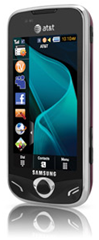
I really liked the Impression with the physical slide-out keyboard. However reading the user’s guide I learned that it didn’t have voice-dialing, a feature I used heavily on my old Nokia flip-phone, my current Blackberry, and is painfully missing on my A727 phone. However, the Impression’s QWERTY “real” keyboard might still win out. They Mythic was a fresh model release, looked really beautiful, but didn’t have a “real” keyboard, only the virtual touch-screen one. It did have the voice-dialing feature that the A877 did not.
So more research was in order. Luckily Google is my dearest friend (next to Lavie…).
The “print” reviews seemed quite positive about the phone, while the video reviews were a bit harsher, particularly regarding feedback and touch-screen in general. I weighted those with some thought they were using the iPhone touch screen as a gold-standard of sorts.
I also pre-downloaded and read (yes, read) the Mythic User’s Guide booklet to make sure I understood and could benefit from the features.
In the end it would come down to a visit and some Valca “hands-on” time at one of the local AT&T storefronts.
I quickly learned just how small and awkward the Impression’s physical keyboard felt while texting in my hands. On the other hand I could compose a novel with very few mis-registers on the Mythic’s touch-screen. It does provide “haptic feedback", which means it vibrates to confirm each key press. Nice touch. So the keyboard feel sold me, coupled with the voice dialing feature. When the store manager learned that I planned to just order it from the AT&T on-line store due the great discount offered, they said they wouldn’t just match, but would beat it (something they wouldn't do when I picked up my A727. And they did. Quite nicely. I’m not sure that was a late night “Black Friday” thing or maybe sales were slow. Regardless I walked out with a new phone, the Samsung Mythic.
Thoughts
If you want a real, technical review of the device, go back up and hit the links provided above. After a week’s usage I’d say they are all generally fair and accurate.
One other thing I heard mentioned in some of the video reviews of the device was that it was described as a “chick” phone (chick as in “girl”). Moving from the tech-cool A727 style, I was a bit concerned. As we all know, a guy can’t be seen with a “chick” cell phone right?
Well, I’ve had it in heavy use for a week now and have more than a few thoughts. I still don’t regret the decision. For a text-only needing, non-data-plan using dude, it works very well.
Size, heft, and physical styling are all high marks. I wish it were just a bit less rounded on the edges as I feel it might tend to slide out of my hands. The design also lends it to perform like a curling-stone on ice when placed on the passenger’s seat and I stop or corner too fast. It is more secure left in the cup-holder station. The front has the big screen with some black framing and chrome edging. The back side actually has a deep rich burgundy/dark-cherry color with some tech-abstract Spirograph-like black striping. It looks very professional and the color surprised (in a good way) from what I had expected from the web-images.
The camera/photo package is nice. Photo resolutions are great, it has a “real” flash built in, lots of photo-editing and filter effects, and will auto-resize pictures before text-message sending them. Handy.
The video playback is very smooth in my testing. I’ve no interest to use the AT&T streaming TV feature, but copying video files over and watching them on it is not too bad. Though for my use it is more of a novelty and show-off thing. I’m not the demographic that feature was designed for.
Call quality is nice. No complaints from my voice parties. I do prefer to use my Jawbone with it however.
The main screen has three different “desktops” which you can then put and rearrange “widgets” onto. Each can be wallpapered separately. This is where things break down a bit for me. I’ve got a different desktop image for each one I resized/cropped for my personal pleasure. However the widgets don’t always stay put where placed when they “activate” That ends up covering up much the nice wallpapers and kinda defeats the purpose. As a Windows guy I’m used to putting desktop icons in place and them staying locked there. This doesn’t happen on the Mythic.
(my personally crafted Mythic “beautiful things” wallpapers currently in service on my phone; P-51 Mustang, a retro Amy Adams, a retro Moon Radio. I’m sure a psychoanalysis of me based on these images would be fascinating…)
Now imagine having the widgets jump from their unobtrusively placed locations (bottom 1/3 area of pics above) to the center or top areas when “activated” and not return to the original place. Who wants to cover all that beauty up? But “hiding” the widgets on the otherwise handy sidebar feature also doesn’t always work as they will re-pop on the desktop in some cases, or require even worse digging in the menu system to launch. Bother.
Also the Menu screen has three pages (expandable to 4-5 total) with a wealth of additional application icons, settings buttons, etc. Many, many of them deal with applications for streaming media services, social media (Twitter’ish) apps, Yahoo stuff, things like that. Some can be removed. Most cannot and are locked in place. What results is a bunch of locked in iPhone like icons that I have to wade through to find the six or seven I really care to use.
As mentioned, while you can change the wallpapers, the “lock” screen provides a screensaver slideshow of locked images full of flowers, butterflies and other pretty things. While I don’t need “girlie” (as in Playboy) wallpapers, I also don’t find it too appealing to be locked into “girly” (as in Alvis and Lavie loving) images either. You can’t change the images shown. You can’t change the screensaver. Yep. It is a really pretty phone.
Luckily, I can set the “fade to black” timeout period to 8 sec or so. That takes care of that a bit. Though I wish they had at least offered this one as a default along with an “alternative” guy or neutral-image (abstracts only) screensaver. That might expand the appeal to more guys. Fortunately for Samsung I’m flexible and am one of those more emotionally sensitive tolerant types.
Another thing moving from the A727 to a “feature” phone like the Mythic is I am getting used to is the battery time. Like I said, going 3-4 days of call/texting use between recharges on the A727 was common. Now I can usually make it two days (tops) on the Mythic. I don’t think it’s a bad battery or unit, it’s that the screen is so much larger, and brighter and on more as I compose text messages. Typically it shows all battery bars for one day. Then drops one or two bars…looking like a 1/2 charge remains. Then I do a text or have a voice call and BAM the battery indicator is showing emptied. So for this month I’m letting it fully discharge a few times and then will be hooking it to the charger nightly.
I got a clear-plastic case for it while in use on my desk or weekend running in my jeans. For the daily work-week I found a nice Blackberry mag-latch vertical holster fit it perfectly (sans the clear-plastic weekender shell). I did allow myself to be sold on the clear-plastic screen protectors as well. They work well and don’t impact feel of the touch-screen whatsoever.
One last quibble. As a Windows guy, I’m used to the double-click the icon rhythm to launch an application. On the Mythic I’m still getting trained by the device if it is long-hold push to execute the application/widget, or if it is a double-tap, or a single-tap. Different things seem to require different actions. Please Samsung. Sick with a double-tap activation. This is driving me a bit batty. I need some consistency!
Voice-dialing is quite useful. Although I still have to find and push the widget button to get it activated first. Awkward while driving but an improvement over hunting through the contacts as I did before on the A727.
Overall texting is great now, and the device really does look smashing in both form and function. I just wish it was a bit more refined and, well, customizable.
Management with a Windows 7 x64 bit System
Silly me. I thought I could just download the PC/phone management link software and go.
I mean, the driver/software package was just released in late November.
Wrong…at least for x64 bit Windows 7. Tons of driver installation issues.
Fortunately, after a wasted-night’s worth of banging the drivers into the system, I gave up, and just plugged the sucker into the Win 7 system via the USB cable and amazingly Windows 7 picked it up as a mass-storage device (because of the SSD micro card in it).
This finding means that while I can’t manage any contact info or stuff like that, I can copy images, files, music, and videos back and forth easily with no fuss.
So instead of using the Samsung software I’ve been using the following freeware Windows tools to create wallpaper and convert video files for playback on it. Your results may vary.
As for picture files and wallpaper making, the “desktop” screen takes a 800x480 ration sizing. So in most cases I just use FastStone Image Viewer or Photoscape or even Hornil StylePix to resize and crop my preferred images for application as wallpapers.
Then I just transfer it all over USB onto the memory card on the phone. Done.
Of course, you could always just find some pre-made wallpapers (and other media items) already done for your Samsung Mythic:
Still to do: make a few United States Military Academy at West Point wallpapers with that stunning coat of arms. (more regarding the USMA’s coat of arms and motto here.) (And to clarify for the curious Google led visitor to this page, I did not attend and am not a graduate in any form or fashion of West Point. I did make a run at selection to the US Air Force Academy my senior year in high school, but bowed out during the process (story for another day.) Dad was an decorated US Army officer who served in the Vietnam “conflict”. And I still deeply hold to the many core values held by the various proud US military branches of service; and try to apply specific USMA-West Point leadership examples in my daily work and home-life: The West Point Way of Leadership by Larry Donnithorne.
Hmm. I’m digressing.
I’ve also got to clip a sound-sample of this awesome “Let A Stranger Drive You Home” Heineken Commercial . As much as I like the Biz Markie’s - Just A Friend “original” remake of the original Just a Friend by Freddie Scott, I have to say, I’d buy a single from iTunes just to hear the cabbie’s (Timm Cooney) entire rendition of Just a Friend. Timm not only sings the song, but owns it with soul!
.Still digressing I see…
Additional Resources for the Mythic Hacking Geeks
Here are some more links for tips, tricks and hacks of your Samsung Mythic.
Most of the info is both helpful and great reference. But some is hard-core programming-code feature hacking so “here be dragons” and proceed at risk of bricking your phone.
Hope someone considering or owning a Samsung Mythic finds this useful.
Oh..and what of my cherished cool-tech Samsung A727 phone?
Funnily enough, Alvis has ditched her AT&T Quickfire phone (with both a “real” and virtual QWERTY keyboard, swapped out SIM cards, and is now using it as her cool-chick phone.
Ironic.
And to make matters more embarrassing, she said she can text message her friends faster on the cursed numeric keypad than the QWERTY keyboards of the Quickfire.
Not only did I get to borrow some neat hardware for drive work, I also tried to provide some perspectives and opinions on “forensically-sound” image capture.
On top of that, I also had just enough time to really play with Harlan Carvey’s RegRipper on a real (non-investigation related) image capture. More on that later in the post.
It was a very crazy week but I felt oddly satisfied; that I had begun to get a handle on some nagging things.
Documentation is Everything
Shop-talking this week about incident-response in general, and “what-if” scenarios, I had the opportunity to share the importance of establishing and documenting what was done when a suspect system is focused upon. Please note: I am not a forensic expert (IANAFE) but there are some some basic common sense things that need to be done. Particularly when it isn’t clear at the onset if the system drive will just be wiped and reimaged or if it needs to be officially escalated to internal or external law-enforcement groups.
As such, it seems imperative that the responder approach the system with the thought in mind of preservation of the machine state as well as documentation of what was done; just in case one has to explain what occurred with the drive/system along the way.
As I don’t personally have any such standard templates that would fit the bill, I had to go looking for some that we could use in a pinch. Luckily I found enough to get me covered for now, and certainly will inspire me when I have the time to design our own.
forensic it chain of custody document – docstoc – search page for related documents of that theme. There were quite a number of good looking forms. I didn’t have time to try to figure out the download process, but even then, I was able to view them and get a better sense of what I was looking for.
Forensic Bibliography – E-Evidence Information Center – great resource page with lots of direct links to PDF and other documents related to evidence collection worksheets, search-warrant templates, and chain-of-custody tracking. I snagged more than a few forms from this site.
USSS Best Practices Guide to Seizing Electronic Evidence v3 – United States Secret Service “pocket-guide”. Update: it has been noted and observed in the post comments that information in this guide seems dated (internal pdf properties give a document year of 2006). And as commenter Erik notes the guide mentions pulling network connectivity and powering system off. Yet as incident responders know; obtaining network traffic captures (at least for a period) as well as running system memory dump/image, and process/port/endpoint mappings could provide additional clues and information that will be irrevocably lost if the system is simply powered off almost immediately upon seizure. -cv.
Authors for Hacking Exposed Computer Forensics – WaybackMachine Internet Archive – The original site of this book appears gone, but some of the links back to forensic checklists, kit suggestions, and forms still live on. Found a few more goodies here.
Technology Pathways Resource Center – Technology Pathways – Simply one of the best collections of updated and current forensic documentation, whitepapers, tool downloads, and general subject material there is out there; period. A must-bookmark page. I only wish it had an RSS feed to monitor for updates.
Image Capture: Forensic Style: Part One
As I mentioned, I finally got my hands on a Windows system that seemed great to use as a test-bed. I had worked the better part of a morning a few weeks ago prepping a special-build XP Pro system-deployment to be used for hand-on-testing of applicants to our team. I took a base system image for the hardware used, then stripped off all the non-essential applications, removed some accounts, set it up to auto-log-in to a restricted user account desktop (after a successful boot by the applicant). It worked great and I dusted off some cobwebs from my brain in the process. When done I captured an ImageX WIM of the system, to make redeployment easy in the future of this particular one-use system.
Before I wiped and reimaged it (I use it for image-building for that particular hardware model) I figured now was a great chance to try to practice capturing a “forensic” image file and then have it to practice on.
The first step was getting a forensically “sound” image of the drive.
To do that corrected with no doubt, it is clear that the preferred method is to use a physical write-block device in-line between the drive and the OS used to capture the image. Something I don’t (yet) have.
I’ve been looking between two primary models:
Tableau T35es eSATA Forensic Bridge – Tableau Forensics Products – Seems to support just about any type of drive type there is. I’m not sure if all the drive type connectors are included or extra.
I’m not sure which would be better but luckily I was able to find a very current review by a forensic professional that seemed to provide a great comparison between the two.
It seemed to find both very good choices, though the Tableau product seemed to have the edge.
They are pricy (if self-bought) seeming to fall in the $250 - $300 range (with cable sets). But seem a critical piece of hardware for forensic-level system captures.
A non-forensically-sound alternative would be a USB drive adapter such as one of these.
Definitely, these provide NO physical write-block protection, though they do offer a convenient way for a support technician or analyst to test and recover files/system off a drive externally.
In fact, I was able to borrow Mr. No’s Vantec device and test a slew off drives we’ve had on the shelf and sort the good from the bad, in addition to wiping the good ones. I’ll be ordering the Rosewill model soon for my own personal use. Price for these ranges from $15-$35 depending on brand and features. Local deals may be even better.
Image Capture: Forensic Style: Part Two
Since I didn’t have a real write-block device, and it was just a test-system capture, I chose to just use a forensic LiveCD to capture the drive-image from the internal drive and save the image to a USB attached storage drive. In theory these disks attempt to provide a software-based OS write-blocked access to the suspect drive for image capture and/or examination. As I have learned, that may be nice but only a physical write-block device (properly used) can guarantee no write-back to the suspect drive.
For a free solution here are the ones I considered for this exercise…certainly not a complete list of options and some well-known names have not been included in this particular post.
I could have used a Windows FE boot disk to do the work, then run Data Recovery Software by ADRC to capture a RAW or IMG single-file image, including all the sector info from the physical drive. It isn’t specifically for “forensic” grade image capture but it would have given me a single-file image in a format I could mount as a virtual drive for examination.
Or I could also have used the Win FE/PE disk along with ProDiscover Basic from Technology Pathways. It allows capture of a physical drive in the Pro Discover format along with dd format.
Or I could have used the Win FE/PE disk along with the DEFT Extra pack on a USB stick.
Then for a non-Windows “forensics” level option, I considered using my copy of the RAPTOR Forensic LiveCD maintained by Forward Discovery. See this excellent post Unsung tools - Raptor Forensics by hogfly at his Forensic Incident Response blog for a how-to. Hogfly covers the MAC edition of the disk, but I use the Windows version. Process is pretty much identical.
In the end, however, I went with the DEFT Linux forensic LiveCD distro and the guymager application.
With that, I captured a single dd file image of the 165 GB SATA internal physical disk 0 to the USB attached hard-drive in just over an hour.
Easy Peasy.
Mounting the captured (dd) image file
I wanted to now mount the single dd image file to my primary Windows system as a virtual physical drive so I could look at the sector information, run some tools against it, etc.
I first tried ProDiscover Basic and it certainly had no problems handling the task. In addition it provides some at-hand tools and features for examination and case-notation of findings. However I wanted something a bit more “seamless”.
In the end I went with incredible (and free) ImDisk Virtual Disk Driver. It installed like a champ and provides read-only mounting options to a slew of different “image-file” formats; including dd.
I also found this dd2vmdk: dd image to vmdk virtual disk image P2V converter (though not what I was focusing on as I rarely use VMware virtualization). It seems to stand out from others Mr. Carvey mentioned in his post as it is an “on-line” web-based conversion tool. I guess it could be a handy option if you were in a bind somehow for such a tool.
Once mounted with ImDisk, I then proceeded to verify I could (and did) see all the info captured at the sector level with one of my sector-viewer utilities. I could run GREP routines, as well as various forensic first-pass tools.
Previously I had only flirted with the tool. This was the first time I had a “real” system to play with.
I pointed it at some of the target registry-hive files and let it, well, rip!
Looking at the log results I was astounded. Not so much by how it performed, I understood that already. What amazed me was what it discovered about the base image I use to build the systems for imaging.
You’ll have to wait for another post just on that, but suffice it to say, there were a tremendous number of artifacts from the image’s former life before I adopted and built upon it. I was quite stunned by what RegRipper uncovered.
It convinced me then and there that although this tool was designed for the forensics crowd, it has unrealized value for desktop system administrators, builders, and analysts. Amazingly informative little tool it is!
Forensic Tips and Treats from across the Webs
As the above illustrates, system admins can find value in the field of forensics. The following are a series of posts that could be of interest to both groups.
Memory forensics: A practical example – SANS Computer Forensics blog. Great “real” application of the technique. Could be useful in memory capture/analysis of a malware-infected system.
Maine State Police CP Project – Lance Mueller at his Computer Forensics, Malware Analysis & Digital Investigations blog provides “The Top 265 hex keywords” for CP investigation GREP’ing along with additional EnScriptresource linkage.
EnScript to Export files based on Extension v1.1 also by Lance Mueller has been nagging me. I don’t use EnCase so EnScript’s don’t seem useful. However I wish I could find (tips anyone?) a Windows utility (freeware?) or VBS script that would perform the same functionality. This would be dead-useful in a Windows system file-recovery response when a user’s drive/system is going south (or did) and you need to quickly recover targeted file-types.
Yep. I did. And I was taught how to share! Lucky you!
Forensic Focus Blog – OK. Not really a “tool” but does provide great regular blog linkage to tools as well as software and hardware reviews of a forensics bent.
List of Cell Phone Forensic tools — PenTestIT – I’m only interested in Windows forensics and really don’t have a need for cell-phone forensics. However this is a important field in electronic forensics and should be given the time it deserves. So this is a great post for the curious or to get some basics. I suppose some of these might apply to flash-based storage cards (often found in use on cell phones) which would apply just a bit as they sometimes are seen in/with Windows systems as well.
Announcing OffVis 1.0 Beta. – Microsoft Research & Defense – Free tool from the MS folks to examine and visualize “…the binary file format used by Microsoft Word, PowerPoint, and Excel.” Neat particularly when looking at malware-tainted/exploited files of those formats.
Sophos updates free Anti-Rootkit tool - H Security – news that there is a new (and free) Sophos Anti-Rootkit tool available. Registration is required for download but you can never have enough updated rootkit tools at your disposal to scan a target system. It’s important not just to avoid self-infection but also to see if a possible “a trojan/root-kit did it, not me” defense is possible or supported.
Speaking of Rootkits…
There was news at Black Hat this year of a new boot-kit that could subvert TrueCrypt WDE systems. Please see this GSD Security and Forensics Linkfest: Duck & Cover edition post for the background info if you aren’t familiar with Stoned-Vienna.
Well, the (generally respectable) debate between the TrueCrypt camp and the author and the security folks continues. It’s been very informative to me on the whole as I work with WDE solutions and find boot-kits particularly fascinating; more-so when paired with WDE protection.
With that in mind, here are some updated/current discussions on the whole thing worth looking at.


 -screen one. It did have the voice-dialing feature that the A877 did not.

