Showing posts with label anti-virus software. Show all posts

Friday, October 12, 2018

QuickPost: Removing Trend Micro Worry-Free Business Security Agent without the password

Not too long ago one of the ministry departments of the church-house needed a computer set up in their room to help manage things.

We had an older Dell laptop that was a beater, but was a business class device that still retained more than adequate performance.

It took me the better part of a weekend to bring the Win 7 Pro OS back up to a fully patched and updated state and clean a lot of older/abandoned applications off.

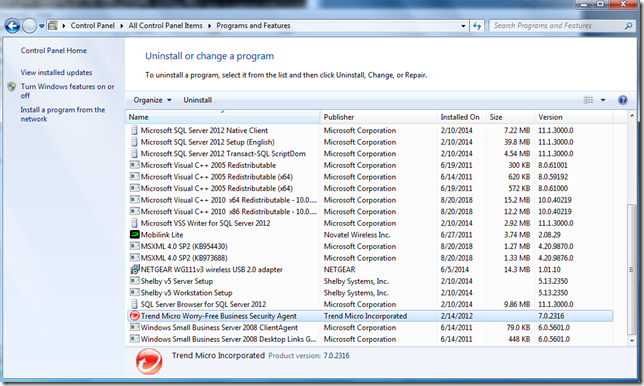
One of my last tasks was to remove the long-expired Trend Micro Worry-Free Business Security Agent off the system.

add-remove

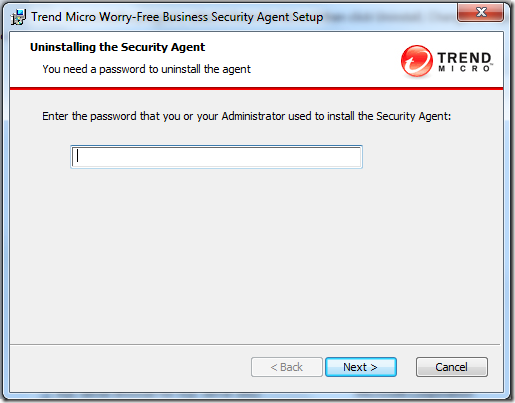
Before the uninstaller can complete, you must provide an administrator-set password (as a security feature).  Unfortunately, the admin who set it had long-since left the congregation and no documentation was left as to what it could be.

password

Bother.

Luckily, PowerBiz Solutions “down-under” had a promising tip:

How to uninstall Trend Micro’s Worry Free Business Security client agent without the password - PowerBiz Solutions

Note: The referenced link back to Trend Micro’s solutions page is now “404” but PowerBiz’s post provided a good start: (Update: Archived Trend Mircro solutions page via Wayback Machine – hat-tip to TinyApps bloggist!)

Basically, it involves setting the registry key “Allow Uninstall” to 1.
For WFBS versions 5.x and 6.x, this key is located here – HKEY_LOCAL_MACHINE\SOFTWARE\TrendMicro\PC-cillinNTCorp\CurrentVersion\Misc
For WFBS versions 7.x, this key can be found here – HKEY_LOCAL_MACHINE\SOFTWARE\TrendMicro\UniClient\1600\Misc

In my particular case, the version appeared to be 7.x.

version

A quick look in the Registry found the “AllowUninstall” key.

Capture-reg

…which I then changed to the needed “1” value.

Capture-regchange

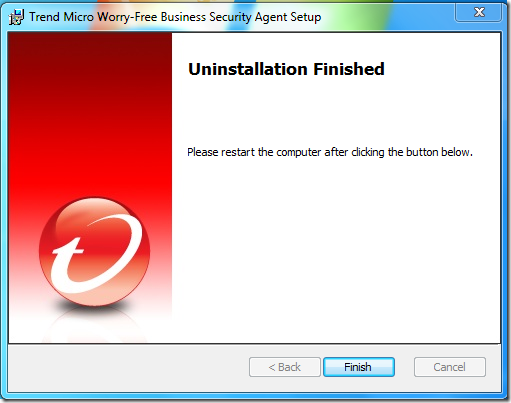
Once set, I was then able to go back and run the uninstaller without any password prompt.

success

Done

Success and done!

I then followed it up with a Microsoft Security Essentials installation that went on without issue and will provide sufficient real-time protection and current signature updates for AV/AM protection.

Cheers!

--Claus V.

Saturday, March 18, 2017

Enhanced Mitigation Experience Toolkit (EMET) 5.5/5.52 Uninstall Error 2738

I’ve been taking the layered “defense in depth” approach on my home systems for some time.

Including using (concurrently)…

Last night something started to go wrong with the process and the wheels came off the wagon.

Here’s how I got them back on.

I am running the Premium (lifetime subscription) version of Malwarebytes. Some time ago they came out with a new 3.0 version release.  I’ve been reading the reviews throughout the rollout and have waited to do the upgrade. Once nice feature is it now includes the full version of their awesome Anti-Exploit program at no cost to Premium subscribers; something I was using the limited/free version for but couldn’t protect my Chromium-based Vivaldi browser sessions with as the free version didn’t allow setting of custom protections.

As I said, all the bits had been running fine together although – to be fair – Malwarebytes does warn users of EMET during installation that it has compatibility issues and recommends removal of EMET.  If disregarded, the installation will continue fine.

Thursday night, my Malwarebytes 2.0 version final got auto-triggered to offer me the eligible upgrade to the 3.0 version.

I said OK and let it install.  Installation seemed to go fine. No errors.

However last night, I went to launch Microsoft Excel and EMET went crazy and blocked it from running due to a perceived exploit. That hasn’t ever happened before and I was very confident my system hadn’t been actually exploited. I tried both Excel 2007 and 2010 versions that I have and both got the same reaction by EMET. I then tried Word and it also caused EMET alerts and binary blockage. Hmm.

Well, maybe something in the new Malwarebytes 3.0 was causing a compatibility issue with EMET finally.

So I went to uninstall EMET.  Only I had two versions.
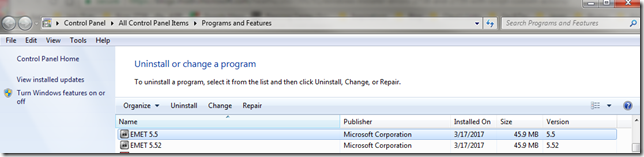
Programs and Features_2017-03-18_15-13-08

Not sure how that happened. EMET 5.52 was supposed to allow for in-place upgrade of EMET over a prior version. Didn’t recall getting an error before.

So I went to uninstall EMET 5.5 and got this:

EMET 5.5_2017-03-18_15-13-43

Same result trying to uninstall EMET 5.52

I tried repairs, changes, etc. to both EMET applications. I still had the original MSI installers for them both but even re-downloaded them from Microsoft. None seemed successful.  Note the dates in the “Installed On” column were yesterday’s so something in the processes I did worked, but it wouldn’t let me uninstall them; continuing to present that same “error code is 2738” message.

Since using Excel/Word were critical last night, I worked around the problem up removing all the EMET setting protections for the Microsoft Office suite application binaries. That let me run them without being blocked.

I figured that would be enough, but this afternoon I went to open a PDF with Adobe Reader – and EMET blocked it too from launching due to some kind of perceived exploit.

EMET had to finally go and I had to punch through that error code.

I ended up in a Microsoft forum where others with previous versions of EMET had encountered the same error but it seemed on installations – not uninstall activity.

Technet forums – Security (EMET forum search for “2738”)

Looking through them many seemed to share a common thread with a previous anti-virus product taking over, corrupting, or locking down a VBScript dll process.

Well, perhaps my Malwarebytes and/or CrytoPrevent protections were keeping the vbscript.dll service from being accessed or running?

So I removed my CryptoPrevent protections and disabled my MalwareBytes application.

Nope. Same error.

I did some more digging on a wider net and the more I read about other non-security applications having a
“2738” error on installation, I became convinced it was all related.

So after reading multiple posts I was confident to do the deeper work needed to try to fix this issue.

Using Registry Finder (under an elevated Administrator session) I searched my registry for the string {B54F3741-5B07-11cf-A4B0-00AA004A55E8}.

It came up 12 times, all in the expected locations, except I did have a single odd-string out under the HKEY_CURRENT_USER location. I was pretty sure that was my problem.

[HKEY_CURRENT_USER\Software\Classes\Wow6432Node\CLSID\{B54F3741-5B07-11cf-A4B0-00AA004A55E8}]

All the rest were under HKEY_CLASSES_ROOT, HKEY_LOCAL_MACHINE, or HKEY_USERS.

I exported the registry key first (just in case) then I deleted it.

I then opened up CMD (under an elevated Administrator session) and ran the following commands (note my system is a Windows 7 Home x64 OS):

  • cd %windir%\syswow64<enter>
  • regsvr32 vbscript.dll <enter>

cjj1w2zq.gps

I then went back and attempted to remove EMET 5.5 and it uninstalled with no more error 2738 codes.

I then followed by removing EMET 5.52 and it came off just fine as well with no errors.

I wrapped things up by re-applying my default CryptoPrevent and MalwareBytes protections states again.

Done.

Again, the trick was to remove the Registry entry just under the HKCU location where it was found present, then re-register the vbscript.dll component properly.

Later while preparing for this post I did find this EMET-related forum post that basically walks one through the same steps for an earlier version of EMET on a x32 bit based version of Windows 7. If you try to follow that and have an x64 bit version of Windows, you will need to adjust accordingly.

EMET 3.0.0 Installation fails on Win7 Pro 32Bit - Error Code 2738 – Microsoft TechNet

Additional resources and guides for addressing the Error Code 2738 problem:

The key to understanding why this works (and where the problem lies is explained nicely in Heath’s above post:

As some people have found, re-registering the runtime libraries vbscript.dll and jscript.dll will fix the errors, but that isn’t always the solution.

As a security measure, Windows Installer will not load script engines registered in HKEY_CURRENT_USER. As a user-writable store, a normal user could get an elevated install to run their library masking as a script engine if the custom action was not explicitly attributed with msidbCustomActionTypeNoImpersonate (0x0800). This is an elevation of privileges attack; thus, Windows Installer returns error message 2738 or 2739 for custom actions type 6 and type 5, respectively, and returns Windows error 1603, ERROR_INSTALL_FAILURE.

Because – somehow – vbscript.dll did get itself registered under my HKEY_CURRENT_USER location, the EMET MSI uninstaller script could not execute. Only by pulling it out, then re-registering it in the correct location automatically, would the removal process complete.

Final thoughts.

I only removed EMET from this particular system as it exhibited the crazy mitigation interceptions for Microsoft Office immediately after upgrading to MalwareBytes 3.0 Premium.

On my other Windows 7 Ultimate system, I am still running EMET (5.52 only) along with the protections noted in the top of this post. The only difference is that I’m using the free version of Malwarebytes 2.0 on it (without real-time protections). So until an issue appears, I’m keeping EMET on that system.

Lavie still is running Windows 8.1 on her laptop with a similar configuration. Lesson learned is that I will first remove EMET before upgrading her MBAM Premium version from 2.0 to 3.0.

Cheers!

--Claus Valca
Monday, May 30, 2016

Windows Defender News and Tricks

I still recommend Microsoft’s free Windows Defender or Microsoft Security Essentials anti-virus/anti-malware applications (depending on Windows OS version) for most family and friends.

When coupled with a layered security approach for Windows systems it is a free and satisfactory solution for most users.

Microsoft has recently added a few new tricks to Windows Defender. These are good to be familiar with.

Note that the PUA feature seems to only work with Windows 10 OS versions – and not Windows 7 or 8.

Stay safe!

Claus Valca

Saturday, February 13, 2016

Enhanced Mitigation Experience Toolkit (EMET) version 5.5

Just a quick post.

A few weeks ago, Microsoft issued a release-version update to EMET.

Enhanced Mitigation Experience Toolkit (EMET) version 5.5 is now available - Security Research & Defense. From that post:

Today we are pleased to announce the release of EMET 5.5, which includes the following new functionality and updates:

  • Windows 10 compatibility
  • Improved configuration of various mitigations via GPO
  • Improved writing of the mitigations to the registry, making it easier to leverage existing tools to manage EMET mitigations via GPO 
  • EAF/EAF+ pseudo-mitigation performance improvements
  • Support for untrusted fonts mitigation in Windows 10

Get the stuff:

You still can’t seem to “upgrade” to the new version. I had to uninstall the previous EMET version (after exporting the custom settings I have). Then I installed the new version and imported my XML file back in.

It seems to be running just fine on our Windows 7 and 8.1 systems.

And yes, I do live dangerously and run it concurrently with Malwarebytes Anti-Exploit in a “yes I will run with scissors and you can’t stop me” sort of attitude.

Cheers.

--Claus Valca

Saturday, November 28, 2015

Malwarebytes Updates: Anti-Exploit and JRT

Malwarebytes has recently (11/23/15) released a new version of their Malwarebytes Anti-Exploit protection software.

Current version is now 1.08.1.1045 and should auto-update eventually. If it doesn’t or you just don’t want to wait, go download the package and over-install it to upgrade your current version.

Release History - Malwarebytes Support

New Features

  • Added Layer0 Dynamic Anti-HeapSpraying mitigation
  • Added Layer0 Anti-Exploit fingerprinting mitigation
  • Added Layer0 finetuned VBScript mitigation for IE
  • Added Layer1 ROP-RET gadget detection mitigation
  • Added Layer3 Application Behavior rules
  • Added protection for Microsoft Edge
  • Added protection for LibreOffice
  • Added failover upgrade mechanism
  • Added auto-recovery for Anti-Exploit service

Fixes

  • Fixed conflict with third-party products that use the same hooks
  • Fixed conflict with Office family profile
  • Fixed conflict with banking software plugin for browsers
  • Fixed conflict with Citrix when opening IE
  • Fixed conflict with components from Asus and Huawei
  • Fixed conflict with Kaspersky 16
  • Fixed conflict with Comodo
  • Fixed conflict with Imprivata OneSign
  • Fixed issue when custom shields were not kept after upgrade
  • Fixed issue with exclusions sometimes not applied to PDF profile
  • Fixed issue with Layer3 Application Behavior
  • Fixed issue with missing balloon notifications
  • Fixed issue with missing balloon notifications
  • Fixed false positive with Adobe Acrobat
  • Fixed false positive with certain .NET modules under IE
  • Fixed PhantomPDF crash when converting to doc

New Malwarebytes Anti-Exploit Adds Fingerprinting Detection - Malwarebytes Unpacked

Malwarebytes Anti-Exploit 1.08 ships with fingerprinting detection and more - gHacks Tech News

They have also released a new version (8.0.1) of the Junkware Removal Tool (JRT) which was recently acquired.

Junkware Removal Tool - Malwarebytes

I like this as it is a fast, focused, and portable tool to remove and repair a number of malware/ad-ware/junkware/PUP focused programs. It is one of the “first-strike” tools I deploy against a heavily infected system I may be servicing for a friend or family member.

Load up and carry on!

Claus Valca

Saturday, October 31, 2015

Anti-Virus linkage

So here is where I still stand on my recommendations:

  1. Free Firewall Software by GlassWire - Monitors and logs network connections…more used for logging than “active firewall blocking”.
  2. Sysmon - Sysinternals core service to log application/network executions
  3. Enhanced Mitigation Experience Toolkit - EMET - TechNet Security
  4. Microsoft Security Essentials - Microsoft Windows - Core AV protection
  5. Malwarebytes Premium - Supplemental real-time AV/AM protection
  6. Malwarebytes Anti-Exploit - Free Zero-Day Exploit Protection - browser layer protection

If MSE seems too light, then I would swap it out for Bitdefender Antivirus Free.

There have been some developments in the AV world and opinions abound:

Cheers,

Claus V.

Sunday, September 27, 2015

GSD QuickTips for Malwarebytes

I don’t have the energy tonight to post my travails in attempting to install Windows 10 on two of our family systems.

Long story short, I ended having to roll them back to Windows 8.1 and Windows 7 Ultimate. Although it was a “pleasant” upgrade experience at the onset, serious stability and functionality issues arose quickly that rollbacks were required. The rollbacks were successful and also “pleasant” -- all things considered.

Anyway, on the Windows 7 Ultimate upgrade to Windows 10, it lasted one week. The Malwarebytes Anti-Exploit behaved just fine after the upgrade.

However on the Windows 8.1 upgrade to Window 10, MBAE had all kinds of issues from the get-go. Uninstalling/reinstalling it fixed nothing, despite being being Windows 10 supported. Specifically it was displaying a “Anti-Exploit is not started” error message after the upgrade.

In the end -- due to other issues -- I did roll back to Win 8.1 and it began working just fine.

I did find these forum threads that point (at this time) to a beta version of MBAE that should address persistent issues in Win 10 for some users.

The fix above (uninstall/reinstall MBAE) didn’t fix the issue which led to these readings:

That finally hops to this:

Sadly, I didn’t get a change to try this preview version as my rollback to Win 8.1 (due to more serious Win 10 system issues than MBAE) fixed the issue with MBAE working properly again. However if you do have issues with MBAE after upgrading to Win 10, try that beta version.

In other news, I had been doing some good Samaritan work on a family’s Win 7 netbook that was so infected with toolbars, PUPs, malware, and other “stuff” that it took me the better part of a week’s time (after hours) to get it cleaned up. I’ve got some good cleaning logs collected so maybe that will eventually rate a post of it’s own.

One challenge I had was getting it cleaned up enough to get it on a network.  It took multiple passes but thanks to my handy write-protect switched Kanguru USB drive I was finally able to use a combo of manual and automated cleaning techniques to get it restored to an almost pristine and healthy state.

One of the first automated tools I ran against it was Malwarebytes Anti-Malware but while I had the installer on my USB drive, I couldn’t get the netbook on the network to get the def file updates. So I had to do my first round of scanning/cleaning with outdated files.

There does seem to be a semi-regularly updated “DAT file updater” package available like from other vendors, but was only found post response. That need led me to find these tips on where I can get a super-current set of data files from a working system and then copy them over onto the borked one; thereby achieving a manual update. Or keep a semi-updated definition updater package tucked on my USB as well. Of course…having both options may be best!

Via that forum post:

the Windows 7 path to rules.ref is C:\ProgramData\Malwarebytes\Malwarebytes Anti-Malware\rules.ref

Just copy/paste that address location in your Windows explorer address bar and jump right to it.

This bleepingcomputer post has some additional information about the other Malwarebytes definition files you might also want to copy of the updated computer and over onto your USB drive to drop back in the same location on the impacted one:

C:\ProgramData\Malwarebytes\Malwarebytes Anti-Malware\rules.ref
C:\ProgramData\Malwarebytes\Malwarebytes Anti-Malware\actions.ref
C:\ProgramData\Malwarebytes\Malwarebytes Anti-Malware\swissarmy.ref
C:\ProgramData\Malwarebytes\Malwarebytes Anti-Malware\Configuration\database.conf

Note: at some point it looks like earlier versions of the application had a patch with an “apostrophe” character “ ‘ “ in the path. That seems to be gone now in the versions I use and I’ve edited it out of these quoted forum references to avoid confusion.

Later I also found this.

From that forum post:

Just very recently available there has been a change were you can now download an offline updater.

There is a new mbam-rules link:
http://downloads.malwarebytes.org/file/mbam_rules

The link is to a download of 1 zip file, where the name is mbam-rules-YYYY-MM-DD.zip

Something to note:
• There are 2 files now:
o Mbam-rules.exe
o Mbam2-rules.exe
•They are specific to the version, so mbam-rules is for any MBAM 1.x installation whereas mbam2-rules is for any MBAM 2.x installation.

•In the future it will have a README included with instructions for users, but for now it is only the executables.

As of tonight (2015-09-27) that download link above is working fine and produces a rules update file dated 2015-09-10 so it is lagging behind a bit from the current def dates found in a “live” Malwarebytes application update.

In either case…the whole point here is to get enough updated files on the system for Malwarebytes to use to get a thorough cleaning and your system back on the network. Once on the network, then you should run the internal update process for Malwarebytes to ensure you have everything updated the way it should be, normally.

Hope this helps in a pinch.

Cheers,

Claus Valca

Friday, August 28, 2015

Malwarebytes Install Error 0x000001d and other challenges

Back in April I pressed my older Shuttle SK41G small-form factor system out of mothballs and loaded up Win 7. New (borrowed) life for the Shuttle SK41G

Overall the process went fairly smoothly though the limited feature sets of the core processor presented challenges.

As a system running x32 bit Windows 7 OS and only purposed for visiting guests to our household to use, it seemed to be adequate. I don’t have a PATA-based DVD-ROM reader to allow me to easily load various Linux LiveCD’s that are DVD sized.

I can use some other tools to try to run them via USB, but Shuttle booting off USB drives (or emulators) is a bit hit-or-miss.  So for now I continue to test Linux distros that are CD-sized to experiment with performance.

Anyway…I was updating the system last weekend (more on that later) and Malwarebytes notified me there was a new version build available.

I manually downloaded the installer file, then launched when done and was greeted by this error

2015-08-21 11_26_46-shuttle-sff - TightVNC Viewer

mbam.exe – Application Error

The application was unable to start correctly (0x000001d). Click OK to close the application.

That was unexpected. Maybe my installer file was corrupted? I tried a few more download/reinstall attempts but was met with the same error. The previous version worked fine. What gives?

Some web searching led me to this post that detailed the problem and the fix (though the steps didn’t seem clear to me at first reading).

Per “Root Admin”, “This is due to a compatibility issue with some older processors (Single core PIII and earlier, and AMD XP+)” and appeared to arise with version 2.18.

The instructions state the following:

If you are receiving this error, luckily there is a special installer that you can use to avoid the problem. Please download the special installer from this page. Once downloaded, simply double-click to run, and the program should install as normal.

So in my mind, that meant first running the “special installer” and getting a full MBAM installation done.

Nope.

What it means is to do the following;

  1. Download and install the Malwarebytes/Malwarebytes-Free application and install it.
  2. Download and run the “special installer” file (Malwarebytes_2.1.8_SSE2_Hotfix.exe). This patches/replaces some of the core files causing issue on the older processors.
  3. Run the Malwarebytes application and it should run normally again.

Step 2 results

2015-08-21 11_33_32-shuttle-sff - TightVNC Viewer

Step 3 results.

2015-08-21 13_29_21-shuttle-sff - TightVNC Viewer

In another matter, since it had been a while since I had booted this system, my attempts to run Windows Update and download/install the waiting patches was fraught with Update Errors.

After not making much progress on this front, I punted.

I downloaded the WSUS Offline Update utility, built a special Windows 7 x86 update package on one of my other systems. Then (via USB) I copied that client build over to the Shuttle system and ran it a few times. After many restarts I ended up getting the updates on the system without any more errors.

Whew!

For now Windows 7 remains on it, but I am very close now to going to a 32-bit version of The LXLE Desktop Linux distro.

Cheers!

Claus Valca

Friday, August 14, 2015

Sysadmin Linkfest: Rnd edition

Here is a seemingly random (Rnd) collection of linkage for the syadmins in the RSS crowd.

Enjoy.

20683743 (Tools)

FileIOTest is a command line tool that tests the speed of local or remote (SMB) storage by performing some common file IO operations repeatedly and measuring the duration.

These are the main facts:

  • Performs four different types of file IO: write, custom read, read with the GetPrivateProfileString API, create/delete
  • The number of iterations can be specified
  • Each generated file name is unique to prevent caching
  • Works with local and UNC paths
  • FileIOTest does not require any software to be installed
  • FileIOTest works on any version of Windows from Vista / Server 2008 onwards
  • FileIOTest is freeware

Couple this utility with some Windows performance monitoring traces (Win 10 WPT via the Win ADK here) and who knows what fun you could have?!  See also PerfView.

44468807 (Surface Pro)

I’ve been seeing some strange trends with a few of our Surface Pro 3 devices. For some of them, they seem to be loosing functionality (drivers?) with the Microsoft Dock hardware. Cases in point; one Surface Pro 3 tablet (Win 8.1) has lost the ability to connect to the network via the Dock Ethernet port. If I take another SP# unit and place it in the same Dock, it connects fine to the network with no issues…so it doesn’t seem to be an issue with the dock itself…just this particular tablet picking up and using the driver. I’m going to see if any of the Ethernet drivers in this pack (or the driver pack MSI itself) resolves the issue before doing reimaging the unit.  Likewise, a different SP3 user reported their external monitor connected via the display port through the Dock stopped working. Take another SP3 unit and place in the same dock and it drives the same external monitor just fine. Again, I’m going to try the driver pack first before doing a reimage on the unit. Thoughts?

59479408 (Mobile Ads/Malware)

I’ve seen a few of these “pop-up” fake alert windows in iOS, but not many. Lavie has seen more than a good many on her iOS devices. So far we have been able to get out of them with a bit of work but no harm done, yet. Regardless we are now more sensitive to these “exploit” methods.

I’m looking forward to the potential capability of ad-blocking modules (for security not revenue drain) in iOS 9. Here are some links

48734052 (Anti-Virus)

71414462 (Network Tools)

35251748 (SSD’s)

60014312 (Windows Server 2012 Essentials)

4537758 (Folder Redirection Considerations)

78434592 (Windows 8/8.1/10 and Windows Photo Viewer)

One of the most common requests for help from our Surface Pro 3 tablet users is how to get the photos embedded in emails to open up in Windows Picture Viewer rather than the Windows 10 “app”. It’s easy enough to show them how to save the attachment to disk, then right click and “open with” Windows Photo Viewer.  However that’s not convenient. Here are some tips on how to set it as the default application.

Randomness courtesy of the random number generator at RandomNumberGenerator.com

Carry on!

Claus Valca

Windows 10 Linkpost: Constructive Edition

etakt2fj.gtu

“ubuntu 9.10 cloud server in a box”
CC by 2.0 attribution: by fsse8info on flickr.
…and yes, I like the irony… 

Despite all my recent rantings about privacy issues in Windows 10 -- and my ongoing delays in actually planning to install it on any of my home systems -- I really and sincerely want to install it on my home systems.

The updates to the Windows kernel, the enhanced performance, the non-controversial feature sets it provides make it a very attractive product for most users.

So with that in mind, and having some time since the initial excitement surrounding its release, here is a new collection -- mostly troubleshooting and tweaking related -- for reference.

Alienware Black Screen During Win 10 Upgrade

My little brother decided to pull the trigger and upgrade his Windows 7 Alienware system to Windows 10 last week. Overall it went well but he did encounter a persistent “black screen” issue during the upgrade process.

Here you go for the issue background and solution.

Side note: What’s interesting to me about this particular issue is that it seems to be related to situations where you have an on-board Intel graphics controller plus a graphics card. Windows (falsely) detects a phantom monitor connected and pipes the “primary display” that direction so you can’t see it. I’ve seen a similar behavior on a new Dell Latitude system running on a Dell Dock unit kicking out extended video output via a DVI-type connection. When the system goes to sleep, or screen-locks, you get the black screen with no (apparent) way to get back onto the system other than a hard-reboot. I don’t have that issue when I run the extended display via a VGA connection.  This is going to be the trick I try next time I set up a system in that configuration.

Possibly related: Windows 8 Pro Upgrade: Black Screen Troubleshooter - Borns IT and Windows Blog (Google Translated)

Anyway, his system seems to be running well at the moment.

No. We haven’t discussed the whole privacy issue and any tweaking he may have done.

Thanks for the tip, bro!

How to do stuff to Windows 10 (Standard Level)

Most of these tips and tweaks are pretty standard items. Nothing too crazy or risky.

How to do stuff to Windows 10 (Advanced Level)

This collection of tips and tricks is a bit more technical. Mostly for the sysadmin crowd.

Clean Installs & Product Key Discovery


Security Thoughts

That first post got my recollections running.

Back for the Windows 8/8.1 release we were asking ourselves a similar question -- how do I interact with Windows Defender?

Advanced Tips for Windows Defender with Windows 8 - grandstreamdreams blog

My comments and tweak-tippage then may still be valid today.

When Lavie upgraded to a Windows 8 system, Microsoft Security Essentials couldn’t be installed as in it’s wisdom, Microsoft bundles a MSSE version of Windows Defender on the system instead.  That’s just the way it is.  While essentially the same product, it doesn’t have some of the more granular control in setting scheduled scans, DAT updates, or on-demand scans.

So if you have Windows 8, and are using the stock Windows Defender as your AV/AM solution, then you might find the following “power tips” to using/tweaking Windows Defender helpful.

Indeed, Margus Saluste has updated his posts to now include Windows 10 support.

TechNet also had a PowerShell script to add Windows Defender “scan with” to the context menu for Windows 8. Experiment on your own Windows dime: [Script of Feb. 25] How to add Windows Defender to the file context menu in Windows 8 (PowerShell) - OneScript Team Blog

So there you go. Happy Windows Defender tweaking in Windows 10.

Windows 10 Updating and Bandwidth Considerations

If you have a lot of Windows 10 systems in your network, this probably sounds like a good thing.

If you don’t like the idea of using your system/bandwidth to update others’ Windows 10 systems outside  your network (via peer to peer type connections) then that feature may be a bad thing.

To be clear, this is different (but related) to that whole - automatic force-feeding of updates thing that Windows 10 does.

Commentary

Errors and Troubleshooting

This next section is pretty link-heavy and technically deep. However there is the off chance that a particular error could arise and these may be valuable.

Cheers,

Claus Valca

Tuesday, July 28, 2015

Rook Security - Milano tool

As usual…a week or more late…

Post Update 2015-07-31 New tool version: Milano 1.1.0 Release with Linux and Mac OSx IOC's Now Included - Rook Security

Anyway, Rook Security spent some time analyzing the data-dump from Hacking Team and in the process have found some indicators of compromise (IOCs) of a Hacking Team presence on a system.

Basically you can download their free/open-source tool which does a quick or full scan of a system and compares the files against known IOC hashes.

Downloads - Rook Security.  Current look for the “Milano 1.0.1: Hacking Team Malware Detection Utility” link.  There is also an MSI version for enterprise deployment.

Then it’s up to your leet skills to figure out if these are false positives or not.

I’ve ran their tool against both my systems. The quick scan is very fast. The full scan took a nighttime to complete on my traditional HDD system but it ran very fast across my SSDD drive system.  In all cases my systems came back clean.

It’s a portable app so no excuse not to include in in your USB carry-stick toolkit.

You may want to keep an eye on their tool for updates. At least one update has been released. It is also unknown if other security vendors are adding the IOC/hashes to their own detection engines.

More info here

Constant Vigilance!

Claus Valca

GSD Windows Defense in Depth Strategy

I noticed more than a few times I have posted a listing of the security posture I take and it has been almost a year since the last topic-specific post here.

So here you go. Tested and approved on Windows 7/8.1 platforms. Not sure yet on Win 10.

  1. TrueCrypt full disk encryption. Yes. I know. Development stopped mysteriously…blah.blah.blah. There are a number of free alternative WDE options for users if you wish (or Bitlocker if your Windows OS supports it) such as DiskCryptor or VeraCrypt. My purpose in using TrueCrypt/WDE is to protect the contents of our system from data-loss in the event the device is stolen. Period. (Note to self…I’ll probably have to do a full TrueCrypt disk decryption before doing the Win 10 upgrade. Hmm… gotta think about the options for WDE on Windows 10 carefully as Bitlocker only valid on one of my systems. Thoughts or recommendations anyone?)
  2. I’m using the built-in Windows Firewall product with (generally) default settings.
  3. I keep the Windows OS fully patched (drivers too as best I can) to minimize OS vulnerabilities.
  4. I keep any (remaining) third party plug-in software (such as Flash, Java, Silverlight, etc.) fully patched and install updates as soon as a new build version is released. However..see item 4.
  5. I have continued my march on removing Flash, Java, etc. plug-ins from our systems…with little ill impact. You can’t exploit what isn’t installed.
  6. Microsoft Security Essentials - Microsoft Windows. Far from the most robust or highly ranked, what I loose there I gain in the additional security layers below. Also the interface is easy to work with and manage and it plays well (thank goodness) with the additional security layers. My alternative choice would be Bitdefender Antivirus Free for those who need a super-duty AV product.
  7. Malwarebytes Anti-Malware & Internet Security Software - I use the “Premium” version on our systems. The free version is good too, however it doesn’t include “real-time” monitoring features.
  8. Malwarebytes Anti-Exploit Free - I use the free version of this tool as it covers all my primary concerns. Works great (as far as I can tell!) for zero-day exploits against (primarily) web-browsers.
  9. Enhanced Mitigation Experience Toolkit - EMET - Use of this anti-exploit platform is left for the more tech-savvy folks…particularly when combining with Malwarebytes Anti-Exploit. They can co-exist but takes some tweaking to harmonize with Internet Explorer in particular.
  10. CryptoPrevent Malware Prevention - Foolish IT - I use the free version to help protect all our home systems against ransomware/cryptoware threats.
  11. GlassWire - I use the free version of this firewall product for it’s logging features.
  12. Zemana AntiLogger Free - I’ve only recently found this product. It seems to be working well in the background.
  13. Process Explorer - Microsoft Sysinternals - I have this set to run in my system-tray automatically at login. It lets me quickly monitor and check on running processes and sub-processes. I check often so I can remain familiar with the normal running processes. If something new appears it should stand out to me and I can explore further.
  14. Sysmon - Microsoft Sysinternals - This core service runs in the background doing logging of process creations. I had turned on the network connection logging as well but there was so many entries, even with an event log manager utility it was hard sorting out the noise. So I turned off that option for now. This is mostly good for post-incident review work but it’s good to have running now.

If you are interested here are some previous GSD posts on this subject.

Constant Vigilance!

Claus Valca

Sunday, July 12, 2015

Summer’s On! Super Sysadmin Linkfest

Little Bro and I just wrapped up some Saturn Ion A/C system repairs in the driveway. Got the chill winds blowing in the cabin again. So with that resolved, time looks available for a summer’s on, super sysadmin linkfest dump to cover all the bases.  (And expect another Shade-tree Saturn Ion Mechanic tip post very soon, too.)

CryptoPrevent (Foolish IT) News

I personally use and recommend the awesome CryptoPrevent Malware Prevention utility from Foolish IT.

It is simple to use, hasn’t caused me any issue with the default security level settings, and gives me the comfort of having an additional layer of protection against ransomware threats. The free version works nicely on our home systems.

If you are using CryptoPrevent, this technical post may be useful: CryptoPrevent, ShadowExplorer, and VSSADMIN - Foolish IT.

Foolish IT has been hard at work on a new version and this post shows some of the new features and GUI - CryptoPrevent v8 Teaser.

Alternative remain thirdtier.net’s Cryptolocker Prevention Kit (updated) over at Spiceworks.

Considering the rash of ransomware infections at work lately, I’m surprised the AD and security team hasn’t gotten together to review the settings in the prevention kit noted above.  Just say’n…

Malwarebytes Tips and Updates

How-To’s

In my GSD post (mostly) Fast burn video file to DVD-playable format I ended up using DVDStyler Portable to burn some miscellaneous video files to a DVD. I really wanted to use DVD Flick (see this interesting comment thread and this one too regarding a portable version) but problems and a limited amount of time to solution the issue prevented a real trial. I had also found this Free Video to DVD Converter at DVDVideoSoft .

So it was with interest I spotted this post that looks like it could do the job as well.

The app mentioned was Freemake Video Converter. It is clearly stated in the post and in the comments that the application comes bundled with OpenCandy that may be tricky to decline installation thereof. A comment in the thread recommended running the installer from the command-line with the “/nocandy” switch. I tried that and it seemed to work. When you download the installer off the product web-site it is just a “stub downloaded” which then fetches and retrieves/installs the “full” package. In my case it was:

C:\Users\<PROFILEID>\Downloads\FreeVideoToDVDConverter.exe /nocandy

A follow-up scan with Malwarebytes Anti-malware come back clean (…well except where it found it embedded in the full app download package placed in the TEMP folder) and it always detects OpenCandy in installer packs (based on my personal experiences).

So here is a fourth option worth considering if you need a free utility to burn various video files into a single DVD compilation.

Passwords

I’m a hard-core user of the free KeePass Password Safe & MiniKeePass (iOS) utility. That said, I have to confess that it is very challenging keeping the core database synced between mine and Lavie’s various iDevices and laptops. Add to the fact that the master password datebase file is a hot target for hacking with all the keys to the kingdom I’m sincerely open to a new model for complex/random password management. And at work KeePass (and all password managers) are not approved software so I have to do a super-kludgy solution with using a Bitlocker volume file.

Master Password – project page.  Thanks to the TinyApps blogger I’m now very intrigued and will likely be seeing if I can incorporate this into my routine. There is lots of documentation available (both on TinyApps’ post and on the project page) and is is all very human-readable. The desktop version is a Java app so there is that “issue” if you are on Windows and have stripped Java from your system, though I guess you could go with jPortable and the jPortable Launcher from portable apps as a compromise. The developer also has a beta version of a Web app that could work.

Encrypting Windows Hard Drives - Schneier on Security

Network Nuggets

TraceWrangler – Jasper Bongertz’s awesome tool for sanitizing and anonymizing trace files was updated a while back to beta build 0.4.0 build 616 in x32/x64 flavors. ChangeLog. Sadly, I don’t (yet) do the twitter so there doesn’t seem to be an RSS alternative to watching for update releases without stopping by for a visit from time to time. Update! Jasper Bongertz has kindly now updated the project page to include a RSS feed! Awesome and many thanks! See also these recent posts by Jasper:

Link to test –> Speed test – DSLReports

Note to get the application to run successfully in Firefox (running NoScript) I had to temporarily do the following:

Adblock, or NOSCRIPT - is blocking access to remote IPs (not scripts).
Set NOSCRIPT>Options>Advanced>Trusted>Cascade top document.

Once testing was done, I disabled that option setting.

New or Interesting Utilities

SimpleWMIView reminded me a bit of WMI Explorer over at CodePlex. Probably would be complimentary apps.

SterJo NetStalker – SterJo Software – This is an interesting app. I particularly like that it comes in a portable version. As noted in the gHacks post, it is very similar to (but with some differences) to Nir Sofer’s CurrPorts utility.

At the church-house we run a program called Shelby Systems. It is a client/server based model and though most all of the systems have the client software on it, only one user in particular is constantly having issues connecting to the server unless we shut-down the (Windows) server’s firewall, allow the client communication to establish, then turn on the firewall again. So it looks like the server firewall has some not-yet-located firewall rule in play not set correctly. I’m hoping that this and/or CurrPorts can help us hone in on the specific issue. If I do solve it, I’ll post a troubleshooting guide.

SterJo Software – Products – SterJo offers a number of freeware utilities that may be of use to some sysadmins.

Troubleshooting Tips from the Pros

Windows SysAdmin Tips and Techniques

Microsoft Trainings and Infographics

Kali & Docker

McAfee & The Great Stinger “feature update” Debacle

So McAfee’s standalone Stinger AV tool is/has-been/was a great tool to run in an attempt to scan a system for specific threats and attempt to neutralize/remove them.  It is updated often with new definition patterns and has been a long-time tool in the GSD infection response toolkit.

However a while back an uproar occurred when it was found a new version upgrade with enhanced features left a running/persistent McAfee service (the 'McAfee Validation Trust Protection Service' mfevtps.exe) on your system afterward; even when the binary was removed, and with no clear way to remove it.

It seemed that the only way to really “clean” your system from McAfee after you tried to clean your system with McAfee’s Stinger was to follow these steps: How to uninstall or re-install supported McAfee products using the Consumer Products Removal tool

Only what I didn’t see in the aftermath were any notices that McAfee reported the persistent service module everyone was hollering about was due to a bug in the application. It was quickly fixed and now Stinger behaves the way it used to, fully cleaning itself up after run.

PortableApps McAfee Stinger news Comment thread post. From that comment..

John - thanks for reporting this issue.

The McAfee Validation Trust Protection Service is needed for Stinger to perform rootkit scanning of a system. This service is temporarily installed during a Stinger scan and is removed once the rootkit scanning portion is completed.

In a recent update to the Stinger's rootkit scanning engine, an issue was found where it wasn't getting uninstalled in certain conditions. We've fixed that in last week's release. The latest Stinger available for download should not leave behind any components post a scan.

Please let me know if you require any other clarification.

Best,
Vinoo Thomas
Product Manager, McAfee Labs

Possibly interesting (or conversational) but not related to McAfee Stinger debacle - Beware: Free Antivirus Isn’t Really Free Anymore – How-To Geek blog. I may come back to this post in more detail at a future time…

Microsoft Surface / Surface Pro News & Tips

iOS 9 Peeks & Misc Apple News

I’m really excited to see some dual-tasking coming to the iPad device in iOS 9!

Whew!

--Claus V.