Friday, July 17, 2015

Shade-tree Saturn Ion Mechanic Tips #2: HVAC Control Panel

OK. Here we go on another guided repair of the beloved 2003 Saturn Ion 3.

This time we are working on the HVAC control system.

Problem:

Over the past 1-2 years I noticed that the blower fan speed seemed to be getting “weaker”.

I eventually couldn’t tell any blower fan output difference between the speed 1 & 2 positions. The 3 position seemed OK and the 4 position seemed a bit faster.  Changing out the cabin air filter is a easy place to start (and needs to be done regularly) but that didn’t help.

Since it is hot on the Texas Gulf coast, being set on 3 or 4 didn’t seem to matter.

Then about two months ago, Lavie and I were riding around town, she got too cool, and she turned the selector down to 2. The fan cut off.  I moved it back to 3 and it was OK. However moving the switch position to 4 or to 2 or 1 caused the fan to cut off entirely. Hmmm.

So I lived with that for a few weeks, but then even 3 stopped working.  No more fan meant no more AC meant Claus was a very warm boy.

Diagnostics:

  • Checked the HVAC breaker, it was fine.
  • HVAC Dash Control Unit - well the rear-window defroster button worked. The in-cabin air recirculation button seemed to work. The ventilation selector knob turned normally and the temperature selector turned. Not helpful information but OK.
  • The blower motor seemed to be running normally right up to the failure event. only problem was I (gradually) couldn’t select the speed.

To the Forums:

Based on a read of these posts, I was pretty confident that blower control switch in the control panel had failed. It seemed like a fairly easy self-repair if I could just find the part and the time.

This video by richpin06a on YouTube sealed the deal. Note the demo car is a salvage so all the extra disassembly you see isn’t related to the specific task at hand.

To find the Parts:

First step was to call the dealership.  Estimated cost for OEM part via the dealer was in the $275 range. Ouch.

So I started looking around for an OEM part.

Vehicle: 2003 - SATURN ION - L4-134ci 2.2L

    • Group: Heating/AC
    • Subgroup: AC Relays and Switches
      • Heating and Air Conditioning Control Panel with Rear Window Defogger Switch
        Part Number:  10388471
        Product Notes:
      • HVAC Control Panel
        AC Man Cont(C60) ; 1 Per Veh
      • Per Vehicle: 1; Years: 2003-2005

Putting in the part # I then found that Amazon is an authorized ACDelco part supplier (who knew!) and so I ordered it from them.  Current price at time of posting is just $121.41

Thanks to Amazon Prime it arrived two days later and was in pristine condition as a new part should be.

dgoebs4r.bpp  yy0e4kah.0mz

The Swap:

Again, brother and I had watched richpin06a’s how-to video until we had it burned in our skulls so we were set with the process. We set aside an hour to perform the task (underachievers that we both are).

I had a full mechanic’s toolkit at the ready but brother had also brought a 7mm flex shaft spanner and a hand-held pry tool. We ended up just using those. Here are some samples in case you are interested:

First begin by removing the negative terminal from the battery post. It’s located in the trunk under the floor cover.  Note the photos below show the clock still on. These are retaken this morning as we didn’t capture pictures during the actual swap as planned. Please remove the power from the battery to be safe! I didn’t do the battery disconnect as I was only removing pieces but not fully disconnecting them.

The dash:

dqtc2re4.k0m

In the end rather than using a pry tool, I just reached into each vent and firmly tugged and pulled forward until I was able to release the metal clips from their slots. Doing so ensured I didn’t damage the plastic trim. The metal clips are strong, but once started, I was able to work by way around and get it released.

Here is a view after it is fully removed so you can see the metal clips and where they are located for reference.

ztpmt5xh.dz1

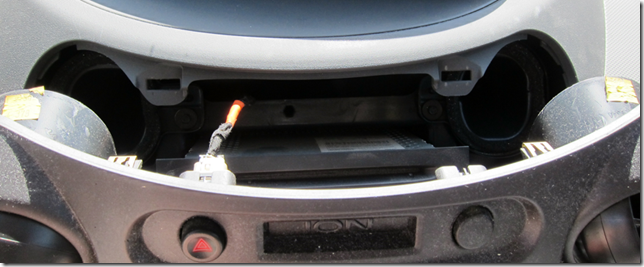
Once the top is pulled open, gently unclip the hazard light harness connector from its button.
vuwkcx2z.i5p

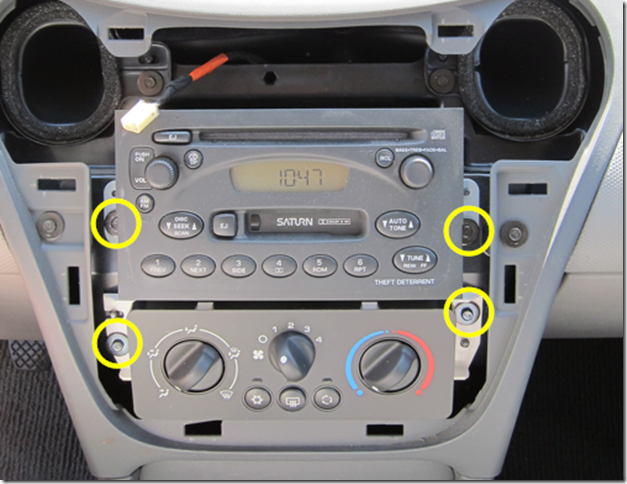
Then you can fully remove the trim cover insert. you can see the corresponding clip insert slots as well below. They are molded in the plastic so don’t go crazy pulling on the clips but it held up fine for me. I highlighted the only bolts  you will be working with.
adeszdtj.xhh

Remove the car radio next (I noted down all my radio pre-sets first before disconnecting the battery to make resetting them fast).

Unscrew the two upper bolts along side the radio unit.  The bolts are long. You can back them off almost even to the outer trim. Be careful to get a good hold on them when you extract them or you might drop them inside the center console which can be a headache to re-find depending on how they bounce!

The radio is connected by three points, a clip-on ground wire (pull off), an antenna wire (pull out), and a harness connector (unclip).  Just handle the connections carefully and you will be OK. Note the view below shows the radio unit rotated 180 degrees (upside down). That make access to the cables for removal a bit easier that “right-way up”.

v2szfys0.4zq

With the radio removed you will have better access to the next stage of service. Note that the OEM GM radio does have some anti-theft technology that will disable the radio in certain conditions. Some people were worried about that and didn’t want to pull it out. I didn’t have any issues with fully removing/reconnecting it and it works just fine with no security reset required.

Don’t try to unscrew/remove the HVAC control unit head module yet. Trust me. There is no slack on the mechanical control cables so you will have to disconnect them while the unit is mounted.

2yjr0uf4.uie

The video makes removing the cable connectors seem pretty easy. It took me a bit of work and knuckle banging to get them released. I was about to use the pry tool but as my brother was handing it to me, I finally was able to get each of them unclipped and unhooked. If you look at them (or your replacement part) carefully, you will see it is more of a “spread-apart and pull cable straight up” motion.

Left side cable connection

pqw4dw0a.5mh

Right side cable connection

cqeb3aa2.rzk

Then unclip the two wiring harness connectors.

Now that all the connectors are free, unscrew the two bolts to each side of this HVAC control head module and lift it up a bit, then pull it forward and free.

All the hard work is now down.

Reverse the steps for the reinstallation.  The control cables go back on much easier.

Once we had everything put back in place and done, battery connected, we turned the car over and tested the AC and the controls.  Hazards worked, radio worked, defroster button lit, vent selector knob turned free with no binding, same for the temperature knob. The fan speed selector worked and a different blower speed was felt for each of the four positions (yea!) and the A/C and recirculation buttons worked fine and lit up as well.  It took a while for the cabin to cool down but the A/C worked great.

Total repair time for the two knuckleheads (IT sysadmin & process safety engineer): 15 minutes tops from battery disconnect to full reassembly and testing.

Problem solved!

Part Comparison:

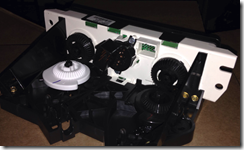
You can see in this picture that the blower switch selector appears to have burned out for some reason as there is clear melting of the housing compared to the new part.

Failed part with plastic melting - click to see fuller size.

iwyaci0x.cr3

Good part - click to see fuller size.

0q55xgbh.vrp

I suppose I might have been able to find just the switch part itself and swap that out, but for only $121 for the entire assembly it wasn’t a big deal to me and I was sure I was getting all new parts/electronic board/switch parts/etc.

Here are some photos of the breakers as well for the curious;

Breaker panel in the driver side foot-well. Turn the little upper-left screw with a nickel to open.

zfkpuku2.fzk 

Guide label on reverse:

33yhfiw4.tg4

HVAC breaker itself in position and noted.

ozwkoo4d.432

Saturn Parts Supply Part 2:

I had great luck finding this OEM part on Amazon but here are some other Saturn Ion part resources/vendors you might be interested in checking out for comparisons or other parts needed:

What was particularly invaluable for me was finding the part schematics that many vendors (such as GMPartsCenter) have online. This not only lets you verify the exact part/# you are looking for, but you can also do some detective work to figure out how the parts and assembly fit together so you can work out the service steps if there are no guides.

Cheers!

Claus Valca

Sunday, July 12, 2015

Rapid Browser News Linkpost

Just some miscellaneous news and linkage on web-browsers.

Firefox/Mozilla

PaleMoon

So in the comments of a recent GSD browser news post, El Guru posted an observation that if Mozilla continues their feature bloat direction, it may drive many more Firefox users to the Pale Moon browser project.  I’m lightly familiar with Pale Moon but haven’t used it except for fiddling around. Firefox public\Developer, Vivaldi, and Chromium all take up most of my browser usage attention.

That said, I’m going to start paying much closer attention to the Pale Moon project, particularly if the “Three Pillars” philosophy/strategy doesn’t bear visible fruit.

Vivaldi

Chrome

Browser Security & Privacy Issues

Cheers!

--Claus Valca

Summer’s On! Super Sysadmin Linkfest

Little Bro and I just wrapped up some Saturn Ion A/C system repairs in the driveway. Got the chill winds blowing in the cabin again. So with that resolved, time looks available for a summer’s on, super sysadmin linkfest dump to cover all the bases.  (And expect another Shade-tree Saturn Ion Mechanic tip post very soon, too.)

CryptoPrevent (Foolish IT) News

I personally use and recommend the awesome CryptoPrevent Malware Prevention utility from Foolish IT.

It is simple to use, hasn’t caused me any issue with the default security level settings, and gives me the comfort of having an additional layer of protection against ransomware threats. The free version works nicely on our home systems.

If you are using CryptoPrevent, this technical post may be useful: CryptoPrevent, ShadowExplorer, and VSSADMIN - Foolish IT.

Foolish IT has been hard at work on a new version and this post shows some of the new features and GUI - CryptoPrevent v8 Teaser.

Alternative remain thirdtier.net’s Cryptolocker Prevention Kit (updated) over at Spiceworks.

Considering the rash of ransomware infections at work lately, I’m surprised the AD and security team hasn’t gotten together to review the settings in the prevention kit noted above.  Just say’n…

Malwarebytes Tips and Updates

How-To’s

In my GSD post (mostly) Fast burn video file to DVD-playable format I ended up using DVDStyler Portable to burn some miscellaneous video files to a DVD. I really wanted to use DVD Flick (see this interesting comment thread and this one too regarding a portable version) but problems and a limited amount of time to solution the issue prevented a real trial. I had also found this Free Video to DVD Converter at DVDVideoSoft .

So it was with interest I spotted this post that looks like it could do the job as well.

The app mentioned was Freemake Video Converter. It is clearly stated in the post and in the comments that the application comes bundled with OpenCandy that may be tricky to decline installation thereof. A comment in the thread recommended running the installer from the command-line with the “/nocandy” switch. I tried that and it seemed to work. When you download the installer off the product web-site it is just a “stub downloaded” which then fetches and retrieves/installs the “full” package. In my case it was:

C:\Users\<PROFILEID>\Downloads\FreeVideoToDVDConverter.exe /nocandy

A follow-up scan with Malwarebytes Anti-malware come back clean (…well except where it found it embedded in the full app download package placed in the TEMP folder) and it always detects OpenCandy in installer packs (based on my personal experiences).

So here is a fourth option worth considering if you need a free utility to burn various video files into a single DVD compilation.

Passwords

I’m a hard-core user of the free KeePass Password Safe & MiniKeePass (iOS) utility. That said, I have to confess that it is very challenging keeping the core database synced between mine and Lavie’s various iDevices and laptops. Add to the fact that the master password datebase file is a hot target for hacking with all the keys to the kingdom I’m sincerely open to a new model for complex/random password management. And at work KeePass (and all password managers) are not approved software so I have to do a super-kludgy solution with using a Bitlocker volume file.

Master Password – project page.  Thanks to the TinyApps blogger I’m now very intrigued and will likely be seeing if I can incorporate this into my routine. There is lots of documentation available (both on TinyApps’ post and on the project page) and is is all very human-readable. The desktop version is a Java app so there is that “issue” if you are on Windows and have stripped Java from your system, though I guess you could go with jPortable and the jPortable Launcher from portable apps as a compromise. The developer also has a beta version of a Web app that could work.

Encrypting Windows Hard Drives - Schneier on Security

Network Nuggets

TraceWrangler – Jasper Bongertz’s awesome tool for sanitizing and anonymizing trace files was updated a while back to beta build 0.4.0 build 616 in x32/x64 flavors. ChangeLog. Sadly, I don’t (yet) do the twitter so there doesn’t seem to be an RSS alternative to watching for update releases without stopping by for a visit from time to time. Update! Jasper Bongertz has kindly now updated the project page to include a RSS feed! Awesome and many thanks! See also these recent posts by Jasper:

Link to test –> Speed test – DSLReports

Note to get the application to run successfully in Firefox (running NoScript) I had to temporarily do the following:

Adblock, or NOSCRIPT - is blocking access to remote IPs (not scripts).
Set NOSCRIPT>Options>Advanced>Trusted>Cascade top document.

Once testing was done, I disabled that option setting.

New or Interesting Utilities

SimpleWMIView reminded me a bit of WMI Explorer over at CodePlex. Probably would be complimentary apps.

SterJo NetStalker – SterJo Software – This is an interesting app. I particularly like that it comes in a portable version. As noted in the gHacks post, it is very similar to (but with some differences) to Nir Sofer’s CurrPorts utility.

At the church-house we run a program called Shelby Systems. It is a client/server based model and though most all of the systems have the client software on it, only one user in particular is constantly having issues connecting to the server unless we shut-down the (Windows) server’s firewall, allow the client communication to establish, then turn on the firewall again. So it looks like the server firewall has some not-yet-located firewall rule in play not set correctly. I’m hoping that this and/or CurrPorts can help us hone in on the specific issue. If I do solve it, I’ll post a troubleshooting guide.

SterJo Software – Products – SterJo offers a number of freeware utilities that may be of use to some sysadmins.

Troubleshooting Tips from the Pros

Windows SysAdmin Tips and Techniques

Microsoft Trainings and Infographics

Kali & Docker

McAfee & The Great Stinger “feature update” Debacle

So McAfee’s standalone Stinger AV tool is/has-been/was a great tool to run in an attempt to scan a system for specific threats and attempt to neutralize/remove them.  It is updated often with new definition patterns and has been a long-time tool in the GSD infection response toolkit.

However a while back an uproar occurred when it was found a new version upgrade with enhanced features left a running/persistent McAfee service (the 'McAfee Validation Trust Protection Service' mfevtps.exe) on your system afterward; even when the binary was removed, and with no clear way to remove it.

It seemed that the only way to really “clean” your system from McAfee after you tried to clean your system with McAfee’s Stinger was to follow these steps: How to uninstall or re-install supported McAfee products using the Consumer Products Removal tool

Only what I didn’t see in the aftermath were any notices that McAfee reported the persistent service module everyone was hollering about was due to a bug in the application. It was quickly fixed and now Stinger behaves the way it used to, fully cleaning itself up after run.

PortableApps McAfee Stinger news Comment thread post. From that comment..

John - thanks for reporting this issue.

The McAfee Validation Trust Protection Service is needed for Stinger to perform rootkit scanning of a system. This service is temporarily installed during a Stinger scan and is removed once the rootkit scanning portion is completed.

In a recent update to the Stinger's rootkit scanning engine, an issue was found where it wasn't getting uninstalled in certain conditions. We've fixed that in last week's release. The latest Stinger available for download should not leave behind any components post a scan.

Please let me know if you require any other clarification.

Best,
Vinoo Thomas
Product Manager, McAfee Labs

Possibly interesting (or conversational) but not related to McAfee Stinger debacle - Beware: Free Antivirus Isn’t Really Free Anymore – How-To Geek blog. I may come back to this post in more detail at a future time…

Microsoft Surface / Surface Pro News & Tips

iOS 9 Peeks & Misc Apple News

I’m really excited to see some dual-tasking coming to the iPad device in iOS 9!

Whew!

--Claus V.

Saturday, July 11, 2015

Just thinking out loud…

Over at the dude ranch there have been a growing string of ransomware infections. (Hence the ongoing GSD posting of ransomware/crypto-whatever threat analysis posts.)

Good news is that (in most cases) our end-user data backup routines are pretty good so we can usually restore their data; give or take a few days back in time.

Bad news is that the current organizational IR plan seems to be detect (post infection or customer help desk call), grab canned report, wipe/reimage the system, then restore the user’s files after additional off-line scan checks.

I keep slapping my face with a prickly pear pad as (granted, based on my limited view from horseback afield and not being in the ranch-house proper) there doesn’t seem to be a clear effort to do real, structured, system/user level based incident response to determine the actual vector of infection(s); was it a Flash Player exploit? Malvertising? Email attachment? Breach in the fence?  What is it about our application levels or security posture that keeps letting these things through and execute?

If such data is being collected and analyzed the information isn’t leaking down to us working the herd.

Anyway…moving on…

What spurred this post is this SANS ISC Diary post from Didier Stevens.

So I dug up these KB’s from Symantec that provide additional info on their Symhelp tool, the Threat Analysis scan, sending a suspicious file, and reading Symhelp’s SDBZ file content on a different system than the infected one.

Ok. Back into the cacti.

--Claus Valca

Taking Flash Player out to the Bins

image

“Trash cans” CC attribution: by andresmbernal on flickr.

Post updated 07/13/2015 to incorporate yet another Flash Player 0-day. That’s three now if you are keeping count.

So in light of recent events, I’ve decided I’m taking Adobe Flash Player to the trash-bin on my secondary system as part of an experiment.

In case you have been living under a rock, the recent hack of “Hacking Team” has led to the public release of not one, but two (for now) 0-day exploits for Flash. Although, there were bad-enough Flash 0-day exploits around just prior to the new mess left on our lawns.

And as soon as each 0-day exploit of Flash became known, it was a done-deal that the exploit would become fairly common-place in the malware attack landscape.

CVE-2015-3113 (pre-Hacking Team)

CVE-2015-5119 (Hacking Team 0-day)

CVE-2015-5122 (Hacking Team 0-day)

CVE-2015-5123 (Hacking Team 0-day)

(not related to Flash Player but since we are on a roll…

So what is one to do?

For most people/businesses/enterprises…probably many folks won’t do anything and will keep on web-surfing with exploitable Flash Player versions hanging over their head like a sword strung up by a thread. (I’m speaking you to Enterprise team that has us running a quite-outdated version of Flash Player as our standard as part of “application compatibility”.)

Everyone using Flash Player should hop immediately over to Adobe’s Adobe Flash Player Distros page and download/install the appropriate version. Not sure if you need it, then first stop by Qualys BrowserCheck in every one of your installed web-browsers. It will tell you if you have the latest version of Flash Player (and other critical browser plug-ins) installed. If not, it will help you get them updated.

However, as the 2nd Flash 0-day shows, having the latest Flash Player installed is no guarantee you won’t get hammered anyway.

To add deeper layers of protection consider installing Malwarebytes Anti-Exploit (free/$) or HitmanPro.Alert (trial/$) for Windows 0-day exploit protection. Couple that with Microsoft’s Enhanced Mitigation Experience Toolkit (EMET) for good measure. Please.

But to get even more hardened on your security, seriously consider dumping Flash Player from your system entirely.  Yes that is a “extreme” position, but considering the threat landscape, if you don’t need it for a business critical reason then it’s time to shed it.

I’ve pulled that trigger on my secondary system. After about a week of trialing, I’m likely to do the same on my primary system and Lavie’s system as well.

Wonder what life may be like without Flash Player? Brian Krebs has already gone down that patch and can tell you all about it.

As a Windows user I used the “Programs and Features” area to manually uninstall both the Active-X (IE) and Plugin-based browser installations of Flash Player. For good measure I then downloaded and ran the official Adobe Flash Uninstaller to make sure no bits were left behind.

I also manually checked for the presence of Flash Player embedded in Chrome/Chromium and was prepared to disable/remove it manually if needed. In my case it wasn’t.

Yes there are additional guides on how to simply disable Adobe Flash (or set Flash media to “click-to-run”) in your browser and/or control Flash activity via add-ons.

However the risk seems too great so for me the answer is to just strip it out entirely.

Next step; to see if I need to remove any remaining Flash elements that are embedded in other Adobe products on my system in case they could be used to pivot as part of an exploit chain.

Seriously…if you don’t critically need Flash Player…remove it.

Constant Vigilance!

--Claus Valca

PS: I didn’t discuss it, but I have already removed Adobe Shockwave & Adobe AIR as well from all our systems. Don’t need them. Don’t use them. Do have the latest Java JRE still installed as I do need that for some JAVA apps but I keep it fully patched. Same with Silverlight. Just saying…

Saturday, June 20, 2015

FireCAT 2.0: What’s that hot kitty been up to?

I was reading with interest a recent post Turn Firefox into a Security Information Powerhouse at gHacks Tech News.

Martin Brinkmann did a very good job lining up a collection of Firefox extension that most regular users might indeed find helpful expanding user-security while browsing.

Please read Brinkmann’s full post for his take on the value of each extension and the feature set.

It’s a pretty good roundup and while I might not be too keen to load them all up in a web-browser, more than a few could be useful.

However, it seemed a bit thin to be used with the description “powerhouse” when it comes to security-related Add-on integration with Firefox.

See, this post jogged my memory cells and called me back to a GSD post from 2009 that introduced FireCAT to Mozilla’s browser.

Both of these tools brought be back to the excellent FireCAT 1.5 collection of Firefox add-ons used for security/network/pen-testing and other high-value activity in Firefox. FireCAT is maintained by Security Database Tools Watch.  Check out this FireCAT 1.5 PDF for the full list and if you don’t want to pick-n-choose hop over to the lover-ly Firecat package for Firefox Files on SourceForge.net to get the whole collection at once.  What surprises me is that no-one has yet submitted it as Firefox Add-ons Collection.  Looks like I may need to crank up a “standalone” profile of Firefox called FireCAT, install them all, then upload the collection like I did for my Claus Valca’s Extension List (Home)   What think thee? Useful perhaps?

I did follow that post up with actually building a FireCAT 1.5 "Plus" Edition collection.

So after reading the gHacks post I got digging to see if FireCAT was still around and worthy of delivering a true security “powerhouse” for Firefox.

Turns out it was updated back in 2013.

FireCAT: Firefox Catalog of Auditing exTensions – version 2.0

There are now over 90 different security focused extensions in the list covering areas such as information gathering, proxies, web page/code editors, network utilities, IT-security, and application auditing, Check out the catalog page for the list.

Besides the newer extensions since the previous version, the developers also worked towards melding FireCAT with OWASP Mantra.

Granted, this is a few years old, but could still form a good framework to bring forward for your own personal needs. I don’t (yet) know how many of the extensions are compatible with the newest Firefox build versions.

More:

Given that it’s been another two years since that publishing, I’m betting that FireCAT 2.0 could probably be updated to version 2.5 with even more extensions that have come out since.

BTW…would a Chrome/Chromium based version be called ChromeCAT or Cr(24)CAT? 

A customized portable version of Firefox (or Chrome) coupled with a bevy of FireCAT /CR(24)CAT extensions sounds like an incredible portable network toolkit. Now that is what I could call a browser-based security powerhouse.

I feel a new challenge coming on!

(This is why I struggle to get things done on the weekends around the house…)

Cheers!

--Claus Valca

Browsers, Browsers, Browsers!

I’ve been all over the place with web browsers lately.

Fussing at (and tweaking) Mozilla/Firefox

Base Jumping with Vivaldi snapshots

I continue to be impressed with where Vivaldi is going on their project.

And Polishing up the Chrome

Discovery of uBlock Origin was a super-duper find for me a few weeks ago.

I have always used Adblock Plus in my “public release” Firefox and Chromium browsers, though I did not in the Developer Mozilla build. I also layered in Ad Muncher at the system level.

So when I learned about uBlock I thought I would give it a try. I liked it so much that I’ve installed it in all my Mozilla browser builds and in my Chromium browser as well. Top shelf.

I also run NoScript in my Mozilla browsers, but didn’t in Chromium. Never thought I could find a product that could be its equal.

I’m a stanch defender of the use of ad/script-blocking tools in my web-browsers. Not so much against the ads (annoying as they can be) but rather as a perimeter defense against malvertizing and zero-day attack campaigns. I follow these attacks time after time in the security blogs where trusted domain sites get nailed with malicious ad injections. Kind of like wearing your seatbelt while driving. It’s not that I myself am planning on being in an accident each time I get into the car to drive, but it comes from having a keen awareness that accidents occur when you least expect them and the seatbelt will provide a level of safety when it happens. (Well, and Texas law requires us to wear them too.) Anyway, hopefully the analogy stands.

Other security experts agree.

It was reading the comments in that SANS post that I then found the NoScript counterpart for Chrome/Chromium browsers:

Using ScriptSafe has been a bit of a learning curve adventure for me. Use of NoScript and fine-tuning the settings is second-nature now to me. However since I never used one in my Chromium browser, I am still scratching my head when pages don’t load as expected until I remember (again) that I have ScriptSafe now installed and have to tweak the domain/page rules to allow it to load properly but strip out the “unwanted” stuff.

The interfaces for making those choices (allow/block/etc.) are very different but as easy as they both are to use, I’m gradually liking the interface for ScriptSafe just a touch more. It is more user-friendly.

Regardless, I’m thrilled to now have two more tools to lock down the gates of my web-browsers with; uBlock and ScriptSafe.

Meanwhile the battle rages on for new ways to get ads past the blockers and deliver (in some malicious cases) their 3vil payloads.

Cheers,

--Claus Valca