Grand Stream Dreams blog

...soaring up...chasing dreams...what would I do if I caught one...

Security and Forensics Roundup: Heavy Version #5

070824-F-5957S-367

Public domain photo: taken by U.S. Air Force Senior Airman Julianne Showalter

Anti-Malware news

  • VIPRE PC Rescue - (freeware) - Sunbelt Software is now offering a “standalone” anti-malware scanning/removal tool.  The self-extracting executable is updated daily with the latest signatures. Scans include rootkit detection.  “Four command line options are available, enabling the program to perform a boot scan during the next start-up, perform a deep scan, log the events, and disabling the rootkit.”  I really like the fact that not only can you download and execute it from the net, but you can keep it packed/unpacked on a USB stick and run from there.  I’ve been using the full VIPRE product from Sunbelt Software for a while now and am very impressed with it.  A full GSD review on both should be coming soon.  Sunbelt reports that they will be providing a guide on how to use VIPRE PC Rescue with a bootCD for non-bootable system use. Sounds like a great add-on for VistaPE or other WinPE based boot disks. Spotted via the Sunbelt Blog.
  • Portable Anti-Virus/Malware Security Tools: A Primer – earlier (related) Grand Stream Dreams post. Looks like I am going to have to do an updated post to add VIPRE PC Rescue to it.  If you haven’t seen that post back and you liked the VIPRE PC Rescue product, visit that one to snag some more soldiers for your battles.
  • A bit of VIPRE roadmap – Sunbelt Blog. I’m really pleased with VIPRE and the performance it offers across our home systems.  It is easy to use and the girls never ask me questions about what it is doing.  Alex’s crack development team is hard at work making it even better.  Not only is the core detection engine about to be upgraded, but it will also include a feature called MX-Virtualization technology (MX-V). As Alex explains it, MX-V will provide “…an extremely compact virtualized Windows environment to test for the presence of malware.”

In the MX-V system, malware is executed in a virtual Windows environment that mimics many of the core Windows functions -- registry, file system, internet connection, mouse clicks, etc. The actions of the malware are then analyzed for behavioral characteristics common to malware, or to look for certain malware signatures. By analyzing malware in this fashion, VIPRE is able to detect many types of malware without the necessity of creating a constant stream of dedicated unpackers and signatures for each variant of a piece of malware.

  • Spybot-S&D – v1.6.2 Released - (freeware) – Granted, I rarely turn to this tool much anymore.  With VIPRE running, and the other portable anti-malware tools and other anti-malware tools and core Windows system utilities at my disposal, I have more options than ever before. However it is hard to leave it behind and I keep it updated anyway.  According to the post this latest version now includes support for “…the latest Opera releases, support for Googles new browser Chrome, fixed support for fresh older Firefox installations, improved support for fast user switching while Spybot is running, plus a few more bugfixes.”  Tantalizingly, they also mention that a preview release of Spybot S&D 2.0 will be available soon. No link to download just yet but fans of Spybot S&D can drool over these Spybot 2.0 alpha screenshots buried in their official forum.
  • Ad-Aware Free Anniversary Edition 8.0 - (freeware) – This latest version looks even more 2.0 in the GUI.  To be honest, I haven’t used Ad-Aware for a very long time (ever since the SE version got dumped and it failed to be able to be run off a USB stick). This version claims improved performance and tweaks, rootkit removal support, and integration with Windows Security Center for what its worth.
  • hype-free: Can you test AV using VirusTotal? – cdman83’s thoughtful blog post on the merits of VirusTotal and a lively follow-on comments discussion. Basically, I think it comes down to understanding that these on-line scan services act as a line to examine an unknown suspect file to see if if contains or exhibits malicious code.  It is not a test or comparison of the performance (efficacy)  of some AV/AM products over others. At least that’s how I’ve always looked at it.  Keep these services in context and use them as a first-response tool to examine a suspect executable/file. Understand the limitations and that just because a submitted sample passes/fails, doesn’t necessarily mean anything.  It is just data to be used as part of a skilled responder’s analysis of the file and possible threat.  As cdman83’s comments and supporting links indicate, having a accurate understanding of their strengths and weaknesses leads should lead to more realistic usage and results interpretations.

Drive Encryption and Authentication

  • Caviar 2TB – When I first got my 500GB HDD for our desktop system, I thought, geez. That’s too much.  Now, with a price-point of about $299, I’m wondering how I can get one for our home.  It’s SATA so I couldn’t (easily) use it on my current system, but a future system upgrade might provide a home.  Holy Hopscotch!  2TB.  I’m trying to get my mind around that.  I don’t yet find any TB-level drives for laptops just yet.  These Newegg offered 500GB drives are the closest.  Yet at about a $100 price-point, they also seem too good to pass on. 
  • Hard drive manufacturers back new disk encryption standard - Ars Technica.  Instead of a software-based HDD solution, drive manufactures are attempting to deal with it at a firmware level.  Ars points out that while drive encryption does provide data protection, it does not solve the issue with hardware protection and while data might be safe, the drive could be possibly be reformatted or replaced (at minimal cost).  And these only protect systems/data at rest.  As we have seen, hackers can successfully intercept unencrypted data one the disk-encryption has been decoded after successful boot with rootkits, trojans, data-sniffers, etc.  As we are finding out ourselves at work, Whole Disk Encryption also poses challenges for IT system support.  It’s hard to remote-boot/access a WDE system.  Use of tokens or a common administrator access code lowers the security the system is supposed to protect.  With WDE we are unable (kinda) to OS boot a system to perform any form of on or off-line service and troubleshooting unless we use a token that erases the user’s code (then they have to pick a new one) or ask the user to give us theirs to use.  At least it’s a start in the right direction.
  • Binary Intelligence: Encrypted Drive Standard – links to the official standards.
  • CYB3RCRIM3: Authentication and the Erased Hard Drive – Interesting legal case where the defendant requested provision of the police investigation’s hard-drive (for the system used to communicate with the defendant in on-line chat sessions)…which ended up getting erased, thus according to the defendant, prevented his defense in attempting to authenticate/disprove the official record/logs provided against him by law enforcement.  Computer forensic experts are all over handling the suspect drive with duplication and chain of custody control.  But it raises a question to this layperson…is the same process handled when a law-enforcement drive is used during an investigation? Anyone care to comment?
  • End to End Encryption is NOT the PCI Silver Bullet! - Branden Williams’ Security Convergence Blog – Wonderful perspective.  Yes, the Heartland credit processor appears to have been victimized by malware code lurking in the unallocated file space.  Yes, whole drive encryption, and encryption of PCI data while transmitted helps.  But even at some basic level, critical data must be unencrypted to be used by the system or system points. Those will always be the chinks in the armor. Constant Vigilance! as Mad-Eye Moody might say is probably the only solution.
  • Going back to the whole disk encryption thought, don’t forget that there are (at least) two long-running free programs that you might consider looking into; CompuSec and TrueCrypt. It will at least keep your data safe in the event of system theft.

Mostly Forensics

  • Free SANS Forensic Training for Local Law Enforcement - SANS Computer Forensics, Investigation, and Response blog – SANS forensics course program allows federal law enforcement officers who sign up for the class to bring along a local law enforcement officer with them for a free training “ride-along".  That’s neat!
  • Forensic Incident Response: Using RegRipper – Hogfly offers up some additional applications for using Harlan’s great Regripper tool.  System Admins take note.
  • Windows Incident Response: Catching up... – Harlan has been hard at work on finishing the next edition of his computer forensics book.  However, this post shows that he has still managed to keep a close on on great sources of forensics information and developments in the field.  All great links.
  • Ascension Blog » Digital Forensics – Links to a paper by Ian Charters directed towards “..the laymen and explores how digital forensics has evolved over the years.” Neither deep or technical, it does provide a nice overview on digital forensics and the issues the field has gone through.
  • Dates from Unallocated Space -  « SANS Computer Forensics, Investigation, and Response – short but interesting piece.  Useful not just for forensics crowd but also for system administrators working on a system.

Security Stuff

  • Heartland Sniffer Hid In Unallocated Portion Of Disk – gcisecurity blog – more details on how Heartland got hacked.
  • Conficker/Downadup Scanning – SANS ISC Handler’s Diary post about network scanning characteristics of this baddie.
  • TinyURL Security Issues Revealed – InfoSecurity blog and Finjan MCRC Blog 2009 - Evasive URL techniques – Turns out that use of a “tinyURL” link often will cause bypass of many web-based “safe-browsing” url link scanners.  Yet another reason to beware of these links without checking them out first.  I’m still waiting for a Firefox 3.x version compatible release of Long URL Please.
  • IT Security Expert: Monster Jan09 breach: The Website Passwords Problem – Oh my.  Dave Whitelegg goes to task on Monster for numerous problems with their security model.  If you have a Monster.com account or deal with website security, it’s a good read.
  • Monster.com - They Just Don’ Get It! | Infosec Ramblings – Kevin picks up on Monster’s beatdown where Dave left off.  Where is the SSL encryption? Not anywhere Dave can find!
  • Test your defenses against malicious USB flash drives - Computerworld Blogs – Long and detailed discussion of issues related to USB devices.  We’ve already covered it a lot at GSD before here and again here, but this is another great reminder and perspective.
  • New Tool: wlan2eth – New find for the network security folks from Josh Wright:
  • “Wlan2eth is a simple tool to convert packet captures in 802.11 format to Ethernet format.  Lots of tools can only understand Ethernet link types, so I wrote this tool to convert captures to a format that they can understand.

    “For each packet in an input 802.11 capture file, wlan2eth examines header values to ensure it is a data frame, then it creates a new output packet with an appropriate Ethernet header (source and destination address and embedded protocol field are preserved from the 802.11/802.2 header).  Timestamps are also preserved from the original capture.

    “This tool is really only useful for encrypted traffic, though you could use it with a tool such as airdecap-ng to decrypt an encrypted capture first, then convert the unencrypted output file to Ethernet format.”

  • VRT: Dial-up Security woes in East Africa - Alain Zidouemba goes on a trip to visit family in East Africa and finds that pervasive use of dial-up Internet access brings headaches.  Couple that with plans that are minute-based, big DAT files and security patch updates from vendors often discourage security updating of software and systems.  In a growing consumer broadband centric world, what options exist for keeping these folks and systems safe and current?  Yes, I know folks can use a variety of off-line system patching solutions, all are great, but unless you still have access to a broadband connection or friend with one, systems for these users often end up being on the front-line of computer security battles, and cannon-fodder.  The post is a good read.

Keep Safe.

--Claus V.

Double-On Call Duty Linkpost

Yep.  Saturday.  Been a very long week at work with our crack IT team presented with some very challenging system failures, office moves, and ongoing project management.

One of those herding-cats kind of weeks.

This weekend there is a big server migration project and a few very dedicated individuals from our team are guiding the transition on our systems.  Meanwhile the rest of us are on-call over the weekend to respond to local sites if something tanks.  So far, so good.  But having my work systems up all weekend and all the team-leadership engaged has still meant a larger than normal flurry of emails and other-project communications for me. Thus my first on-call duty.

Meanwhile, Lavie has found a hidden reserve of energy and has decided to plan for a rearrangement of the family-room furniture.  So I’ve been happy to provide logistical support for this duty as well.

So while I work double-duty, kick back and raise one for Claus and take a look at this miscellaneous linkage.

Utilities and such

  • PeaZip - (freeware) – Updated to v2.5 this version incorporates a number of optimizations, GUI updates, OS interaction tweaks and other refinements.  There are lots of compressed file managers and I really like this one.  PeaZip also supports the 7-Zip compression format.  For another compatible tool that has a much easier to use interface than 7-Zip, check out jZip as well.

  • NirBlog: Utilities update for 25/01/2009 – Nir Sofer lists the latest tweaks to his awesome tools.

  • RegScanner -  (freeware) – Updated to version 1.75. “RegScanner is a small utility that allows you to scan the Registry, find the desired Registry values that match to the specified search criteria, and display them in one list.” This version adds a new option that shows found items during the scan process.

  • SysExporter - (freeware) – Updated to version 1.50. “SysExporter utility allows you to grab the data stored in standard list-views, tree-views, list boxes, combo boxes, text-boxes, and WebBrowser/HTML controls from almost any application running on your system, and export it to text, HTML or XML file.” This really helps me extract data and information from error boxes or other special window notifications. This version adds the ability to “…locate the desired window simply by dragging the target icon from the SysExporter toolbar into the window that you need to grab the data.”

  • CurrPorts -   (freeware) – Updated to version 1.60. “CurrPorts displays the list of all currently opened TCP/IP and UDP ports on your local computer.” This version adds three new features:
    • Added new column: Window Title (The window title of the process)
    • Added 'Clear All Filters' option.
    • Added 'Include Selected Processes In Filters' option. Allows you to easily filter by selected processes.

  • PasswordFox - (freeware) – Updated to version 1.11. “PasswordFox is a small password recovery tool that allows you to view the user names and passwords stored by Mozilla Firefox Web browser.”  Adds a new option in “…'Select Folders' dialog-box: Remember the folder settings in the next time that you use PasswordFox.”

  • Download ATI Catalyst Drivers 9.1 XP - FileHippo.com – Ah yes, the never ending march of updating the video drivers of a system continues.

  • CrunchBang Linux – I have to confess.  With all the WinPE work I’ve been doing, it has been almost a year since I’ve spend any amount of time working with a desktop-Linux system or LiveCD.  I still reach and use some forensics-specific Linux LiveCD’s but my days of fiddling with DamnSmallLinux or Knoppix have been far and few between.  So the stripped down and light look of this implementation looks pretty nice and attractive to me.

  • A Portable Remote Desktop Connection (mstsc.exe) - the back room tech blog – Julie saw my post about making a portable version of Windows Remote Desktop.  I found it interesting but not practical for my daily remote needs.  Leave it to the ever-clever Julie to find a deployment scenario that makes wonderful use of this trick.

Browser Bits

  • Firefox Showcase – Mozilla Add-ons. This week I was having to monitor multiple network traffic graphs and Firefox doesn’t allow you to do side-by-side windows in a single browser session.  I had used and liked Viamatic foXpose but it isn’t compatible with FF3.x and development appears dead for now.  So I did some searching and found Firefox Showcase.  It has lots of great features.  Besides allowing for display of open tabbed windows in a single view, any of those “thumbnails” can be refreshed or browsed accordingly.  It also supports placement of the tab “thumbnail” views in a sidebar, much like Tab Sidebar. However, Firefox Showcase provides many more features.  Lots of options!  Check it out.

  • Convenience is number one factor in keeping browsers secure - Ars Technica – Information from a limited sample set still provides some neat thoughts.  Firefox seems to be the most quickly updated web-browser by it’s users.  Here’s my thought.  Firefox has an internal self-checking updater. If enabled, as soon as updates are offered and found, the user has the chance to update. Opera’s latest release versions look to now do the same.  Internet Explorer users have to wait for IE to be updated as part of Windows Update policy settings or manual checks via the OS.  Updating will then be much less frequent or used in this case.  I’m not even sure how Apple’s Safari browser updating process works.  Does it “phone-home” for update checks? Is there an internal (manual) way to check for available updates?  Only times I have seen it updated is when I do a seed-version update or it is offered via a Quicktime/iTunes Apple-Software updater utility run.  Chrome at least has an Update version feature that also works automatically (or manually) to protect the user, similar to Firefox. I agree that the easier the developers make a browser to automatically update itself, the more secure it will be for the end-user.

  • AdSweep – clever little tool that helps clean up ad-content in Chrome and Opera.  Works a bit like Firefox’s Ad-block type of extensions.  Installation is a bit more technical as “plug-in” support for Chrome and Opera isn’t quite as seamless as Firefox. However it is a start and not too hard to do.  Spotted via Lifehacker’s AdSweep Blocks Ads in Google Chrome and Opera post.

M-Lab - Google Networking Tools Collection

We have a number of network traffic monitoring tools and resources at our disposal, along with an elite-team of top-tier networking systems specialists.  However things get a bit more dicey when trying to see what is going on outside our routers and local-area networks before we escalate issues up the problem resolution food-chain.  Sure, we can always run a Speedtest but that is pretty limited.

This new Google project partnership, M-Lab, looks like it can provide us a selection of additional tools to see what is going on with the network. Home users could benefit as well.

Data is golden when troubleshooting network issues.

  • Network Diagnostic Tool  - Test your connection speed and receive sophisticated diagnosis of problems limiting speed.

  • Glasnost - Test whether BitTorrent is being blocked or throttled.

  • Network Path and Application Diagnosis  - Diagnose common problems that impact last-mile broadband networks.

  • DiffProbe (coming soon)  - Determine whether an ISP is giving some traffic a lower priority than other traffic.

  • NANO (coming soon)  - Determine whether an ISP is degrading the performance of a certain subset of users, applications, or destinations.

Prepare to wait a while before some of these tests kick off. They look pretty popular at the moment.

Supporting information and details from other technical locations.

--Claus V.

Tools and Techniques…Linkfest

Now back to regular blog material.

Submitted for your approval…a hodge-podge of assorted links containing applications, updates, news and information.

Just don’t put the mashed-potato spoon from the buffet back into the spaghetti bin.

That’s not kind.

  • ExifTool GUI – freeware – Nathaniel dropped a comment in a recent post regarding the command-line ExifTool which can be used to gather great info on EXIF info in digital photographs.  His tip was that there was a GUI wrapper for it.  I’ve since downloaded and configured it and must say it works great.  Awesome tip!

  • The Dude network monitor – freeware – Now updated to version 3.1.  This is a wonderful network monitor and mapping tool.  Incredibly, it is free.  The latest version addresses some stability fixes.  Sysadmins will really find this a useful utility.

  • SmartSniff: Freeware Packet Sniffer – freeware – Nirsoft’s handy and portable network packing sniffing utility is now up to version 1.45.  The latest version offers a new option to display Outgoing/Incoming Data.  Per Nir Sofer’s description, “When this option is turned on, separated values for outgoing and incoming packets are displayed for the following columns: 'Packets', 'Data Size', and 'Total Size'. The values are displayed in the following format: {Outgoing ; Incoming}.”

  • Bits from Bill: Yes We Can, Release WinPatrol v16 Beta – WinPatrol founder and coder Bill Pytlovany has released a beta version of the next WinPatrol software.  WinPatrol is a great program that comes in both a freeware and $ version.  I have lots of individual and specialized utilities that accomplish most of what WinPatrol does in a single program.  For one-stop system protection, cleaning, and monitoring it’s the way for most home and system administrators to go.  Bill is a great guy and is constantly tweaking his product based on real-world user feedback.  v16 looks to add better handling of UAC/WinPatrol interaction in Windows 7.  The second change also allows suppression of alerts (for Plus subscribers).Don’t forget about his WinPatrol USB Flash Edition as well.

  • 4 Tools You Need To Predict The Death Of Your Hard Drive - MakeUseOf.com – Hot off the RSS feed. MakeUseOf drops four wonderful and free tools that help you monitor and diagnose issues with your hard-drive, before they become fatal.  I have used and recommended all of them: CrystalDiskInfo, HD Tune, HDD Health, and finally HDD Scan.  All are nicely portable off a USB stick.

  • Comodo Registry Cleaner – freeware – I’ve been a longtime fan and user of CCleaner and while I don’t feel these classes of tools are the solve-all tools for system problems (sometimes they create problems), they can be useful at times.  So it was with curiosity that I read a CyberNet News post bringing my attention to this new Comodo product.  I downloaded the portable version (in both 32 and 64 bit versions) and did some test runs.  It did claim to find a host of issues on my Vista system registry.  I didn’t apply any cleaning changes yet, but I might try it on a few virtual systems first, after backing up before the changes and also creating a system restore point.  If it is as thorough as it claims, and doesn’t nuke the systems, it might be a great counter-point to CCleaner.

  • h Centralized Information About The Conficker Worm - Microsoft Malware Protection Center blog.  Really nice writeup and overview of the headache making its way across Windows systems world-wide.  Not since the Storm-Worm have we seen such an ugly mess due to lack of Windows patching by end-users and sysadmins.  They break down the various infection vectors and provide linkage for more research and fighting.

  • Windows Incident Response: WFA 2/e Status – Windows Forensics expert Harlan Carvey is hard at work on his next volume. I was getting ready to buy his first edition just before the holidays, but then he let slip a new edition is coming soon.  So I am going to hold off just a bit longer and get the newest version.  Looks good and I can’t wait!

  • Microsoft Virtual PC 2007 SP1 vs. Sun xVM VirtualBox 2.1.0 – 4ysyops blogger Michael Pietroforte does a really great comparison of the benefits and differences between VirtualPC and VirtualBox. I am often asked my opinion and have to say that “generally” for Microsoft OS systems I want to virtualize, I always go with Virtual PC.  For Linux systems I want to virtualize, I turn to VirtualBox.  Michael goes a bit more technical.

  • MacOS X Forensics – I don’t get to play with MacOS X at all. So while I find forensic discussions on Windows systems very helpful as a sysadmin and troubleshooter, I wouldn’t have a clue regarding OS X.  That said, this looks to be a great starting resource point for those looking to learn more about this particular field.  Spotted via Eternal sunshine of the geeky mind.

  • Anton Chuvakin Blog - "Security Warrior": On Heartland – OK. Here’s the deal.  Heartland was a credit-card transaction processing company that got hacked bad and it looks like it could rate as one of the biggest—if not biggest—security breaches ever.  I’ve held off posting linkage as it goes on forever.  Good thing I did as Anton Chuvakin has sorted through all the chafe and provides us with the key linkage needed to understand the breakdown from multiple angles.  Not just a what went wrong, but also has ideas on future prevention and what this teaches us in general.  Great reads.

  • Report: Law Enforcement Closing In On Heartland Breach Perpetrator - Security breaches/Attacks – DarkReading security website.  The most interesting parts to me from that writeup:

Many experts continue to speculate on why it took so long for Heartland to identify and disclose the breach. According to the Storefront Backtalk report, the payment processor revealed the breach was first discovered in late October or early November, whereas previous statements indicated that it was only in the fall. The company has had two outside forensics teams and the Secret Service working on the problem for more than two months, and yet the "sniffer" software used to collect the data was located only last week.

"It will be interesting to see how this incident pans out," says Rob Rachwald, Fortify's director of product marketing. "Our best guess is that the software was either installed by a sleeper, a rogue employee working inside the firm who passed the usual vetting procedures, or a direct systems attack followed by the insertion of a custom application on the processor's IT resources. "The $64,000 question, of course, is whether Heartland and the U.S. Secret Service will reveal the actual modus operandi of the fraudsters. I somehow think this will not happen." According to the news report, a Heartland spokesman did reveal that the sniffer software was "inactive" when it was finally discovered by the forensics experts. The spokesman did not say whether the software was inoperative, or simply dormant and waiting to be called on again by the criminals.

--Claus V.

A Toilet Tip and some Self-Centered Links

Mmmm.  Potty talk.

Please tune to another blog post if you want.  Nothing to see here but some really mish-mash linkages and ramblings….

Toilet Bowl Black Streaks - Q&A - Mosby Building Arts – Yeah. I know.  How gross can we get?  Only for the past year I have been fighting an ongoing battle with the toilets trying to get these Amityville Horror-esque black streaks from re-spawning under the rims.  I’ve tried every under-rim bowl cleaner I could find, dumped bleach down the tank-tube to try to nuke the mildew-growth out of existence.  But despite my weekly deep-cleanings, the sparking bowl became re-streaked in less than a week.  It was gross and frustrating.

I was about ready to rip them out and replace the entire toilet.

Then I read that tip that claimed the mildew problem (that I knew) was caused by hard-water deposits.  I took the advice offered, and found some Lime-A-Way under-rim toilet cleaner at the grocery store and gave them a good coating at bed-time one night.  For good measure I also dropped about a 1/2 cup down the overflow/fill-tube in the tank as well that feeds water down the rim-holes and into the bowl to get the inside run above the holes coated and cleaned as well.

In the morning I flushed well, re-scrubbed with standard toilet-bowl cleaner and waited.

Months later the black streaking still hasn’t returned and the bowls seem to stay cleaner longer as well!

What do you know!

I’m continuing with a bi-monthly application just to be safe as we do have a mineral-deposit problem with the local municipal water supply in our area (also tends to be iron-heavy).  But I think the problem is solved.

Thanks to Tug over at The Undershirt Guy Blog, I think I have found my long-lost solution to a clothing issue I have also been working on for years.  Long time ago I got a short-sleeved mock-turtleneck shirt from Lavie’s mom.  I quickly found it looked great (to me) under polo's, particularly in the fall and winter months.  I really liked the way the higher collar worked with polo shirts.  The fabric was too heavy though and it wasn’t comfortable for summer.  So I have been searching for a high-collared style t-shirt ever since and never found exactly what I was looking for.  I did find some high-end t-shirts such as in the UnderArmour line and some tactical (police-grade) t-shirts that came close, but they were very pricy and still not a “true” turtle-neck high collar.

Leave it to Tug.  I run his blog’s RSS feed and recently spotted his post Ask Tug Update: Undershirts with a high, tight collar that don’t stretch out or sag.

Turns out Jockey makes a higher-necked collar for the common man. 

Jockey Short Sleeve Mock Neck T-Shirt 8351

Priced at just $7 each, they are from a trusted and quality manufacturer and are easy on the budget.  I just finished ordering several in white and black.  I can’t wait for them to come in.  So if you are law-enforcement, military, work-uniform wearers, or just plain strange like me, this might just be a rare and golden find.

one hundred push ups – Just found this site.  Who knew this task was big enough to rate?  Back in high-school I did a lot of push ups.  And I set the challenge to myself to be able to accomplish 100 reps non-stop.  It took me a while, but I did get to where I could crank out 100-rep sets nightly.  No biggie.

I tried again the other night after hitting this site and was only able to turn out forty five before my arms gave out.

I find that it isn’t just a matter of physical strength but also mental strength to push-up through the pain and “quit” that my shoulders feed to my central cortex.

So starting tonight I plan on reclaiming that goal from high-school.  I’ll keep you posted on my progress.

Men’s Health - Eat This, Not That - 20 Worst Foods of 2009 – I pulled this link the other day and read through the items.  Horrible!  Now I don’t calorie-count (usually) but do try to make healthy choices with food items, snacking, and work to eat in moderation. But it was still as shock to find out just how many calories are packed in some food products.

From that article:

  • Worst Burger of 2009 - Chili’s Smokehouse Bacon Triple-The-Cheese Big Mouth Burger with Jalapeno Ranch Dressing - 2,040 calories
  • Worst Chinese Entrée of 2009 - P.F. Chang’s Tam’s Noodles -1, 678 calories
  • Worst Supermarket Meal of 2009  - Marie Callender’s Creamy Parmesan Chicken Pot Pie - 1,060 calories
  • Worst Ribs of 2009 - Outback Steakhouse Baby Back Ribs (full rack) - 2,260 calories
  • The Worst Food in America of 2009 - Baskin Robbins Large Chocolate Oreo Shake - 2,600 calories

Now we eat at all these places and have consumed these items from time to time. Nothing wrong there.  To be fair, everyone likes their indulgences and in Texas, we like our cow cooked and big portioned.  But this information does provide helpful context for dining decisions.  Say, spend a few days eating lighter, low-cal fare before satisfying your desires on one of these items.

Me? I usually get the standard hamburger when eating out at Chili's or Outback and ask for some steamed broccoli on the side.  That gets nods from the family and usually impresses the waitresses (and the waistline).

mandolux | desktops | flags | Hope – I love this dual-monitor desktop from Mandolux.  The colors and textures in Old Glory are fantastic!  And yet the simple field provides a great desktop wallpaper without loosing desktop icons which sometimes can occur with some wallpaper designs.Full size, single-image download available over on Mando’s Flickr page if you want to crop one up on your own.

The Longstockings – Fun blog maintained by a number of teen/tween authors.  I don’t know if I will ever get around to writing that novel, but these folks provide great and honest feedback on the real-life of writing.  It’s fun, frustrating, and glamorous.  Well, probably just the first two.  Great source for finding new teen/tween novels that you might not encounter by looking on the shelves of the local “Fox Books” store.

Are you going to believe me, or your lying eyes? – Dan over at Dan’s Data and his also amusing How To Spot A Psychopath blog goes on a great and thoughtful rant.  This one is aimed primarily at geeks who appear to continually have a need to do hardware-upgrades on their system with little thought behind the real cause of their performance woes.

I love this quote:

My own motto, though, is that if something's worth doing, it's worth knowing what you're doing, and why, and how you can tell if it's really working.

Dan the Dude nails it.  And that’s a motto that you can apply pretty well across life.

--Claus V.

A Microsoft Energy-Saver quick-wash Linkpost

The Valca family is recovering today. image

Lavie has bloomed again after a three-week battle with a nagging flu.  Alvis is recovering from homework and adjusting to having a TV in her own bedroom.

And me?

I’m trying to catch up on blog posting, several hours of DVR recordings, and the regular Sunday laundry offerings.

It’s cloudy outside but warm and cozy inside.

Wash, Rinse, Recycle

  • Process Explorer v11.32 - “This update fixes a bug in the process security page's name resolution and uses history graph tooltips that track the mouse.”

  • Autoruns v9.38 - “This fixes a bug that prevented v9.37 from viewing the system account's profile on 32-bit Windows.”

  • ZoomIt v3.0 - “This major update to ZoomIt, the Sysinternals screen magnification and annotation utility, adds a LiveZoom mode on Windows Vista and higher, allows you to change the typing and break timer font, adds the ability to copy the magnified screen to the clipboard with Ctrl+C, and introduces a new configuration interface.”

  • The Case of the Crashed Phone Call – Mark’s Blog. Mark Russinovich presents a new case where VOIP calls keep crashing David Solomon’s Vista system.  Great troubleshooting exercise.

  • How do I Fix a Corrupted Virtual Hard Disk? - Virtual PC Guy’s WebLog.  Ben Armstrong provides some great information regarding the structure and troubleshooting of VirtualPC VHD (Virtual Hard Disk) files.

  • Cross Platform Sysprep’ing with XP SP3  - David Remy’s “Ping” blog.  David is one of  my prime go-to sources for information and answers with Sysprep.  In this guide, he shows how to deal with cross-core hardware cloning (AMD <—> Intel) deployments with Sysprep.  Not a common situation, but good information to keep handy.

  • Fix for Windows Vista Black Screen of Death, aka KSOD - the back room tech.  Julie does it again with a great find for Vista support staff.  When the black-screen-of-death occurs just after reboot, you are presented with “a black screen with a white mouse cursor and nothing else ever loads (no logon screen, etc). Safe mode does the same thing. Last Known Good configuration and System Restore do not fix it except in rare cases where performing a System Restore to 1 month ago or earlier does…”  The fix Julie found involves the off-line editing of the system’s registry, and a particular registry key.

  • Download details: IE App Compat VHD – Microsoft Downloads – I know I posted it before but I’m sticking it here since I keep coming back for it.  MS has updated their free VHD builds of XP and VIsta for IE testing so that these don’t expire until April 09.  I keep these handy for quick and painless testing of software and applications.

  • The Internet Explorer 8 User-Agent String (Updated Edition) – IEBLog – Brief info on how the User-Agent string is presented to web-servers in IE8.

  • IE8 in Windows 7 Beta – IEBLog – Turns out that Windows 7 Beta actually is using a modified version of IE 8 beta.  This post gets into the particulars.

  • Make Microsoft Remote Desktop A Portable App  MakeUseOf.com – We use a Novell remote desktop support product in our shop, and at home I use ShowMyPC.com as a free and easy remote-support solution.  But I do like portable applications, and learning the elements that make it up was interesting, although as a post commenter stated, I’m not sure what purpose this fulfills.

  • RSS-powered Windows 7 desktop slideshows – istartedsomething – Long Zheng dishes up some clever work for W7 and provides us the method (and packages) to serve up RSS image feeds directly to the desktop.  Still hack/beta level work at the moment, Long does show us the possibilities that W7 may offer in the future.

--Claus V.

Inkheart…see the movie, but buy the books

Welcome to the Inkworld

Saw Inkheart last night as scheduled.  The theatre was half full which was surprising for an early Saturday night screening.

Basically the plot revolves around a man who can read elements of fictional stories into real life. Only when something comes out, someone usually goes in.  When Mo (Brendan Fraser) last read out loud, three dark characters came out of the “Inkworld” story and he lost his wife into it.  Thus the story develops as their daughter (and her aunt) learn the truth, Dustfinger (a troubled good-guy) searches out Mo to be read back into his world, and Capricorn and his henchmen try to force Mo into reading out ultimate evil into the “real world” from theirs for added power.

Overall it was a fun movie.  I would call it light fantasy/adventure.  It does bring a lot of family-friendly themes; father-daughter bonding, the love of a mother, family going extra miles for each other.

The danger never was too threatening from the “bad-guys” so the urgency of the plot seemed a bit weak.

Alvis really enjoyed it and Lavie and I had a great time escaping.

The only problem for us was that we had already read Cornelia Funke’s Inkworld trilogy.  And the movie takes incredible liberties with the plot, the characters, and the general tone of the story. In the Harry Potter book/movie series, the balance between film and page is handled quite well and both seem to co-exist amicably despite the liberties taken.  With Inkheart, sad irony considering the plot, making the fictional real might do more harm to the written word.

Funke’s Inkworld is a deep and layered series of fantasy books.  We have always read stories out loud at bedtime as a family, and when I learned of the plot of a father who reads out loud and things happen, well the storyline intrigued me.

Unlike the His Dark Materials (trilogy) which brought us The Golden Compass, this fantasy series brings no religious controversy or political baggage along with it.  The Inkworld series is as pure in its message of friendship, family, and overcoming darkness (within and without) as it is bold in creating another world, not unlike our own, but magically different.  All actions have consequences (even the best intended), and some are plainly brutal and final. But where there is hope and inspiration, there is always wonder and love.

Major characters in the book were glossed over or became minor ones in the movie.  Elements were added to the movie that were totally non-existent in the books.  The relationship between Mo, Meggie, and Dustfinger in the books is very rich and nuanced.  Something that didn’t translate at all in the movie with Mo being much more pensive and flighty than the character he was in the books.  I would say that only the characters of Farid, Fenoglio, and Elinor successfully translated honestly from their written to on-screen characterizations.

And for readers of the series, some things just stuck out horribly…like Farid’s acceptance of shoes (he refused to wear them in the books) and when Inkworld author Fenoglio gets an inspiration from Mo and decides to create a character called “The Bluejay” mid-way through the movie.  And by the way, Mo wasn’t a “silvertounge”, Mo is “Silvertounge.”   In the books, we don’t meet “The Bluejay” until the last volume, with complicated and lasting consequences.  I guess this “foreshadowing” is clearly meant to be a sign we can expect two more movies to be made.

Although marketed towards advanced youth readers here in the States, we found the Inkworld trilogy was much more adult-centered in tone and content.  The writing is very structured and heavy with details and descriptions.  After reading Harry Potter for years, the word-flow and rhythm was much more challenging to read aloud.  While both Funke and J.K.Rowling are accomplished and gifted writers, they provide a great comparison on how the author’s writing style itself contributes to the tone and timbre of their creations.

That said, all three books, Inkheart, Inkspell, and Inkdeath present a rare and rich read that demonstrates that there is power not just in the written world, but also in the spoken one as well.

See the movie for fun, then go and read the books to be amazed and captivated by the real Inkworld and its characters. 

You might just find it’s someplace you won’t ever be able to leave either.

Inkheart the movie – See it and forget it.

Inkheart, Inkspell, and Inkdeath the books – buy and read them and you will never put them down again.

--Claus V.

Four Ways to Try Windows 7 Beta in a Virtual Machine

I’ve been a long-time lover of using virtual machines to help me test software and OS’s.

Windows 7 is no different.

Granted, some folks like to live “live” and Dual Boot Windows 7 with XP or Vista, but that isn’t quite my taste (or daring).

While it wasn’t a problem for me to load and install W7 in a virtual machine, some folks might have some issues and be longing from the sidelines to play with W7 while others dual-boot.

So I scoured the Tubes and found the following awesome posts that provide amazingly clear walkthroughs on doing just that, installing Windows 7 in four different virtual-machine platforms.

Have fun!

--Claus V.

Windows 7 News Roundup #5

MSDump

CC Photo Credit: by Choctopus on Flickr

We are getting ready to see INKHEART at the movies after having read all three of the books as a family.  Can’t wait!

Until then, here are a truckload of Windows 7 links you might find interesting.

Presented in no particular order.

I’m enjoying my personal explorations of W7 Beta.  So far it is quite stable and seems to accept most Vista/XP compatible applications with few complaints.

Some utilities don’t play well, particularly ones that deal with networking, but overall, it is a nice build and hopefully will overcome most of the issues Vista had during it’s public release.

Besides, Vista already did the hard work getting folks to upgrade their hardware, RAM, and system CPU’s.

Windows 7 looks to be gravy.

--Claus V.

Custom Win PE Boot Disk Building: VistaPE 12 RC1 Walkthrough

Yes I know.

I did last say we would be looking at dead-ends first in my post Custom Win PE Boot Disk Building: Dead Ends Ahead!

But as I thought about it, it doesn’t do any good to talk about those dead-end paths until we get the next element constructed in our custom Win PE boot disk building.

That would be a working base version of VistaPE using WinBuilder 12 RC1.

So let’s knock that one down first.

Summary

The purpose of this overall project is to build a Win PE 2.0 based boot-disk, that has a great VistaPE GUI interface (instead of the standard CLI shell) and the PGP WDE drivers injected so we can “liveCD-boot” a PGP WDE system (assuming we have the user’s passphrase).  Oh yes, and it has to handle the Dell GX 7xx series USB keyboard drivers.

If you are just joining us, please go back and review the following posts to get up to speed:

Done?

Great!  On to the task at hand.

Foundations

As I have mentioned before VistaPE is build on the Win PE 2.0 foundation.  It provides a slick shell for an otherwise command-line based environment. I’ve been building VistaPE boot disks for a long time and have not encountered any issues until attempting to use them on recent Dell GX-7xx series systems.

I found that a standard WAIK built VistaPE disk just didn’t properly load the USB keyboard drivers.  And while a VistaPE disk built using a Vista setup DVD would properly load the drivers, that led to a different problem.  Since we have gone enterprise-wide to using PGP WDE, we needed a method to continue to decrypt the drives “on-the-fly” for data-recovery and off-line service.  I worked out injecting the PGP WDE drivers into both VistaPE versions.  However, while that worked perfectly under the WAIK-based VistaPE, the stupid Dell USB keyboard wouldn’t work.  And under the Vista DVD-based VistaPE, the boot disk would blue-screen due to a driver conflict.

Eventually I worked out a way to successfully hack out a WAIK-VistaPE + Win PE 2.0 + PGP WDE injected driver disk that does successfully load the Dell GX-7xx series USB keyboard drivers.

If you have been following along, we last created a WinPE 2.0 boot.wim file that has the PGP WDE drivers injected into it.

Now we need to build a parallel VistaPE wim file…and then suck the life out of it for our nefarious purposes!

What follows is an updated version of a previous post I had written walking through using VistaPE WinBuilder 011.

Now I am going to present a walkthrough on using VistaPE WinBuilder version 12 RC1 to create the raw source materials for the next stage of our project.

Something you should know before beginning

When we work the the VistaPE WinBuilder, the build-folder (and sub-files/folders) must have a user security permissions object "Everyone" with full rights assigned for that user. 

Beginning with version 010 (I think) the scripts were modified and unless the files during the build process have full "Everyone" rights, you can build the ISO for VistaPE, but during the boot process, the files that are created don't carry with them sufficient security permissions to allow the boot process to execute. 

So what do you do?  I'll cover that in a minute (look for item #3 a bit below). But for now, if you have XP Pro (or Vista) you shouldn't have any issues setting up the security rights.  If you have XP Home, it isn't as easy.  See my GSD post "Get the Security Tab in XP Home! For Free!" to see what options you will have to consider.

Also, there are a lot of cool things that can be done and customized in VistaPE.  I’m only addressing this walkthrough with the purpose of meeting our custom project needs.  Maybe later when I wrap this series up will I go into a “typical” VistaPE-WAIK and VistaPE Vista Setup Disk based walkthrough and comparisons…

Shall we proceed?

Some Pre-Assembly Required

I will perform this version 12 RC1 build walkthrough on a XP-SP3 system.  Mine is a XP Home version.  I have done this quite well on both XP Professional and Vista.  There may be some slight differences between the OS versions, but if you understand the concepts, you should be good to go. 

First, the drive partition you are doing your mastering on MUST BE formatted as NTFS.  If you don't know what I am talking about, you might not be at the point of taking on this project. 

I always just do my building in a C:\VistaPE_WinBuilder_v12RC1 folder on the root of my C: drive.

Also, be sure your drive/partition has enough space to build the project.  One GB should do nicely for this base project, but two would be better.  You will be creating an ISO file for the disk so you need that room for it as well as the build files and applications you will be fetching down to your local drive.

First: System and Program Prepping

  1. Note, for this project, we have already installed the Windows Automated Installation Kit (Windows AIK). If you are just joining us or want to just follow along for a default VistaPE 12 RC1 build, then go back and do the stuff in that post that gets the WAIK installed first.) 
  2. Download and unpack WinBuilder to your NTFS partition.  It is a .rar file format, but most all compression programs should be able to unpack it. If not, just get and use either the free 7-Zip or the more user-friendly free jZip.  I unpacked mine on the root at C:\VistaPE_WinBuilder_v12RC1 .  Note: I am using the download-link offered for the "Latest stable version 12 RC1 (21.10.2008)" on the download page for this guide.  Again, you can actually put the file anywhere you wish, but it must be on an NTFS formatted partition!
  3. Once the main build folder is ready, we must prep the file and folder security permissions.  Right-click on the folder and select "Properties".  Now click the "Security" tab.  Add/Create a user account called "Everyone."  Now select that account and ensure that all the items in the bottom window are checked to "Allow".  Good.  Save, apply, and click on out.

Tip1: If you forget for some reason to do this on a NTFS formatted partition, when you run the final build file (virtually or off a burned disk) it will boot to a point but then stop at the following error: "...winload.exe is either corrupt or missing."  That's because you didn't do the building on a NTFS formatted partition. If this is the case find and move your WinBuilder folder and contents over onto one and try another ISO build again.  It should work fine the second time.

Tip2:  If you are completely lost about step 3 about with setting of security permissions, see these related (illustrated) posts from assorted websites:

Second: Download the VistaPE WinBuilder components

  1. Browse to where you unpacked WinBuilder and run the exe file. (You did remember to set the Everyone account and set full permissions, right?)
  2. The version I am using reports "WinBuilder 075 – beta 5 j" in the title bar.  If yours is different you probably can still follow the principles outlined here, but some of the references might not exactly match.
  3. Take a moment to examine the “Download Center” window. This appears the very first time you run the program. There are three buttons: Main, Servers, and Download.  You should also see a folder tree with a dropdown arrow.
  4. You can click on the "+” items to expand the folder tree.  Basically these are all the program and script elements that will make up the VistaPE build and be included.  You can include/exclude an item by toggling the respective check box.  Let’s leave them all alone for now.
  5. Click the "Servers" tab and take a look.  I recommend starting out with just the default server.  Checking others provides additional project scripts for extra building features.  Play with this once you have mastered the basic steps. Leave the default value set.
  6. On the left hand side, you will see "Complete" in a drop-down option box.  If you click the drop-arrow you will see additional projects "Minimum," "Recommended," “Complete,” and "Beta."  Again, let's leave it on "Complete" for this build run. Play with the others as you gain experience.
  7. Note that on the info area for this tab (at the top) you should see that you have 147 files selected and about 118.40 Mb of data to download. I hope you have a broadband Internet connection!
  8. Click the "Download" button at the bottom and the WinBuilder will begin fetching the files and scripts needed for your project.  A "Projects" folder will be automatically created in your C:\VistaPE_WinBuilder_v12RC1 (or whatever you called yours) and the files placed into there.
  9. On the left-hand side you will see the detail elements being ticked off as they are obtained with a download status bar showing the progress on the bottom right hand side.  This may take a while so get up and go spend some time with your loved ones (family, friends, cat, rat, etc.)
  10. WinBuilder should restart when done.

Additional notes:  Once you get the basics of VistaPE building down, come back here and play around on this page. Note that when you select other Web Servers, additional projects or project sub-elements appear.  There are a lot of cool ones so take your time exploring.  Unless you start out on the "Complete" build version to begin with, you will need to do the download process again to bring down the additional project scripts and programs.

Third: Set your Environmentals!

You should now see third buttons have been added to our WinBuilder window.  There are the Script, Source, and Code Box buttons.  We also see four icons in the top-right corner: Play, Tools, Refresh, and Download.  Now the fun begins!

  1. Click on the "Source" button and set your Source directory.
    • If  you are using the WAIK and installed it to the defaults, browse to the following location using the folder icon next to the blank line: "C:\Program Files\Windows AIK". The "Target directory" is set by default.  I would leave it alone for now.
  2. The "ISO file" location and name is set by default.  I would leave it alone as well.
  3. Click the "Script" button (next to the "Source" button) again.
  4. On the left-hand side next to "VistaPE" project, you will see the project elements listed in detail. Each of these also has a "+" you can select to expand if you find it helpful and you are curious.

Fourth: Fine tuning ahead!

  1. Back on the "Script" area on the right-hand side, you will see two small and blue arrows (forward and back) separated by a light line.  These allow us to step through the project elements and "tweak" the build.
  2. We should be on the "Main Configuration" item.  For the most part, I leave the options alone:
    1. Screen resolution to "1024x768".
    2. Main Shell is "BS Explorer" as it mimics a Windows theme.
    3. System Locale = Auto
    4. Grub4Dos Skin = Face
  3. Let's leave the "VPE Main Configuration" radio buttons set, as-is.
  4. On the right-hand side, Click the little right-facing blue arrow.
  5. Notice we are now in the "Base" sub-element area of the project.
    • If you are using the WAIK, you should see the path listed.
    • Since we are using the WAIK, the Windows Vista source settings here don’t apply. Leave them alone.
    • Leave the "install.wim" container value set on "1".
  6. On the right-hand side, Click the little right-facing blue arrow again.
  7. We are now in the "Additional files and drivers" sub-element.
    • Since we are using the WAIK as our build source, uncheck both boxes so we don’t get errors when the program looks for the Vista Install DVD.
  8. On the right-hand side, Click the little right-facing blue arrow again.
  9. We are now in the "Custom Folder" sub-element.
    • Just leave it set to the default.
  10. On the right-hand side, Click the little right-facing blue arrow again.
  11. We are now in the "Basic configuration and tools" sub-element.
    • Here we have a drop-down to set the FBWF cache size value.  I must confess, I didn't know what the heck this was at first.  It is the "File-Based Write Filter" which allows PE "...to maintain the appearance of read and write access to write sensitive or read only storage. FBWF makes read and write access transparent to applications."
    • I just left it at the default "64" setting. Once you get used to building, you can fiddle with higher values.  64 seems to work fine for my tests on various systems.
  12. On the right-hand side, Click the little right-facing blue arrow again.
  13. We are now in the "BS Explorer 2" sub-element.
    • You can set the Desktop label.  I leave it at the default.
  14. On the right-hand side, Click the little right-facing blue arrow again.
  15. We are now in the "Explorer Shell" sub-element.
    • This requires use of the Vista DVD to work, so since we are using the WAIK as our source instead, let’s uncheck its shaded folder tree element (remove the green check) for this item in the left-hand side to disable it.
  16. On the right-hand side, Click the little right-facing blue arrow again. .
    • Now you will jump down into "Addons" elements (and others) and can set custom options for these as you advance through them.  I would just leave everything set as-is for now.  They are generally very self-explanatory.  Add and remove project script applications as you see fit.  For now why don't you just leave them set to the defaults.
  17. On the right-hand side, keep clicking the little right-facing blue arrow again as you cycle down the list on the right hand side.
  18. When we get to the “OtherOS”, let’s make things simple for us and untick the green checks next to the default enabled OS elements.  This will disable loading these in our building process.  We really don’t need them for our custom project. However if you do a standard WinPE disk, they could be really cool to include and bring along to your boot-disk party.
  19. On the right-hand side, Click the little right-facing blue arrow again.
  20. We are now under the "Finalize" folder and on the “PostConfig” item.
    • Leave the options at the default.
    • On the right-hand side, Click the little right-facing blue arrow again.
    • We are now on the “Create ISO/CD/USB” menu.
    • Leave the options at the default.
      • Yes. You can make a USB-bootable device boot-version with this latest WinBuilder version.  It does work and is VERY cool.  But that will have to wait.

We should now be all set.  If you want to go back and check something in your project configuration, you can just click on the specific element on the left-hand side tree structure...just be careful to not accidentally uncheck something.

Fifth: Let-er-Rip!

All ready?  Good!

We are about to process all the pieces to make our masterpiece!

  1. Click the BIG blue arrow "Play" at the top-right of the WinBuilder window.
  2. WinBuilder will start to process the build.
    • If something errors out, that (usually) doesn't prevent the build process from completing, just that element may fail to work.
    • You will see a nice progress meter for each stage of the process.  If additional programs are needed, it will attempt to go and fetch them.
    • If all is well, you might see a DOS window for mkISOfs pop up and it will show the progress of rolling up the ISO file.  Depending on your system's CPU, RAM and drive-speed, this might take a moment, but should be relatively quick. On my system it takes about 5 minutes or less for a "Complete" build.
    • When all is done (I didn’t see a single error myself following these steps) you should get an “Information” window saying “Build sucessfull”. Ignore the spelling error and click “OK”
  3. When done you will be back to WinBuilder with the "Log" window displayed.
  4. I sometimes have a few "Warnings" as I noted where the builder was actually looking for associated Vista DVD files that don't exist when you use the WAIK as the building source.  No big deal. You can explore this window if you want.  As you get used to things, you will discover what scripts call to the Vista DVD and can disable them (uncheck them) if you are using just the WAIK as your build source.

Playtime!

Although we won’t be using it for this custom project, you can enjoy your VistaPE boot disk creation by burning it to a CD, or mounting it in a virtual machine.  Virtual PC works well.

Might as well play with your work for a bit before I move on to the next stage.  Poke around in the WinBuilder application and play with the boot disk.  It should help you better understand the issues I was facing and the dead-ends I went down in the next posts.

If you want, go into the C:\VistaPE_WinBuilder_v12RC1\ISO folder of your WinBuilder location and find the actual ISO file. Mount it and boot from it in a virtual session or burn it and try it out on a real system.

From what I understand, you really need to set your virtual machine at 512 MB system RAM.  Lower than that and the WinPE 2.0 environment gets kinda cranky.  Go too low and it won't boot.  Seems to apply this way in "real-life" system booting as as well.

WinBuilder does allow you the options (under the second "Finalize" element) to burn the ISO directly to a CD when done as well as run the ISO in a VirtualBox session automatically.  You do have to have VirtualBox (freeware) installed on your system prior to doing the build with this option selected, however. WinBuilder provides you a link to the site or you can get it here.

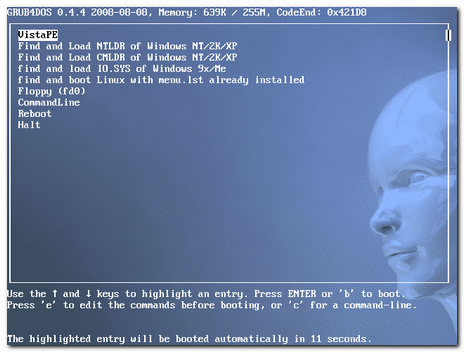
If all went well, you should see a GRUB4DOS boot loader with the blue-face wallpaper background.  

image

Pass through that and you should also a familiar Windows Loading progress bar, then you will see a Vista'ish logo appear in the "Complete" build version; again a very nice and professional touch.

image

When the default configuration comes up, you should see a “VistaPE Loader. Preparing system…” configuration process.  It's turning on some services and starting a network connection.

If all goes well, you will have a sexy task-bar, the familiar Windows navigation structure, and various application icons on the desktop. I launched a few things below for you to see.

image

So what can you do?  A lot!  Click on the Start menu and get playing (carefully as there could be a lot of high-powered tools here).   

Heck, if you didn’t need PGP WDE drivers, and you don’t intend to use it on a Dell GX-7xx system with USB keyboards, you could stop here and be wonderfully happy.

Unfortunately, I need all those things…so my project must continue.

What Next?

Well we will take a trip down two (fascinating) dead-ends, then proceed to gut and fillet this VistaPE 12 RC1 fish we just caught and took so much time to create!

Then we will cram all the best parts back into our PGP WDE injected Win PE 2.0 wim file we made in step two.

Sounds like fun doesn’t it?

--Claus

Mandatory Security Addendum…

Call me an alarmist, but I just don't feel comfortable leaving a folder/zone on my drive with the "Everyone" account on it and full rights.

Looks like a playground full of mischief waiting to happen.

What I do is this: Once I have completed my VistaPE building activity for the day, I go back to the folder, right-click and select "Properties" then the Security tab.  I select the Everyone account group I made, then go to the window below and unclick all the "Allow" checkboxes. 

When I apply the change this effectively removes the power from this "Everyone" account on the folder and contents.

Next time I need to do more building, I go in and recreate it with the rights and do my building again.

There are other ways (setting the items in the account to "deny" or deleting the Everyone account at the top) but I just personally like this technique.

Were any malware or other baddies get on my system, it would prevent them from using this folder as a launching ground for rouge behavior.  It's not perfect, but is better than leaving it there.

The choice is yours…you’ve been warned.

--CV

Custom Win PE Boot Disk Building: Dead Ends Ahead!

And that ended up being a Good Thing.

No I haven’t forgotten.

The next installment is going to be the first of two interesting dead-ends I took.

I’ll address the method I used to try to find why the Dell Optiplex USB keyboard wouldn’t load under a WinPE 2.0 WAIK wim VistaPE build but would under the Vista setup disk wim VistaPE build and the plain-Jane WinPE 2.0 WAIK boot disk build.

Once I got the required drivers identified, I had to extract them then inject them back into the WinPE 2.0 WAIK wim VistaPE build again (since the PGP Injection method BSOD’s the Vista setup disk based VistaPE build).

That didn’t ultimately fix the issue, but a little “hack” I worked out did extend my knowledge of ways to load extra drivers in VistaPE builds.

The second dead-end brought me closer to working out what would become the third-step in producing my custom PGP-WDE driver-injected VistaPE’ish Win 2.0 boot CD.  And we will play with some neat WIM file tools in the process.

Unfortunately, this extended weekend brought a barrel-full of unexpected and unpleasant surprises involving unplanned emergency maintenance to both of our vehicles (battery replacement for the Ion, radiator replacement for the Altima), Lavie going to the ER (she is better but her worn-out system just can’t shake this flu-bug), more than a few “honey-I’m-sick-can-you-run-out-to-<insert store here>” errands, as well as my handling the full slate of regular household chores I have to budget for on the weekends (grocery shopping, laundry, house-cleanup, etc.). 

Though to confess, it felt nice sitting on our swing in the back yard in the sun and cool breeze getting some fresh air and sun with Lavie curled up next to me.  Good medicine and I had fun carelessly pulling up a few wild green-onions from the clumps that somehow are spread across the backyard.  Their scent reminds me that spring is near.

Sometimes the super-dad’s schedule gets out of whack and something has to give so I wasn’t able to give out the full measure of posting I had planned.

Hang in there.  It’ll be worth the wait.

Cheers!

Claus V.

Linkfest: Inaugural-eve Edition

Quite a selection of great and useful applications have been updated over the past weeks.

Belly up to the bar and have a pint.

For the Visual Learners

  • Flickr: Search The Commons and Library of Congress Releases Report on Flickr Pilot – The Library of Congress uploaded thousands of visual images in their archives to Flicker.  It is a simply amazing collection of material.  Much of it unseen until now.  It is a treasure-trove of images from a by-gone era.
  • FlickrLeech – FlickrLeech used to be a web-site location where you could enter some search terms, pick a date, etc. and then be treated with a ton of greatly arranged and presented images from Flickr.  It was tons cooler and more effective than going to Flickr itself.  Unfortunately for the creator this caused a few issues.  The first was bandwidth, the other was that it could pull images that might not be appropriate according to various country’s censorship laws.  In the end, Andrew Houser scrapped the current model and is developing FlickrLeech (in alpha) so you can now download this tool (Adobe Air based) and do your searching here.  Current caveats: First you need to have a Flickr account and when you start the application, you must log in to Flickr to agree to the content presented.  Secondly, this early version only allows searching for most interesting images based on date.  There are many tantalizing enhanced features that are visible but not active quite yet.  So have fun kids and stay tuned for updates. This has become my daily diversion application!  It runs smooth and fast on our Vista systems no no problems, but it seems to lock up our XP system with CPU cycles getting pegged.  I’m not sure if that is just me or an XP thing.
  • TiltShiftMaker - (web-service) – Site does some photo-manipulation work using blur filters to create a tilt-shift lens effect.  Not quite as good as the real thing, but it is a bit fun.
  • The 10 Most Stunning Photo Blogs | MakeUseOf.com – Nice roundup of some other websites that feature the best in amateur photography.  Quite a nice list of sites. Almost all of them provide daily images. 
  • The Air Force’s Rules of Engagement for Blogging — Global Nerdy – Completely non-image related post, but provides an interesting flow-chart that reflects on decision to respond via comments to a blog post or not.  Besides being a great flow-chart, it also is quite translatable to a guide for posting comments of your own.  I like the way it shows that some “engagements” might not be worth pursuing.

Utilities

  • OperaCacheView -  v1.15 – “...a small utility that reads the cache folder of Opera Web browser, and displays the list of all files currently stored in the cache.” Changes include adding 'Show Zero-Length Files' option and add of filter by file type. (text/html, image, audio, video, application).

  • ChromeCacheView – v1.10 – “...a small utility that reads the cache folder of Google Chrome Web browser, and displays the list of all files currently stored in the cache.”  Changes include adding 'Show Zero-Length Files' option and add of filter by file type. (text/html, image, audio, video, application).

  • RegDllView – v1.30 – “…a small utility that displays the list of all registered dll/ocx/exe files (COM registration). For each registered file, you can view the last date/time that it was registered, and the list of all registration entries (CLSID/ProgID).  RegDllView also allows you to unregister dll/ocx files that you don't need on your system anymore.”  Changes include the following new informational columns: File Modified Time, File Created Time, File Attributes.

  • SysExporter – v1.41 – “…allows you to grab the data stored in standard list-views, tree-views, list boxes, combo boxes, text-boxes, and WebBrowser/HTML controls from almost any application running on your system, and export it to text, HTML or XML file> This version add a new option: Add Tree Indent Spaces To Exported Data.

  • OpenedFilesView – v1.30 – “…displays the list of all opened files on your system. For each opened file, additional information is displayed: handle value, read/write/delete access, file position, the process that opened the file, and more... Optionally, you can also close one or more opened files, or close the process that opened these files.”  New option: Bring process to front and enhanced with more accelerator keys.

  • CurrPorts - v 1.56 – “…displays the list of all currently opened TCP/IP and UDP ports on your local computer. For each port in the list, information about the process that opened the port is also displayed, including the process name, full path of the process, version information of the process (product name, file description, and so on), the time that the process was created, and the user that created it.”  Newest release adds option: Ask before any action.

  • CCleaner – new release version offers these tweaks: command-line secure deletion, google Chrome thumbnail cleaning, moved language files to /lang folder, improved options cookie list browser detection, fixed minor bug in XP prefetch cleaning, fixed bug in IE History Index.dat cleaning, installer engine updates, and minor architecture improvements.

  • Recuva -  This is a great freeware tool to restore files that have been accidentally or purposely deleted from a Windows system. Works on both hard drives, flash memory devices, and digital camera memory cards or MP3 players.  Changes to this release include Improved messages when cancelling large file recovery, secure delete is now grayed for non-deleted files, improved recovery of .TIF files from FAT32 drives, filter category text now updates dynamically when changing languages, fixed 'Check for updates' position in Vista, along with various minor tweaks and improvements.

  • VirtualBox 2.1 – While I still primarily use Virtual PC 2007 for my Microsoft virtual systems, if I need to do virtualization of a Linux system, this is the tool I go to.  In addition to a large number of tweaks, performance enhancements, and bug-fixes, the following major changes were made: support for hardware virtualization (VT-x and AMD-V) on Mac OS X hosts, support for 64-bit guests on 32-bit host operating systems (experimental), experimental 3D acceleration via OpenGL, full VMDK/VHD support including snapshots, new NAT engine with significantly better performance, reliability and ICMP echo (ping) support, and new Host Interface Networking implementations for Windows and Linux hosts with easier setup (replaces TUN/TAP on Linux and manual bridging on Windows).

NirBlog: NirSoft utilities on Windows 7 Beta – Nir Softer has been playing with the new Windows 7 beta version and finds that his wonderful apps seem to work just fine.  That’s great news!

 New Finds

  • Fried Babelfish – Do you do a lot of language translation work?  Generally when I do I fire up a web-browser session and hop over to Google Translate and to the job.  Fried Babelfish doesn’t use the Babelfish service but does use the Google Translate service, accessing it from within the application itself and not via a web-browser.  Clever!  Spotted over at Download Squad.

  • Free Desktop FLV Player – nice standalone Flash video player.  GUI is very sweet.  Quite portable so you can take it with you on your USB stick.

  • SUPER  - I don’t usually do much re-coding of media files.  Generally I need to do it only when I am converting a video for use on one of the girls’ iPod nanos.  Super is a great tool to simply that process.  This is a new release version.  Spotted via Download Squad.

  • Howto: Generate many files of a particular size in Windows « the back room tech – Great post that points to a simple technique to generate test-files in high volume for testing of data or application handling.  Great tip Julie!

  • Stardock ObjectDock - (freeware) -  OK. Confession.  I am a RocketDock fanboy and thing that next to nothing can go wrong with that application.  However, Stardock’s ObjectDock offers a freeware version that might give RocketDock fans pause to wonder.  RocketDock hasn’t been updated for a while (which based on its current stability isn’t a bad thing) but Stardock seems to continue product improvement.  If you are looking for some sexy eye–candy dock launchers, I think either one might fit your bill.                       

Browser Bits

  • Firefox new tab behavior to be updated – MozillaLinks tips us that the new tab handling feature in Firefox 3.1 is being tweaked a bit.  While it doesn’t look like it is getting a kill-command to nuke the bad behavior, it will now open child tabs directly to the right of the parent tab.  I guess that might make things simpler for some folks. 

  • Update Firefox’s search bar with new Google favicon, again (MozillaLinks). You may or may not have noticed, but Google recently updated their favicon.  In most cases my Google-related bookmarks have slowly been updating to the new icon, but not the Google icon in the searchbar.  I tried the tweak linked but it didn’t stick in my 3.1 builds.  So I came up with another technique that did.  First I deleted Google from my list of searchbar plugins and selected another as the default.  Then I hopped over to the Mycroft Project: Google Search Engine Plugins and reinstalled the Google searchbar item and set it as the default.  That worked and it sticks. 

  • Textarea Cache :: Firefox Add-ons – Great little extension that caches the contents of text-area text while you type in comments.  Users can now recover the saved texts in the cache window, even the tab or the window is closed unexpectedly.  This might help save the day if you accidently crash while composing that extended comment or click-off with a hand-to-mouse spasm.

Full yet?

--Claus V.

In other EU “Dept. of Silly Ministries” legal news…

image

cc credit: work by southtyrolean on flickr

Just saw this:

Microsoft Ordered to Delete Browser - NYTimes.com

Then wondered when we won’t next see this:

BRUSSELS (DS) — The European Union said Friday that Ford and GM’s practice of selling tires together with their individualized transportation systems (i.e. cars and trucks) violated the union’s antitrust rules.

It ordered the battered US vehicle making giants to untie tires from their products in the 27-nation union, enabling makers of rival tyres to compete fairly.

“These Yanks tying of tires to their vehicles harms competition between tyre makers,  undermines product innovation and ultimately reduces consumer choice,” the E.U. said in a statement.

It gave the Big Two eight weeks to respond, adding that the companies could defend their position in a hearing if it found that useful for the amusement of the EU court systems.

A frustrated US product spokesman issued a statement saying, “We are committed to conducting our business in full compliance with European law, no matter how difficult our attempts to navigate and understand confusing EU member government ministries might be.”

The commission’s investigation into these latest charges of unfairly equipping their vehicles with tires began a year ago, after European Carmakers filed a complaint. They argued that US car makers hurt EU competitors not only by bundling tires with vehicles, in effect allowing them to drive vehicles these products directly off the dealer lot after purchase, but also continued to hurt their feelings by not following accepted internationally accepted standards as to which side of the road is the proper one to drive on.

According to the EU spokesman after catching his breath from a laughing-fit, Chrysler was left out of the suit because, “…nobody takes them seriously anyway…they are like that software made by penguins in the Arctic.”

I’m certainly no Internet Explorer fan, but I’m thinking most folks are savvy enough to know how to download and install an alternative browser to IE on their own by now.

I can’t believe I am saying this, but I can’t imagine a Windows OS release that didn’t include any web-browser included at all as part of the install package.  Certainly Microsoft has a right to include a web-browser in their software OS packages?  Yes I wish the Windows OS didn’t require IE for operation of some things, but sheesh.  Cut ‘em some slack here guys…

I haven’t forgotten the uproar and furor that IE generated last time this reared its head.  But come, on.  Now I think things are getting a bit silly overseas!

--Claus V.

Security and Forensics Roundup #4: Eyes on you

Alvis got a major teen upgrade last month.

We moved our old TV out of the bedroom and into her room.

I haven’t had time yet to run a cable line from a junction-box to it just yet, but she is diligently reminding me that I had promised to address the lack of visual connectivity this weekend.

So I prepare for a trip to Lowe’s.

As much as I like watching the new LCD TV as a family, this might get me the extra wiggle room needed to catch up on some classic movies I’ve so far been unable to watch due to a lack of control on the remote.

While I am working out the cable-runs, I thought I would toss these security and forensics tidbits your way to snack on.

Just chew quietly…wouldn’t want to get on the bad-side of any librarians.  They work hard to keep us safe!

Web Watching

BartZilla has been hard at work recently.  He dropped a line to me that he has puzzled out just how Firefox 3’s “safebrowsing” functions both in regular and “private-browsing mode.

I am seeing a number of short-linked URL’s lately in comments.  TinyURL is one of many locations that takes a really long URL and shortens it.  This makes it much easier to copy/past to a user.  However it also may mask information on what could turn out to be a malicious web-url.

spylogic.net – What’s behind that short URL? took a look at these issues and recommended a great Firefox Add-on that promises to remove and re-display the short-url back to its full-length splendor.

  • Long URL Please – Firefox Add on.  Supports 32 different short-url services.  So you don’t have to worry about being tricked by a mysterious short-URL.

Hidden IP Addresses Not Hidden Anymore – This post from infosecurity.us isn’t really that new.  Security wonks have known for years that anonymizer services can be seeded or tricked into “decloaking” a user’s actual IP address using a number of techniques.  They bring attention to a new write up of one tool in particular.

Security and the Net has published a superb write-up of the newly updated Metasploit decloaking engine, utilized to determine the original (supposedly anonymized)  IP of a connecting machine (when that computer is  tunneling its’ network communications through an anonymous proxy).  More information regarding the capabilities of the Metasploit Decloaker, and how to find the original IP, even with an anonymous proxy server running) appears after the jump.

If properly configured, one can still use these anonymizing tools to hide an IP address with reasonable certainty.  But that takes more work to do than casual users of these utilities might pay attention to.

More Autorun hacking

In a recent post, we looked at USB autorun file dangers and methods to protect them.

In that context I had come across yet another danger in autorun files I wasn’t aware of…malicious code can be dropped in what looks like garbage text in the file and still execute.

As the images on that link show, must sysadmins and even regular pc users might be able to decode a call to a malicious file in a standard autorun file content.

However, if you open up some and see what looks to be encrypted/or garbage text fields, you might just pass it off as a harmless corrupted file.

That’s not the case.  See Windows will ignore all the junk text in the file until it finds something it can execute, and away it goes.

The noteworthy text is found somewhere around the middle of this 90kB file. At the bottom of the screenshot. See it?

Open=RUNDLL32.EXE .\RECYCLER\jwgvsq.vmx

…which would execute a DLL called jwgvsq.vmx from a hidden folder on the USB drive.

The rest of the binary junk are comments and will be ignored by Windows. And of course, the file size and amount of binary junk is different every time.
Nice trick.

So yes, I’m sorry but you must examine any such files very carefully.  They might contain a hidden executable call. 

Virus Testing your Email Protection

Anonymous was having some problems testing the efficacy of his AV system in checking emails for malicious content.  It’s a good point.  Unless you have malicious files hanging around and can mail them to yourself, how do you know your AV program is sufficiently protecting you.

While I do collect the odd malicious file in my desktop-support responses, I keep them only long enough to safely send to some AV research labs for inspection and inclusion.  Once I have removed the threat, I rarely keep them around.

And if you are working with a malicious file, chances are that your AV protection will keep on catching it and locking it down.  Try sending a malicious file via Gmail and it gets scanned and removed.

See the problem?

Even the “safe” EICAR Test Files are a frustration to work with in testing email protection as they too, by design, should be caught and locked down by your AV system, preventing you from emailing them to yourself! 

However, there is an easy workaround when it comes to testing your email protection system—use one of these sources!

Both offer a free and easy, third-party way to send an “infected” test file to yourself without tripping any of your local AV protections in the process!

Great way to no only see if your AV system is working, but it can be used to explain to mom and dad what (should) happen if someone send them a malicious file.  Or testing a potentially compromised system to see if email/download protections for the software have been turned off somehow.

Watching for the Inside Job

We watched Numb3rs last night and it wasn’t 1/3 of the way in before I was telling Lavie that the cop and his fiancée both were in on the job.  We were right.  The fiancée was casing the F.B.I. tactical room as a “concerned” family member and feeding the bad-guys information to keep them one-step ahead of the game.

Many times we might become complacent to the nature and motives of those who work around us.  This includes our customers, our vendors, our co-workers, and the hardware that we support.  In our willingness and drive to meet service-levels and keep the productivity flowing, we might decide to overlook or ignore things that just don’t quite jive with the way things should be.

That can be a serious security mistake.

Printer Scanning the Firewall? – Andrew Hay’s blog.  Is IP scanning of the network by a printer normal or is something else going on? Turns out that that one can actually use a JetDirect box as an Nmap Idlescan Zombie.  While not likely a common attack vector, you never know….

SynJunkie has started yet another new series on a modified social-engineering based attack on a system.  Good read.

Syn: The Story of a Newbie Hax0r - Part 1

Syn: The Story of a Newbie Hax0r - Part 2. My Evil AP

Meanwhile, letting a malicious file into your network, which has not been kept current on security patches can have devastating results:

Still having trouble getting the bean-counters to respond seriously?  Could be the case. I mean with the economy in the tank, I could see IT shops reconfiguring their priorities to focus on production and not prevention.

Might want to drop them a link to this post.

It links to Peter Sommers deep whitepaper: Directors' and Corporate Advisors' Guide to Digital Investigations and Evidence (PDF-link).

At 100 pages, many might think they don’t have the time or need to review just how critical and understanding, plan, and relationship with digital investigations and forensics really is.

In the forward, Sir Edmund Burton sums up the importance in that typical understated British manner:

This useful guide highlights the potential risks for enterprises that do not have a
detailed planned response to typical risk scenarios.  It points out that the ‘Low
Frequency/High Impact’ events are disruptive and emphasises that ‘High
Frequency/Low Impact’ events are also disruptive and must be addressed by
contingency plans and preventative measures.

An Effective Wiping Technique

…..for hard drives.  Sheesh!

I and our IT group apply Secure Disk-wiping Software solutions to all the hard-drives and memory storage devices we manage. Unneeded CD/DVD and floppy material goes into the shredder.  Depending on the hardware/firmware, a policy-mandated DoD-grade three-pass secure-wipe can take anywhere from 30-minutes to several hours to complete on a single hard-drive.  It is a time-consuming, but critical function of data handling and management.

So I read with curiosity the following posts:

With the exception of the Data Sanitization Tutorial (PDF-link) written by the University of California at San Diego Center for Magnetic Recording Research, I haven’t seen very many other official-grade research papers that detail just how effective a single-pass bit-wipe of a drive is in comparison to a 3-pass or even a 35-pass wipe.  Now there’s a new research paper on the block Overwriting Hard Drive Data: The Great Wiping Controversy that seeks to dispel the mythos surrounding multi-pass wipes.

From the heise Security link:

Craig Wright, a forensics expert, claims to have put this legend finally to rest. He and his colleagues ran a scientific study to take a close look at hard disks of various makes and different ages, overwriting their data under controlled conditions and then examining the magnetic surfaces with a magnetic-force microscope. They presented their paper at ICISS 2008 and it has been published by Springer AG in its Lecture Notes in Computer Science series (Craig Wright, Dave Kleiman, Shyaam Sundhar R. S.: Overwriting Hard Drive Data: The Great Wiping Controversy).

They concluded that, after a single overwrite of the data on a drive, whether it be an old 1-gigabyte disk or a current model (at the time of the study), the likelihood of still being able to reconstruct anything is practically zero. Well, OK, not quite: a single bit whose precise location is known can in fact be correctly reconstructed with 56 per cent probability (in one of the quoted examples). To recover a byte, however, correct head positioning would have to be precisely repeated eight times, and the probability of that is only 0.97 per cent. Recovering anything beyond a single byte is even less likely.

The actual paper itself must be accessed for $ or bought via a book, however the author kindly repackaged the research paper in a recent post at SANS Computer Forensics blog.  The details there should be sufficient for most mortals.

Overwriting Hard Drive Data – Dr. Craig Wright, SANS Computer Forensics, Investigation, and Response blog

Now if we can only convince our director that once will be good enough….old habits and wisdom die hard. 

Tin-foil hat-wearers are free to continue to worry.

Tips, Tools, and Techniques

  • A quick analysis helper – Forensic Incident Response blog. Hogfly drops a gem of a tip that points to the registry location where Symantec keeps their last date scanned and the date of the definition files.  Yes I realize you could try to load up the installed Symantec GUI and use it to look for log information, but when you are looking at a system via the captured image, that might not be a viable option. As Hogfly also points out, it can provide information whether the scan was a scheduled scan or initiated manually by a user.

  • Memory Collection and Analysis Tools and New and interesting things – Windows Incident Response blog.  Harlan must not have much work to do on his 2nd edition update.  Obviously he has some free-time on his hands as he continues to share with us awesome tools for memory data collection and analysis.  Be careful,  there are a lot of links for awesome tools.  You will likely loose significant blocks of time checking them out!  I also advise you to check out the post comment threads.  Good detail in there.  Thanks for sharing Harlan!  Looking forward for the book!

  • MANDIANT First Response – free tool to remotely collect key data on a system by security and investigation responders. “MANDIANT First Response provides the ability to remotely collect the volatile data, file lists, registry information, event logs, running processes, running services, file time/date stamps and many other data sources to allow an organization to perform precision strike responses when an incident may have occurred.”  This is a data-collection tool, not a data-analysis tool.

  • F-Secure Exploit Shield – (freeware) – Heuristics based beta tool that runs real-time to provide protection against web-based malicious exploits and malware.  It does phone-home and provide data to the F-Secure labs to help with exploit detection and response.  So be aware.  See this F-Secure post for screenshots and more details.  Download link here.  Supported on Windows XP.  No word on Vista/W7 editions yet.  Similar freeware product: ThreatFire.

  • F-Secure Easy Clean – (freeware) – Free and easy to use tool to remove common malware and viruses from a system.  Also does root-kit check before scan commencement.  Can be run in Safe-Mode. XP/Vista compatible. For more details see F-Secure Easy Clean – FAQ.

  • ThreatFire Research Blog – I’m always on the lookout for security blogs that have both technical and real-world information.  Finally uncovered the ThreatFire blog.  Even if you don’t use the free product, the information from their blog could be helpful in threat-assessment and defense.

  • Exiftool - (freeware) – Tool by Phil Harvey allows for read, write, and edit of meta-data information.  This is golden stuff, especially if you are investigating information on recovered image format files.  (Example Output).  This tool could provide clues in investigation work.  Depending on the camera itself (and assuming the meta-data hasn’t been tampered with), one might be able to to use data in the files to associate an image, to a specific image capture date/time, to a specific camera, and maybe to a specific owner.  Could be a stretch, but cases have been broken with less…

  • Security Database Tools Watch - FireCAT 1.5 released – This update of FireCAT (Firefox Catalog of Auditing exTension) is a mindmap collection of the most efficient and useful firefox extensions oriented application security auditing and assessment.  The latest version now lists a number of new Add-ons in some restructured categories.  If you are into security research and use Firefox, you simply must spend some time checking this out!  If you don’t want to do a pick-n-choose to get them installed, pop over to the Package de plugins FireCat 1.5 (natively in French so here is the English Version a-la Google) and download the compressed file and install away.

  • SANS SIFT Workstation Version 1.2 Released - SANS Computer Forensics, Investigation, and Response blog.   “The SANS SIFT Workstation is a VMware Appliance that is preconfigured with all the necessary tools to perform a forensic examination. It is compatible with Expert Witness Format (E01), Advanced Forensic Format (AFF), and raw (dd) evidence formats.”

  • Zero Wine: Malware Behavior Analysis – Open Source – Tool to “…dynamically analyze the behavior of malware. Zero wine just runs the malware using WINE in a safe virtual sandbox (in an isolated environment) collecting information about the APIs called by the program.”  I must say, this is really cool and can provide a fast and locally obtained malware-behavior report similar to those offered by the web-based CWSandbox - Automated Malware Analysis or the Norman SandBox Information Center.  Having a local-system-based lab-tool like this really can speed incident response analysis and response.

Cheers!

--Claus V.

On the Download…

Confession time again here.

Very rarely do I touch a torrent file.

Seriously.

Most of the software that I get come from sources that use either ftp or http protocols.  And I’m not out looking for movies or songs to download.  We worship at the iTunes mountain for those. 

If the only option is to download a particular file I need is via torrent and it isn’t a must-have, I generally take a pass.

However, every now and then the Linux LiveCD distro I’m looking into only supports download via a torrent.  So I pull out one of any number of portable torrent downloaders and grab the file.

Torrent Support via Firefox – Light Lifting only

Even my favorite Firefox browser doesn’t support torrent downloads automatically.

Otherwise, both the Download Statusbar :: Firefox Add-ons and the DownloadHelper Add ons are the only ones I have ever found use for in my Firefox configurations.

So I noted with interest a new Firefox add-on in early development stages that seemed to fit the bill:

This indeed seemed like a helpful utility for a casual torrent file downloader as myself.

Information from the project page is next-to-nil so from the TorrentFreak post FireTorrent Brings BitTorrent to Firefox comes a bit more background on the project from Ernesto:

The add-on uses the popular libtorrent library and fully integrates into the native download manager of Firefox.

Since it’s an alpha release, there are no options or preferences to configure yet. The official release, however, will include adjustable download and upload limits and several other basic configurable settings. Completed downloads will currently be stored in the desktop folder, this can be changed in the beta release that will come out in a few weeks.

Firefox 3.0 or greater is required to get the add-on to work properly. At the moment, the upload speed is capped at 15kB/s. This is for the alpha release only, but since BitTorrent is based on ‘tit-for-tat’ sharing, it doesn’t really help to get the downloads up to full speed. That aside, the add-on works just fine, and download speeds on most connections are comparable to clients such as uTorrent and Vuze.

You can sign up for the alpha project info or just jump to the download page.

The Fat Lady really can Sing!

Reading the comments from the TorrentFreak page led me to another realization: Opera natively supports torrent file downloads.

So that’s a second resource for grabbing torrent file downloads.

Yes I’m a bit late to that dance.  Feel like the last guy to dance with the prom queen again.

Anyway, some folks actually feel pretty strongly about not using an embedded torrent manager in Opera. If you feel that way too there is a way to Disable BitTorrent Integration in Opera [Techie Buzz].

Heavy Download Lifting, Torrent Style

Though I don’t really use “standalone” download managers for daily use, I have found they can come in really handy when downloading ISO files or other similar files that are over 300 MB.  In my case these almost always end up being Linux LiveCD ISO’s.

In these cases, download managers can dramatically assist in reducing download times by splitting the file into sections and downloading them simultaneously via multiple connections.  As long as it doesn’t overwhelm the server (and others) by using too many connections at once, and as I do it infrequently, I don’t feel too bad.

Free Download Manager - absolutely free download accelerator and manager - (freeware) – is a pretty amazing tool I’ve been playing around with.

The GUI is very nice and polished; very intuitive stuff.

The feature list is very rich as well:

  • GNU General Public License   
  • BitTorrent support available in Windows 2000/XP/2003/Vista
  • Upload manager
  • Flash video download
  • Portable mode
  • Enhanced audio/video files support
  • Download acceleration
  • Resuming broken downloads
  • Smart file management and powerful scheduler
  • Adjusting traffic usage
  • Site Explorer
  • HTML Spider
  • Simultaneous downloading from several mirrors
  • Zip files partial download

I also like that when running it provides a transparent “drop-zone” that allows me to drag/drop download links out of my browser onto for download queuing in the program.

Spotted over at this post:

Other popular (and free) Torrent download applications

µTorrent - The Lightweight and Efficient BitTorrent Client

BitComet - A free C++ BitTorrent/HTTP/FTP Download Client

Orbit Downloader - File and media download manager. Newer star on the block.

BitLord - The Ultimate Torrent Downloader

Halite BitTorrent Client – BinaryNotions.com – Fairly active project that uses a clean interface to get the job done.

G3 Torrent – Python coded utility that has a nice and simple interface with lots of features under the hood.  Hasn’t been updated for quite a while (years) as far as I can tell.

BitLet - the BitTorrent Applet. This one is an odd duck.  It actually isn’t an “application” but a web-based applet that allows you to paste in a torrent-file link and then it will act as the intermediary handler to download to your otherwise torrent-unsupported system locally.  Clever and handy to bookmark and use in a pinch.

Then there was this one…

Vuze/Azureus - Bittorrent Client

That last one is pretty contentious.  I (like many others really like it under the Azureus builds, but since it got gobbled up and rebranded/modded into the Vuze product as a media-torrent file downloader/manager, many folks who are purists have been loath to recommend it.  Fortunately, you can still fine old versions of Azureus still around for download.

Most all of those listed above are “portable” in some form or fashion for hauling around on your USB stick.

Many, many, many more BitTorrent clients can be found on this List of BitTorrent clients page over at Wikipedia.

Just use all this downloading power for good.

--Claus V.

RocketDock Booster

I’ve been a longtime fan of RocketDock.

It is basically a Windows freeware clone of the Apple Dock.  It’s highly recommended by others and myself.

While it supports gadgets and other things, I like to use it as an application launcher with sweet eye-candy.  Since it can be skinned and supports swapping the original program icon with any custom high-quality icon you might have around (and I have plenty), it is very pretty to look at once configured and tweaked.

It works under both Windows XP and Vista. And is sophisticated enough to work with multi-display monitor arrangements.

I never fail to get compliments and questions from folks who see it on my systems.

In all that time I’ve used it I’ve had very few issues.  Performance hit is negligible. It behaves nicely when monitored with Process Monitor.  That’s something that some similar dock apps cannot claim based on my monitoring and testing.

Yet one thing on Vista has always bothered me.  Launching applications from it in Vista results in them running under “normal” security level permissions.  If I wanted to run, say Process Explorer or a command window, I’ve had to go and dig for the original file to right-click to “run as administrator.”

Sure, it does have command-line launching support and can even handle special arguments with aplomb. So I could have made both “normal launch” and “run as admin” launching icons but that seemed to negate the otherwise clean and simple number of key application icons I use.

Right-clicking on any of the icons in RocketDock brings up the normal RocketDock icon item option menu as seen below.

RocketDockNml

Not very useful for an otherwise awesome app-launching utility.

I didn’t read the manual (big mistake) and was poking around in the RocketDock options last night and noticed a curious option I hadn’t paid attention to before at the very bottom.

“Popup Menu   Display Special Actions”

RDControl

I enabled it and then went back to see what “Special Actions” the popup menu would offer for the icon in question (in this case it was Process Explorer).

Wow!

RocketDockBoost

Behold the RocketDock launching power options when I want to boot the launch-stage!

So that’s what “Display Special Actions” means.

Almost full “normal” right-click context menu options, including the desired “Run as..” options.

And at the very bottom, the standard RocketDock icon management options are still available.

I guess I should go back and read the documentation some more….

Cheers!

--Claus V.

Windows 7: Unexpected Discoveries

Yes, I know that Windows 7 Beta got released last week.

I had tried valiantly this past Friday to get my W7 Beta key and W7 ISO downloads.

The key was a complete wash until Saturday when the floodgates opened and I was able to get several along with a quick download of the ISO file.

I had been worried but found that Microsoft uncapped the download and key limits for the next two weeks!

The Key to the problem is…

Here's where we stand - Windows 7 Team Blog.

"Due to an enormous surge in demand, the download experience was not ideal so we listened and took the necessary steps to ensure a good experience. We have clearly heard that many of you want to check out the Windows 7 Beta and, as a result, we have decided remove the initial 2.5 million limit on the public beta for the next two weeks (thru January 24th). During that time you will have access to the beta even if the download number exceeds the 2.5 million unit limit."

(Turns out that the MS W7 EULA allows multiple installations with the same key. Thanks for the tip, Dwight!)

So don’t sweat that you will left out of this latest gold-rush.  Grab your beta key and move on.  There’s lots to see and you don’t need to waste your time filling your pockets. Leave some for the late-comers.

Swatting at W7 NATs

I suppose I could have followed this Lifehacker post ( Windows 7: How to Dual Boot Windows 7 with XP or Vista ) and done a dual-boot configuration of one of my systems with Windows 7 Beta, but I am a bit risk adverse with my home systems.

Instead, I took the safer route and created a fresh virtual hard-drive file in VirtualPC 2007 picking Vista as the intended system.  I mounted the downloaded W7 beta ISO file with VirtualPC as I booted the new vhd.  That got me directly to the installation process and it went surprisingly fast.  Much faster than what I had encountered under the Vista beta versions I had tested.

I got it installed on a VirtualPC session with no issues (except I had to set the VirtualPC session to use NAT routing due to the wireless config I had.  Then the virtual Windows7 couldn’t find the Internet through my host system until I did a little research and on a hunch tried to manually assign the IP address for the DNS Server for the Windows 7 virtual operating system to 192.168.131.254, the virtual gateway IP address used by Virtual PC.  That did the trick and the Webs flowed quick and fast.

For a walkthrough on this process see this great post with visuals:

Virtual Machine Additions…

Once I had the virtualized W7 Beta rocking in VirtualPC I wanted to do some drag-n-drop file transfers and set up a shared folder between the VirtualPC of Windows 7 and my hosting Vista system.  However, I couldn’t do that without installing Virtual Machine Additions in the client.  Only I haven’t yet found a Windows 7 version of them yet.

Would the set (ISO file) that came with VirtualPC 2007 work?

Surely not!

I browsed to the VirtualPC program folder and found the ISO file and attached to it.

Sure enough, Windows 7 took the setup and installed them with no complaints.  After a reboot I was good to go with both sound as well as the drag-n-drop and shared folder features working perfectly.  No BSOD or other fatal flaws have been encountered.

Who knew Windows 7 was so flexible and Vista-backward supportive?

That really bodes well.

Windows 7 WAIK = WinPE 3.0 ?

I didn’t get much time this weekend to play with it, but what I did see impressed me.  It ran speedy and well with just 512MB system RAM allocated to the Windows 7 virtual machine.

I also found these related Microsoft items regarding Windows 7 that are now available.

Knowing that there is a Windows Automated Installation Kit beta already available for Windows 7 is very exciting.

The current WinPE 2.0 is based on the current Vista WAIK.  And as we are finding out, WinPE 2.0 can do amazing things and is quite customizable.

I’m not sure if we can call the Windows 7 WAIK the road to WinPE 3.0, but if early indications bear out, it might be even more versatile than PE 2.0 is.

And those other finds with the USMT for W7 as well as image serving will demand close inspection!

Microsoft’s Windows 7 Driver Goals

The post Engineering Windows 7 : Primer on Device Support and Testing for Windows 7 is a long and fairly dry and technical post.  However, it did contain this interesting tidbit that again looks well for upgrades of existing Vista-supported hardware platforms.  Folks with working Vista systems that are fence-sitting regarding Windows 7 might feel more welcome than the XP folks who got splinters in their tooshies from Vista.

From that post (emphasis mine):

One of our primary goals for Windows 7 is compatibility with all Vista certified drivers and to ensure that people have a seamless upgrade experience. This breaks down into several requirements that guide how we test:

  • Drivers for basic functionality are in-box (by in-box we mean available as part of the installation of Windows). This includes drivers for mainstream storage, network, input, and display devices so the OS can be installed and user can get online where, if needed, additional drivers can be acquire from Windows Update.
  • Drivers update and/or install with minimal end user effort.
  • When drivers are upgraded, there aren’t problems with the new drivers.
  • Drivers are reliable.

That may explain why the VirtualPC 2007 additions went on smoothly.

The post then goes on to detail the elements of clean installs, attaching devices without setup disks (containing drivers at hand), and updating drivers via Windows Update or an independent hardware vendor (IHV) website source.

There was much more in the post than meets the eye at first blush.

Windows 7 Problem Steps Recorder

One of the challenges in Help Desk work for end-user workstation support is tracking down the cause of the error they are reporting.

Sure there are system and event logs.  If I am lucky I can remote-attach to the user’s system while the problem still is present or the error alert is showing.

Usually, I have to play detective and use a variety of interrogation and system inspection techniques to get the clues and facts needed to replicate the issue…and then work out the solution.

Long Zheng drops a killer tip that Windows 7 might have dramatically improved my ability to collect meaningful fault data.

A feature new to Windows 7, called “Problem Steps Recorder” looks to be the missing tool for documenting where it all goes wrong.

What the tool is a simple but advanced variation of a screen capture software. Think of it as an automated “Print Screen” plus a little monkey in the background documenting all the mouse clicks, key strokes and gathers some technical reading material, who then ties up everything in a neat box and saves the results. The neat little box you get is a zipped MHTML report page which can be sent off directly to the help desk.

The report page is where this tool really shines. It actually is an XML page documenting each step of the user’s actions complete with a screenshot with the item highlighted. You can view the report as is, or as a slideshow, or even dig into the raw XML to expose greater detail like the X&Y coordinates of the mouse.

To try the “Problem Steps Recorder” for yourself, type and select “psr.exe” in the Windows 7 start menu.

Long Zheng helpfully provides a link to a report he prepared earlier for your viewing pleasure. You must use Internet Explorer to view MHTMLs.

Check it out.  It’s tre’ chic!

Crime? You can’t hide in Windows 7!

Leave it to Windows forensic expert Harlan Carvey to not let any Windows 7 grass grow on his side of the fence!

He decided to start poking the Windows 7 beta fish bowl with a stick to see what he could stir up.

Windows Incident Response: Windows 7 Beta Registry

He does some looking and found a VMWare built virtual drive of Windows 7 beta and brings it home to play with.

Initial results were very positive.

Very cool! Not only do the tools seem to work just fine, but it looks as if the VMDK is a Windows 7 Beta VM. Very nice. Other plugins, such as samparse, seemed to work just fine, but parsing the UserAssist key in the NTUSER.DAT file was problematic...the "normal" GUID key didn't seem to be in the hive.

So, it would seem that the binary format of the Windows 7 (the Beta, anyway) Registry hive files has not changed. I'm sure that the content has, as keys have changed names and functionality, and values and ways of recording data have changed. However, as with the move from Windows 2000 to XP, there may simply be more opportunities for forensic analysts.

There may be some changes/additions required, but seeing as Windows 7 is built upon much of the foundations already laid in Vista, the forensics and system administrators alike should find the under-the-hood workings pretty similar and recognizable to current tools and techniques.  Tweaking them to the Windows 7 environment changes hopefully will be minimal.

I have no doubt Harlan’s is the first of many great W7 related forensic posts to come.

BTW…be sure you grab and apply an anti-virus application to your Windows 7 build from one of several Windows 7: Security Providers.  Nice to know these are coming out pretty quickly along with the Beta release.

Wishing you were here…

For the folks who are curious what all the geek ruckus that has hit the blog-o-sphere over Windows 7 but could care less as they are still trying to come to terms with both XP and this new-fangled “Vista” thing they got for Christmas, here is a selection of posts that have lots of pretty pictures and cover a range of features and issues to be found in Windows 7 (to date).

Think of them as postcards for the Windows 7 tourist set…

That’s all for now.

More Windows 7 technical linkage and finds are waiting in the wings.

Check back soon.

--Claus V.

Drive Prep Made Simple: GParted

Two weeks ago I was staring at over twenty laptops that had been loaned to us during an emergency deployment and now were needing preparation for return.

As part of the pre-return process, I needed to wipe the drives and toss a fresh image on them.

Into each one I popped in my custom VistaPE boot disk and ran a DiskPart routine from the command line, following my usually procedures in this case.

However, this time I used the “clean all” command this time instead of just “clean” as I usually do since I wanted to be sure the previous data was reasonably wiped off the drive. (If I had needed a full DoD secure wipe I would have likely turned to one of the many Secure Disk-wiping Software solutions that exist.)  In this case, a simple single-pass overwrite was sufficient.

However, on these laptops, when I went to create the partition afterwards it couldn’t do it as it said there was no free space on the drive and errored out.  I didn’t have the time or patience to try to figure out and set the size and offset manually from the command line so I bailed on DiskPart.

Instead I reached for my copy of GParted that is a Linux LiveCD to sort out the mess and do a clean NTFS reformat/partition of the drives.

In no time I had reclaimed the drive, and created an active NTFS partition, fully ready and able to accept the image.

GParted is the best non-Windows tool I know of for both drive formatting and preparations.  It is a breeze to use and is wicked-quick at what it does.

Take a look at these great how-to’s for more of its features.

Other alternatives I have used with success are PartedMagic (Linux LiveCD), Trinity Rescue Kit (Linux LiveCD), the Ultimate Boot CD (UBCD), Terabyte's BootIt Next Generation (NG), and the free EASEUS Partition Manager Home Edition.

Earlier versions of EASUS PMHE allowed for creation of a bootable disk version from an included ISO file.  As I understand it, the newer version does not allow creation of the disk in the “free” home version, but you can also download the trial Professional Edition which still contains that feature and then find and extract and burn the ISO file that way.

It works just fine although it gives you a number of scary “this is untested and might not work” warnings in the process.

I like having a number of similar tools as I have found from experience that different hardware sometimes gives the boot disks issues in the video-display driver handling process.  Having a variety of tools lets me work around that issue without too much delay.

And in yet another situation, as the D-Man and I found out this past week when confronted with a killed drive, a short timeline to restore a system, and a critical reimage deployment, GParted combined with focus and flexibility in solutioning yet again saved the day.

Hopefully you don’t need these tools on a daily basis, but when you do it is good to have them at the ready in your toolbox.

Cheers.

--Claus V.

All Healed!

Got our Gateway laptop back!

To summarize, it had been having issues holding an AC connection.  Alvis had gotten quite creative with twisting the AC cord to get it to work, but eventually we weren’t able to do that any longer.

I figured that there must be a short in it near the plug.  That seemed like a reasonable thought seeing how mangled it looked.

So I picked up a universal AC/DC laptop brick. But that didn’t help.  Same symptoms.

A bit of research and it seemed that the next level of problem indicated was a bad/busted DC plug off the systemboard.

A replacement motherboard was looking at just under $400.

However, I wasn’t really feeling up to trying to find the correct laptop DC power jack and then attempt to do a resolder job myself.

I did find this great guide however to help me understand the issue:

In the end I decided to try a local shop, down in Webster.  I took it in and explained the symptoms, provided them both the laptop (sans hard-drive), the OEM power brick, and the replacement power brick.  I had to sign a acknowledgement that this was a dicey affair and though success was good, it was not guaranteed.  I was promised a return in 3-5 days.  Got to say, I was really impressed by their work station areas and the test-bench frames for pc components.  Wish my cubicle had some of their toys….

As this was during the New Year holiday, I expected it would take longer than that, but in five-working days I had call that it was good to go and fixed.

Total repair cost was just under $250.  Indeed, a solder connection had been found broken and the DC jack was otherwise in good shape.

The repair worked and all is well.  Considering the amount of labor involved in extracting a motherboard from a laptop, re-soldering it, and then putting it all back in place, it seems to me a fair price and investment.   The only thing that I could complain about was the company sticker affixed to the laptop next to the trackpad.  Luckily it was of a good enough quality to be easily and cleanly removed.  A business card would have been sufficient in my opinion, or offer me the sticker without affixing it.

Everyone was prompt, professional, and service delivered as promised.  I can’t complain about that.

Now I’m scheming on a way to try to “hack” an AC cord holder to the back of the laptop to keep the AC plug safely in the DC jack.

On the opposite side of the rear of the laptop from the DC plug is the D-sub VGA output plug.  I’m thinking of making a low-profile dummy cap for it to which I can affix a clip of sorts to hook the AC cord wire into.  That should keep the L-shaped AC/DC plug aligned safely so it doesn’t get jammed when resting on the desk or my lap and maybe apply pressure again that could rebreak the solder joint.  I’ll take pic’s when I get it hobbled together.

When making a laptop purchase decision, the lowly AC/DC connection hasn’t been anywhere on my list of things to consider.  Now it is going to be bumped up near the top to see if the placement makes sense and that the plug connection appears durable and stress-resistant.

Kinda wish PC laptop makers would adopt the MagSafe form AC/DC connector to be found on Apple products.  Seems much safer and less likely to break solder points on the laptop itself.  Oh well, I can wish….

For more laptop (hardware repair) fun and joy see these links from Laptop Repair Help:

There are lots more great how-to posts with detailed photos on a variety of hardware-related laptop illnesses.

It’s a great resource site and all laptop owners would do well to spend some time there.  I promise you will have a deeper appreciation of your laptop for it.

Cheers!

--Claus V.

Back At Everyone! First post of 2009.

Hi all!

Happy new year!  Now I have to get into the swing of learning to write “2009” on everything.  It usually takes me a few weeks to get that habit under control.

We said “good-bye” to the last of our holiday guests yesterday.  Alvis and I spend the remainder of the afternoon taking down the Christmas decorations. And no, unlike many of our friends and family, we don’t usually wait until after Epiphany to do so as I have learned is a traditional custom.

I was surprised to see several trees tossed on the road-side in front of neighborhood homes as early as Christmas Day afternoon.  I’m not that hard-core a cleanup-artist.

Household chores are fairly well cleared through.

In spite of this year’s top-gift of the flat-screen HDTV by little-bro to our hamster, I think Lavie won 2nd place in the gift category.

She pulled together various $ gifts and a number of company holiday gift-certificate prizes she had received and bought (on her own I might add) a Compaq Presario CQ60-215DX Notebook PC.  (alternative link).  She got it for just over $450.  It has a dual-core processor, sufficient RAM, a generous hard-drive, and a sexy shell that looks like it should be wearing a black corset.  As soon as I had opened the lid, I knew instantly why Lavie had selected this particular model.  It has a full-sized 10-key pad.  She confessed that was indeed the major selling point.  Doing so has made the keys slightly smaller, but still much larger and comfortable then on a netbook.

That’s actually right in the price-range of an entry-level netbook.  We were going to get Alvis one for Christmas, but she really wanted a QWERTY enabled cell-phone so she got an AT&T Quickfire.  I must say, it is pretty nice.

Lavie’s previous Compaq Presario V2575US (I guess she is a Compaq fangirl!) is now being hand-me-down’ed to Alvis for primary use.  Good thing as the Gateway notebook is still a the repair shop having the DC plug replaced on the systemboard and I don’t want to have to pay for this again.

So I’m slowly getting her new system set up and tweaked, then will have to transfer her programs, files and settings over to the new one from the other laptops.  This will be hers “exclusively”.

In good news, I finally have a real-life chance to try using some neat GUI-based Windows User State Migration Tool (USMT) software.  I’ve been holding off posting on these until I could live-fire train on them.  Now I have my chance.

I still have a nice pile of security, freeware, and other stuff linkage to post here.  I don’t know if time will allow me today to get through it all today.  I suspect not.

Maybe this week will be generous and allow me some light posting when I get home from work in the coming days.

In the meantime, here is some feedback to those who have been dropping comments during the holidays.

Comments welcome

@ Sunny: I’m sorry to hear about the transmission in your Ion coupe.  Mine is a standard and is still turning strong.  I’m going to have to replace the clutch-plate eventually, but the dealer service tech says they will last for a long, long, time with normal usage.  When I do replace it, I might go with the heavy-duty version that Saturn offers in its performance line.  Last grindy noise I had to deal with in an auto of ours ended up being a CV joint replacement on a Renault.  Nuisance but no big deal.  Little bro ended up having to have the drive-shaft on his Toyota 4Runner replaced last week.  Now that was expensive!  Any idea if Saturn is going to survive the GM fallout?  Last I heard is that decision may be made by March 09.  I really have been considering getting a Saturn soon to replace Lavie’s ‘01 Altima but she (and I) am a bit hesitant now, no matter how much we love our Ion. I’m keeping an eagle-eye on the blogs ( ImSaturn - u r 2  and Saturn | Automotive.com Saturn Blog Page & Enthusiast Car Discussions) in the meantime.  I think Lavie has decided to return to the Nissan fold.

@ Anonymous: I didn’t have any issues getting AGV 8 Free and Thunderbird to play well with each other.  Glad to hear you worked it out.  In my experience, AVG did scan attachments in emails and then would “quarantine” any malicious attachment files found in incoming messages.  One of the problems with trying to test your AV system with EICAR Test Files is that by working with them, the files are caught thus preventing you from emailing them to yourself!  There is an easy workaround when it comes to testing your email protection system—use one of these sources!

Both offer a free and easy, third-party way to send an “infected” test file to yourself without tripping any of your local AV protections in the process! Good luck!

@ Nathaniel: That is a nice tip.  I hadn’t thought of using Unlocker that way.  BTW, did you see my post I will kill thee a hundred and fifty ways ...?  It’s kinda related.  OpenedFilesView might also do the trick and is a fab-fave utility.

@ BartZilla: -  Great Firefox 3 anti-phishing/anti-malware analysis!  (Firefox 3 "Antiphishing/Antimalware" (so-called "safebrowsing") Server-side Project).  Looks like this should be must-read material for all hard-core Firefox fans!  Excellent work and thanks for bringing it to my attention!

@ Duncan: – Did you know that we were going to name Alvis “Duncan” if she had been a boy?  I really liked the name and thought it strong and different.  Anyway…I’m glad the tip helped!  I beat my head on the keyboard for a while until I got that one down.  Now it is a quick and easy fix for Firefox profile issues.

@ Nathaniel: Thanks for the notebook sympathy.  I’m always going to be gun-shy now on DC plugs into laptops from here on out.  I dropped it off at the place in Webster, TX I noted and hopefully will hear something positive back by the end of the coming week.  I’ve got some links related to this issue I am sitting on sharing until I get it back.  I hope I can post a positive follow-up post!

@ Nathaniel: That is a great tip!  I am going to try loading NewsFox in PermaTabs this week at work and see how that goes.  If it fits the bill, I will add it to my home-systems as well.

@ Anonymous: I had linked to Microsoft KB304040 in that post.  However it didn’t (for some reason in my memory) seem to give me the same degree of security control that was offered in XP Pro’s security properties tab.  That’s why I proposed the alternative “hack” solution of the Security Configuration Manager Tool.

Thanks everyone for the comments!  I read them all and approve almost 99% of them!

I appreciate you all very much and your comments not only help point me to great and better information than I had found on my own, but they also inspire me with new post ideas!

Best wishes for the new year!

--Claus V.